
Practice Free AZ-400 Exam Online Questions
DRAG DROP
You are creating a NuGet package.
You plan to distribute the package to your development team privately.
You need to share the package and test that the package can be consumed.
Which four actions should you perform in sequence? To answer, move the appropriate actions from the list of actions to the answer area and arrange them in the correct order.
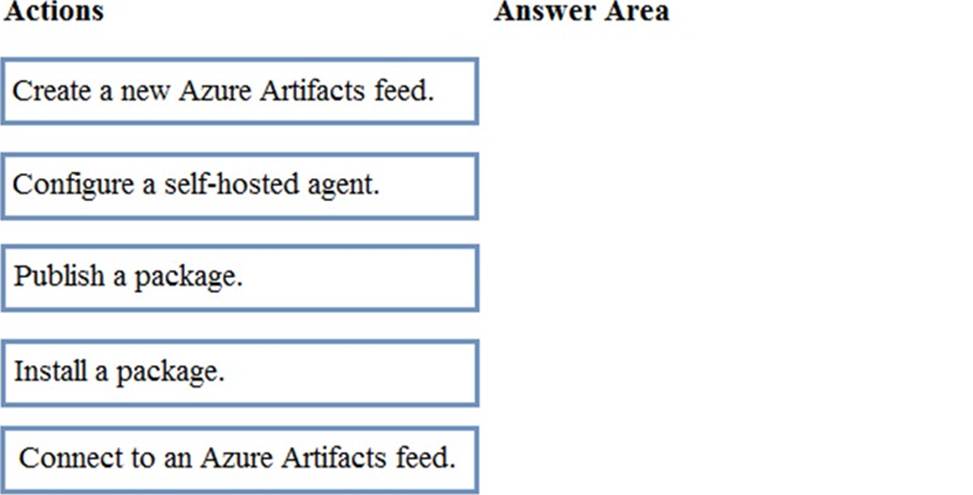
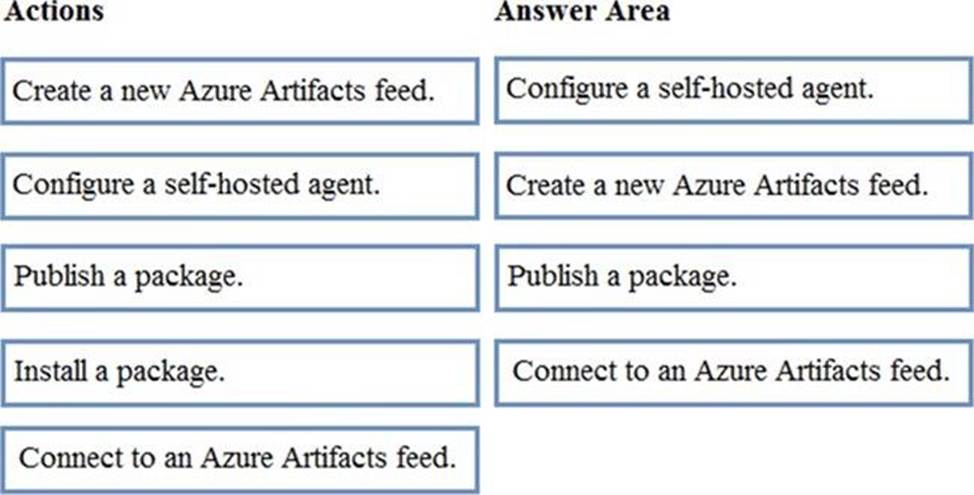
Explanation:
Step 1: Configure a self-hosted agent.
The build will run on a Microsoft hosted agent.
Step 2: Create a new Azure Artifacts feed
Microsoft offers an official extension for publishing and managing your private NuGet feeds.
Step 3: Publish the package.
Publish, pack and push the built project to your NuGet feed.
Step 4: Connect to an Azure Artifacts feed.
With the package now available, you can point Visual Studio to the feed, and download the newly published package
Reference: https://medium.com/@dan.cokely/creating-nuget-packages-in-azure-devops-with-azure-pipelines-and-yaml-d6fa30f0f15e
You have an Azure subscription that contains resources in several resource groups.
You need to design a monitoring strategy that will provide a consolidated view.
The solution must support the following requirements:
• Support role-based access control (RBAC) by using Azure Active Directory (Azure AD) identities.
• Include visuals from Azure Monitor that are generated by using the Kusto query language.
• Support documentation written in markdown.
• Use the latest data available for each visual.
What should you use to create the consolidated view?
- A . Azure Data Explorer
- B . Azure dashboards
- C . Azure Monitor
- D . Microsoft Power Bl
A
Explanation:
There are several tools available for running queries in Azure Data Explorer, including Kusto.
Kusto uses a role-based access control (RBAC) model, under which authenticated principals are mapped to roles, and get access according to the roles they’re assigned.
Note: Azure Data Explorer is a highly scalable and secure analytics service that enables you to do rich exploration of structured and unstructured data for instant insights. Optimized for ad-hoc queries, Azure Data Explorer enables rich data exploration over raw, structured, and semi-structured data delivering fast time to insight. Query with a modern, intuitive query language that offers fast, ad-hoc, and advanced query capabilities over high-rate data volumes and varieties
Reference: https://docs.microsoft.com/en-us/azure/data-explorer/tools-integrations-overview
You have an Azure subscription that contains resources in several resource groups.
You need to design a monitoring strategy that will provide a consolidated view.
The solution must support the following requirements:
• Support role-based access control (RBAC) by using Azure Active Directory (Azure AD) identities.
• Include visuals from Azure Monitor that are generated by using the Kusto query language.
• Support documentation written in markdown.
• Use the latest data available for each visual.
What should you use to create the consolidated view?
- A . Azure Data Explorer
- B . Azure dashboards
- C . Azure Monitor
- D . Microsoft Power Bl
A
Explanation:
There are several tools available for running queries in Azure Data Explorer, including Kusto.
Kusto uses a role-based access control (RBAC) model, under which authenticated principals are mapped to roles, and get access according to the roles they’re assigned.
Note: Azure Data Explorer is a highly scalable and secure analytics service that enables you to do rich exploration of structured and unstructured data for instant insights. Optimized for ad-hoc queries, Azure Data Explorer enables rich data exploration over raw, structured, and semi-structured data delivering fast time to insight. Query with a modern, intuitive query language that offers fast, ad-hoc, and advanced query capabilities over high-rate data volumes and varieties
Reference: https://docs.microsoft.com/en-us/azure/data-explorer/tools-integrations-overview
You have an Azure subscription that contains resources in several resource groups.
You need to design a monitoring strategy that will provide a consolidated view.
The solution must support the following requirements:
• Support role-based access control (RBAC) by using Azure Active Directory (Azure AD) identities.
• Include visuals from Azure Monitor that are generated by using the Kusto query language.
• Support documentation written in markdown.
• Use the latest data available for each visual.
What should you use to create the consolidated view?
- A . Azure Data Explorer
- B . Azure dashboards
- C . Azure Monitor
- D . Microsoft Power Bl
A
Explanation:
There are several tools available for running queries in Azure Data Explorer, including Kusto.
Kusto uses a role-based access control (RBAC) model, under which authenticated principals are mapped to roles, and get access according to the roles they’re assigned.
Note: Azure Data Explorer is a highly scalable and secure analytics service that enables you to do rich exploration of structured and unstructured data for instant insights. Optimized for ad-hoc queries, Azure Data Explorer enables rich data exploration over raw, structured, and semi-structured data delivering fast time to insight. Query with a modern, intuitive query language that offers fast, ad-hoc, and advanced query capabilities over high-rate data volumes and varieties
Reference: https://docs.microsoft.com/en-us/azure/data-explorer/tools-integrations-overview
You have an Azure subscription that contains resources in several resource groups.
You need to design a monitoring strategy that will provide a consolidated view.
The solution must support the following requirements:
• Support role-based access control (RBAC) by using Azure Active Directory (Azure AD) identities.
• Include visuals from Azure Monitor that are generated by using the Kusto query language.
• Support documentation written in markdown.
• Use the latest data available for each visual.
What should you use to create the consolidated view?
- A . Azure Data Explorer
- B . Azure dashboards
- C . Azure Monitor
- D . Microsoft Power Bl
A
Explanation:
There are several tools available for running queries in Azure Data Explorer, including Kusto.
Kusto uses a role-based access control (RBAC) model, under which authenticated principals are mapped to roles, and get access according to the roles they’re assigned.
Note: Azure Data Explorer is a highly scalable and secure analytics service that enables you to do rich exploration of structured and unstructured data for instant insights. Optimized for ad-hoc queries, Azure Data Explorer enables rich data exploration over raw, structured, and semi-structured data delivering fast time to insight. Query with a modern, intuitive query language that offers fast, ad-hoc, and advanced query capabilities over high-rate data volumes and varieties
Reference: https://docs.microsoft.com/en-us/azure/data-explorer/tools-integrations-overview
You have an Azure subscription that contains resources in several resource groups.
You need to design a monitoring strategy that will provide a consolidated view.
The solution must support the following requirements:
• Support role-based access control (RBAC) by using Azure Active Directory (Azure AD) identities.
• Include visuals from Azure Monitor that are generated by using the Kusto query language.
• Support documentation written in markdown.
• Use the latest data available for each visual.
What should you use to create the consolidated view?
- A . Azure Data Explorer
- B . Azure dashboards
- C . Azure Monitor
- D . Microsoft Power Bl
A
Explanation:
There are several tools available for running queries in Azure Data Explorer, including Kusto.
Kusto uses a role-based access control (RBAC) model, under which authenticated principals are mapped to roles, and get access according to the roles they’re assigned.
Note: Azure Data Explorer is a highly scalable and secure analytics service that enables you to do rich exploration of structured and unstructured data for instant insights. Optimized for ad-hoc queries, Azure Data Explorer enables rich data exploration over raw, structured, and semi-structured data delivering fast time to insight. Query with a modern, intuitive query language that offers fast, ad-hoc, and advanced query capabilities over high-rate data volumes and varieties
Reference: https://docs.microsoft.com/en-us/azure/data-explorer/tools-integrations-overview
You have an Azure subscription that contains resources in several resource groups.
You need to design a monitoring strategy that will provide a consolidated view.
The solution must support the following requirements:
• Support role-based access control (RBAC) by using Azure Active Directory (Azure AD) identities.
• Include visuals from Azure Monitor that are generated by using the Kusto query language.
• Support documentation written in markdown.
• Use the latest data available for each visual.
What should you use to create the consolidated view?
- A . Azure Data Explorer
- B . Azure dashboards
- C . Azure Monitor
- D . Microsoft Power Bl
A
Explanation:
There are several tools available for running queries in Azure Data Explorer, including Kusto.
Kusto uses a role-based access control (RBAC) model, under which authenticated principals are mapped to roles, and get access according to the roles they’re assigned.
Note: Azure Data Explorer is a highly scalable and secure analytics service that enables you to do rich exploration of structured and unstructured data for instant insights. Optimized for ad-hoc queries, Azure Data Explorer enables rich data exploration over raw, structured, and semi-structured data delivering fast time to insight. Query with a modern, intuitive query language that offers fast, ad-hoc, and advanced query capabilities over high-rate data volumes and varieties
Reference: https://docs.microsoft.com/en-us/azure/data-explorer/tools-integrations-overview
You have a project in Azure DevOps named Project1. Project! contains a pipeline that builds a container image named Image! and pushes Image1 to an Azure container registry named ACR1. Image! uses a base image stored in Docker Hub.
You need to ensure that Image1 is updated automatically whenever the base image is updated.
What should you do?
- A . Create and run an Azure Container Registry task.
- B . Add a Docker Hub service connection to Azure Pipelines.
- C . Enable the Azure Event Grid resource provider and subscribe to registry events.
- D . Create a service hook in Project1.
A
Explanation:
ACR Tasks supports automated container image builds when a container’s base image is updated, such as when you patch the OS or application framework in one of your base images.
Reference: https://docs.microsoft.com/en-us/azure/container-registry/container-registry-tutorial-base-image-update
You have an Azure subscription that contains 50 virtual machines
You plan to manage the configuration of the virtual machines by using Azure Automation State Configuration.
You need to create the Desired State Configuration (DSO configuration files.
How should structure the code blocks?
- A . Node>Configuration>Resource
- B . Configuration>Node> Resource
- C . Configuration>Resource>Node
- D . Resource>Configuration>Node
B
Explanation:
In Azure Automation State Configuration, the Desired State Configuration (DSC) configuration files are used to define the desired state of resources on a system. The structure of the code blocks in a DSC configuration file should be organized in a logical and meaningful way.
One way to structure the code blocks is as follows:
Configuration: This block defines the overall configuration, including any parameters that are used in the configuration.
Node: This block defines the target node(s) for the configuration, typically specified by the hostname or IP address of the target system.
Resource: This block defines the resources that are managed by the configuration, including the resource type, module, and properties.
"A configuration script consists of the following parts:
The Configuration block. This is the outermost script block. You define it by using the Configuration keyword and providing a name. In this case, the name of the configuration is My Dsc Configuration. One or more Node blocks. These define the nodes (computers or VMs) that you are configuring. In the above configuration, there is one Node block that targets a computer named TEST-PC1. The Node block can accept multiple computer names.
One or more resource blocks. This is where the configuration sets the properties for the resources that it is configuring. In this case, there are two resource blocks, each of which call the Windows Feature resource."
https://docs.microsoft.com/en-us/powershell/dsc/configurations/configurations?view=dsc-1.1#configuration-syntax
After you answer a question in this section, you will NOT be able to return to it. As a result, these questions will not appear in the review screen.
You use Azure Pipelines to build and test a React js application.
You have a pipeline that has a single job.
You discover that installing JavaScript packages from npm takes approximately five minutes each time you run the pipeline.
You need to recommend a solution to reduce the pipeline execution time.
Solution: You recommend enabling parallel jobs for the pipeline.
Does this meet the goal?
- A . Yes
- B . No
B
Explanation:
Instead enable pipeline caching.
Note:
npm-cache is a command line utility that caches dependencies installed via npm, bower, jspm and composer.
It is useful for build processes that run [npm|bower|composer|jspm] install every time as part of their build process. Since dependencies don’t change often, this often means slower build times. npm-cache helps alleviate this problem by caching previously installed dependencies on the build machine.
Reference: https://www.npmjs.com/package/npm-cache