
Practice Free AZ-400 Exam Online Questions
DRAG DROP
You mc configuring Azure DevOps build pipelines.
You plan to use hosted build agents.
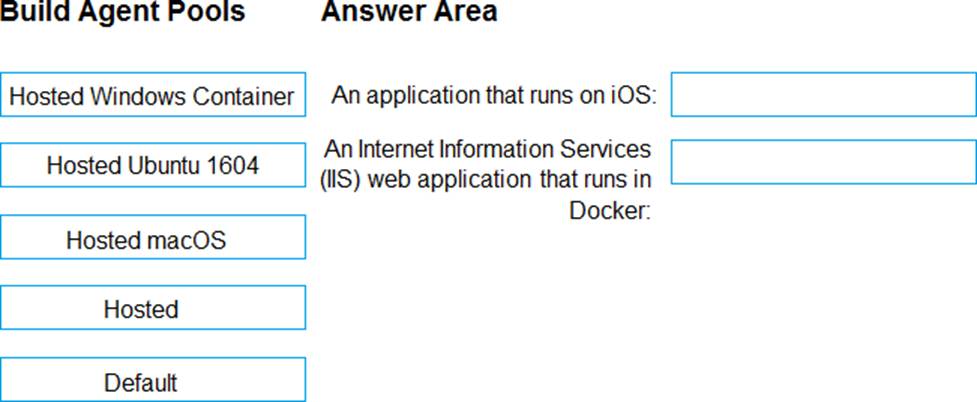
Which build agent pool should you use to compile each application type? To answer, drag the appropriate built agent pools to the correct application types. Each butt agent pool may be used once, more than once, or not at all. You may need to drag the split bar between panes or scroll to view content. NOTE: Each correct selection is worth one point.
Explanation:
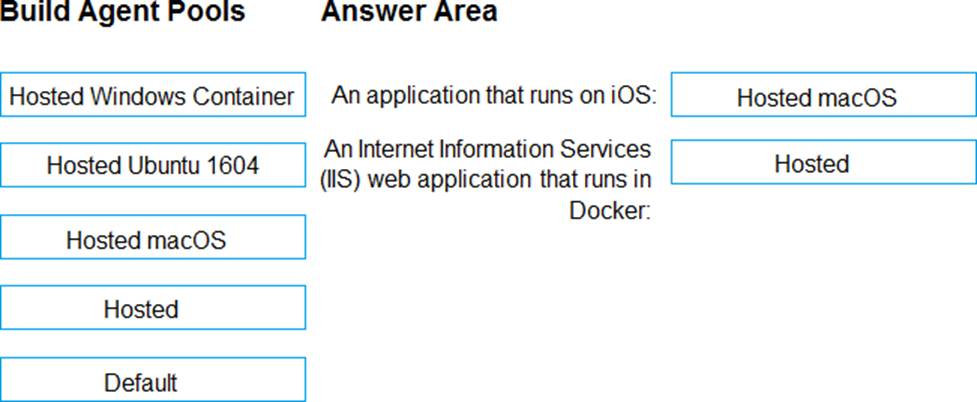
Box 1: Hosted macOS
Hosted macOS pool (Azure Pipelines only): Enables you to build and release on macOS without having to configure a self-hosted macOS agent. This option affects where your data is stored.
Box 2: Hosted
Hosted pool (Azure Pipelines only): The Hosted pool is the built-in pool that is a collection of Microsoft-hosted agents.
Incorrect Answers:
Default pool: Use it to register self-hosted agents that you’ve set up.
Hosted Windows Container pool (Azure Pipelines only): Enabled you to build and release inside Windows containers. Unless you’re building using containers, Windows builds should run in the Hosted VS2017 or Hosted pools.
Reference: https://docs.microsoft.com/en-us/azure/devops/pipelines/agents/v2-osx
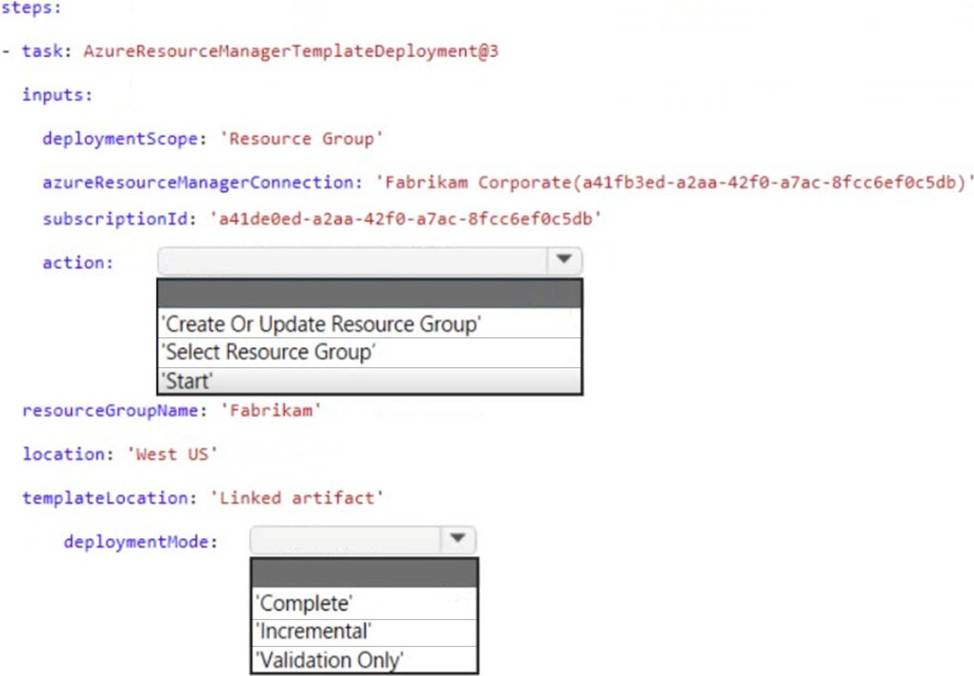
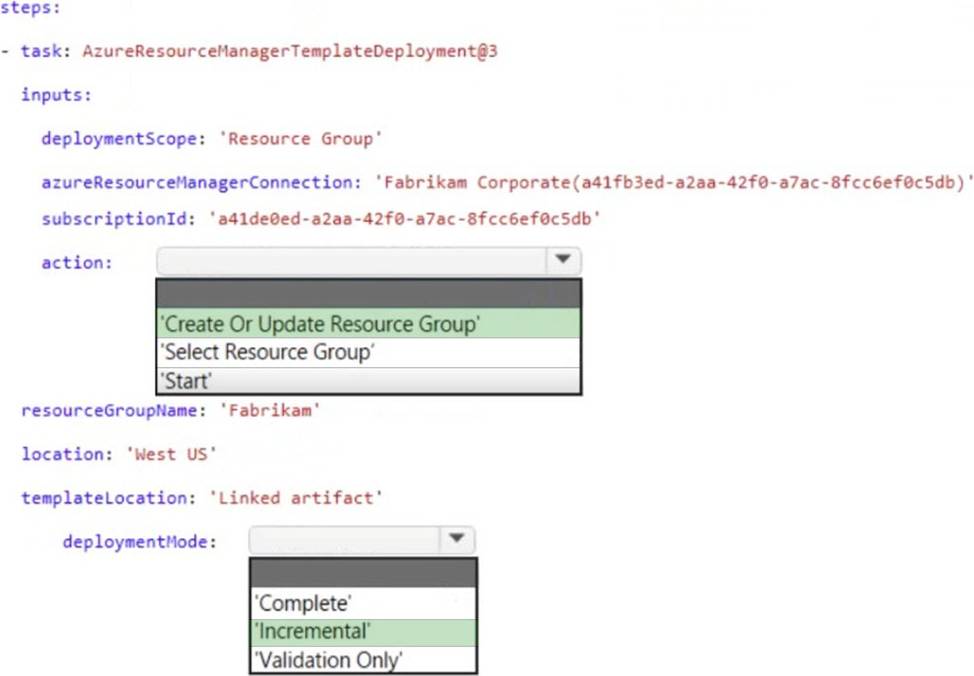
You are creating a YAML-based Azure pipeline to deploy an Azure Data factory instance that has the following requirements:
• If a Data Factory instance exists already, the instance must be overwritten.
• No other resources in a resource group named Fabrikam must be affected.
How should you complete the code? To answer, select the appropriate options in the answer area. NOTE: Each correct selection is worth one point.
You plan to deploy a new database environment. The solution must meet the technical requirements. You need to prepare the database for the deployment.
How should you format the export?
- A . NDF
- B . MDF
- C . BACPAC
- D . DACPAC
Note: This question is part of a series of questions that present the same scenario. Each question in the series contains a unique solution that might meet the stated goals. Some question sets might have more than one correct solution, while others might not have a correct solution.
After you answer a question in this section, you will NOT be able to return to it As a result, these questions will not appear in the review screen.
You need to recommend an integration strategy for the build process of a Java application.
The solution must meet the following requirements:
• The builds must access an on-premises dependency management system.
• The build outputs must be stored as Server artifacts m Azure DevOps.
• The source code must be stored in a get repository in Azure DevOps.
Solution: Configure the build pipeline to use a Microsoft-hosted agent pool running the Windows Server 2022 with Visual Studio 2022 image, include the Java Tool installer task in the build pipeline.
Does this meet the goal?
- A . Yes
- B . No
Your company uses Azure DevOps to manage the build and release processes for applications.
You use a Git repository for applications source control.
You plan to create a new branch from an existing pull request. Later, you plan to merge the new branch and the target branch of the pull request.
You need to use a pull request action to create the new branch. The solution must ensure that the branch uses only a portion of the code in the pull request.
Which pull request action should you use?
- A . Set as default branch
- B . Approve with suggestions
- C . Cherry-pick
- D . Reactivate
- E . Revert
C
Explanation:
Cherry-pick a pull request
To copy changes made in a pull request to another branch in your repo, follow these steps:
In a completed pull request, select Cherry-pick, or for an active pull request, select Cherry-pick from the … menu. Cherry-picking a pull request in this way creates a new branch with the copied changes. Merge into a target branch in a second pull request.
In Target branch, enter the branch you want to merge the copied changes.
In Topic branch name, enter a new branch to contain the copied changes, then select Cherry-pick.
Select Create pull request to merge the topic branch into the target branch to complete the cherry-pick.
Reference: https://docs.microsoft.com/en-us/azure/devops/repos/git/pull-requests
You have an Azure DevOps project named Project! that uses an Azure Pipelines pipeline to build, test, and deploy an app named Appl.
You have a credential named credl.
You need to ensure that credl can be used to deploy builds of Appl to production The solution must ensure that credl is available for use only by specific users and pipelines in Project 1.
What should you do?
- A . Create a deployment gate for the pipelines that deploy builds of Appl to production.
- B . Create cred 1 as a secret variable in a variable group.
- C . Add credl to an Azure key vault.
- D . Add credl as a variable to a template pipeline.
You have a project in Azure DevOps
You build an app named Appl that will be used on devices that run either MacOS, Linux, or Windows.
You need to create an Azure DevOps YAML pipeline to build App1 on the three operating systems.
The solution must meet the following requirements:
• Minimize code duplication in the pipeline configuration.
• Minimize maintenance effort.
What should you use?
- A . a stage template
- B . a variable template
- C . a step template
- D . a job template
You have a project in Azure DevOps
You build an app named Appl that will be used on devices that run either MacOS, Linux, or Windows.
You need to create an Azure DevOps YAML pipeline to build App1 on the three operating systems.
The solution must meet the following requirements:
• Minimize code duplication in the pipeline configuration.
• Minimize maintenance effort.
What should you use?
- A . a stage template
- B . a variable template
- C . a step template
- D . a job template
You have several Azure Active Directory (Azure AD) accounts.
You need to ensure that users use multi-factor authentication (MFA) to access Azure apps from untrusted networks.
What should you configure in Azure AD?
- A . access reviews
- B . managed identities
- C . entitlement management
- D . conditional access
D
Explanation:
You can configure a Conditional Access policy that requires MFA for access from untrusted networks.
Reference: https://docs.microsoft.com/en-us/azure/active-directory/conditional-access/howto-conditional-access-policy-all-users-mfa
DRAG DROP
You use GitHub Enterprise Server as a source code repository.
You create an Azure DevOps organization named Contoso.
In the Contoso organization, you create a project named Project 1.
You need to link GitHub commits, pull requests, and issues to the work items of Project 1. The solution must use OAuth-based authentication
Which three actions should you perform in sequence? To answer, move the appropriate actions from the list of actions to the answer area and arrange them in the correct order.
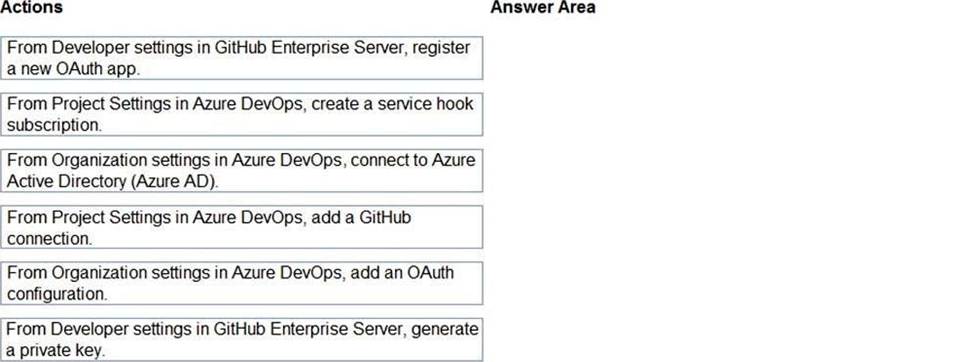
Explanation:
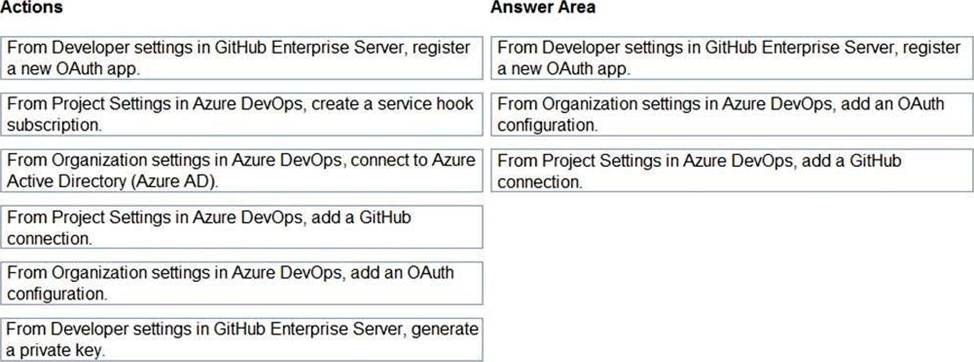
Step 1: From Developer settings in GitHub Enterprise Server, registera new OAuth app.
If you plan to use OAuth to connect Azure DevOps Services or Azure DevOps Server with your GitHub Enterprise Server, you first need to register the application as an OAuth App
Step 2: Organization settings in Azure DevOps, add an OAuth configuration
Register your OAuth configuration in Azure DevOps Services.
Note:
Sign into the web portal for Azure DevOps Services.
Add the GitHub Enterprise Oauth configuration to your organization.
Open Organization settings>Oauth configurations, and choose Add Oauth configuration.
Fill in the form that appears, and then choose Create.
Step 3: From Project Settings in Azure DevOps, add a GitHub connection.
Connect Azure DevOps Services to GitHub Enterprise Server
Choose the Azure DevOps logo to open Projects, and then choose the Azure Boards project you want to configure to connect to your GitHub Enterprise repositories.
Choose (1) Project Settings, choose (2) GitHub connections and then (3) Click here to connect to your GitHub Enterprise organization.
Reference: https://docs.microsoft.com/en-us/azure/devops/boards/github/connect-to-github