
Practice Free AZ-400 Exam Online Questions
Your company plans to use an agile approach to software development.
You need to recommend an application to provide communication between members of the development team who work in locations around the world.
The applications must meet the following requirements:
✑ Provide the ability to isolate the members of different project teams into separate communication channels and to keep a history of the chats within those channels.
✑ Be available on Windows 10, Mac OS, iOS, and Android operating systems.
✑ Provide the ability to add external contractors and suppliers to projects.
✑ Integrate directly with Azure DevOps.
What should you recommend?
- A . Microsoft Project
- B . Bamboo
- C . Microsoft Lync
- D . Microsoft Teams
D
Explanation:
Within each team, users can create different channels to organize their communications by topic.
Each channel can include a couple of users or scale to thousands of users.
Microsoft Teams works on Android, iOS, Mac and Windows systems and devices. It also works in Chrome, Firefox, Internet Explorer 11 and Microsoft Edge web browsers.
The guest-access feature in Microsoft Teams allows users to invite people outside their organizations to join internal channels for messaging, meetings and file sharing. This capability helps to facilitate business-to-business project management.
Teams integrates with Azure DevOps.
Reference: https://searchunifiedcommunications.techtarget.com/definition/Microsoft-Teams
SIMULATION
Task 12
You need to create a personal access token (PAT) named Token! that has only the following capabilities
• Read write, and manage code
• Read and execute builds
• Read releases
Token1 must expire in 60 days.
Sign in to Azure DevOps:
Go to Azure DevOps and sign in with your credentials.
Access User Settings:
Click on your profile picture in the top right corner.
Select User settings.
Open Personal Access Tokens:
In the user settings menu, select Personal access tokens.
Step 2: Create a New Personal Access Token
Create a New Token:
Click on + New Token.
Configure the Token:
Name: Enter Token1.
Organization: Select the organization where you want to use the token.
Expiration: Set the expiration to 60 days.
Set Scopes:
Code: Select Read, Write, & Manage.
Build: Select Read & Execute.
Release: Select Read.
Create the Token:
Click on Create.
Step 3: Save the Token
Copy the Token:
Once the token is created, copy it immediately as it will not be displayed again.
Store the token in a secure location.
By following these steps, you will have successfully created a personal access token named Token1 with the specified capabilities and a 60-day expiration
DRAG DROP
You need to configure access to Azure DevOps agent pools to meet the following requirements:
– Use a project agent pool when authoring build or release pipelines.
– View the agent pool and agents of the organization.
– Use the principle of least privilege.
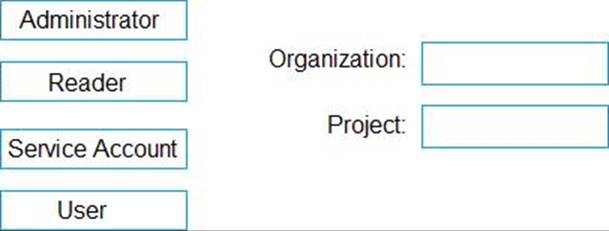
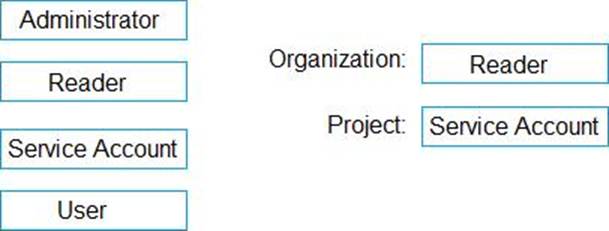
Which role memberships are required for the Azure DevOps organization and the project? To answer, drag the appropriate role memberships to the correct targets. Each role membership may be used once, more than once, or not at all. You may need to drag the split bar between panes or scroll to view content. NOTE: Each correct selection is worth one point.
Explanation:
Box 1: Reader
Members of the Reader role can view the organization agent pool as well as agents. You typically use this to add operators that are responsible for monitoring the agents and their health.
Box 2: Service account
Members of the Service account role can use the organization agent pool to create a project agent pool in a project. If you follow the guidelines above for creating new project agent pools, you typically do not have to add any members here.
Incorrect Answers:
In addition to all the permissions given the Reader and the Service Account role, members of the administrator role can register or unregister agents from the organization agent pool. They can also refer to the organization agent pool when creating a project agent pool in a project. Finally, they can also manage membership for all roles of the organization agent pool. The user that created the organization agent pool is automatically added to the Administrator role for that pool.
Reference: https://docs.microsoft.com/en-us/azure/devops/pipelines/agents/pools-queues
DRAG DROP
You need to configure access to Azure DevOps agent pools to meet the following requirements:
– Use a project agent pool when authoring build or release pipelines.
– View the agent pool and agents of the organization.
– Use the principle of least privilege.
Which role memberships are required for the Azure DevOps organization and the project? To answer, drag the appropriate role memberships to the correct targets. Each role membership may be used once, more than once, or not at all. You may need to drag the split bar between panes or scroll to view content. NOTE: Each correct selection is worth one point.
Explanation:
Box 1: Reader
Members of the Reader role can view the organization agent pool as well as agents. You typically use this to add operators that are responsible for monitoring the agents and their health.
Box 2: Service account
Members of the Service account role can use the organization agent pool to create a project agent pool in a project. If you follow the guidelines above for creating new project agent pools, you typically do not have to add any members here.
Incorrect Answers:
In addition to all the permissions given the Reader and the Service Account role, members of the administrator role can register or unregister agents from the organization agent pool. They can also refer to the organization agent pool when creating a project agent pool in a project. Finally, they can also manage membership for all roles of the organization agent pool. The user that created the organization agent pool is automatically added to the Administrator role for that pool.
Reference: https://docs.microsoft.com/en-us/azure/devops/pipelines/agents/pools-queues
HOTSPOT
You company uses Azure DevOps to deploy infrastructures to Azure.
Pipelines are developed by using YAML.
You execute a pipeline and receive the results in the web portal for Azure Pipelines as shown in the following exhibit.
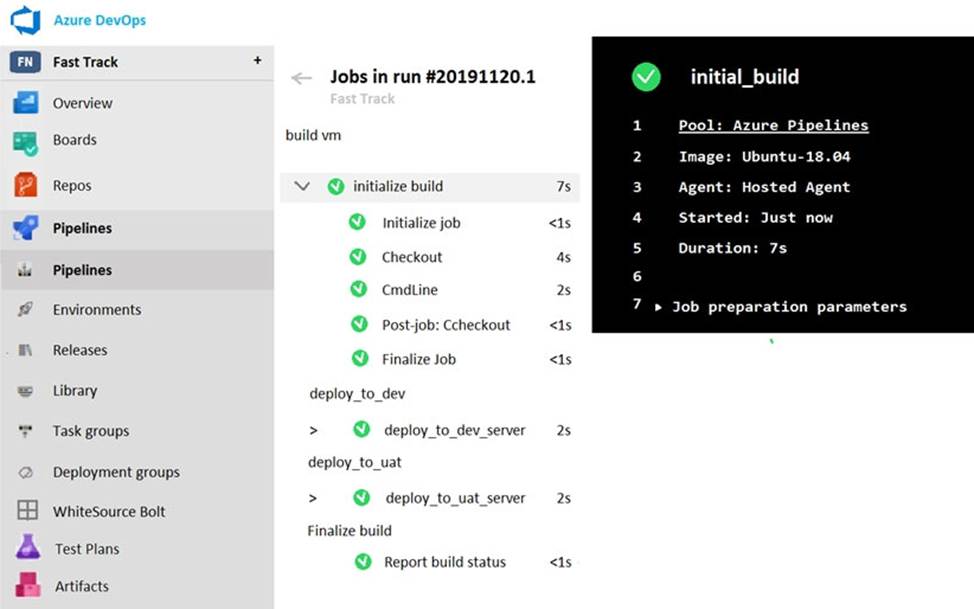
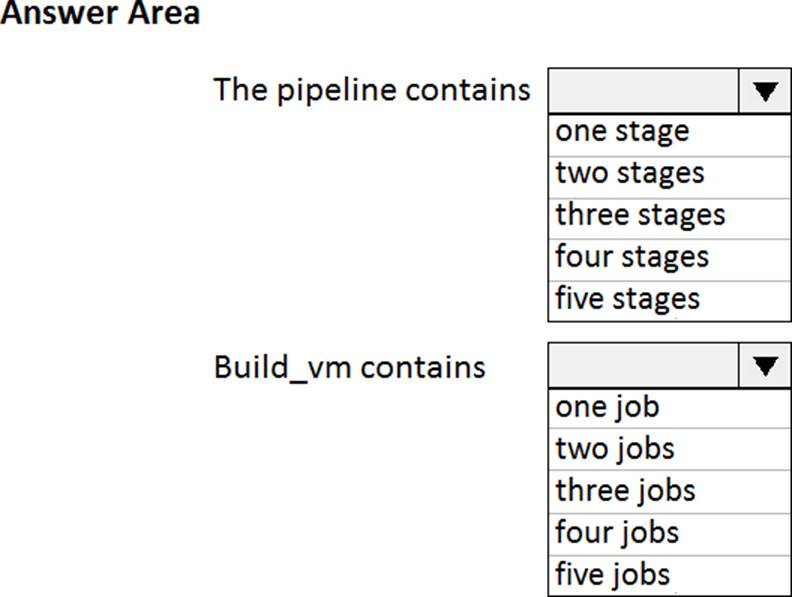
Use the drop-down menus to select the answer choice that completes each statement based on the information presented in the graphic. NOTE: Each correct selection is worth one point.
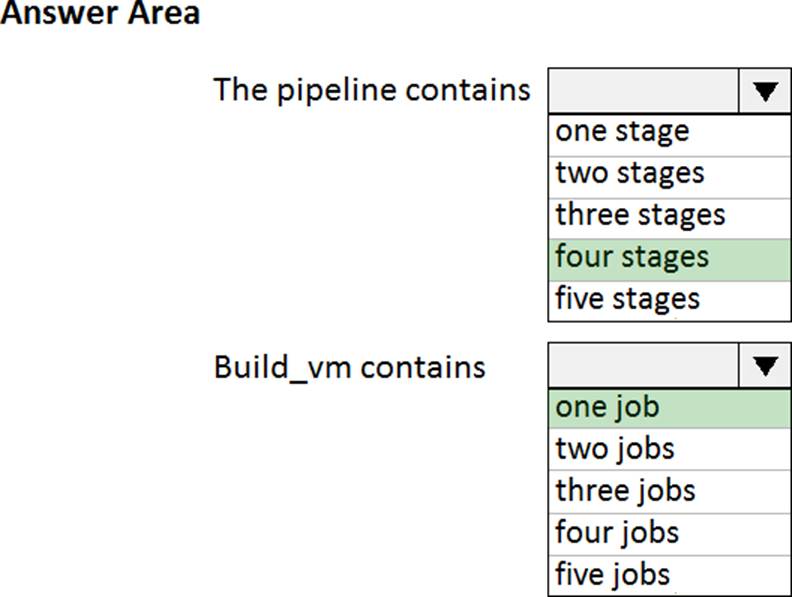
Explanation:
Reference: https://dev.to/rajikaimal/azure-devops-ci-cd-yaml-pipeline-4glj
HOTSPOT
You company uses Azure DevOps to deploy infrastructures to Azure.
Pipelines are developed by using YAML.
You execute a pipeline and receive the results in the web portal for Azure Pipelines as shown in the following exhibit.
Use the drop-down menus to select the answer choice that completes each statement based on the information presented in the graphic. NOTE: Each correct selection is worth one point.
Explanation:
Reference: https://dev.to/rajikaimal/azure-devops-ci-cd-yaml-pipeline-4glj
You have a project in Azure DevOps named Project1. Project1 contains a published wiki.
You need to change the order of pages in the navigation pane of the published wiki in the Azure DevOps portal.
What should you do?
- A . At the root of the wiki, create a file named order that defines the page hierarchy.
- B . At the root of the wiki, create a file named wiki.md that defines the page hierarchy.
- C . Rename the pages in the navigation pane.
- D . Drag and drop the pages in the navigation pane.
B
Explanation:
Reorder a wiki page
You can reorder pages within the wiki tree view to have pages appear in the order and hierarchy you want.
You can drag-and-drop a page title in the tree view to do the following operations:
Change the parent-child relationship of a page
Change the order of the page within the hierarchy
Reference: https://docs.microsoft.com/en-us/azure/devops/project/wiki/add-edit-wiki
DRAG DROP
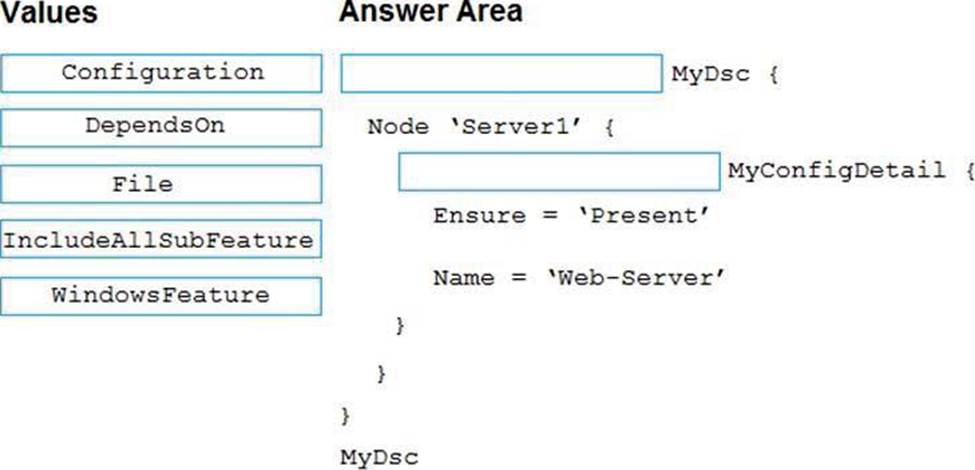
You need to deploy Internet Information Services (IIS) to an Azure virtual machine that runs Windows Server 2019.
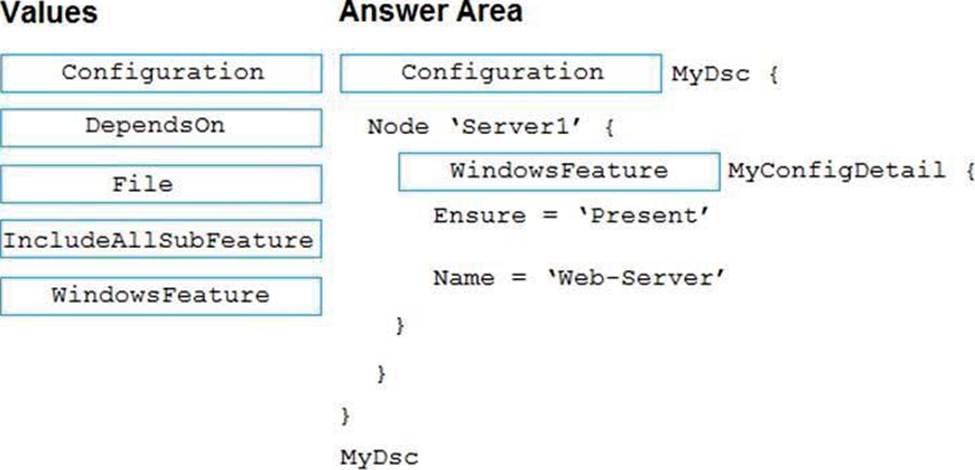
How should you complete the Desired State Configuration (DSQ configuration script? To answer, drag the appropriate values to the correct locations. Each value may be used once, more than once, or not at all. You may need to drag the split bar between panes or scroll to view content. NOTE: Each correct selection is worth one point.
Explanation:
Box 1: Configuration
The following example shows a simple example of a configuration.
configuration IISInstall
{
node "localhost"
{
WindowsFeature IIS
{
Ensure = "Present"
Name = "Web-Server"
}
}
}
Box 2: WindowsFeature
Reference: https://docs.microsoft.com/en-us/azure/virtual-machines/extensions/dsc-overview
DRAG DROP
You need to deploy Internet Information Services (IIS) to an Azure virtual machine that runs Windows Server 2019.
How should you complete the Desired State Configuration (DSQ configuration script? To answer, drag the appropriate values to the correct locations. Each value may be used once, more than once, or not at all. You may need to drag the split bar between panes or scroll to view content. NOTE: Each correct selection is worth one point.
Explanation:
Box 1: Configuration
The following example shows a simple example of a configuration.
configuration IISInstall
{
node "localhost"
{
WindowsFeature IIS
{
Ensure = "Present"
Name = "Web-Server"
}
}
}
Box 2: WindowsFeature
Reference: https://docs.microsoft.com/en-us/azure/virtual-machines/extensions/dsc-overview
You have a project in Azure DevOps named Project1 that Reference an Azure Artifacts feed named Feed1.
You have a package named Package1 that has the versions shown in the following table.
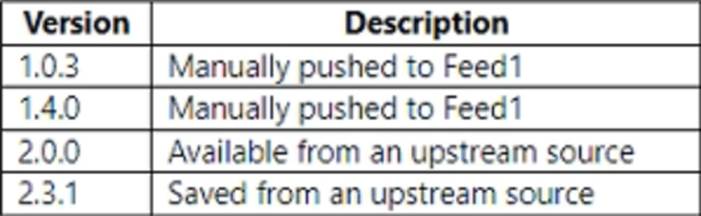
You need to perform a build of Project1.
Which version of Package1 will be used?
- A . 1.0.3
- B . 1.4.0
- C . 2.0.0
- D . 2.3.1