Practice Free AZ-400 Exam Online Questions
DRAG DROP
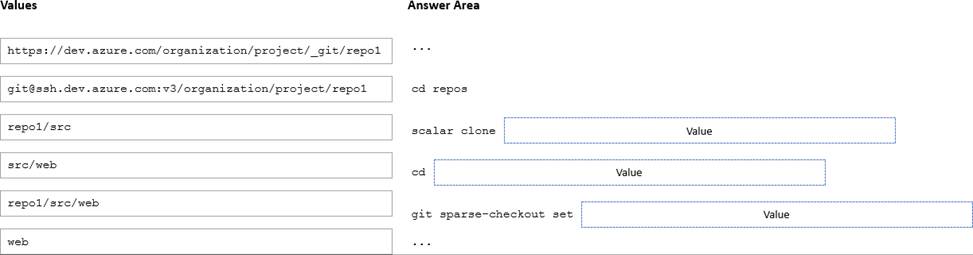
You have an Azure Repos repository named repo1.
You need to clone repo1. The solution must clone only a directory named src/web.
How should you complete the script? To answer, drag the appropriate values to the correct targets. Each value may be used once, more than once, or not at all. You may need to drag the spirt bar between panes or scroll to view content. NOTE: Each correct selection is worth one point
DRAG DROP
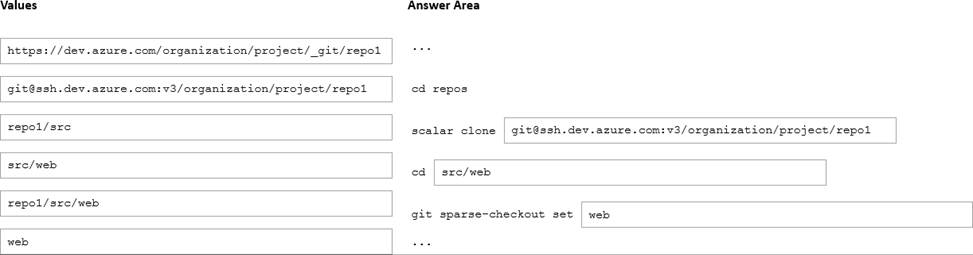
You have an Azure Repos repository named repo1.
You need to clone repo1. The solution must clone only a directory named src/web.
How should you complete the script? To answer, drag the appropriate values to the correct targets. Each value may be used once, more than once, or not at all. You may need to drag the spirt bar between panes or scroll to view content. NOTE: Each correct selection is worth one point
DRAG DROP
You have an Azure Repos repository named repo1.
You need to clone repo1. The solution must clone only a directory named src/web.
How should you complete the script? To answer, drag the appropriate values to the correct targets. Each value may be used once, more than once, or not at all. You may need to drag the spirt bar between panes or scroll to view content. NOTE: Each correct selection is worth one point
unique solution that might meet the stated goals. Some question sets might have more than one correct solution, while others might not have a correct solution
After you answer a question in this section, you will NOT be able to return to it. As a result these questions will not appear in the review screen.
You integrate a cloud-hosted Jenkins server and a new Azure DevOps deployment.
You need Azure DevOps to send a notification to Jenkins when a developer commits changes to a branch in Azure Repos.
Solution: You create a service hook subscription that uses the build completed event.
Does this meet the goal?
- A . Yes
- B . No
B
Explanation:
You can create a service hook for Azure DevOps Services and TFS with Jenkins.
However, the service subscription event should use the code pushed event, is triggered when the code is pushed to a Git repository.
SIMULATION
You need to create and configure an Azure Storage account named az400lod11566895stor in a resource group named RG1lod11566895 to store the boot diagnostics for a virtual machine named VM1.
To complete this task, sign in to the Microsoft Azure portal.
On the Azure portal menu, select All services. In the list of resources, type Storage Accounts. As you begin typing, the list filters based on your input. Select Storage Accounts.
On the Storage Accounts window that appears, choose Add.
Select the subscription in which to create the storage account.
Under the Resource group field, select RG1lod11566895
Next, enter a name for your storage account named: az400lod11566895stor
Select Create.
Step 2: Enable boot diagnostics on existing virtual machine
To enable Boot diagnostics on an existing virtual machine, follow these steps:
SIMULATION
Task 11
You need to create a new artifact feed named artifact_feed.
Only 10 versions of the packages must be retained, and downloaded packages must be retained for 90 days.
Step 1: Navigate to Artifacts
In your Azure DevOps Project (Project1), click on the Artifacts section in the left menu.
Step 2: Create a New Feed
Click on the + New feed button.
In the Name field, enter:
nginx
Copy
artifact_feed
Choose the visibility of the feed:
Project scoped (only accessible to Project1).
Or Organization scoped (accessible across your Azure DevOps organization).
Leave other settings at default unless you have specific permissions or upstream sources.
Click Create.
This creates a new feed named artifact_feed.
Step 3: Configure Retention Policies
In the Artifacts section, click on the feed named artifact_feed to open its details page.
In the top-right corner, click on the three dots (…) and select Feed settings.
Step 4: Set the Maximum Number of Versions to Retain
In the Feed settings page, find the Retention policies section.
Set Maximum number of versions per package to:
Copy
10
Click Save.
This ensures that only the latest 10 versions of any package are retained in the feed.
Step 5: Set the Downloaded Package Retention Period
In the Feed settings page, under Retention policies, find Downloaded package retention.
Set Number of days to retain downloaded packages to:
Copy
90
Click Save.
This ensures that downloaded packages will be retained in the cache for 90 days before deletion.
SIMULATION
Task 11
You need to create a new artifact feed named artifact_feed.
Only 10 versions of the packages must be retained, and downloaded packages must be retained for 90 days.
Step 1: Navigate to Artifacts
In your Azure DevOps Project (Project1), click on the Artifacts section in the left menu.
Step 2: Create a New Feed
Click on the + New feed button.
In the Name field, enter:
nginx
Copy
artifact_feed
Choose the visibility of the feed:
Project scoped (only accessible to Project1).
Or Organization scoped (accessible across your Azure DevOps organization).
Leave other settings at default unless you have specific permissions or upstream sources.
Click Create.
This creates a new feed named artifact_feed.
Step 3: Configure Retention Policies
In the Artifacts section, click on the feed named artifact_feed to open its details page.
In the top-right corner, click on the three dots (…) and select Feed settings.
Step 4: Set the Maximum Number of Versions to Retain
In the Feed settings page, find the Retention policies section.
Set Maximum number of versions per package to:
Copy
10
Click Save.
This ensures that only the latest 10 versions of any package are retained in the feed.
Step 5: Set the Downloaded Package Retention Period
In the Feed settings page, under Retention policies, find Downloaded package retention.
Set Number of days to retain downloaded packages to:
Copy
90
Click Save.
This ensures that downloaded packages will be retained in the cache for 90 days before deletion.
You have a project m Azure DevOps that has a release pipeline.
You need to integrate work item tracking and an Agile project management system to meet the following requirements:
• Ensure that developers can track whether their commits are deployed to production.
• Report the deployment status.
• Minimize integration effort.
Which system should you use?
- A . Trello
- B . Jira
- C . Basecamp
- D . Asana
B
Explanation:
Jira Software is a development tool used by agile teams to plan, track, and manage software releases. Using Azure Pipelines, teams can configure CI/CD pipelines for applications of any language, deploying to any platform or any cloud.
Note: Microsoft and Atlassian have partnered together to build an integration between Azure Pipelines and Jira Software.
This integration connects the two products, providing full tracking of how and when the value envisioned with an issue is delivered to end users. This enables teams to setup a tight development cycle from issue creation through release. Key development milestones like builds and deployments associated to a Jira issue can then be tracked from within Jira Software.
Reference: https://devblogs.microsoft.com/devops/azure-pipelines-integration-with-jira-software/
You store source code in a Git repository in Azure repos. You use a third-party continuous integration (CI) tool to control builds.
What will Azure DevOps use to authenticate with the tool?
- A . certificate authentication
- B . a personal access token (PAT)
- C . a Shared Access Signature (SAS) token
- D . NTLM authentication
B
Explanation:
Personal access tokens (PATs) give you access to Azure DevOps and Team Foundation Server (TFS), without using your username and password directly.
Reference: https://docs.microsoft.com/en-us/azure/devops/repos/git/auth-overview
HOTSPOT
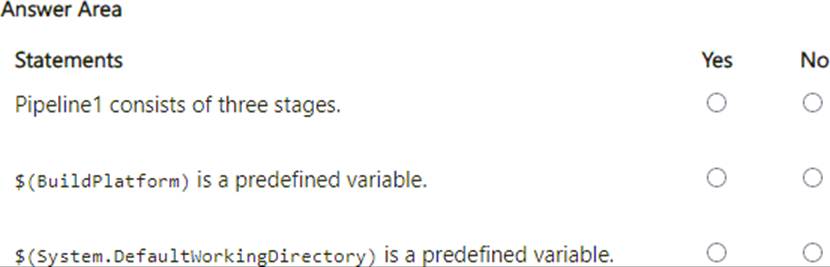
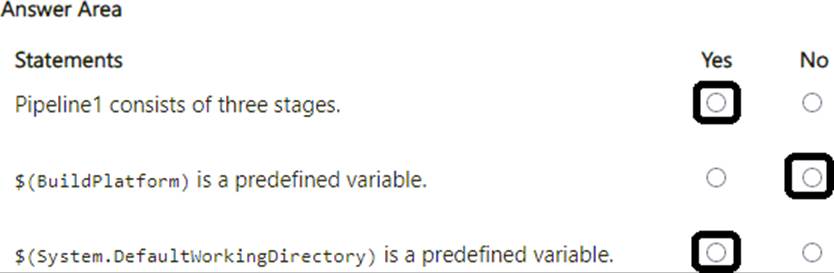
You have an Azure Pipelines pipeline named Pipeline1 that has the following YAML definition.
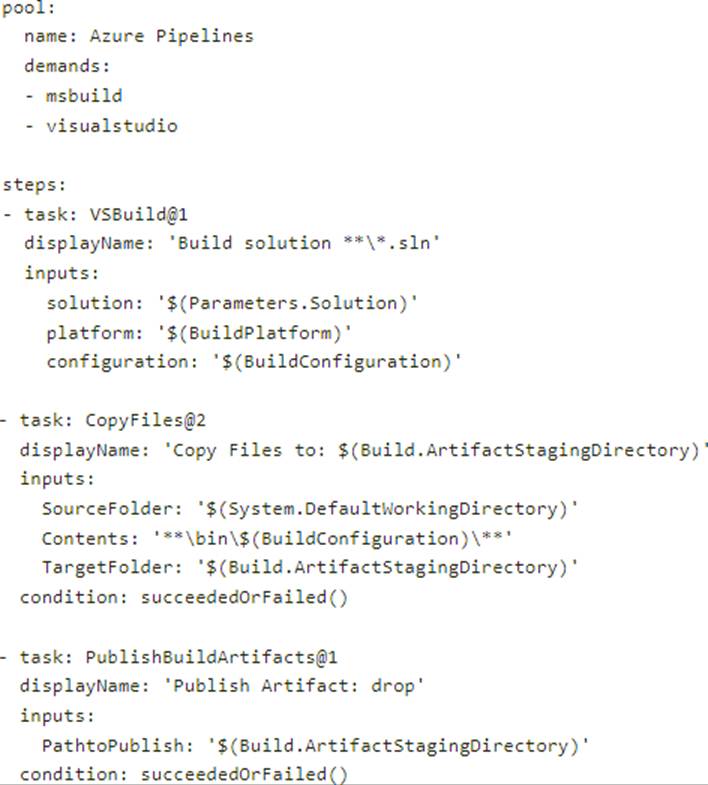
For each of the following statements, select Yes if True. Otherwise select No. NOTE: Each correct selection is worth one point.