
Practice Free AZ-400 Exam Online Questions
HOTSPOT
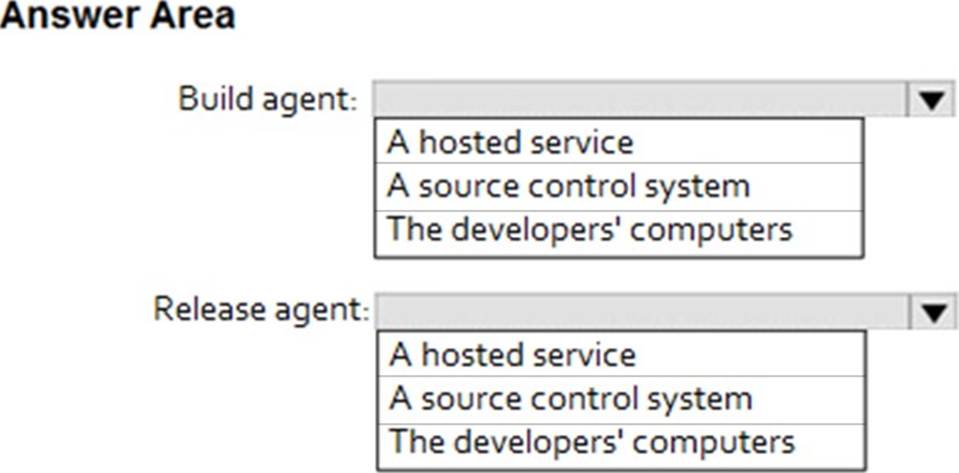
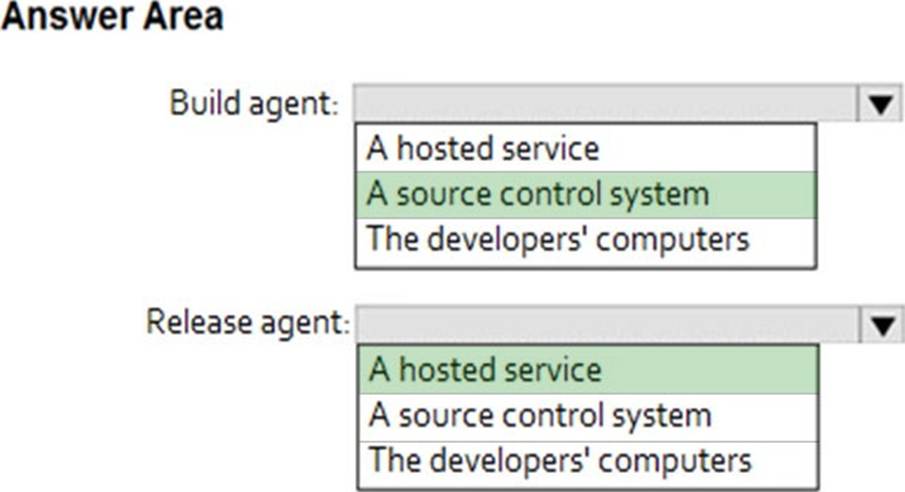
Where should the build and release agents for the investment planning application suite run? To answer, select the appropriate options in the answer area. NOTE: Each correct selection is worth one point.
Explanation:
Box 1: A source control system
A source control system, also called a version control system, allows developers to collaborate on code and track changes. Source control is an essential tool for multi-developer projects.
Box 2: A hosted service
To build and deploy Xcode apps or Xamarin.iOS projects, you’ll need at least one macOS agent. If your pipelines are in Azure Pipelines and a Microsoft-hosted agent meets your needs, you can skip setting up a self-hosted macOS agent.
Scenario: The investment planning applications suite will include one multi-tier web application and two iOS mobile applications. One mobile application will be used by employees; the other will be used by customers.
Reference: https://docs.microsoft.com/en-us/azure/devops/pipelines/agents/v2-osx?view=azure-devops
HOTSPOT
Where should the build and release agents for the investment planning application suite run? To answer, select the appropriate options in the answer area. NOTE: Each correct selection is worth one point.
Explanation:
Box 1: A source control system
A source control system, also called a version control system, allows developers to collaborate on code and track changes. Source control is an essential tool for multi-developer projects.
Box 2: A hosted service
To build and deploy Xcode apps or Xamarin.iOS projects, you’ll need at least one macOS agent. If your pipelines are in Azure Pipelines and a Microsoft-hosted agent meets your needs, you can skip setting up a self-hosted macOS agent.
Scenario: The investment planning applications suite will include one multi-tier web application and two iOS mobile applications. One mobile application will be used by employees; the other will be used by customers.
Reference: https://docs.microsoft.com/en-us/azure/devops/pipelines/agents/v2-osx?view=azure-devops
You have an Azure subscription that contains the resources shown in the following table.

Project1 produces 9pm packages that are published to Feed1. Feed1 is consumed by multiple projects.
You need to ensure that only tested packages are available for consumption. The solution must minimize development effort.
What should you do?
- A . Create a feed view named @default. After the 9pm packages test successfully, configure a release pipeline that tags the packages as release.
- B . Create a feed view named @release and set @release as the default view. After the 9pm packages test successfully, configure a release pipeline that tags the packages as release.
- C . Create a feed view named @release and set @release as the default view After the 9pm
packages test successfully, configure a release pipeline that promotes a package to the @release view. - D . Create a feed view named @default. After the 9pm packages test successfully, configure a release pipeline that promotes a package to the @default view.
C
Explanation:
By creating a feed view named "release" and setting it as the default view, packages that are published to the feed will not be immediately available for consumption. After the 9pm packages are tested successfully, you can configure a release pipeline that promotes a package to the @release view. This ensures that only tested packages are available for consumption and minimizes development effort as it doesn’t require any additional steps to be taken by the consumer of the feed.
Reference: Azure DevOps Docs: Create a feed and views https://docs.microsoft.com/en-us/azure/devops/artifacts/feeds/create-feed?view=azure-devops
Azure DevOps Docs: Promote a package https://docs.microsoft.com/en-us/azure/devops/artifacts/feeds/promote-package?view=azure-devops
DRAG DROP
You are planning projects for three customers.
Each customer’s preferred process for work items is shown in the following table.
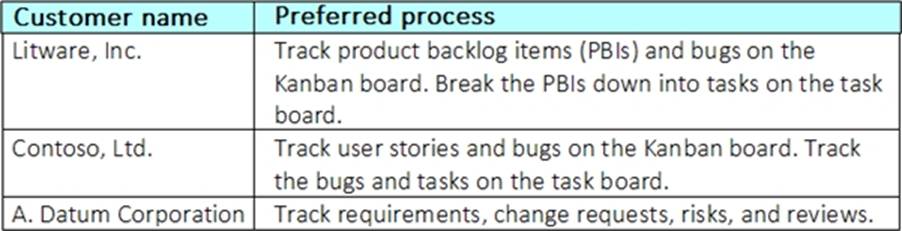
The customers all plan to use Azure DevOps for work item management.
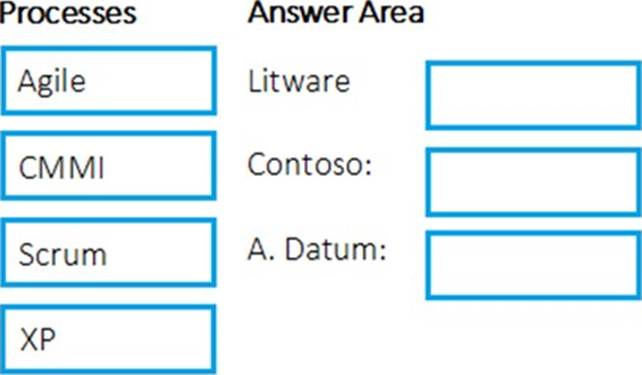
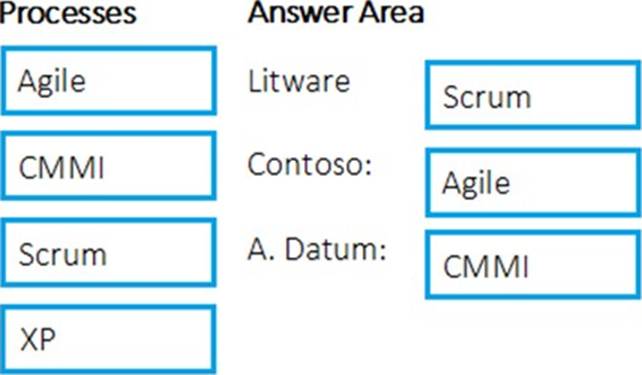
Which work item process should you use for each customer? To answer, drag the appropriate work item process to the correct customers. Each work item process may be used once, more than once, or not at all. You may need to drag the split bar between panes or scroll to view content. NOTE: Each correct selection is worth one point.
Explanation:
Box 1: Scrum
Choose Scrum when your team practices Scrum. This process works great if you want to track product backlog items (PBIs) and bugs on the Kanban board, or break PBIs and bugs down into tasks on the taskboard.
Box 2: Agile
Choose Agile when your team uses Agile planning methods, including Scrum, and tracks development and test activities separately. This process works great if you want to track user stories and (optionally) bugs on the Kanban board, or track bugs and tasks on the taskboard.
Box 3: CMMI
Choose CMMI when your team follows more formal project methods that require a framework for process improvement and an auditable record of decisions. With this process, you can track requirements, change requests, risks, and reviews.
Incorrect Answers:
XP:
The work tracking objects contained within the default DevOps processes and DevOps process templates are Basic, Agile, CMMI, and Scrum
XP (Extreme Programming) and DevOps are different things. They don’t contradict with each other, they can be used together, but they have different base concepts inside them.
Reference: https://docs.microsoft.com/en-us/azure/devops/boards/work-items/guidance/choose-process?view=azure-devops
HOTSPOT
How should you configure the filters for the Project5 trigger? To answer, select the appropriate option in the answer area. NOTE: Each correct selection is worth one point.
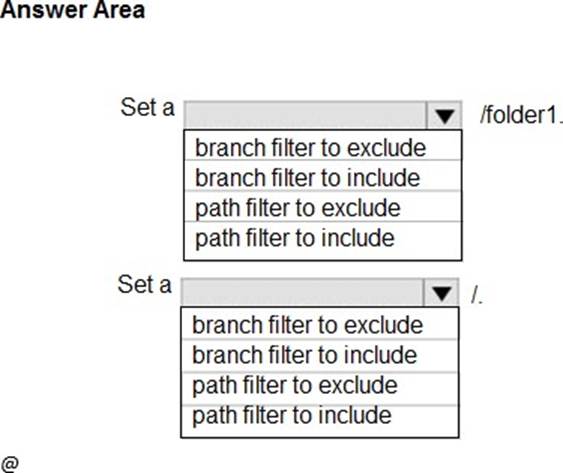
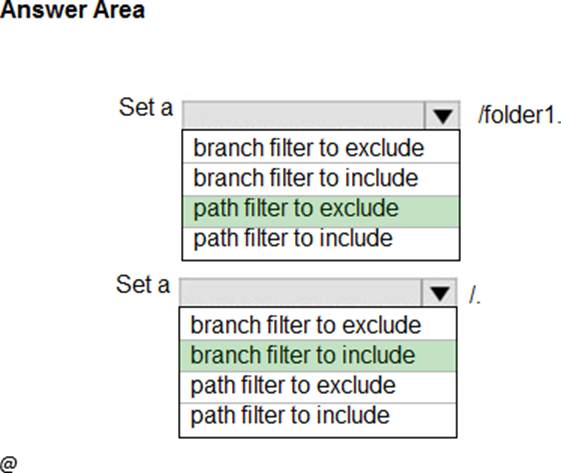
Explanation:
Scenario:

Reference: https://docs.microsoft.com/en-us/azure/devops/pipelines/build/triggers
HOTSPOT
How should you configure the filters for the Project5 trigger? To answer, select the appropriate option in the answer area. NOTE: Each correct selection is worth one point.
Explanation:
Scenario:
Reference: https://docs.microsoft.com/en-us/azure/devops/pipelines/build/triggers
You have a GitHub Actions workflow named workflow1 that is used to deploy an app name Appl.
You need to ensure that App1 is deployed only when the following conditions are met:
• A pull request is merged to the main branch.
• The change includes a JavaScript file.
Solution. You configure the YAML file of workflow1 to include the following.
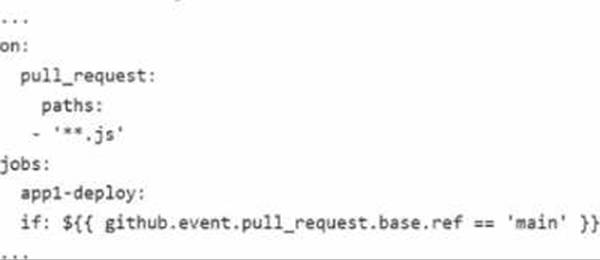
Does this meet the goal?
- A . Yes
- B . No
Your company has a project in Azure DevOps for a new application. The application will be deployed to several Azure virtual machines that run Windows Server 2016.
You need to recommend a deployment strategy for the virtual machines.
The strategy must meet the following requirements:
• Ensure that the virtual machines maintain a consistent configuration.
• Minimize administrative effort to configure the virtual machines.
What should you include in the recommendation?
- A . Deployment YAML and Azure pipeline stage templates
- B . Azure Resource Manager templates and the Custom Script Extension for Windows
- C . Azure Resource Manager templates and the PowerShell Desired State Configuration (DSC) extension for Windows
- D . Deployment YAML and Azure pipeline deployment groups
C
Explanation:
The Custom Script Extension downloads and executes scripts on Azure virtual machines. This extension is useful for post deployment configuration, software installation, or any other configuration or management tasks. Scripts can be downloaded from Azure storage or GitHub, or provided to the Azure portal at extension run time. The Custom Script Extension integrates with Azure Resource Manager templates, and can be run using the Azure CLI, PowerShell, Azure portal, or the Azure Virtual Machine REST API.
Reference: https://docs.microsoft.com/en-us/azure/virtual-machines/extensions/custom-script-windows
Your company has a project in Azure DevOps for a new application. The application will be deployed to several Azure virtual machines that run Windows Server 2016.
You need to recommend a deployment strategy for the virtual machines.
The strategy must meet the following requirements:
• Ensure that the virtual machines maintain a consistent configuration.
• Minimize administrative effort to configure the virtual machines.
What should you include in the recommendation?
- A . Deployment YAML and Azure pipeline stage templates
- B . Azure Resource Manager templates and the Custom Script Extension for Windows
- C . Azure Resource Manager templates and the PowerShell Desired State Configuration (DSC) extension for Windows
- D . Deployment YAML and Azure pipeline deployment groups
C
Explanation:
The Custom Script Extension downloads and executes scripts on Azure virtual machines. This extension is useful for post deployment configuration, software installation, or any other configuration or management tasks. Scripts can be downloaded from Azure storage or GitHub, or provided to the Azure portal at extension run time. The Custom Script Extension integrates with Azure Resource Manager templates, and can be run using the Azure CLI, PowerShell, Azure portal, or the Azure Virtual Machine REST API.
Reference: https://docs.microsoft.com/en-us/azure/virtual-machines/extensions/custom-script-windows
Your company has a project in Azure DevOps for a new application. The application will be deployed to several Azure virtual machines that run Windows Server 2016.
You need to recommend a deployment strategy for the virtual machines.
The strategy must meet the following requirements:
• Ensure that the virtual machines maintain a consistent configuration.
• Minimize administrative effort to configure the virtual machines.
What should you include in the recommendation?
- A . Deployment YAML and Azure pipeline stage templates
- B . Azure Resource Manager templates and the Custom Script Extension for Windows
- C . Azure Resource Manager templates and the PowerShell Desired State Configuration (DSC) extension for Windows
- D . Deployment YAML and Azure pipeline deployment groups
C
Explanation:
The Custom Script Extension downloads and executes scripts on Azure virtual machines. This extension is useful for post deployment configuration, software installation, or any other configuration or management tasks. Scripts can be downloaded from Azure storage or GitHub, or provided to the Azure portal at extension run time. The Custom Script Extension integrates with Azure Resource Manager templates, and can be run using the Azure CLI, PowerShell, Azure portal, or the Azure Virtual Machine REST API.
Reference: https://docs.microsoft.com/en-us/azure/virtual-machines/extensions/custom-script-windows