
Practice Free AZ-400 Exam Online Questions
Your company has a project in Azure DevOps for a new application. The application will be deployed to several Azure virtual machines that run Windows Server 2016.
You need to recommend a deployment strategy for the virtual machines.
The strategy must meet the following requirements:
• Ensure that the virtual machines maintain a consistent configuration.
• Minimize administrative effort to configure the virtual machines.
What should you include in the recommendation?
- A . Deployment YAML and Azure pipeline stage templates
- B . Azure Resource Manager templates and the Custom Script Extension for Windows
- C . Azure Resource Manager templates and the PowerShell Desired State Configuration (DSC) extension for Windows
- D . Deployment YAML and Azure pipeline deployment groups
C
Explanation:
The Custom Script Extension downloads and executes scripts on Azure virtual machines. This extension is useful for post deployment configuration, software installation, or any other configuration or management tasks. Scripts can be downloaded from Azure storage or GitHub, or provided to the Azure portal at extension run time. The Custom Script Extension integrates with Azure Resource Manager templates, and can be run using the Azure CLI, PowerShell, Azure portal, or the Azure Virtual Machine REST API.
Reference: https://docs.microsoft.com/en-us/azure/virtual-machines/extensions/custom-script-windows
Your company has a project in Azure DevOps for a new application. The application will be deployed to several Azure virtual machines that run Windows Server 2016.
You need to recommend a deployment strategy for the virtual machines.
The strategy must meet the following requirements:
• Ensure that the virtual machines maintain a consistent configuration.
• Minimize administrative effort to configure the virtual machines.
What should you include in the recommendation?
- A . Deployment YAML and Azure pipeline stage templates
- B . Azure Resource Manager templates and the Custom Script Extension for Windows
- C . Azure Resource Manager templates and the PowerShell Desired State Configuration (DSC) extension for Windows
- D . Deployment YAML and Azure pipeline deployment groups
C
Explanation:
The Custom Script Extension downloads and executes scripts on Azure virtual machines. This extension is useful for post deployment configuration, software installation, or any other configuration or management tasks. Scripts can be downloaded from Azure storage or GitHub, or provided to the Azure portal at extension run time. The Custom Script Extension integrates with Azure Resource Manager templates, and can be run using the Azure CLI, PowerShell, Azure portal, or the Azure Virtual Machine REST API.
Reference: https://docs.microsoft.com/en-us/azure/virtual-machines/extensions/custom-script-windows
Your company has a project in Azure DevOps for a new application. The application will be deployed to several Azure virtual machines that run Windows Server 2016.
You need to recommend a deployment strategy for the virtual machines.
The strategy must meet the following requirements:
• Ensure that the virtual machines maintain a consistent configuration.
• Minimize administrative effort to configure the virtual machines.
What should you include in the recommendation?
- A . Deployment YAML and Azure pipeline stage templates
- B . Azure Resource Manager templates and the Custom Script Extension for Windows
- C . Azure Resource Manager templates and the PowerShell Desired State Configuration (DSC) extension for Windows
- D . Deployment YAML and Azure pipeline deployment groups
C
Explanation:
The Custom Script Extension downloads and executes scripts on Azure virtual machines. This extension is useful for post deployment configuration, software installation, or any other configuration or management tasks. Scripts can be downloaded from Azure storage or GitHub, or provided to the Azure portal at extension run time. The Custom Script Extension integrates with Azure Resource Manager templates, and can be run using the Azure CLI, PowerShell, Azure portal, or the Azure Virtual Machine REST API.
Reference: https://docs.microsoft.com/en-us/azure/virtual-machines/extensions/custom-script-windows
You are automating the build process for a Java-based application by using Azure DevOps.
You need to add code coverage testing and publish the outcomes to the pipeline.
What should you use?
- A . Cobertura
- B . JUnit
- C . Coverage.py
- D . Bullseye Coverage
Your company hosts a web application in Azure. The company uses Azure Pipelines for the build and release management of the application.
Stakeholders report that the past few releases have negatively affected system performance.
You configure alerts in Azure Monitor.
You need to ensure that new releases are only deployed to production if the releases meet defined performance baseline criteria in the staging environment first
What should you use to prevent the deployment of releases that fail to meet the performance baseline?
- A . a trigger
- B . an Azure function
- C . a gate
- D . an Azure Scheduler job
C
Explanation:
https://docs.microsoft.com/en-us/azure/azure-monitor/continuous-monitoring
https://docs.microsoft.com/en-us/azure/devops/pipelines/release/approvals/gates?view=azure-devops
DRAG DROP
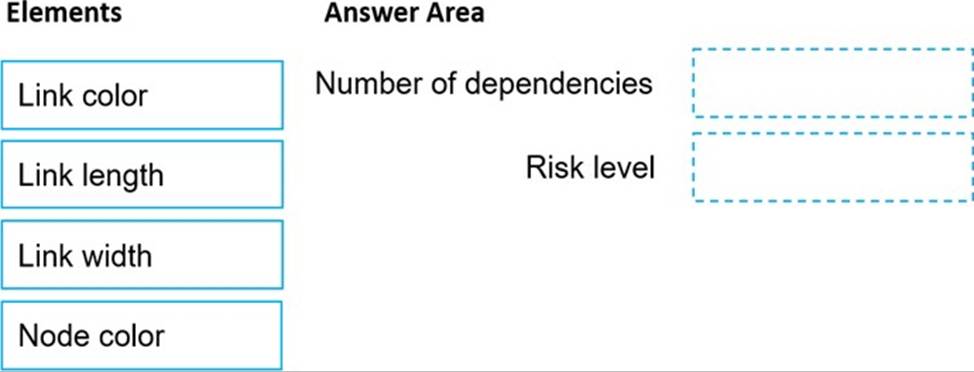
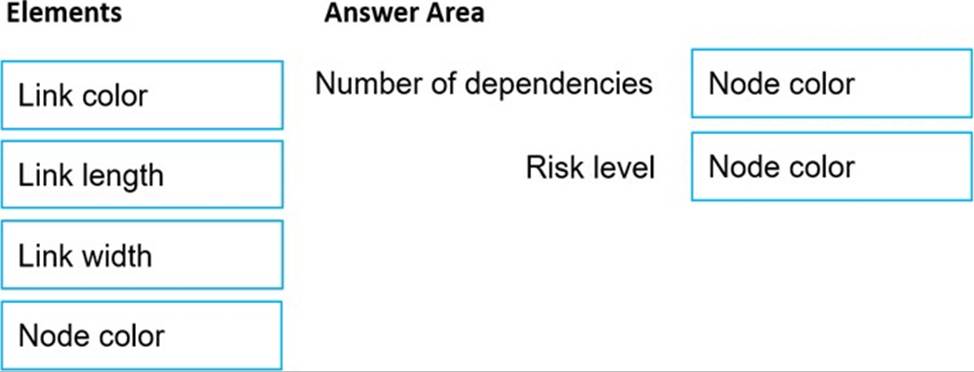
You are using the Dependency Tracker extension in a project in Azure DevOps.
You generate a risk graph for the project.
What should you use in the risk graph to identify the number of dependencies and the risk level of the project? To answer, drag the appropriate elements to the correct data points. Each element may be used once, more than once, or not at all. You may need to drag the split bar between panes or scroll to view content. NOTE: Each correct selection is worth one point.
SIMULATION
You need to prepare a network security group (NSG) named az400-9940427-nsg1 to host an Azure DevOps pipeline agent. The solution must allow only the required outbound port for Azure DevOps and deny all other inbound and outbound access to the Internet.
To complete this task, sign in to the Microsoft Azure portal.
You have an Azure DevOps organization named Contoso and an Azure subscription.
You use Azure DevOps to build a containerized app named Appl and deploy App1 to an Azure container instance named ACM.
You need to restart ACI1 when App1 stops responding.
What should you do?
- A . Add a liveness probe to the YAML configuration of App1.
- B . Use Connection Monitor in Azure Network Watcher.
- C . Add a readiness probe to the YAML configuration of App1.
- D . Use IP flow verify in Azure Network Watcher.
A
Explanation:
https://docs.microsoft.com/en-us/azure/container-instances/container-instances-liveness-probe
You have an Azure DevOps organization named Contoso and an Azure subscription.
You use Azure DevOps to build a containerized app named Appl and deploy App1 to an Azure container instance named ACM.
You need to restart ACI1 when App1 stops responding.
What should you do?
- A . Add a liveness probe to the YAML configuration of App1.
- B . Use Connection Monitor in Azure Network Watcher.
- C . Add a readiness probe to the YAML configuration of App1.
- D . Use IP flow verify in Azure Network Watcher.
A
Explanation:
https://docs.microsoft.com/en-us/azure/container-instances/container-instances-liveness-probe
You have an Azure DevOps organization named Contoso and an Azure subscription.
You use Azure DevOps to build a containerized app named Appl and deploy App1 to an Azure container instance named ACM.
You need to restart ACI1 when App1 stops responding.
What should you do?
- A . Add a liveness probe to the YAML configuration of App1.
- B . Use Connection Monitor in Azure Network Watcher.
- C . Add a readiness probe to the YAML configuration of App1.
- D . Use IP flow verify in Azure Network Watcher.
A
Explanation:
https://docs.microsoft.com/en-us/azure/container-instances/container-instances-liveness-probe