
Practice Free AZ-400 Exam Online Questions
You use Azure SQL Database Intelligent Insights and Azure Application Insights for monitoring.
You need to write ad-hoc queries against the monitoring data.
Which query language should you use?
- A . Kusto Query Language (KQL)
- B . PL/pgSQL
- C . PL/SQL
- D . Transact-SQL
A
Explanation:
Azure Monitor Logs is based on Azure Data Explorer, and log queries are written using the same Kusto query language (KQL). This is a rich language designed to be easy to read and author, and you should be able to start using it with minimal guidance.
Reference: https://docs.microsoft.com/en-us/azure/azure-monitor/log-query/log-query-overview
You haw an Azure subscription that contains multiple Azure services. You need to send an SMS alert when scheduled maintenance is planned for the Azure services.
Which two actions should you perform? Each correct answer presents part of the solution. NOTE: Each correct selection is worth one point.
- A . Create an Azure Service Health alert.
- B . Enable Azure Security Center.
- C . Create and configure an action group
- D . Create and configure an Azure Monitor alert rule
DRAG DROP
You have several Azure virtual machines that run Windows Server 2019.
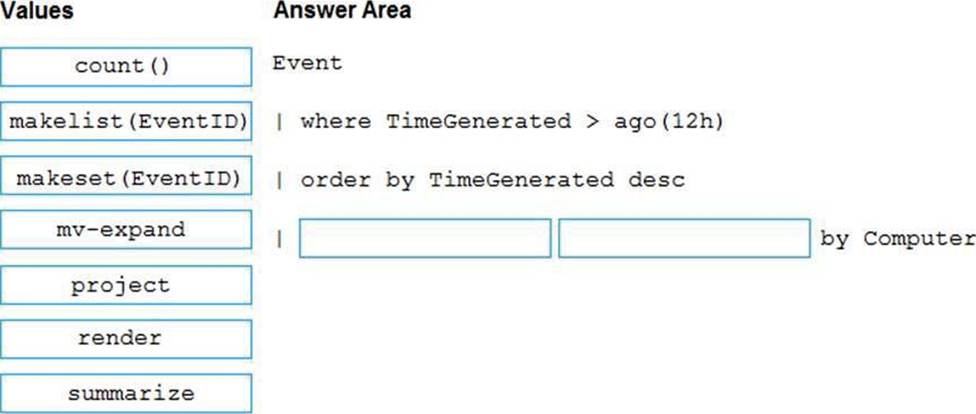
You need to identify the distinct event IDs of each virtual machine as shown in the following table.

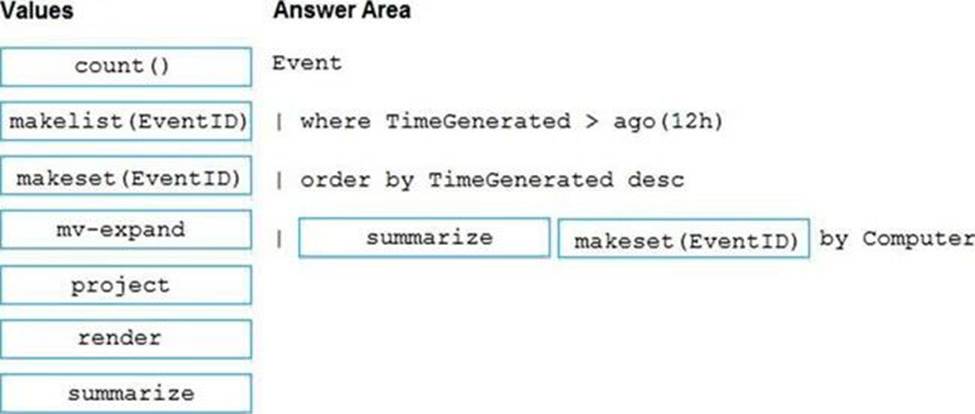
How should you complete the Azure Monitor query? To answer, drag the appropriate values to the correct locations. Each value may be used once, more than once, or not at all. You may need to drag the split bar between panes or scroll to view content.
Explanation:
You can use makelist to pivot data by the order of values in a particular column. For example, you may want to explore the most common order events take place on your machines. You can essentially pivot the data by the order of EventIDs on each machine.
Example:
Event
| where TimeGenerated > ago(12h)
| order by TimeGenerated desc
| summarize makelist(EventID) by Computer
Reference: https://docs.microsoft.com/en-us/azure/azure-monitor/log-query/advanced-aggregations
DRAG DROP
You have several Azure virtual machines that run Windows Server 2019.
You need to identify the distinct event IDs of each virtual machine as shown in the following table.
How should you complete the Azure Monitor query? To answer, drag the appropriate values to the correct locations. Each value may be used once, more than once, or not at all. You may need to drag the split bar between panes or scroll to view content.
Explanation:
You can use makelist to pivot data by the order of values in a particular column. For example, you may want to explore the most common order events take place on your machines. You can essentially pivot the data by the order of EventIDs on each machine.
Example:
Event
| where TimeGenerated > ago(12h)
| order by TimeGenerated desc
| summarize makelist(EventID) by Computer
Reference: https://docs.microsoft.com/en-us/azure/azure-monitor/log-query/advanced-aggregations
You plan to onboard 10 new developers.
You need to recommend a development environment that meets the following requirements:
✑ Integrates with GitHub
✑ Provides integrated debugging tools
✑ Supports remote workers and hot-desking environments
✑ Supports developers who use browsers, tablets, and Chromebooks
What should you recommend?
- A . VS Code
- B . Xamarin Studio
- C . Mono Develop
- D . Github/Visual Studio Code spaces
D
Explanation:
Visual Studio Code spaces is built to accommodate the widest variety of projects or tasks, including
GitHub and integrating debugging.
Visual Studio Code spaces conceptually and technically extends the Visual Studio Code Remote Development extensions.
In addition to "backend" environments, Visual Studio Code spaces supports these "frontend" editors:
Visual Studio Code
Visual Studio Code-based editor in the browser
Reference: https://docs.microsoft.com/sv-se/visualstudio/codespaces/overview/what-is-vsonline
HOTSPOT
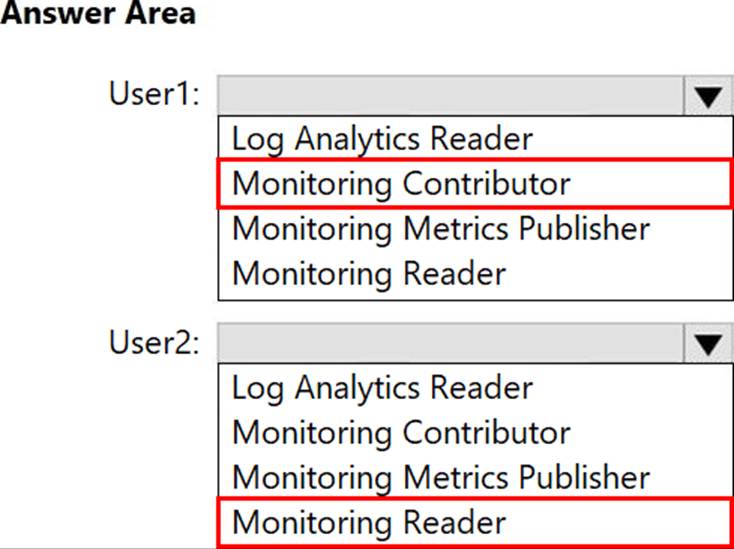
You have a project in Azure DevOps that includes two users named User1 and User2.
You plan to use Azure Monitor to manage logs.
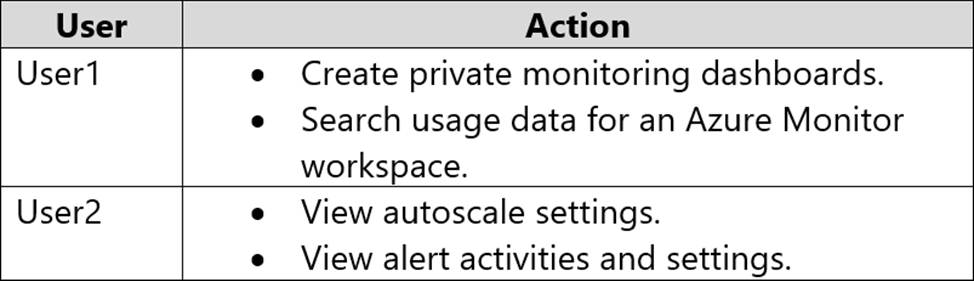
You need to ensure that the users can perform the actions shown in following the table.
The solution must follow the principle of least privilege.
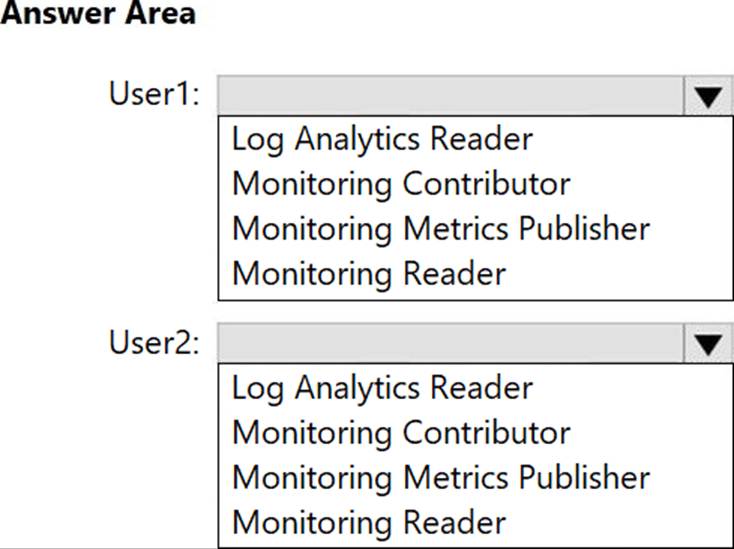
Which role should you assign to each user? To answer select the appropriate options in the answer area. NOTE: Each correct selection is worth one point.
HOTSPOT
You have a project in Azure DevOps that includes two users named User1 and User2.
You plan to use Azure Monitor to manage logs.
You need to ensure that the users can perform the actions shown in following the table.
The solution must follow the principle of least privilege.
Which role should you assign to each user? To answer select the appropriate options in the answer area. NOTE: Each correct selection is worth one point.
HOTSPOT
You have an Azure subscription that contains the resources shown in the following table.
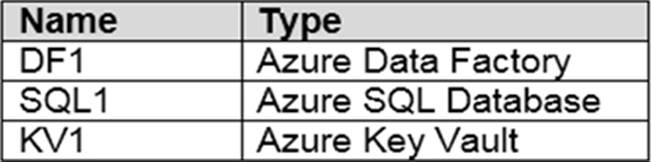
You plan to create a linked service in DF1. The linked service will connect to SQL1 by using Microsoft SQL Server authentication. The password for the SQL Server login will be stored in KV1.
You need to configure DF1 to retrieve the password when the data factory connects to SQL1. The solution must use the principle of least privilege.
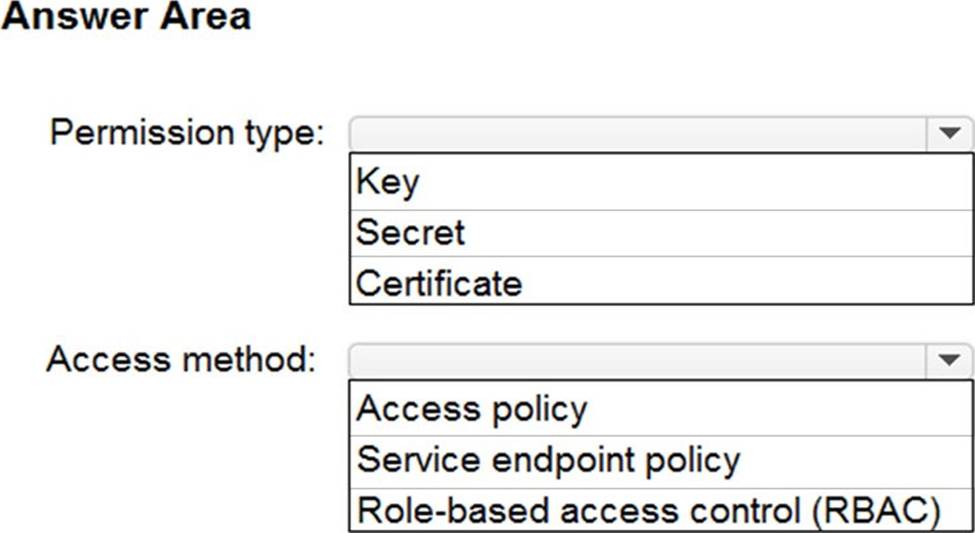
How should you configure DF1? To answer, select the appropriate options in the answer area. NOTE: Each correct selection is worth one point.
Explanation:
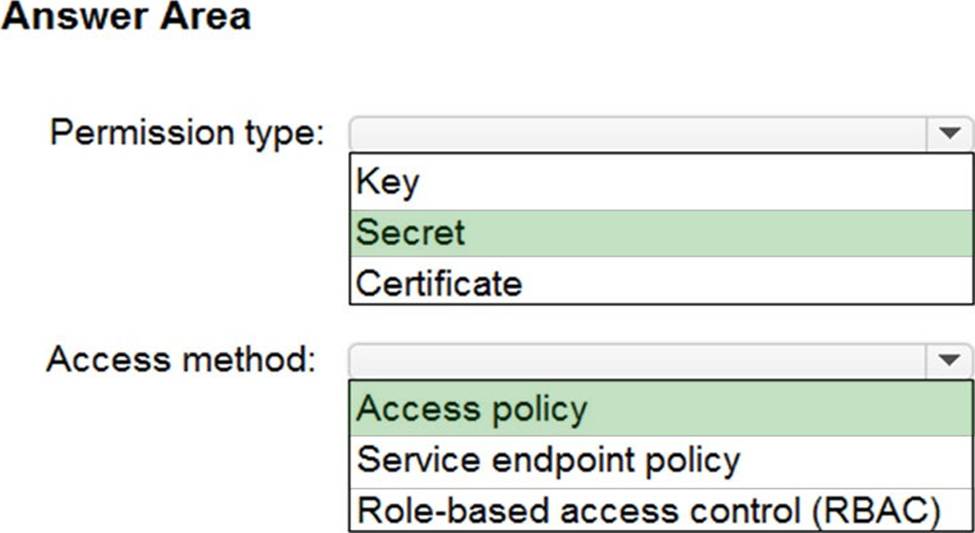
Box 1: Secret
Store credential in Azure Key Vault by reference secret stored in key vault.
To reference a credential stored in Azure Key Vault, you need to:
Retrieve data factory managed identity
Grant the managed identity access to your Azure Key Vault. In your key vault -> Access policies -> Add Access Policy, search this managed identity to grant Get permission in Secret permissions dropdown. It allows this designated factory to access secret in key vault.
Create a linked service pointing to your Azure Key Vault.
Create data store linked service, inside which reference the corresponding secret stored in key vault.
Box 2: Access policy
Reference: https://docs.microsoft.com/en-us/azure/data-factory/store-credentials-in-key-vault
DRAG DROP
You have an Azure DevOps release pipeline as shown in the following exhibit.
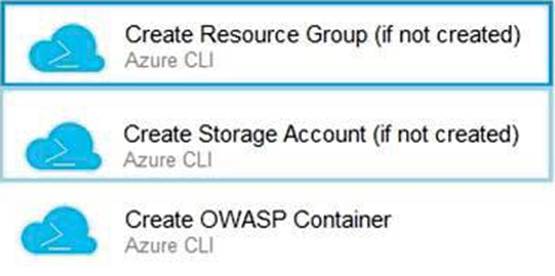
You need to complete the pipeline to configure OWASP ZAP for security testing.
Which five Azure CLI tasks should you add in sequence? To answer, move the tasks from the list of tasks to the answer area and arrange them in the correct order.
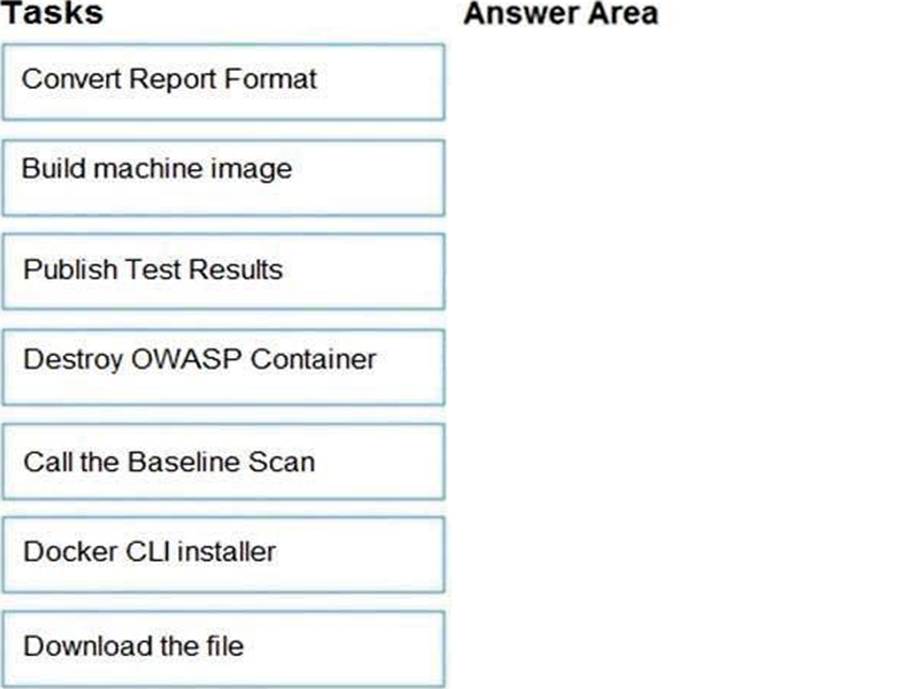
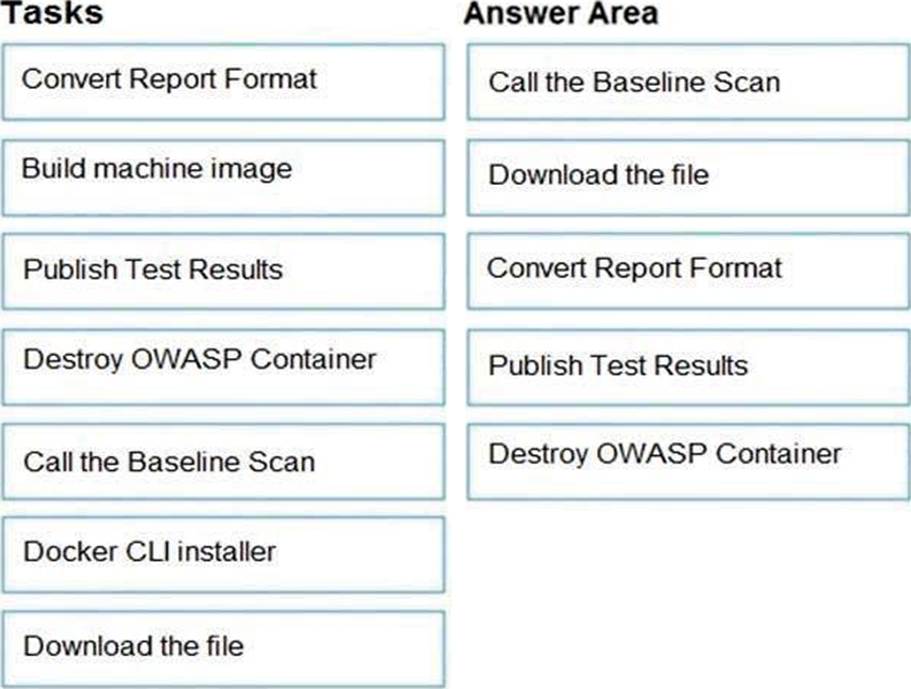
Explanation:
Defining the Release Pipeline
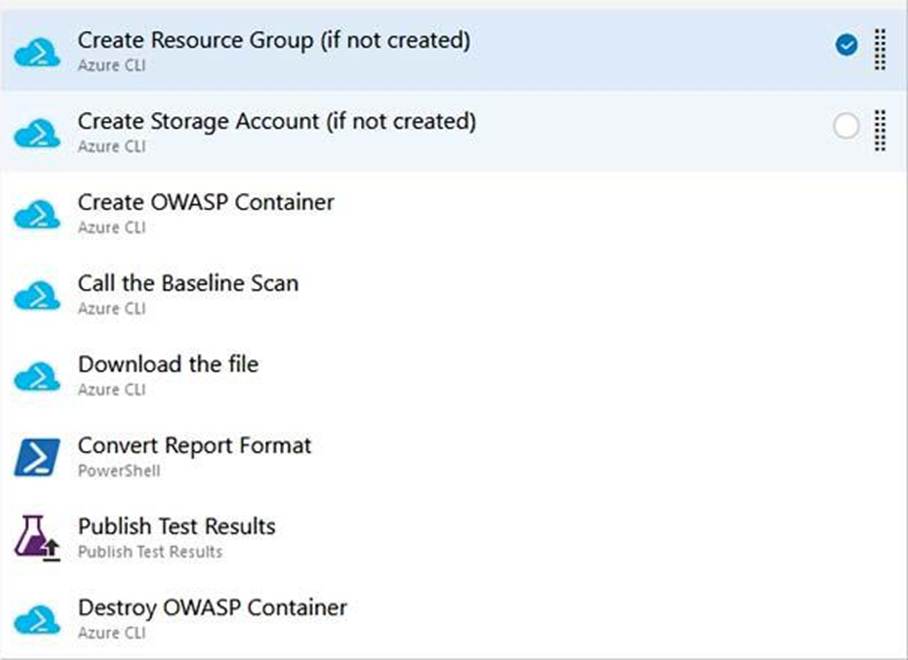
Once the application portion of the Release pipeline has been configured, the security scan portion can be defined. In our example, this consists of 8 tasks, primarily using the Azure CLI task to create and use the ACI instance (and supporting structures).
Otherwise specified, all the Azure CLI tasks are Inline tasks, using the default configuration options.
Reference: https://devblogs.microsoft.com/premier-developer/azure-devops-pipelines-leveraging-owasp-zap-in-the-release-pipeline/
DRAG DROP
You have an Azure DevOps release pipeline as shown in the following exhibit.
You need to complete the pipeline to configure OWASP ZAP for security testing.
Which five Azure CLI tasks should you add in sequence? To answer, move the tasks from the list of tasks to the answer area and arrange them in the correct order.
Explanation:
Defining the Release Pipeline
Once the application portion of the Release pipeline has been configured, the security scan portion can be defined. In our example, this consists of 8 tasks, primarily using the Azure CLI task to create and use the ACI instance (and supporting structures).
Otherwise specified, all the Azure CLI tasks are Inline tasks, using the default configuration options.
Reference: https://devblogs.microsoft.com/premier-developer/azure-devops-pipelines-leveraging-owasp-zap-in-the-release-pipeline/