
Practice Free AZ-400 Exam Online Questions
You manage source code control and versioning by using GitHub.
You need to ensure that a PowerShell script is executed automatically before rebase operations are performed.
What should you use?
- A . a package
- B . GitHub Copilot
- C . a webbook
- D . a gist
SIMULATION
You need to configure an Azure web app named az400-9940427-main to contain an environmental variable named “MAX_ITEMS”. The environmental variable must have a value of 50.
To complete this task, sign in to the Microsoft Azure portal.
SIMULATION
You need to configure an Azure web app named az400-9940427-main to contain an environmental variable named “MAX_ITEMS”. The environmental variable must have a value of 50.
To complete this task, sign in to the Microsoft Azure portal.
Note: This question is part of a series of questions that present the same scenario. Each question in the series contains a unique solution that might meet the stated goals. Some question sets might have more than one correct solution, while others might not have a correct solution.
After you answer a question in this section, you will NOT be able to return to it. As a result, these questions will not appear in the review screen.
You have an approval process that contains a condition. The condition requires that releases be approved by a team leader before they are deployed.
You have a policy stating that approvals must occur within eight hours.
You discover that deployment fail if the approvals take longer than two hours.
You need to ensure that the deployments only fail if the approvals take longer than eight hours.
Solution: From Pre-deployment conditions, you modify the Time between re-evaluation of gates option.
Does this meet the goal?
- A . Yes
- B . No
B
Explanation:
Reference: https://docs.microsoft.com/en-us/azure/devops/pipelines/release/approvals/gates
Note: This question is part of a series of questions that present the same scenario. Each question in the series contains a unique solution that might meet the stated goals. Some question sets might have more than one correct solution, while others might not have a correct solution.
After you answer a question in this section, you will NOT be able to return to it. As a result, these questions will not appear in the review screen.
You have an approval process that contains a condition. The condition requires that releases be approved by a team leader before they are deployed.
You have a policy stating that approvals must occur within eight hours.
You discover that deployment fail if the approvals take longer than two hours.
You need to ensure that the deployments only fail if the approvals take longer than eight hours.
Solution: From Pre-deployment conditions, you modify the Time between re-evaluation of gates option.
Does this meet the goal?
- A . Yes
- B . No
B
Explanation:
Reference: https://docs.microsoft.com/en-us/azure/devops/pipelines/release/approvals/gates
You are automating the testing process for your company. You need to automate UI testing of a web application.
Which framework should you use?
- A . JaCoco
- B . Playwright
- C . Xamarin.UITest
- D . Microsoft.CodeAnalysis
B
Explanation:
Performing user interface (UI) testing as part of the release pipeline is a great way of detecting unexpected changes, and need not be difficult. Selenium can be used to test your website during a continuous deployment release and test automation.
Reference: https://docs.microsoft.com/en-us/azure/devops/pipelines/test/continuous-test-selenium?view=azure-devops
HOTSPOT
You have an application named App1 that has a custom domain of app.contoso.com.
You create a test in Azure Application Insights as shown in the following exhibit.
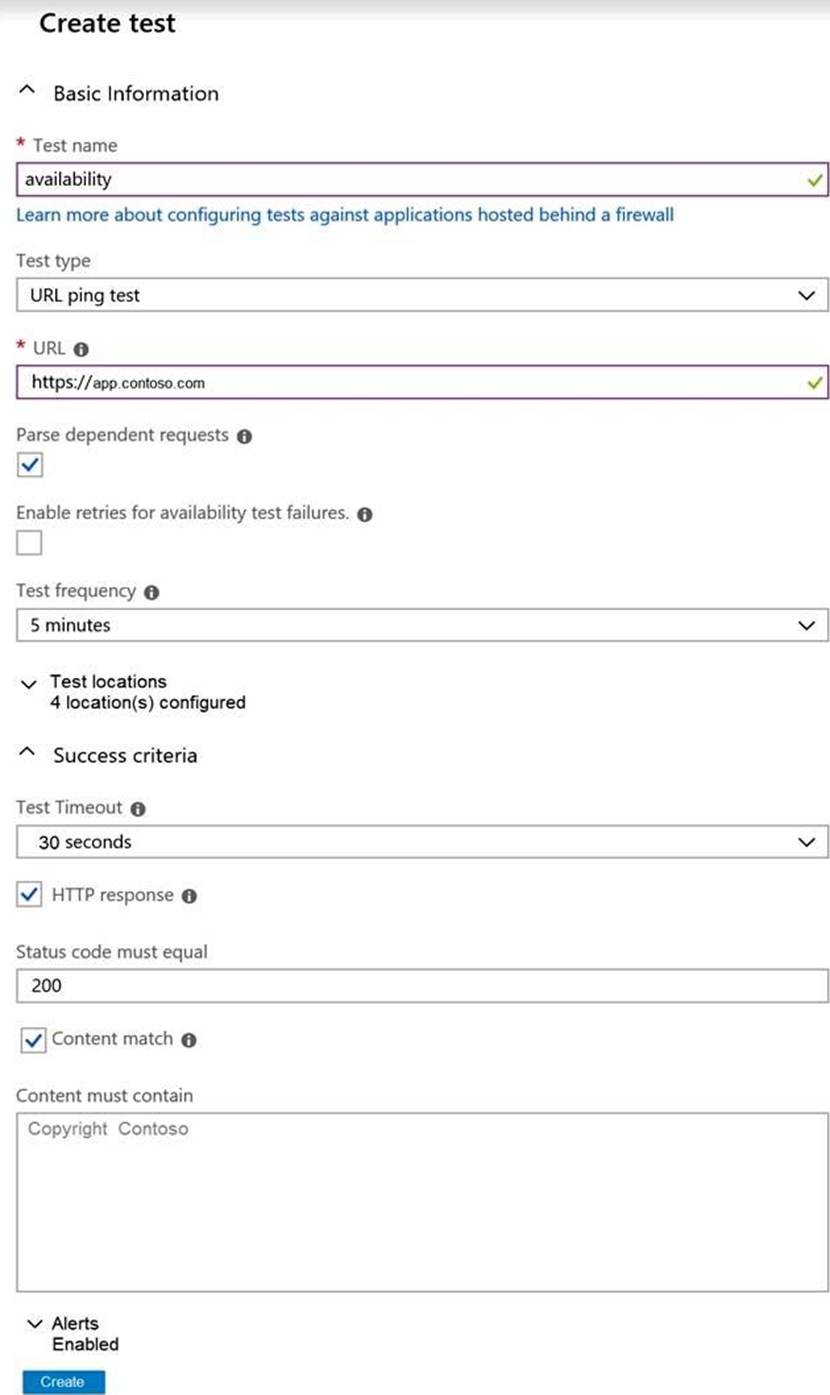
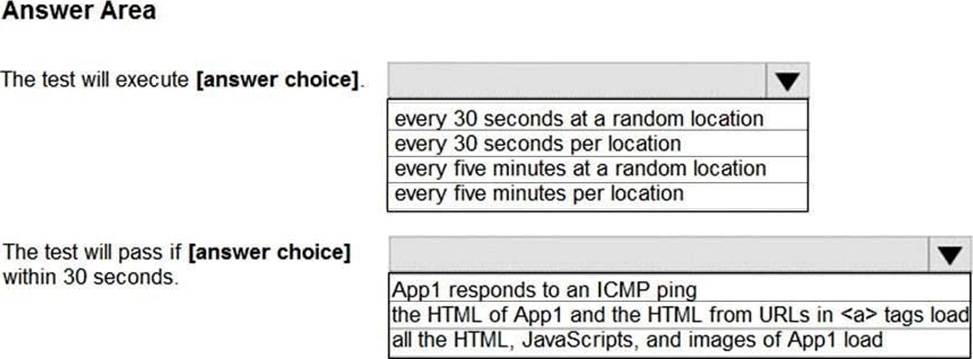
Use the drop-down menus to select the answer choice that completes each statement based on the information presented in the graphic. NOTE: Each correct selection is worth one point.
Explanation:
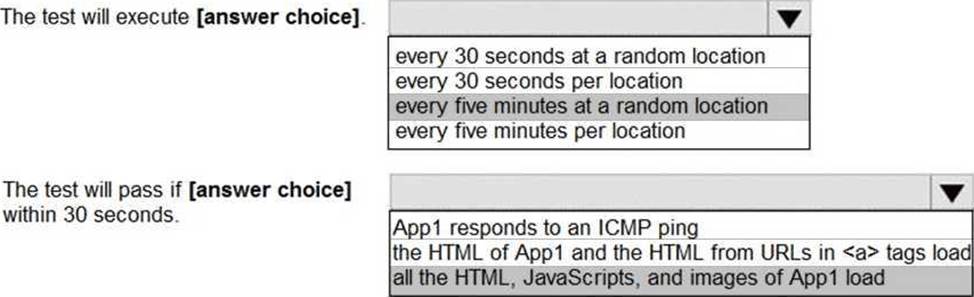
Box 1: every five minutes at a random location
Test frequency: Sets how often the test is run from each test location. With a default frequency of five minutes and five test locations, your site is tested on average every minute.
Box 2:
Parse dependent requests: Test requests images, scripts, style files, and other files that are part of the web page under test. The recorded response time includes the time taken to get these files. The test fails if any of these resources cannot be successfully downloaded within the timeout for the whole test.
Reference: https://docs.microsoft.com/en-us/azure/azure-monitor/app/monitor-web-app-availability
SIMULATION
Task 3
You need to ensure that an Azure Web App named az400-38443478-matn supports rolling upgrades The solution must ensure that only 10 percent of users who connect to az400-38443478 main use updated versions of the app. The solution must minimize administrative effort.
Create a Deployment Slot:
Navigate to the Azure Portal.
Go to your Web Appaz400-38443478-main.
SelectDeployment slotsin the menu.
Click on Add Slot.
Name the slot (e.g.,staging) and if needed, clone settings from the production slot.
Configure the Traffic Percentage:
In the Deployment Slots menu, you will see a column for Traffic %.
Set the traffic percentage to10%for thestagingslot1.
This will route only 10% of the traffic to the updated version of the app in thestagingslot.
Deploy the Updated App to the Staging Slot:
Deploy yourupdated application to thestagingslot.
Test the application in thestagingslot to ensure it’s working as expected.
Complete the Rolling Upgrade:
Once you’re satisfied with the performance and stability of the app in thestagingslot, you can gradually increase the percentage of traffic until you’re ready to swap with the production slot.
To swap slots, go to the Deployment slotsmenu and click on Swapwith the production slot.
By using deployment slots, you can achieve rolling upgrades with minimal administrative effort, as it allows you to test the new version on a subset of users before fully releasing it. Remember to adjust the traffic percentage and monitor the application’s performance throughout the process.
SIMULATION
Task 3
You need to ensure that an Azure Web App named az400-38443478-matn supports rolling upgrades The solution must ensure that only 10 percent of users who connect to az400-38443478 main use updated versions of the app. The solution must minimize administrative effort.
Create a Deployment Slot:
Navigate to the Azure Portal.
Go to your Web Appaz400-38443478-main.
SelectDeployment slotsin the menu.
Click on Add Slot.
Name the slot (e.g.,staging) and if needed, clone settings from the production slot.
Configure the Traffic Percentage:
In the Deployment Slots menu, you will see a column for Traffic %.
Set the traffic percentage to10%for thestagingslot1.
This will route only 10% of the traffic to the updated version of the app in thestagingslot.
Deploy the Updated App to the Staging Slot:
Deploy yourupdated application to thestagingslot.
Test the application in thestagingslot to ensure it’s working as expected.
Complete the Rolling Upgrade:
Once you’re satisfied with the performance and stability of the app in thestagingslot, you can gradually increase the percentage of traffic until you’re ready to swap with the production slot.
To swap slots, go to the Deployment slotsmenu and click on Swapwith the production slot.
By using deployment slots, you can achieve rolling upgrades with minimal administrative effort, as it allows you to test the new version on a subset of users before fully releasing it. Remember to adjust the traffic percentage and monitor the application’s performance throughout the process.
SIMULATION
Task 3
You need to ensure that an Azure Web App named az400-38443478-matn supports rolling upgrades The solution must ensure that only 10 percent of users who connect to az400-38443478 main use updated versions of the app. The solution must minimize administrative effort.
Create a Deployment Slot:
Navigate to the Azure Portal.
Go to your Web Appaz400-38443478-main.
SelectDeployment slotsin the menu.
Click on Add Slot.
Name the slot (e.g.,staging) and if needed, clone settings from the production slot.
Configure the Traffic Percentage:
In the Deployment Slots menu, you will see a column for Traffic %.
Set the traffic percentage to10%for thestagingslot1.
This will route only 10% of the traffic to the updated version of the app in thestagingslot.
Deploy the Updated App to the Staging Slot:
Deploy yourupdated application to thestagingslot.
Test the application in thestagingslot to ensure it’s working as expected.
Complete the Rolling Upgrade:
Once you’re satisfied with the performance and stability of the app in thestagingslot, you can gradually increase the percentage of traffic until you’re ready to swap with the production slot.
To swap slots, go to the Deployment slotsmenu and click on Swapwith the production slot.
By using deployment slots, you can achieve rolling upgrades with minimal administrative effort, as it allows you to test the new version on a subset of users before fully releasing it. Remember to adjust the traffic percentage and monitor the application’s performance throughout the process.