Practice Free AZ-400 Exam Online Questions
You have a brand policy in a project in Azure DevOps. The policy requires that code always builds successfully.
You need to ensure that a specific user can always merge change to the master branch, even if the code fails to compile. The solution must use the principle of least privilege.
What should you do?
- A . From the Security setting of the repository, modify the access control tor the user.
- B . From the Security settings of the branch, modify the access control for the user.
- C . Add the user to the Build Administrators group,
- D . Add the user to the Project Administrators group
B
Explanation:
In some cases, you need to bypass policy requirements so you can push changes to the branch directly or complete a pull request even if branch policies are not satisfied. For these situations, grant the desired permission from the previous list to a user or group. You can scope this permission to an entire project, a repo, or a single branch. Manage this permission along the with other Git permissions.
Reference: https://docs.microsoft.com/en-us/azure/devops/repos/git/branch-policies
SIMULATION
Task 5
You need to create an instance of Azure App Configuration and a feature flag named feature 1.
Feature1 must be enabled and must expire in one week.
Go to https://portal.azure.com.
Log in with your Azure account.
Step 2: Create an Azure App Configuration Instance
In the search bar at the top, type “App Configuration” and select App Configuration from the search results.
Click + Create.
Fill in the required fields:
Subscription: Your Azure subscription.
Resource Group: Create a new one or select an existing one.
Name: Provide a globally unique name (for example, myappconfig-instance).
Location: Choose a region close to your application.
Click Review + Create, then Create.
The instance will take a few seconds to deploy.
Step 3: Access the App Configuration Instance
Once the deployment is complete, click Go to resource.
You are now in the App Configuration resource.
Step 4: Enable Feature Management
In the left menu, click on Feature Manager (Preview).
Click + Add to create a new feature flag.
Step 5: Create the Feature Flag
Provide the following details:
Feature flag name: feature1
Label: (optional)
Description: (optional)
State: Set to Enabled.
Click on the Add filters link if you want to add targeting filters (optional).
Click Save to create the feature flag.
Step 6: Set the Expiration Date for the Feature Flag
In the Feature Manager list, find the newly created feature1 flag.
Click on the three dots (context menu) next to feature1 and select Edit.
In the Edit feature pane, look for the Expiration date setting.
If there is no direct UI for expiration date, you can store it as a custom key-value (metadata).
Here’s how to store expiration as metadata:
In the App Configuration left menu, click on Configuration Explorer.
Locate the key: .appconfig.featureflag/feature1.
Click on the key to edit.
Add a new label or add a custom key in the Content type or tags section to store expiration metadata:
Key: expiration
Value: yyyy-MM-dd (set to today + 7 days)
For example, if today is June 4, 2025, set the expiration as 2025-06-11.
Your company has a hybrid cloud between Azure and Azure Stack.
The company uses Azure DevOps for its CI/CD pipelines. Some applications are built by using Erlang and Hack.
You need to ensure that Erlang and Hack are supported as part of the build strategy across the hybrid cloud. The solution must minimize management overhead.
What should you use to execute the build pipeline?
- A . AzureDevOps self-hosted agents on Azure DevTest Labs virtual machines.
- B . AzureDevOps self-hosted agents on virtual machine that run on Azure Stack
- C . AzureDevOps self-hosted agents on Hyper-V virtual machines
- D . a Microsoft-hosted agent
B
Explanation:
Azure Stack offers virtual machines (VMs) as one type of an on-demand, scalable computing resource. You can choose a VM when you need more control over the computing environment.
Reference: https://docs.microsoft.com/en-us/azure/azure-stack/user/azure-stack-compute-overview
SIMULATION
You plan to implement a CI/CD strategy for an Azure Web App named az400-11566895-main.
You need to configure a staging environment foraz400-11566895-main.
To complete this task, sign in to the Microsoft Azure portal.
SIMULATION
You plan to implement a CI/CD strategy for an Azure Web App named az400-11566895-main.
You need to configure a staging environment foraz400-11566895-main.
To complete this task, sign in to the Microsoft Azure portal.
SIMULATION
You need to ensure that an Azure web app named az400-9940427-main supports rolling upgrades. The solution must ensure that only 10 percent of users who connect to az400-9940427-main use update versions of the app.
The solution must minimize administrative effort.
To complete this task, sign in to the Microsoft Azure portal.
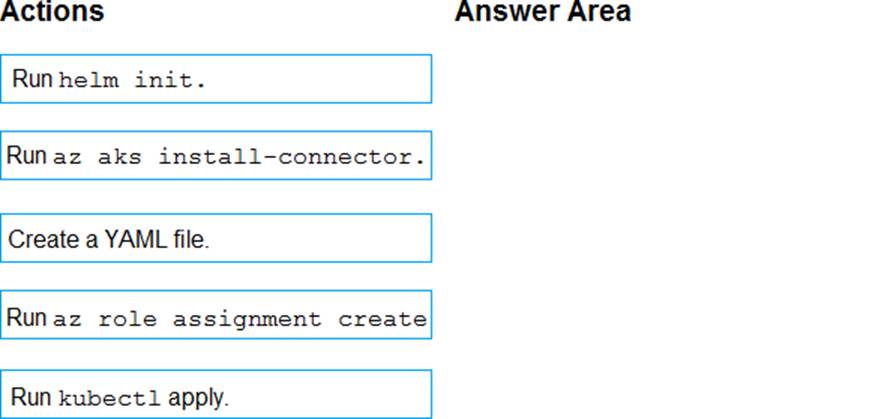
DRAG DROP
You have an Azure Kubermets Service (AKS) implementation that is RBAC-enabled
You plan to use Azure Container Instances as a hosted development environment to run containers in the AKS implementation.
You need to conjure Azure Container Instances as a hosted environment for running me containers in AKS.
Which three actions should you perform m sequence? To answer, move the appropriate actions from the list of actions to the answer area and arrange them in the correct order.
Explanation:
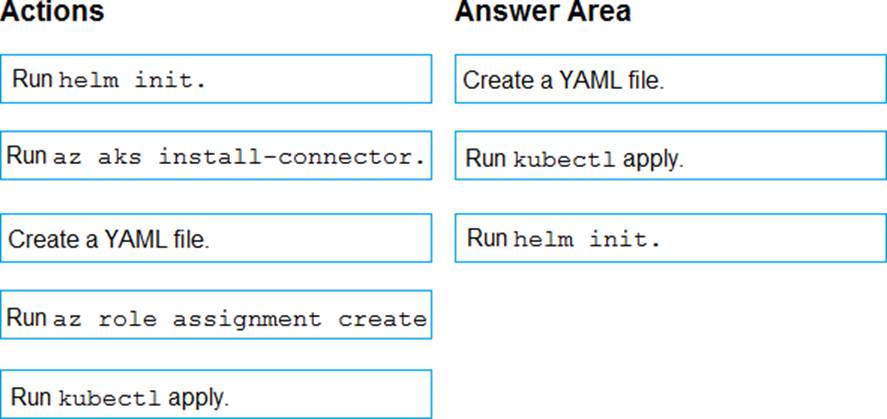
Step 1: Create a YAML file.
If your AKS cluster is RBAC-enabled, you must create a service account and role binding for use with Tiller. To create a service account and role binding, create a file named rbac-virtual-kubelet.yaml
Step 2: Run kubectl apply.
Apply the service account and binding with kubectl apply and specify your rbac-virtual-kubelet.yaml file.
Step 3: Run helm init.
Configure Helm to use the tiller service account:
helm init –service-account tiller
You can now continue to installing the Virtual Kubelet into your AKS cluster.
Reference: https://docs.microsoft.com/en-us/azure/aks/virtual-kubelet
You are deploying a server application that will run on a Server Core installation of Windows Server 2019.
You create an Azure key vault and a secret.
You need to use the key vault to secure API secrets for third-party integrations.
Which three actions should you perform? Each correct answer presents part of the solution. NOTE: Each correct selection is worth one point.
- A . Configure RBAC for the key vault.
- B . Modify the application to access the key vault.
- C . Configure a Key Vault access policy.
- D . Deploy an Azure Desired State Configuration (DSC) extension.
- E . Deploy a virtual machine that uses a system-assigned managed identity.
BCE
Explanation:
BE: An app deployed to Azure can take advantage of Managed identities for Azure resources, which allows the app to authenticate with Azure Key Vault using Azure AD authentication without credentials (Application ID and Password/Client Secret) stored in the app.
Select Add Access Policy.
Open Secret permissions and provide the app with Get and List permissions.
Select Select principal and select the registered app by name. Select the Select button.
Select OK.
Select Save.
Deploy the app.
Reference:
https://docs.microsoft.com/en-us/aspnet/core/security/key-vault-configuration
https://docs.microsoft.com/en-us/azure/key-vault/general/tutorial-net-virtual-machine
SIMULATION
You need to ensure that Microsoft Visual Studio 2017 can remotely attach to an Azure Function named fa-11566895.
To complete this task, sign in to the Microsoft Azure portal.
Before we start a debugging session to our Azure Function app we need to enable the functionality.
Navigate in the Azure portal to your function app fa-11566895 Go to the “Application settings”
Under “Debugging” set Remote Debugging to On and set Remote Visual Studio version to 2017.
Reference: https://www.locktar.nl/uncategorized/azure-remote-debugging-manually-in-visual-studio-2017/
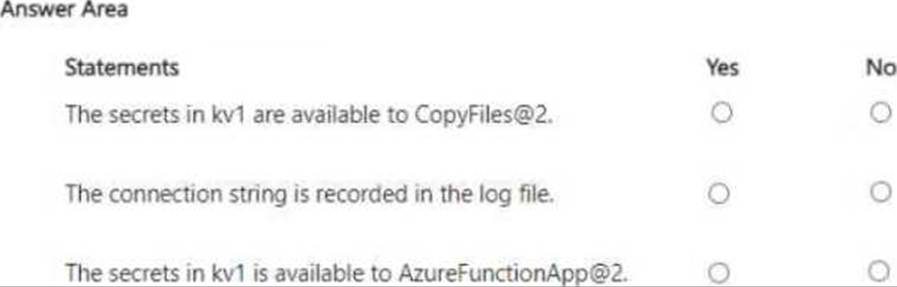
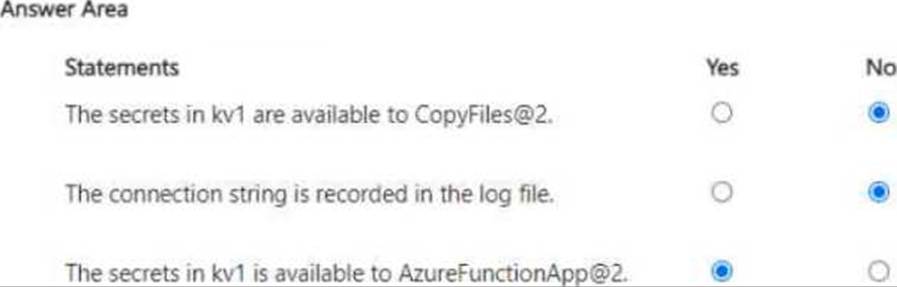
HOTSPOT
You have an Azure Pipelines pipeline that has the following definition.
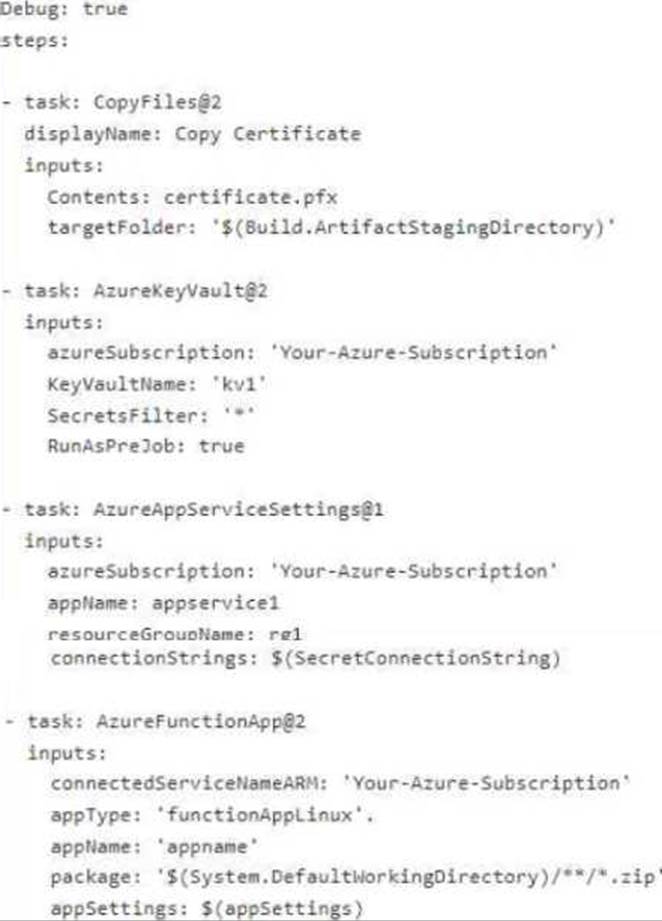
For each of the following statements, select Yes if the statement is true, otherwise select No. NOTE: Each correct selection is worth one point.