
Practice Free AZ-400 Exam Online Questions
You create an alert rule in Azure Monitor as shown in the following exhibit.
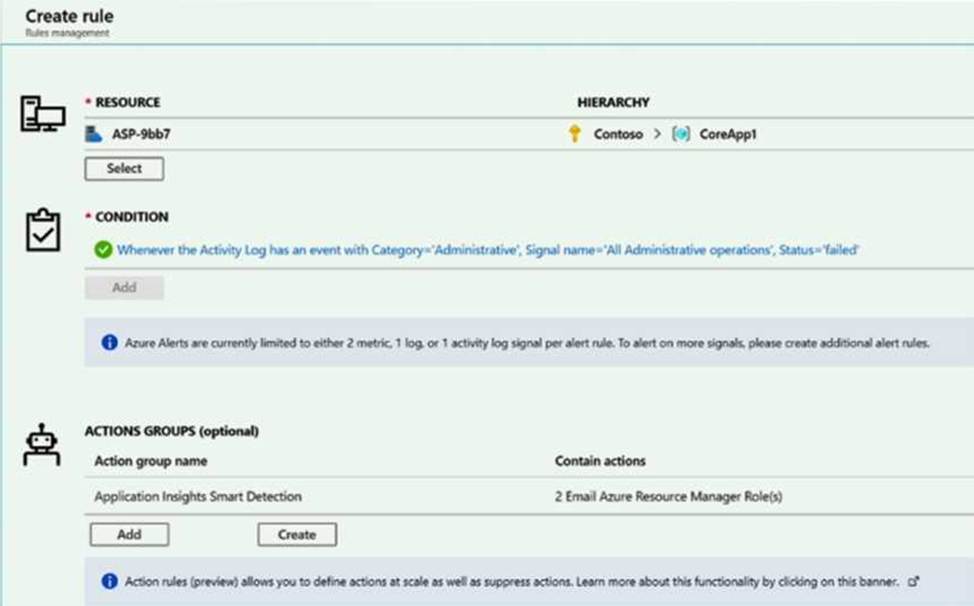
Which action will trigger an alert?
- A . a failed attempt to delete the ASP-9bb7 resource
- B . a change to a role assignment for the ASP-9bb7 resource
- C . a successful attempt to delete the ASP-9bb7 resource
- D . a failed attempt to scale up the ASP-9bb7 resource
This question is part of a series of questions that present the same scenario. Each question in the series contains a unique solution that might meet the stated goals. Some question sets might have more than one correct solution, while others might not have a correct solution.
After you answer a question in this section, you will NOT be able to return to it. As a result, these questions will not appear in the review screen.
You have an Azure DevOps project.
Your build process creates several artifacts.
You need to deploy the artifacts to on-premises servers.
Solution: You deploy an Azure self-hosted agent to an on-premises server. You add a Copy and Publish Build Artifacts task to the deployment pipeline.
Does this meet the goal?
- A . Yes
- B . No
A
Explanation:
To build your code or deploy your software using Azure Pipelines, you need at least one agent.
If your on-premises environments do not have connectivity to a Microsoft-hosted agent pool (which is typically the case due to intermediate firewalls), you’ll need to manually configure a self-hosted agent on on-premises computer(s). The agents must have connectivity to the target on-premises environments, and access to the Internet to connect to Azure Pipelines or Team Foundation Server.
Reference: https://docs.microsoft.com/en-us/azure/devops/pipelines/agents/agents?view=azure-devops
This question is part of a series of questions that present the same scenario. Each question in the series contains a unique solution that might meet the stated goals. Some question sets might have more than one correct solution, while others might not have a correct solution.
After you answer a question in this section, you will NOT be able to return to it. As a result, these questions will not appear in the review screen.
You have an Azure DevOps project.
Your build process creates several artifacts.
You need to deploy the artifacts to on-premises servers.
Solution: You deploy an Azure self-hosted agent to an on-premises server. You add a Copy and Publish Build Artifacts task to the deployment pipeline.
Does this meet the goal?
- A . Yes
- B . No
A
Explanation:
To build your code or deploy your software using Azure Pipelines, you need at least one agent.
If your on-premises environments do not have connectivity to a Microsoft-hosted agent pool (which is typically the case due to intermediate firewalls), you’ll need to manually configure a self-hosted agent on on-premises computer(s). The agents must have connectivity to the target on-premises environments, and access to the Internet to connect to Azure Pipelines or Team Foundation Server.
Reference: https://docs.microsoft.com/en-us/azure/devops/pipelines/agents/agents?view=azure-devops
SIMULATION
Task 4
You need to configure a virtual machine template in a DevTest Labs environment named az400-38443478-dtl1. The operating system must be based on Windows Server 2016 Datacenter. Virtual machines created from the DevTest Lab must include the Selenium tool and the Google Chrome browser.
Create a Custom Image with Windows Server 2016 Datacenter: In the Azure Portal, go to your DevTest Labaz400-38443478-dtl1. Navigate to Configuration and policies>Custom images.
Use an existing VM or create a new one with Windows Server 2016 Datacenter.
After setting up the VM, capture it to create a custom image1.
Install Selenium and Google Chrome on the VM:
Connect to the VM via RDP.
Download and install the Selenium WebDriver for your preferred programming language from the official Selenium website2.
For Google Chrome, download the offline installer from the official website and install it on the VM3.
Generalize the VM:
Run thesysprepcommand to generalize the VM, which prepares it to be used as a template.
Shutdown the VM aftersysprepcompletes.
Capture the Generalized VM to Create a Template:
In the Azure Portal, navigate to the VM and select Capture.
Provide the required details and create the image.
Add Selenium and Google Chrome Artifacts to the Template:
Go back to the DevTest Labaz400-38443478-dtl1.
SelectArtifactsand add Selenium and Google Chrome artifacts to the template. Ensure these artifacts are configured to install during the VM creation process. Create VMs from the Template:
Now, when you create a new VM in the DevTest Lab, select the custom image you created.
The VM will be provisioned with Windows Server 2016 Datacenter, and the Selenium tool and Google Chrome browser will be installed automatically.
By following these steps, you can ensure that all virtual machines created from this template in your DevTest Lab will have the required operating system, tools, and browser installed. Remember to replace placeholder names with the actual names of your resources where necessary.
You have an app named App1 that will be deployed by using Azure Container Apps. You need to ensure that App1 can be deployed by using the blue-green deployment strategy.
Which two actions should you perform in Container Apps? Each correct answer presents part of the solution. NOTE; Each correct selection is worth one point.
- A . From Scale rule setting, set Max replicas to 2.
- B . From Scale rule setting, set Min replicas to 2.
- C . Set Revision Mode to Multiple
- D . Configure continuous deployment.
- E . Enable ingress.
Your company uses Azure DevOps for the build pipelines and deployment pipelines of Java based projects. You need to recommend a strategy for managing technical debt.
Which two actions should you include in the recommendation? Each correct answer presents part of the solution. NOTE: Each correct selection is worth one point.
- A . Integrate Azure DevOps and SonarQube.
- B . Integrates Azure DevelOPs and Azure DevTest Labs.
- C . Configure post-deployment approvals in the deployment pipeline.
- D . Configure pre-deployment approvals in the deployment pipeline.
HOTSPOT
You have an Azure subscription that contains an Azure load testing instance named Test1 and an Azure App Service web app named App1.
You implement a CI/CD pipeline named Pipeline1 that uses Test1. Pipeline1 uses the following alt-config-pipeline1.yam1 file.
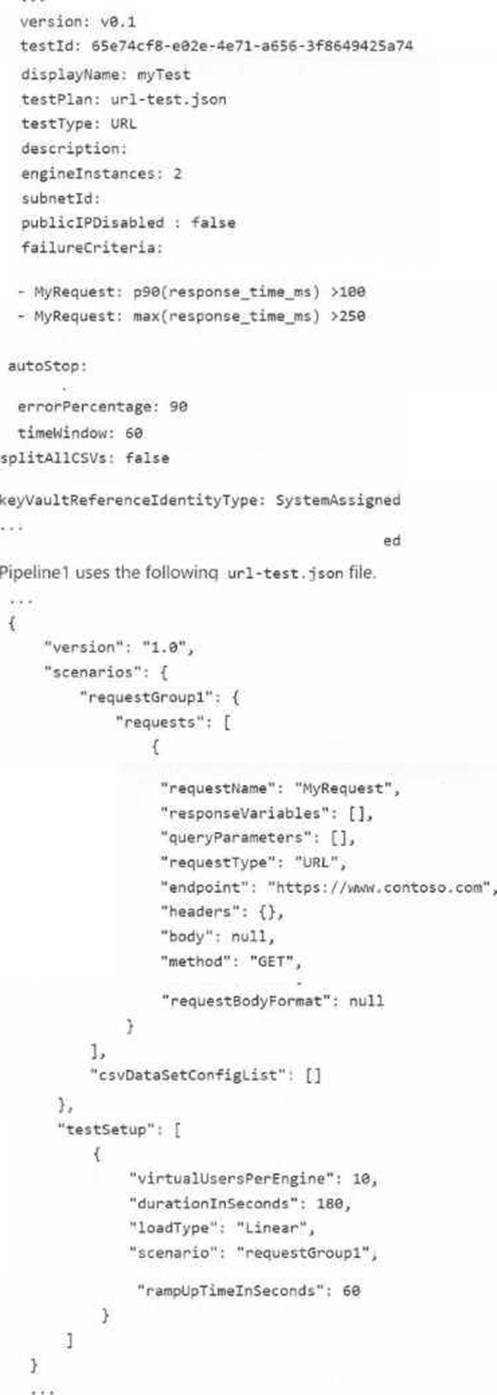
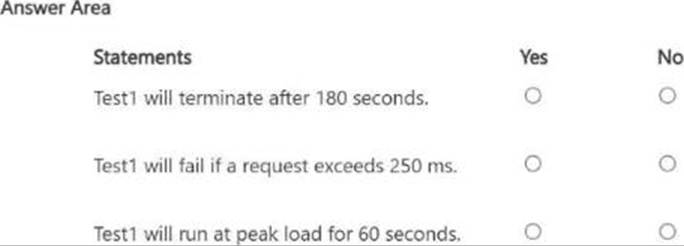
For each of the following statements, select Yes if the statement is true, otherwise select No.
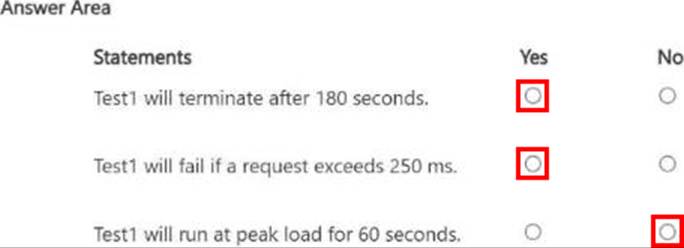
Explanation:
Yes
Yes
No
Your company builds a multi tier web application.
>You use Azure DevOps and host the production application on Azure virtual machines.
Your team prepares an Azure Resource Manager template of the virtual machine that you mil use to test new features.
You need to create a staging environment in Azure that meets the following requirements:
• Minimizes the cost of Azure hosting
• Provisions the virtual machines automatically
• Use* the custom Azure Resource Manager template to provision the virtual machines.
What should you do?
- A . In Azure DevOps, configure new tasks in the release pipeline to create and delete the virtual machines in Azure DevTest Labs.
- B . From Azure Cloud Shell, run Azure PowerShell commands to create and delete the new virtual machines in a staging resource group.
- C . In Azure DevOps, configure new tasks in the release pipeline to deploy to Azure Cloud Services.
- D . In Azure Cloud Shell, run Azure CLI commands to create and delete the new virtual machines in a staging resource group.
A
Explanation:
You can use the Azure DevTest Labs Tasks extension that’s installed in Azure DevOps to easily integrate your CI/CD build-and-release pipeline with Azure DevTest Labs.
The extension installs three tasks:
Create a VM
Create a custom image from a VM
Delete a VM
The process makes it easy to, for example, quickly deploy a "golden image" for a specific test task and then delete it when the test is finished.
Reference: https://docs.microsoft.com/en-us/azure/lab-services/devtest-lab-integrate-ci-cd-vsts
HOTSPOT
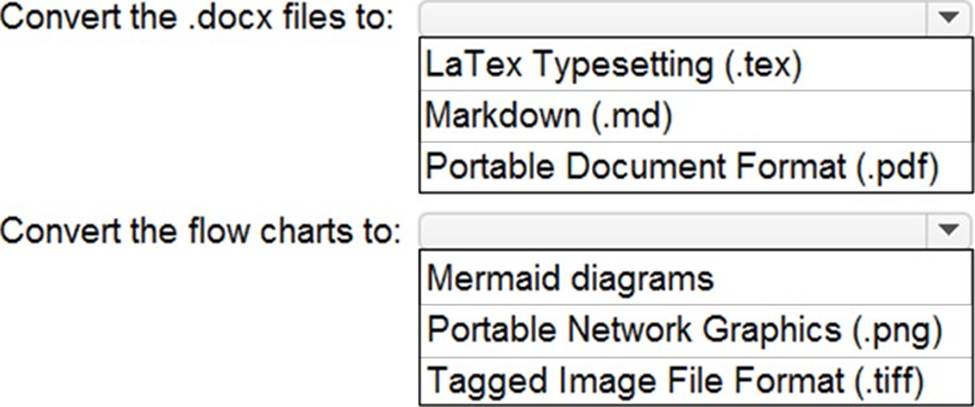
Your company uses GitHub for source control. GitHub repositories store source code and store process documentation. The process documentation is saved as Microsoft Word documents that contain simple flow charts stored as .bmp files.
You need to optimize the integration and versioning of the process documentation and the flow charts.
The solution must meet the following requirements:
• Store documents as plain text.
• Minimize the number of files that must be maintained.
• Simplify the modification, merging, and reuse of flow charts.
• Simplify the modification, merging, and reuse of documents.
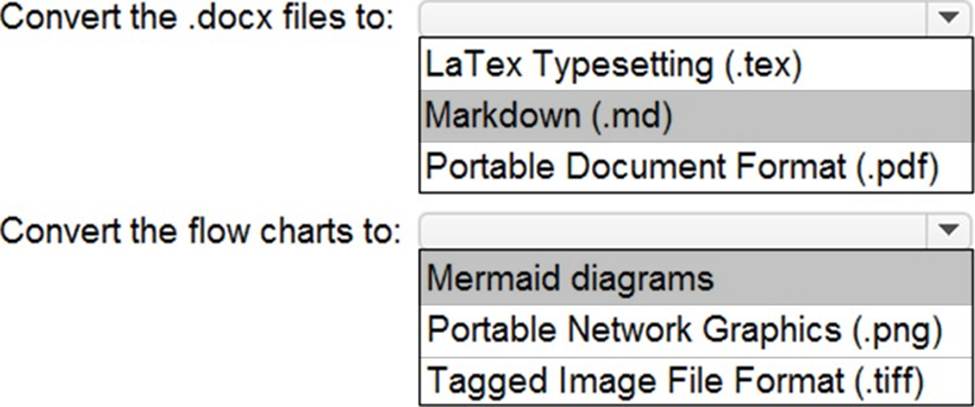
What should you include in the solution? To answer, select the appropriate options in the answer area. NOTE: Each correct selection is worth one point.
Explanation:
Box 1: Markdown (.md)
Github understands several text formats, including .txt and .md. .md stands for a file written in Markdown.
Box 2: Mermaid diagrams
Mermaid lets you create diagrams and visualizations using text and code.
It is a Javascript based diagramming and charting tool that renders Markdown-inspired text definitions to create and modify diagrams dynamically.
Reference:
https://ourcodingclub.github.io/tutorials/git/
https://mermaid-js.github.io/mermaid/#/
SIMULATION
You need to configure a virtual machine named VM1 to securely access stored secrets in an Azure Key Vault named az400-11566895-kv.
To complete this task, sign in to the Microsoft Azure portal.
Sign in to Azure portal
Locate virtual machine VM1.
Select Identity
Enable the system-assigned identity for VM1 by setting the Status to On.
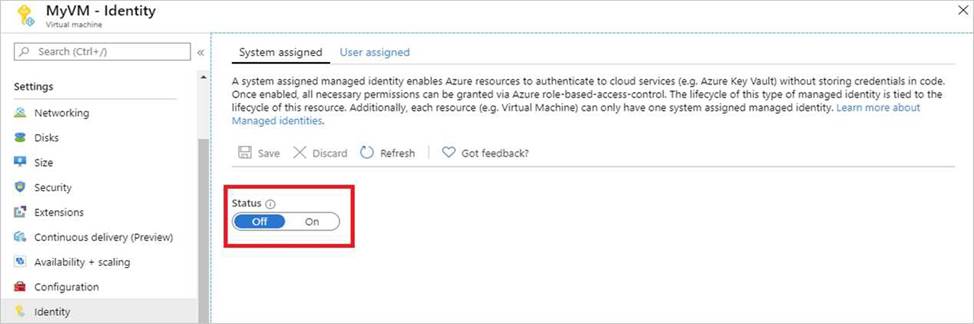
Note: Enabling a system-assigned managed identity is a one-click experience. You can either enable it during the creation of a VM or in the properties of an existing VM.
Reference: https://docs.microsoft.com/en-us/azure/active-directory/managed-identities-azure-resources/tutorial-windows-vm-access-nonaad