
Practice Free AZ-400 Exam Online Questions
DRAG DROP
You have a GitHub repository that contains the code for an app named App1.
App1 depends on a library of functions from a repository at https://github.com/contoso/afeed.
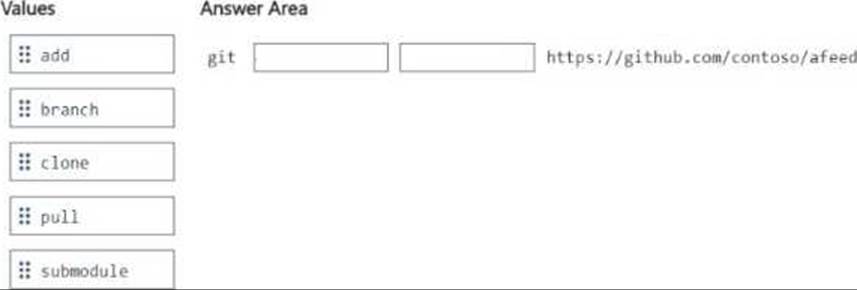
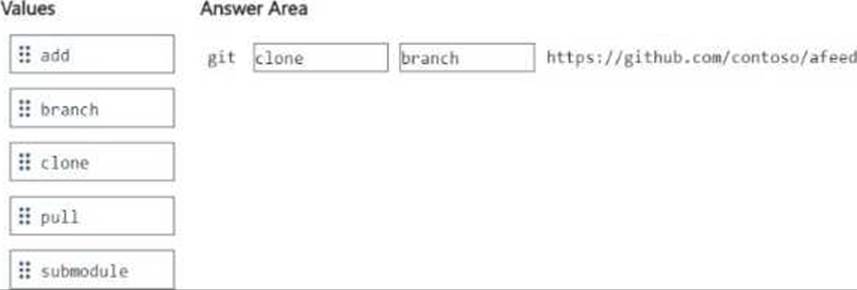
You need to keep a clone of a feed repository as a subdirectory of the App1 repository.
How should you complete the Git command? To answer, drag the appropriate values to the correct targets. Each value may be used once, more than once, or not at all. You may need to drag the split bar between panes or scroll to view content. NOTE: Each correct selection is worth one point.
Your company uses Azure Artifacts for package management.
You need to configure an upstream source in Azure Artifacts for Python packages.
Which repository type should you use as an upstream source?
- A . PyPI
- B . npmjs.org
- C . Maven Central
- D . third-party trusted Python
A
Explanation:
Get started with Python packages in Azure Artifacts
Create a feed
Select Artifacts (in the left navigation of your Azure DevOps project).
On the Artifacts page, select Create Feed.
In the Create new feed dialog box:
In the Name field, give the feed a name.
PyPI is the default repository name for twine, which is a tool for publishing Python packages.
Reference: https://docs.microsoft.com/en-us/azure/devops/artifacts/quickstarts/python-packages
Your company uses Azure Artifacts for package management.
You need to configure an upstream source in Azure Artifacts for Python packages.
Which repository type should you use as an upstream source?
- A . PyPI
- B . npmjs.org
- C . Maven Central
- D . third-party trusted Python
A
Explanation:
Get started with Python packages in Azure Artifacts
Create a feed
Select Artifacts (in the left navigation of your Azure DevOps project).
On the Artifacts page, select Create Feed.
In the Create new feed dialog box:
In the Name field, give the feed a name.
PyPI is the default repository name for twine, which is a tool for publishing Python packages.
Reference: https://docs.microsoft.com/en-us/azure/devops/artifacts/quickstarts/python-packages
DRAG DROP
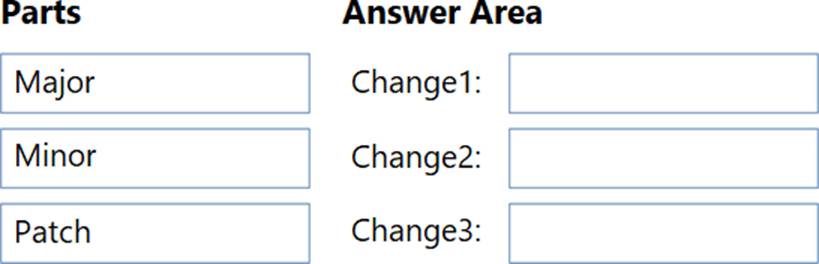
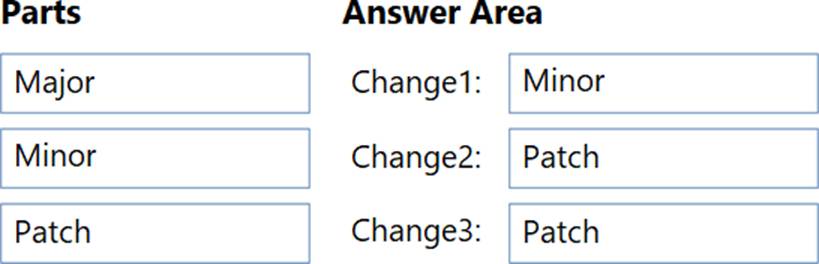
You use Semantic Versioning (Sem Ver) as a dependency versioning strategy.
You perform changes to code as shown in the following table.

Which part of the version should you increment for each change? To answer, drag the appropriate parts to the correct changes. Each part may be used once, more than once, or not at all. You may need to drag the split bar between panes or scroll to view content. NOTE: Each correct selection is worth one point.
HOTSPOT
You manage build and release pipelines by using Azure DevOps. Your entire managed environment resides in Azure.
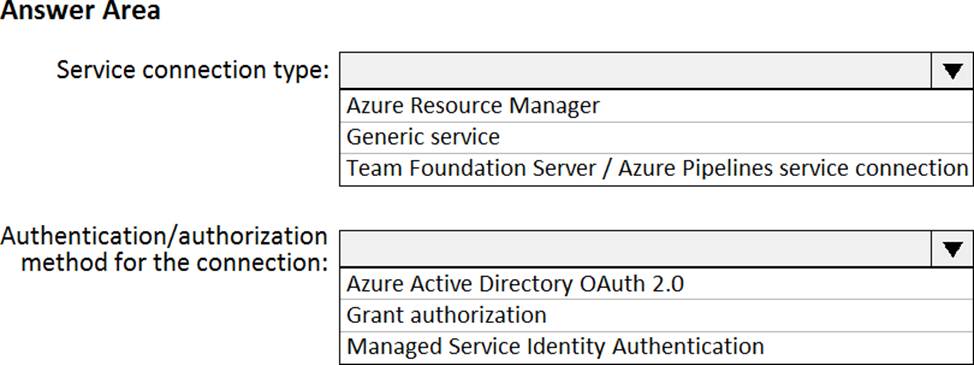
You need to configure a service endpoint for accessing Azure Key Vault secrets.
The solution must meet the following requirements:
✑ Ensure that the secrets are retrieved by Azure DevOps.
✑ Avoid persisting credentials and tokens in Azure DevOps.
How should you configure the service endpoint? To answer, select the appropriate options in the answer area. NOTE: Each correct selection is worth one point.
Explanation:
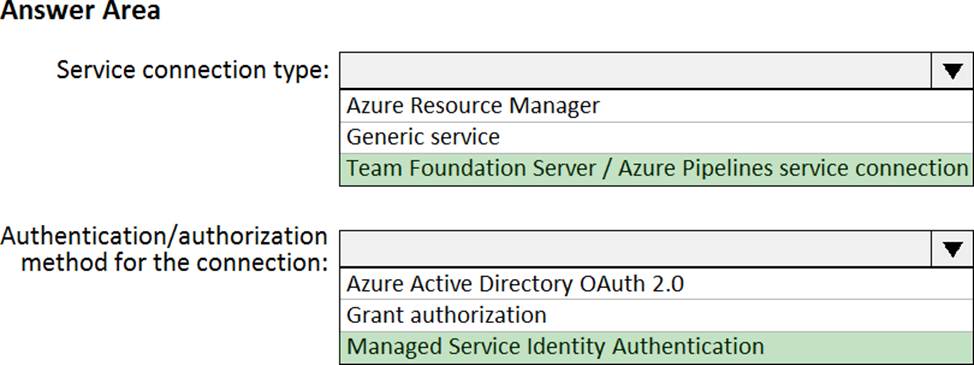
Box 1: Azure Pipelines service connection
Box 2: Managed Service Identity Authentication
The managed identities for Azure resources feature in Azure Active Directory (Azure AD) provides Azure services with an automatically managed identity in Azure AD. You can use the identity to authenticate to any service that supports Azure AD authentication, including Key Vault, without any credentials in your code.
Reference:
https://docs.microsoft.com/en-us/azure/devops/pipelines/tasks/deploy/azure-key-vault
https://docs.microsoft.com/en-us/azure/active-directory/managed-identities-azure-resources/overview
SIMULATION
You need to create and configure an Azure Storage account named az400lod11566895stor in a resource group named RG1lod11566895 to store the boot diagnostics for a virtual machine named VM1.
To complete this task, sign in to the Microsoft Azure portal.
On the Azure portal menu, select All services. In the list of resources, type Storage Accounts. As you begin typing, the list filters based on your input. Select Storage Accounts.
On the Storage Accounts window that appears, choose Add. Select the subscription in which to create the storage account. Under the Resource group field, select RG1lod11566895
Next, enter a name for your storage account named: az400lod11566895stor Select Create.
Step 2: Enable boot diagnostics on existing virtual machine
To enable Boot diagnostics on an existing virtual machine, follow these steps:
DRAG DROP
You are implementing an Azure DevOps strategy for mobile devices using App Center.
You plan to use distribution groups to control access to releases.
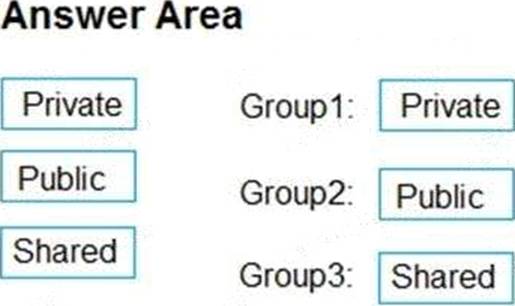
You need to create the distribution groups shown in the following table.
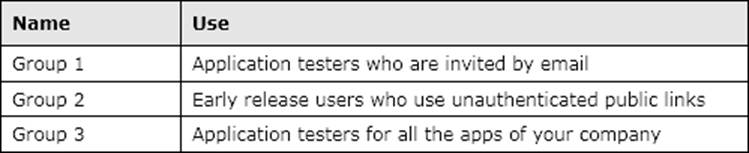
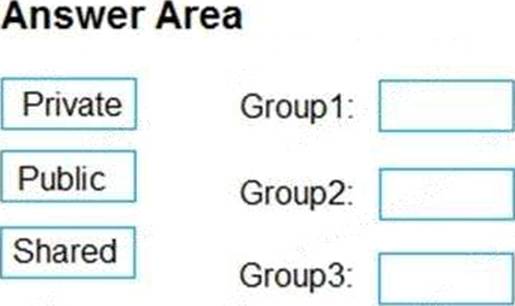
Which type of distribution group should you use for each group? To answer, drag the appropriate group types to the correct locations. Each group type may be used once, more than once, or not at all. You may need to drag the split bar between panes or scroll to view content. NOTE: Each correct selection is worth one point.
Explanation:
Box1: Private
In App Center, distribution groups are private by default. Only testers invited via email can access the releases available to this group.
Box 2: Public
Distribution groups must be public to enable unauthenticated installs from public links.
Box 3: Shared
Shared distribution groups are private or public distribution groups that are shared across multiple apps in a single organization.
Reference: https://docs.microsoft.com/en-us/appcenter/distribution/groups
DRAG DROP
You are implementing an Azure DevOps strategy for mobile devices using App Center.
You plan to use distribution groups to control access to releases.
You need to create the distribution groups shown in the following table.
Which type of distribution group should you use for each group? To answer, drag the appropriate group types to the correct locations. Each group type may be used once, more than once, or not at all. You may need to drag the split bar between panes or scroll to view content. NOTE: Each correct selection is worth one point.
Explanation:
Box1: Private
In App Center, distribution groups are private by default. Only testers invited via email can access the releases available to this group.
Box 2: Public
Distribution groups must be public to enable unauthenticated installs from public links.
Box 3: Shared
Shared distribution groups are private or public distribution groups that are shared across multiple apps in a single organization.
Reference: https://docs.microsoft.com/en-us/appcenter/distribution/groups
You have Azure Pipelines and GitHub integrated as a source code repository.
The build pipeline has continuous integration enabled.
You plan to trigger an automated build whenever code changes are committed to the repository.
You need to ensure that the system will wait until a build completes before queuing another build.
What should you implement?
- A . path filters
- B . batch changes
- C . scheduled builds
- D . branch filters
B
Explanation:
Batching CI runs
If you have many team members uploading changes often, you may want to reduce the number of runs you start. If you set batch to true, when a pipeline is running, the system waits until the run is completed, then starts another run with all changes that have not yet been built.
Example:
# specific branch build with batching trigger:
batch: true branches: include:
– master
To clarify this example, let us say that a push A to master caused the above pipeline to run. While that pipeline is running, additional pushes B and C occur into the repository. These updates do not start new independent runs immediately. But after the first run is completed, all pushes until that point of time are batched together and a new run is started.
Reference: https://docs.microsoft.com/en-us/azure/devops/pipelines/repos/github
DRAG DROP
Your company has a project in Azure DevOps.
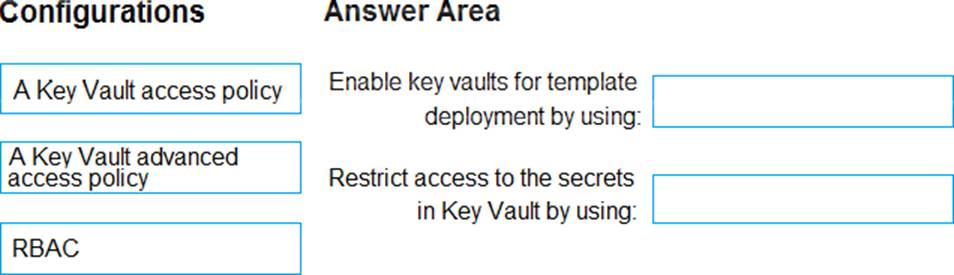
You plan to create a release pipeline that will deploy resources by using Azure Resource Manager templates. The templates will reference secrets stored in Azure Key Vault.
You need to recommend a solution for accessing the secrets stored in the key vault during deployments. The solution must use the principle of least privilege.
What should you include in the recommendation? To answer, drag the appropriate configurations to the correct targets. Each configuration may be used once, more than once, or not at all. You may need to drag the split bar between panes or scroll to view content. NOTE: Each correct selection is worth one point.
Explanation:
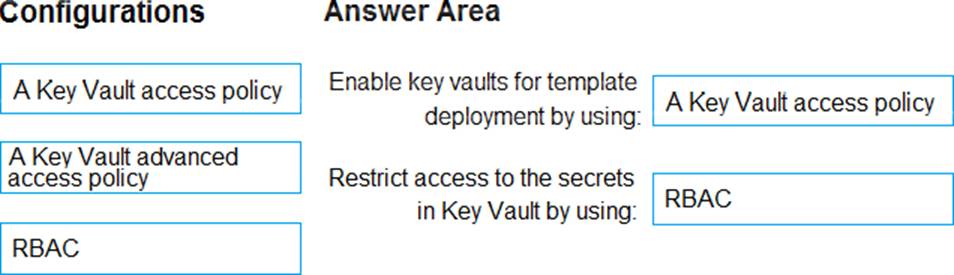
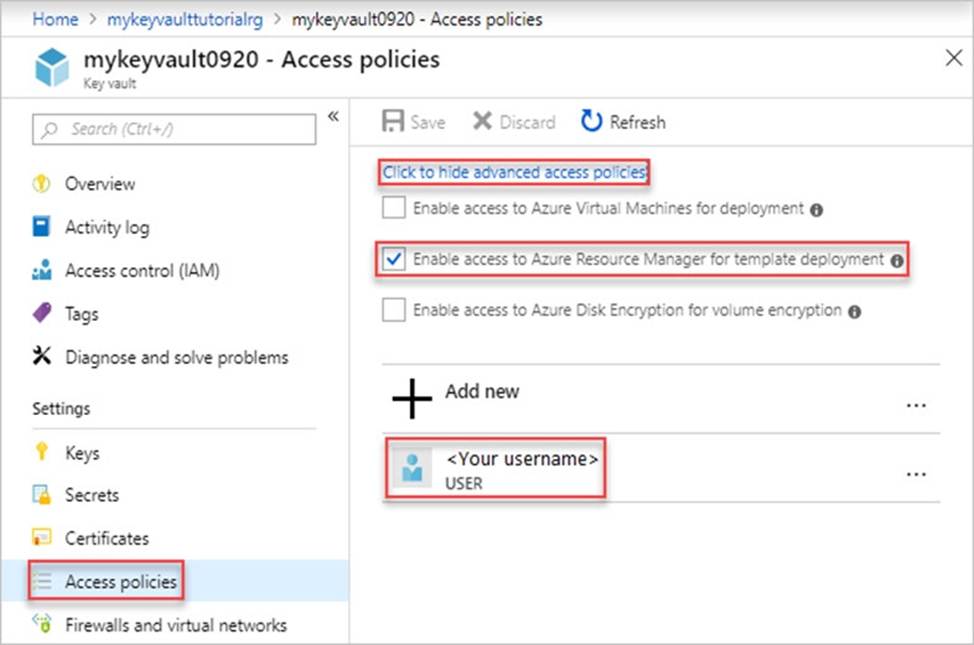
Box 1: A key Vault advanced access policy
Box 2: RBAC
Management plane access control uses RBAC.
The management plane consists of operations that affect the key vault itself, such as:
✑ Creating or deleting a key vault.
✑ Getting a list of vaults in a subscription.
✑ Retrieving Key Vault properties (such as SKU and tags).
✑ Setting Key Vault access policies that control user and application access to keys and secrets.
Reference: https: //docs.microsoft.com/en-us/azure/azure-resource-manager/resource-manager-tutorial-use-key-vault