
Practice Free AZ-400 Exam Online Questions
HOTSPOT
You use Azure DevOps to manage the build and deployment of an app named App1.
You have a release pipeline that deploys a virtual machine named VM1.
You plan to monitor the release pipeline by using Azure Monitor
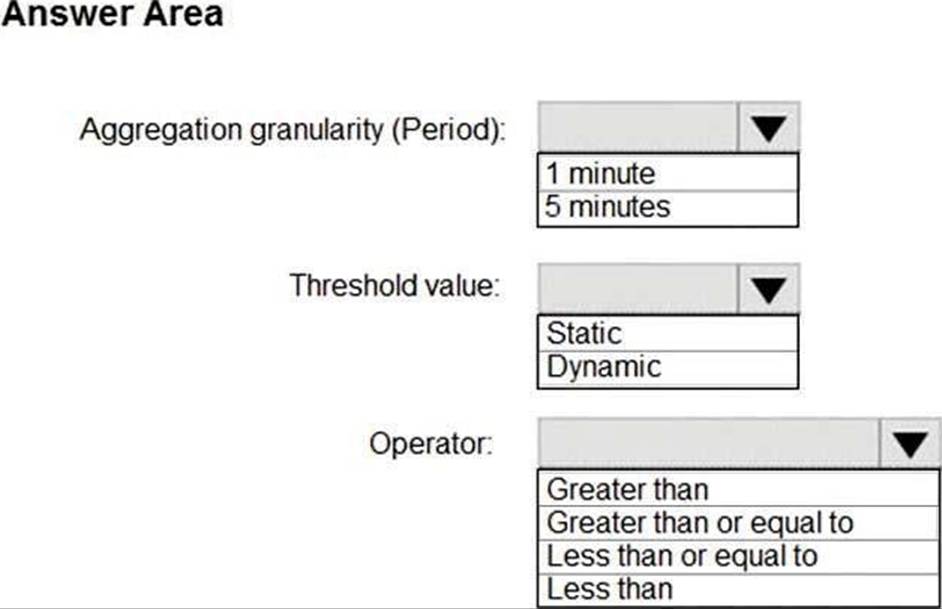
You need to create an alert to monitor the performance of VM1. The alert must be triggered when the average CPU usage exceeds 70 percent for five minutes. The alert must calculate the average once every minute.
How should you configure the alert rule? To answer, select the appropriate options in the answer area.
Explanation:
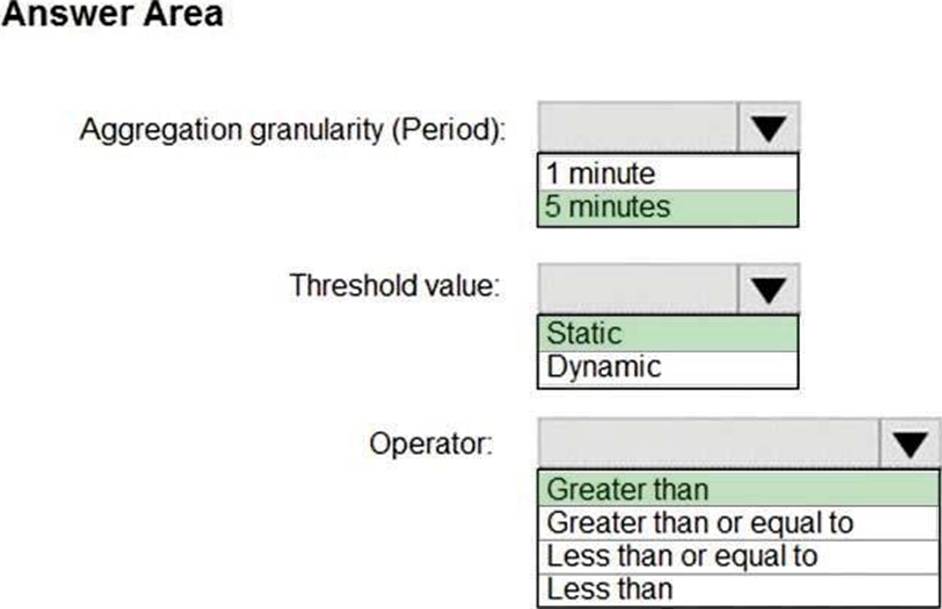
Box 1: 5 minutes
The alert must calculate the average once every minute.
Note: We [Microsoft] recommend choosing an Aggregation granularity (Period) that is larger than the Frequency of evaluation, to reduce the likelihood of missing the first evaluation of added time series
Box 2: Static
Box 3: Greater than
Example, say you have an App Service plan for your website. You want to monitor CPU usage on
multiple instances running your web site/app. You can do that using a metric alert rule as follows:
Target resource: myAppServicePlan
Metric: Percentage CPU
Condition Type: Static
Dimensions
Instance = InstanceName1, InstanceName2
Time Aggregation: Average
Period: Over the last 5 mins
Frequency: 1 min
Operator: GreaterThan
Threshold: 70
Like before, this rule monitors if the average CPU usage for the last 5 minutes exceeds 70%. Aggregation granularity
Reference: https://docs.microsoft.com/en-us/azure/azure-monitor/platform/alerts-metric-overview
Your company creates a web application.
You need to recommend a solution that automatically sends to Microsoft Teams a daily summary of the exceptions that occur in the application.
Which two Azure services should you recommend? Each correct answer presents part of the solution. NOTE: Each correct selection is worth one point.
- A . Azure Logic Apps
- B . Azure Pipelines
- C . Microsoft Visual Studio App Center
- D . Azure DevOps Project
- E . Azure Application Insights
A,E
Explanation:
E: Exceptions in your live web app are reported by Application Insights.
Note: Periodical reports help keep a team informed on how their business critical services are doing. Developers, DevOps/SRE teams, and their managers can be productive with automated reports reliably delivering insights without requiring everyone to sign in the portal. Such reports can also help identify gradual increases in latencies, load or failure rates that may not trigger any alert rules.
A: You can programmatically query Application Insights data to generate custom reports on a schedule. The following options can help you get started quickly:
Automate reports with Microsoft Flow Automate reports with Logic Apps
Reference:
https://docs.microsoft.com/en-us/azure/azure-monitor/app/asp-net-exceptions https://docs.microsoft.com/en-us/azure/azure-monitor/app/automate-custom-reports
DRAG DROP
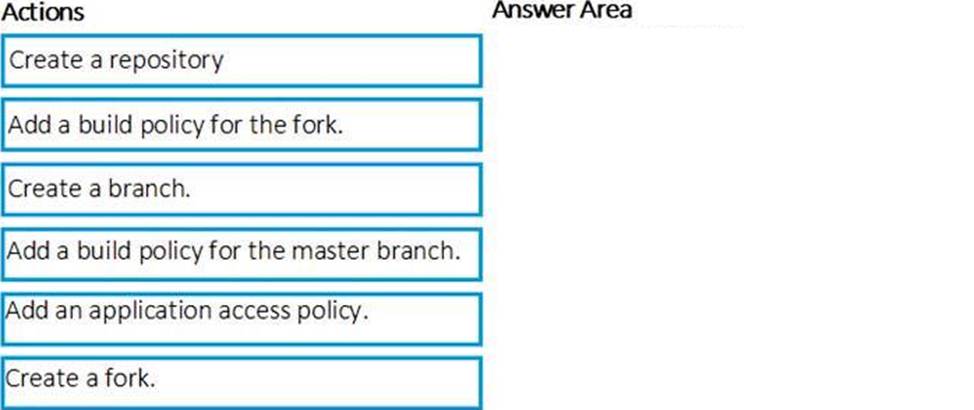
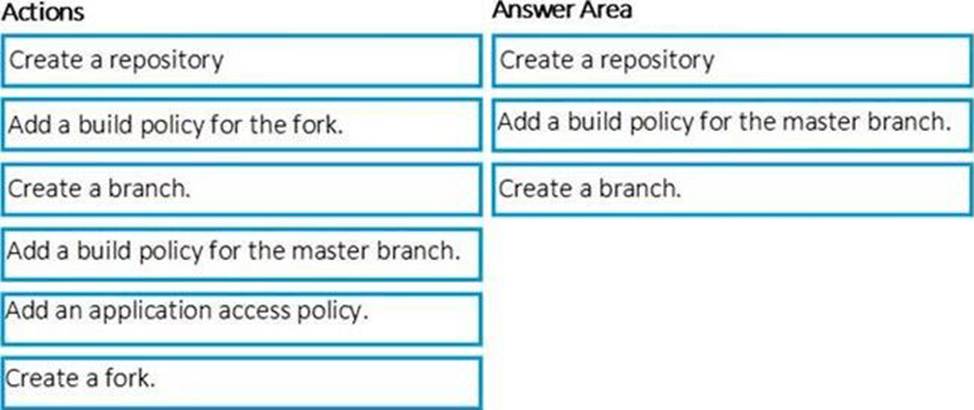
You need to implement the code flow strategy for Project2 in Azure DevOps.
Which three actions should you perform in sequence? To answer, move the appropriate actions from the list of actions to the answer area and arrange them in the correct order.
DRAG DROP
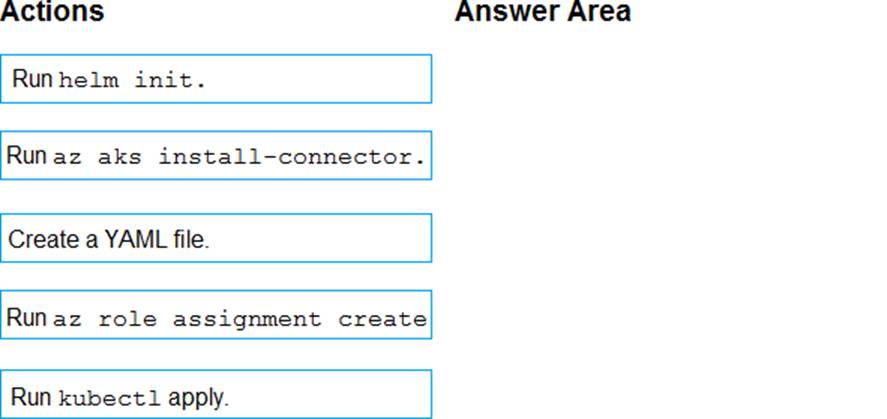
You have an Azure Kubermets Service (AKS) implementation that is RBAC-enabled
You plan to use Azure Container Instances as a hosted development environment to run containers in the AKS implementation.
You need to conjure Azure Container Instances as a hosted environment for running me containers in AKS.
Which three actions should you perform m sequence? To answer, move the appropriate actions from the list of actions to the answer area and arrange them in the correct order.
Explanation:
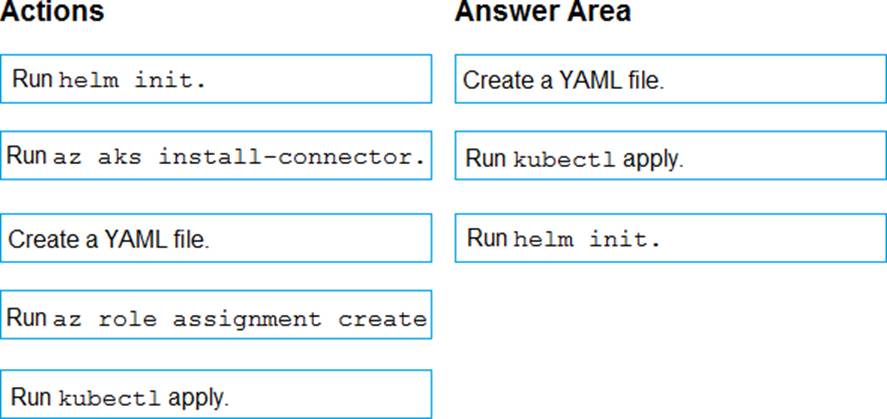
Step 1: Create a YAML file.
If your AKS cluster is RBAC-enabled, you must create a service account and role binding for use with Tiller. To create a service account and role binding, create a file named rbac-virtual-kubelet.yaml
Step 2: Run kubectl apply.
Apply the service account and binding with kubectl apply and specify your rbac-virtual-kubelet.yaml file.
Step 3: Run helm init.
Configure Helm to use the tiller service account:
helm init –service-account tiller
You can now continue to installing the Virtual Kubelet into your AKS cluster.
References: https://docs.microsoft.com/en-us/azure/aks/virtual-kubelet
HOTSPOT
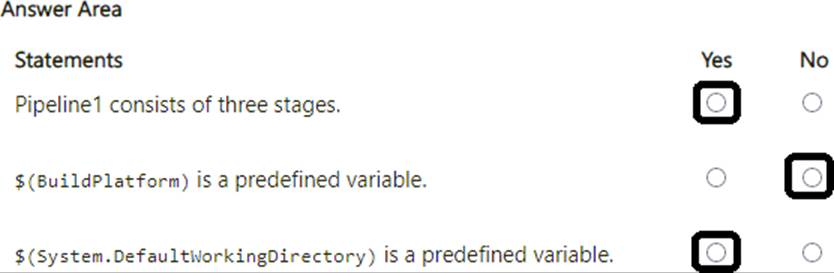
You have an Azure Pipelines pipeline named Pipeline1 that has the following YAML definition.
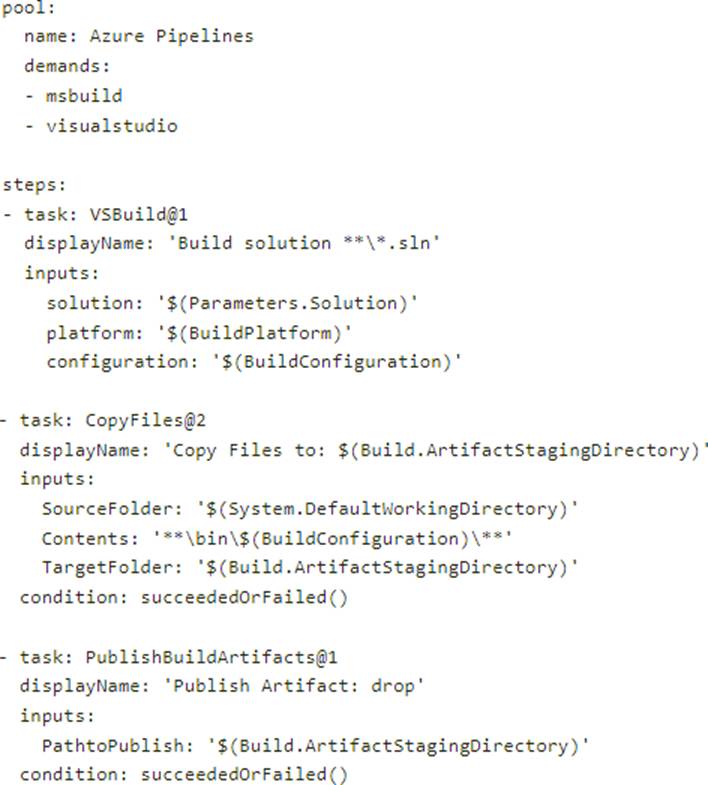
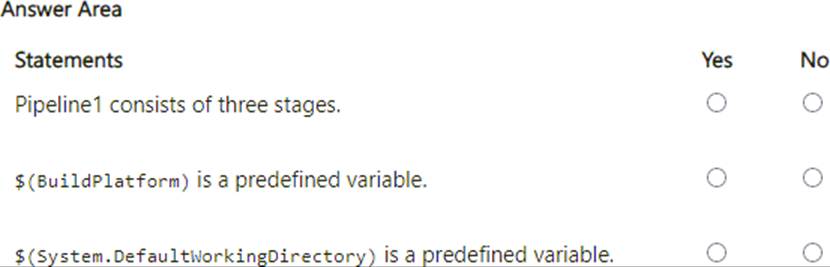
For each of the following statements, select Yes if True. Otherwise select No. NOTE: Each correct selection is worth one point.
You have an Azure subscription. The subscription contains virtual machines that run either Windows Server or Linux.
You plan to use Prometheus to monitor performance metrics.
You need to integrate Prometheus and Azure Monitor.
Which two actions should you perform? Each correct answer presents part of the solution. NOTE: Each correct selection is worth one point.
- A . Install a Prometheus server on a Windows virtual machine in Azure.
- B . On each virtual machine, expose the metrics endpoint.
- C . On each virtual machine, enable the Azure Diagnostics extension.
- D . On each virtual machine, enable the containerized agent for Azure Monitor.
- E . Expose a virtual network service endpoint for Azure Storage.
- F . Install a Prometheus server on a Linux virtual machine in Azure.
What should you use to implement the code quality restriction on the release pipeline for the investment planning applications suite?
- A . a trigger
- B . a pre deployment approval
- C . a post-deployment approval
- D . a deployment gate
HOTSPOT
HOTSPOT
You are using PowerShell to administer Azure Log Analytics workspaces.
You need to list the available workspaces and their properties.
How should you complete the command? To answer, select the appropriate options in the answer area. NOTE: Each correct selection is worth one point.


Explanation:
Box 1: Get-AzResource
Use the following command to examine the access control mode for all workspaces in the subscription:
PowerShell
Get-Az Resource CResource Type Microsoft. Operational Insights/workspaces CExpand Properties |
for each {s.Name + ": " + $_.Properties.features.enableLogAccessUsingOnlyResourcePermissions
Box 2: -Resource Type
Reference: https://docs.microsoft.com/en-us/azure/azure-monitor/logs/manage-access
HOTSPOT
You need to create deployment files for an Azure Kubernetes Service (AKS) cluster.
The deployments must meet the provisioning storage requirements shown in the following table.
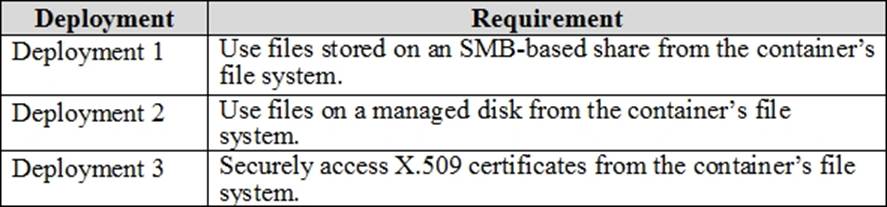
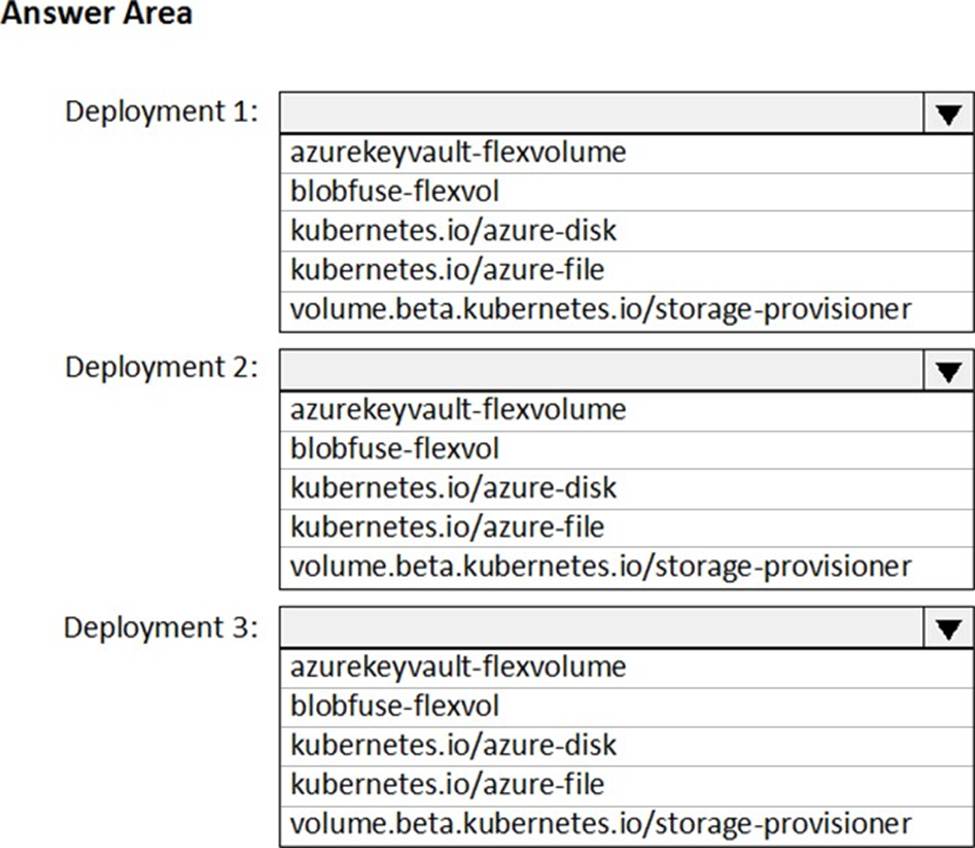
Which resource type should you use for each deployment? To answer, select the appropriate options in the answer area. NOTE: Each correct selection is worth one point.
Explanation:
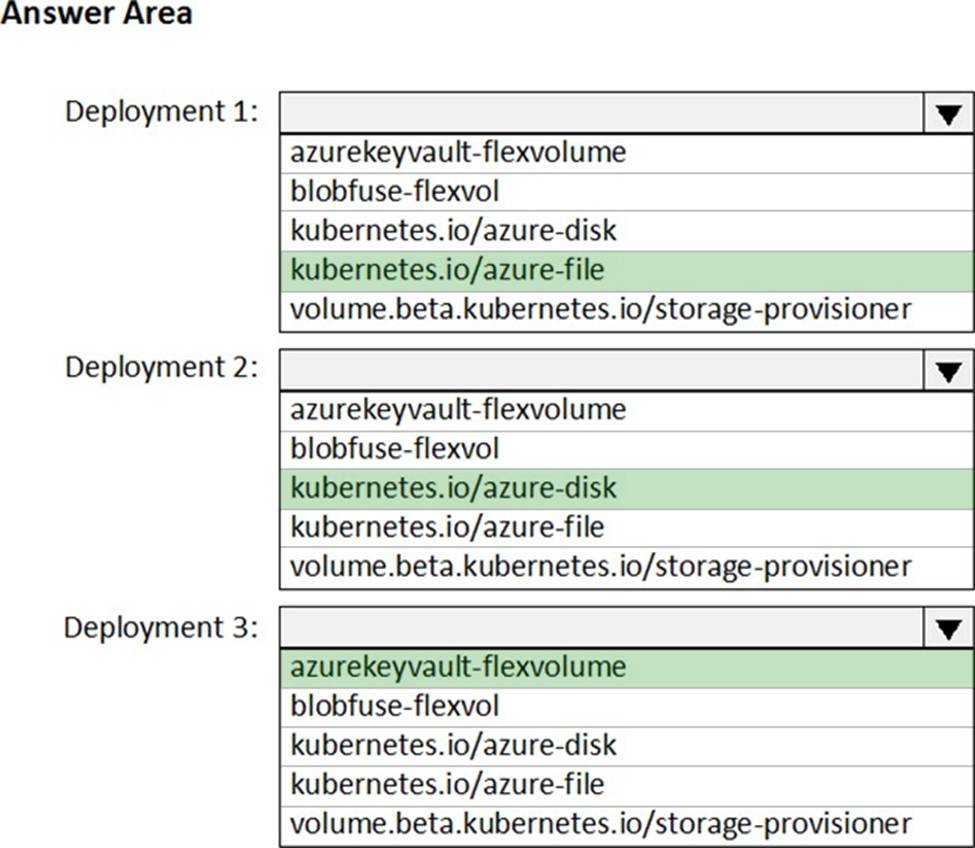
Deployment 1: Kubernetes.io/azure-file
You can use Azure Files to connect using the Server Message Block (SMB) protocol.
Deployment 2: Kubernetes.io/azure-disk
Deployment 3: azurekeyvault-flexvolume
azurekeyvault-flexvolume: Key Vault FlexVolume: Seamlessly integrate your key management
systems with Kubernetes.
Secrets, keys, and certificates in a key management system become a volume accessible to pods. Once the volume is mounted, its data is available directly in the container filesystem for your application.
Reference:
https://docs.microsoft.com/bs-cyrl-ba/azure/aks/azure-files-dynamic-pv
https://docs.microsoft.com/en-us/azure/aks/azure-disks-dynamic-pv
Note: This question is part of a series of questions that present the same scenario. Each question in the series contains a unique solution that might meet the stated goals. Some question sets might have more than one correct solution, while others might not have a correct solution.
After you answer a question in this section, you will NOT be able to return to it. As a result, these questions will not appear in the review screen.
You have an Azure DevOps project.
Your build process creates several artifacts.
You need to deploy the artifacts to on-premises servers.
Solution: You deploy a Docker build to an on-premises server. You add a Download Build Artifacts task to the deployment pipeline.
Does this meet the goal?
- A . Yes
- B . No
B
Explanation:
Instead you should deploy an Azure self-hosted agent to an on-premises server.
Note: To build your code or deploy your software using Azure Pipelines, you need at least one agent.
If your on-premises environments do not have connectivity to a Microsoft-hosted agent pool (which is typically the case due to intermediate firewalls), you’ll need to manually configure a self-hosted agent on on-premises computer(s).
Reference: https://docs.microsoft.com/en-us/azure/devops/pipelines/agents/agents?view=azure-devops