
Practice Free AZ-400 Exam Online Questions
HOTSPOT
You have an Azure Pipelines pipeline that has the following definition.
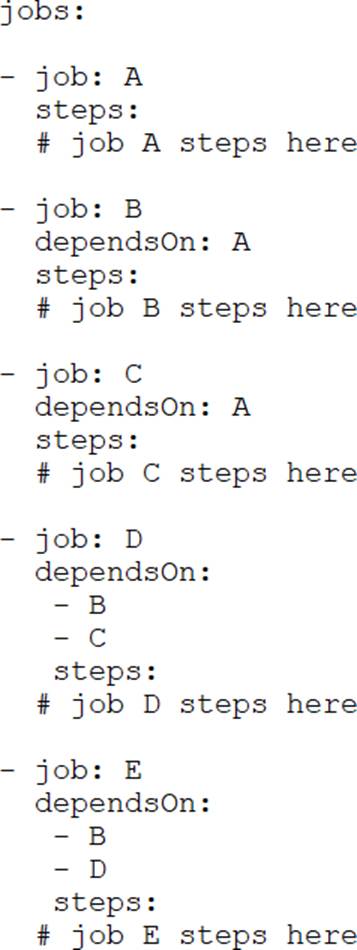
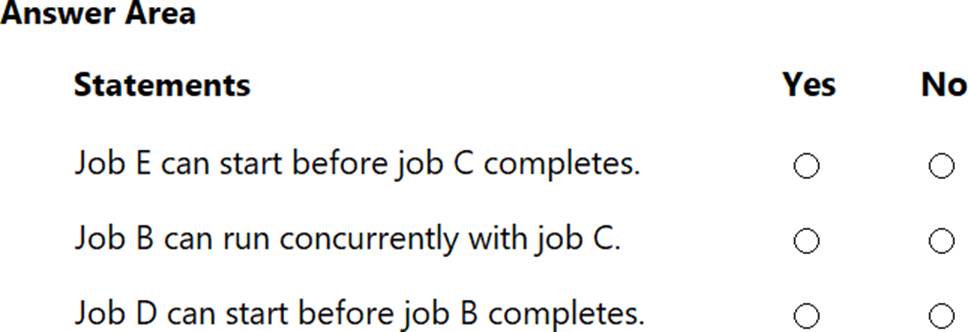
For each of the following statements, select Yes if the statement is true. Otherwise, select No. NOTE: Each correct selection is worth one point.
HOTSPOT
You have an Azure Pipelines pipeline that has the following definition.
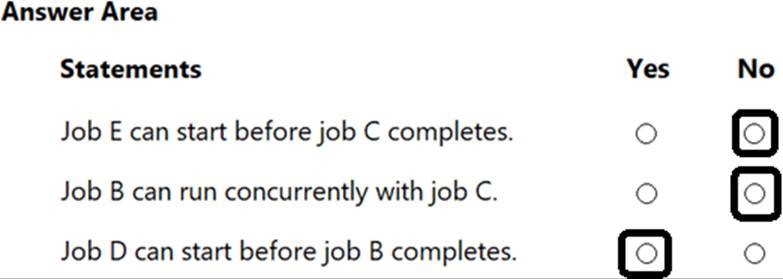
For each of the following statements, select Yes if the statement is true. Otherwise, select No. NOTE: Each correct selection is worth one point.
HOTSPOT
You have an Azure Pipelines pipeline that has the following definition.
For each of the following statements, select Yes if the statement is true. Otherwise, select No. NOTE: Each correct selection is worth one point.
DRAG DROP
You use GitHub Enterprise Server as a source code repository.
You create an Azure DevOps organization named Contoso.
In the Contoso organization, you create a project named Project 1.
You need to link GitHub commits, pull requests, and issues to the work items of Project 1. The solution must use OAuth-based authentication
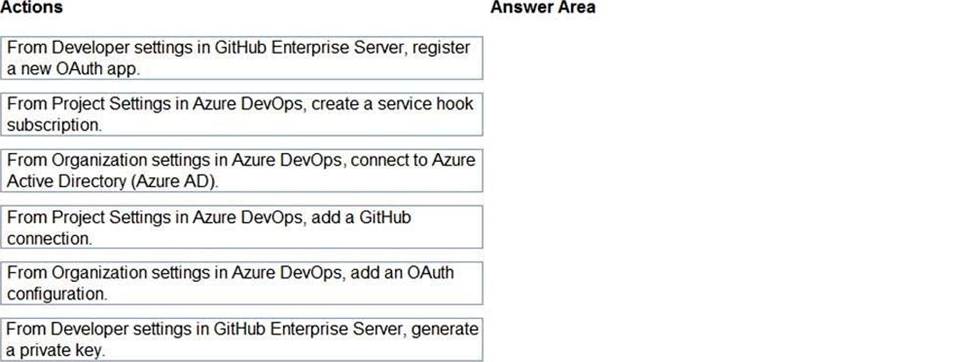
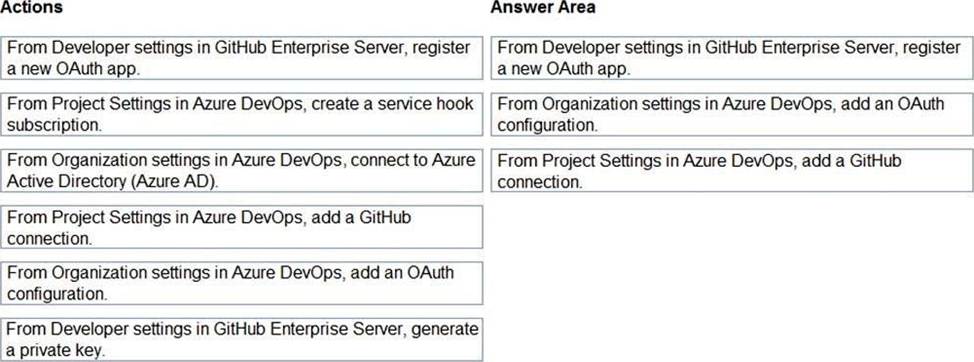
Which three actions should you perform in sequence? To answer, move the appropriate actions from the list of actions to the answer area and arrange them in the correct order.
Explanation:
Step 1: From Developer settings in GitHub Enterprise Server, registera new OAuth app.
If you plan to use OAuth to connect Azure DevOps Services or Azure DevOps Server with your GitHub Enterprise Server, you first need to register the application as an OAuth App
Step 2: Organization settings in Azure DevOps, add an OAuth configuration
Register your OAuth configuration in Azure DevOps Services.
Note:
Sign into the web portal for Azure DevOps Services.
Add the GitHub Enterprise Oauth configuration to your organization.
Open Organization settings>Oauth configurations, and choose Add Oauth configuration.
Fill in the form that appears, and then choose Create.
Step 3: From Project Settings in Azure DevOps, add a GitHub connection.
Connect Azure DevOps Services to GitHub Enterprise Server
Choose the Azure DevOps logo to open Projects, and then choose the Azure Boards project you want to configure to connect to your GitHub Enterprise repositories.
Choose (1) Project Settings, choose (2) GitHub connections and then (3) Click here to connect to your GitHub Enterprise organization.
Reference: https://docs.microsoft.com/en-us/azure/devops/boards/github/connect-to-github
You have an application that consists of several Azure App Service web apps and Azure functions.
You need to access the security of the web apps and the functions.
Which Azure features can you use to provide a recommendation for the security of the application?
- A . Security & Compliance in Azure Log Analytics
- B . Resource health in Azure Service Health
- C . Smart Detection in Azure Application Insights
- D . Compute & apps in Azure Security Center
D
Explanation:
Monitor compute and app services: Compute & apps include the App Services tab, which App services: list of your App service environments and current security state of each.
Recommendations
This section has a set of recommendations for each VM and computer, web and worker roles, Azure App Service Web Apps, and Azure App Service Environment that Security Center monitors. The first column lists the recommendation. The second column shows the total number of resources that are affected by that recommendation. The third column shows the severity of the issue.
Incorrect Answers:
C: Smart Detection automatically warns you of potential performance problems, not security problems in your web application.
Reference: https://docs.microsoft.com/en-us/azure/azure-monitor/app/proactive-diagnostics
You are automating the build process for a Java-based application by using Azure DevOps.
You need to add code coverage testing and publish the outcomes to the pipeline.
What should you use?
- A . Cobertura
- B . Bullseye Coverage
- C . MSTest
- D . Coverlet
A
Explanation:
Use Publish Code Coverage Results task in a build pipeline to publish code coverage results to Azure Pipelines or TFS, which were produced by a build in Cobertura or JaCoCo format.
Reference: https://docs.microsoft.com/en-us/azure/devops/pipelines/tasks/test/publish-code-coverage-results
DRAG DROP
You plan to use Azure Kubernetes Service (AKS) to host containers deployed from images hosted in a Docker Trusted Registry.
You need to recommend a solution for provisioning and connecting to AKS. The solution must ensure that AKS is RBAC-ena Wed and uses a custom service principal.
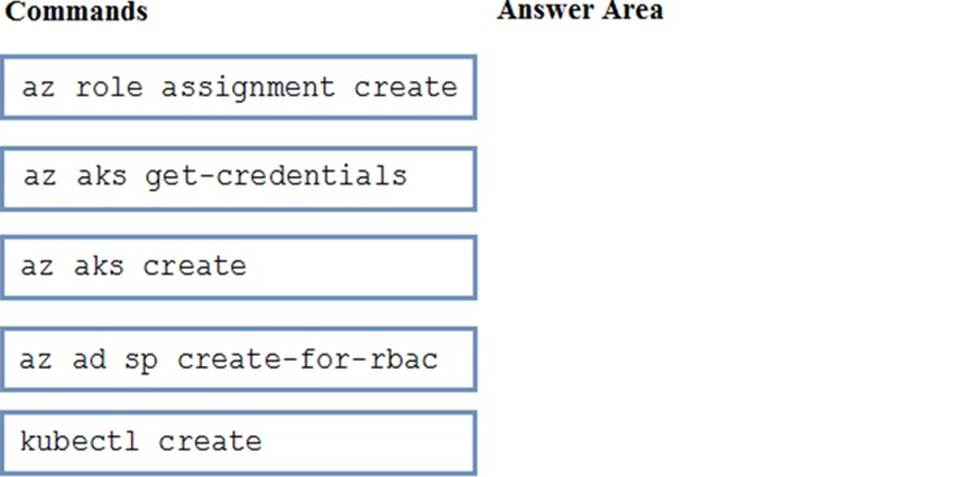
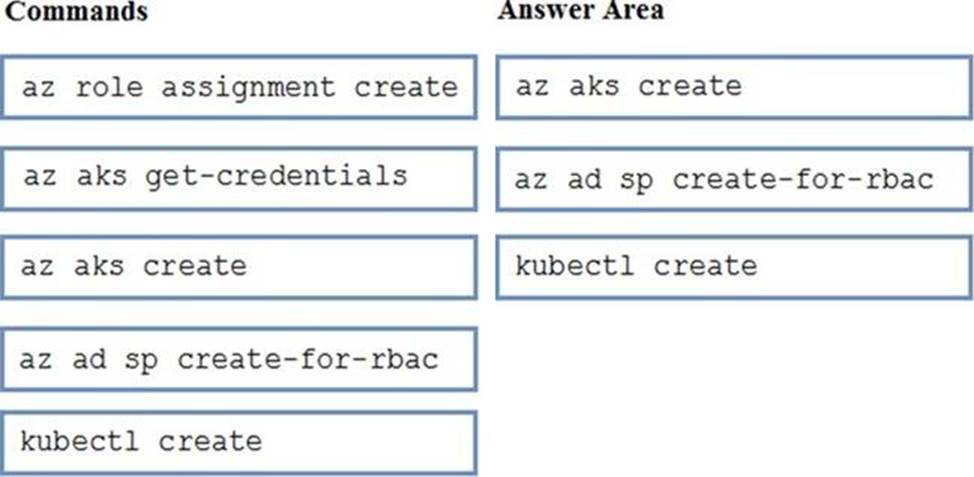
Which three commands should you recommend be run in sequence? To answer, move the appropriate commands from the list of commands to the answer area and arrange them in the coned order.
Explanation:
Step 1: az acr create
An Azure Container Registry (ACR) can alsobe created using the new Azure CLI.
az acr create
–name <REGISTRY_NAME>
–resource-group <RESOURCE_GROUP_NAME>
–sku Basic
Step 2: az ad sp create-for-rbac
Once the ACR has been provisioned, you can either enable administrative access (which is okay for testing) or you create a Service Principal (sp) which will provide a client_id and a client_secret.
az ad sp create-for-rbac
—
scopes/subscriptions/<SUBSCRIPTION_ID>/resourcegroups/<RG_NAME>/providers/Microsoft.Contai
nerRegistry/registries/<REGISTRY_NAME>
–role Contributor
–name <SERVICE_PRINCIPAL_NAME>
Step 3: kubectl create
Create a new Kubernetes Secret.
kubectl create secretdocker-registry <SECRET_NAME>
–docker-server <REGISTRY_NAME>.azurecr.io
–docker-email <YOUR_MAIL>
–docker-username=<SERVICE_PRINCIPAL_ID>
–docker-password <YOUR_PASSWORD>
Reference: https://thorsten-hans.com/how-to-use-private-azure-container-registry-with-kubernetes
DRAG DROP
You plan to use Azure Kubernetes Service (AKS) to host containers deployed from images hosted in a Docker Trusted Registry.
You need to recommend a solution for provisioning and connecting to AKS. The solution must ensure that AKS is RBAC-ena Wed and uses a custom service principal.
Which three commands should you recommend be run in sequence? To answer, move the appropriate commands from the list of commands to the answer area and arrange them in the coned order.
Explanation:
Step 1: az acr create
An Azure Container Registry (ACR) can alsobe created using the new Azure CLI.
az acr create
–name <REGISTRY_NAME>
–resource-group <RESOURCE_GROUP_NAME>
–sku Basic
Step 2: az ad sp create-for-rbac
Once the ACR has been provisioned, you can either enable administrative access (which is okay for testing) or you create a Service Principal (sp) which will provide a client_id and a client_secret.
az ad sp create-for-rbac
—
scopes/subscriptions/<SUBSCRIPTION_ID>/resourcegroups/<RG_NAME>/providers/Microsoft.Contai
nerRegistry/registries/<REGISTRY_NAME>
–role Contributor
–name <SERVICE_PRINCIPAL_NAME>
Step 3: kubectl create
Create a new Kubernetes Secret.
kubectl create secretdocker-registry <SECRET_NAME>
–docker-server <REGISTRY_NAME>.azurecr.io
–docker-email <YOUR_MAIL>
–docker-username=<SERVICE_PRINCIPAL_ID>
–docker-password <YOUR_PASSWORD>
Reference: https://thorsten-hans.com/how-to-use-private-azure-container-registry-with-kubernetes
You have an Azure DevOps project named Project1 and an Azure subscription named Sub1. Sub1 contains an Azure SQL database named DB1.
You need to create a release pipeline that uses the Azure SQL Database Deployment task to update DB1.
Which artifact should you deploy?
- A . a BACPAC
- B . a DACPAC
- C . an LDF file
- D . an MDF file
B
Explanation:
Use Azure SQL Database Deployment task in a build or release pipeline to deploy to Azure SQL DB using a DACPAC or run scripts using SQLCMD.
Reference: https://docs.microsoft.com/en-us/azure/devops/pipelines/tasks/deploy/sql-azure-dacpac-
deployment
You need to the merge the POC branch into the main branch. The solution must meet the technical requirements.
Which command should you run?
- A . git push
- B . git merge –squash
- C . git merge –allow-unrelated-histories
- D . git rebase