
Practice Free AZ-400 Exam Online Questions
You have the following Azure policy.
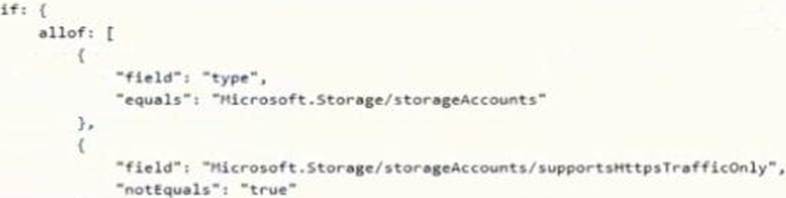
- A . ensures that at) data for new Azure Storage accounts is encrypted at rest
- B . prevents HTTPS traffic to new Azure Storage accounts when the accounts are accessed over the internet
- C . prevents all HTTP traffic to wasting Azure Storage accounts
- D . ensures that all traffic to new Azure Storage accounts is encrypted
Your company uses a Git repository in Azure Repos lo manage the source code of a web application. The master branch is protected from direct updates. Developers work on new features in the topic branches.
Because of the high volume of requested features, it is difficult to follow the history of the changes to the master branch.
You need to enforce a pull request merge strategy.
The strategy must meet the following requirements:
• Consolidate commit histories
• Merge tie changes into a tingle commit
Which merge strategy should you use in the branch policy?
- A . Git fetch
- B . no-fast-forward merge
- C . squash merge
- D . fast-forward merge
C
Explanation:
Squash merging is a merge option that allows you to condense the Git history of topic branches when you complete a pull request. Instead of each commit on the topic branch being added to the history of the default branch, a squash merge takes all the file changes and adds them to a single new commit on the default branch.
A simple way to think about this is that squash merge gives you just the file changes, and a regular merge gives you the file changes and the commit history.
Note: Squash merging keeps your default branch histories clean and easy to follow without demanding any workflow changes on your team. Contributors to the topic branch work how they want in the topic branch, and the default branches keep a linear history through the use of squash merges. The commit history of a master branch updated with squash merges will have one commit for each merged branch. You can step through this history commit by commit to find out exactly when work was done.
ces: https://docs.microsoft.com/en-us/azure/devops/repos/git/merging-with-squash
Your company deploys applications m Docket containers.
You want to detect known exploits in the Docket images used to provision the Docker containers. You need to integrate image scanning into the application lifecycle. The solution must expose the exploits as early as possible during the application lifecycle.
What should you configure?
- A . a task executed in the continuous deployment pipeline and a scheduled task against a running production container.
- B . a task executed in the continuous integration pipeline and a scheduled task that analyzes the production container.
- C . a task executed in the continuous integration pipeline and a scheduled task that analyzes the image registry
- D . manual tasks performed during the planning phase and the deployment phase
C
Explanation:
You can use the Docker task to sign into ACR and then use a subsequent script to pull an image and scan the container image for vulnerabilities.
Use the docker task in a build or release pipeline. This task can be used with Docker or Azure Container registry.
Reference: https://docs.microsoft.com/en-us/azure/devops/articles/security-validation-cicd-pipeline?view=vsts
You have an Azure Resource Manager (ARM) template that contains the following expression.
[if(parameters(‘isComplete’), ‘1a’, ‘2a’)]
You need to migrate the template to Bicep.
Which expression should you run?
- A . iif(isComplete, ‘1a’, ‘2a’)
- B . if(isComplete, ‘1a’, ‘2a’)
- C . if(‘isComplete’) ‘1a’ else ‘2a’
- D . isComplete ? ‘1a’ ‘2a’
You need to meet the technical requirements for monitoring App1.
What should you use?
- A . Splunk
- B . Azure Application Insights
- C . Azure Advisor
- D . App Service logs
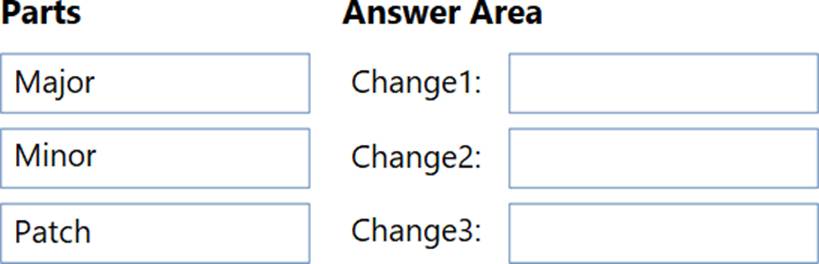
DRAG DROP
You use Semantic Versioning (Sem Ver) as a dependency versioning strategy.
You perform changes to code as shown in the following table.

Which part of the version should you increment for each change? To answer, drag the appropriate parts to the correct changes. Each part may be used once, more than once, or not at all. You may need to drag the split bar between panes or scroll to view content. NOTE: Each correct selection is worth one point.
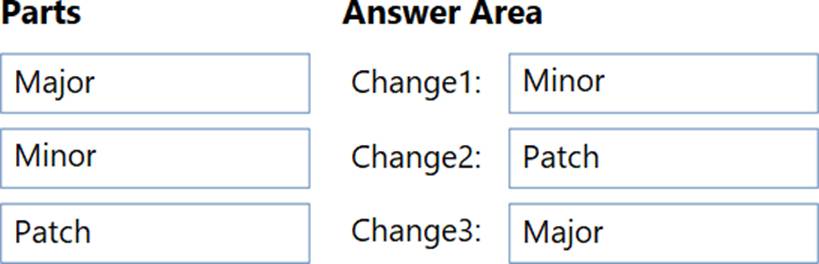
Explanation:
Minor
Patch
Major
DRAG DROP
You use Semantic Versioning (Sem Ver) as a dependency versioning strategy.
You perform changes to code as shown in the following table.
Which part of the version should you increment for each change? To answer, drag the appropriate parts to the correct changes. Each part may be used once, more than once, or not at all. You may need to drag the split bar between panes or scroll to view content. NOTE: Each correct selection is worth one point.
Explanation:
Minor
Patch
Major
Your company uses Azure DevOps for the build pipelines and deployment pipelines of Java based projects. You need to recommend a strategy for managing technical debt.
Which two actions should you include in the recommendation? Each correct answer presents part of the solution
NOTE: Each correct selection is worth one point.
- A . Integrate Azure DevOps and SonarQube.
- B . Integrates Azure DevelOPs and Azure DevTest Labs.
- C . Configure post-deployment approvals in the deployment pipeline.
- D . Configure pre-deployment approvals in the deployment pipeline.
SIMULATION
SIMULATION
You need to create and configure an Azure Storage account named az400lod11566895stor in a resource group named RG1lod11566895 to store the boot diagnostics for a virtual machine named VM1.
To complete this task, sign in to the Microsoft Azure portal.
On the Azure portal menu, select All services. In the list of resources, type Storage Accounts. As you begin typing, the list filters based on your input. Select Storage Accounts.
On the Storage Accounts window that appears, choose Add. Select the subscription in which to create the storage account. Under the Resource group field, select RG1lod11566895
Next, enter a name for your storage account named: az400lod11566895stor Select Create.
Step 2: Enable boot diagnostics on existing virtual machine
To enable Boot diagnostics on an existing virtual machine, follow these steps:
Sign in to the Azure portal, and then select the virtual machine VM1.
In the Support + troubleshooting section, select Boot diagnostics, then select the Settings tab.
In Boot diagnostics settings, change the status to On, and from the Storage account drop-down list, select the storage account az400lod11566895stor. Save the change.
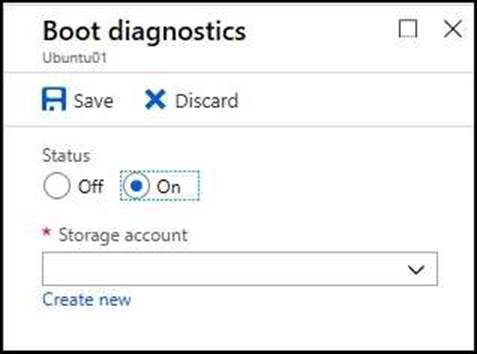
You must restart the virtual machine for the change to take effect.
Reference:
https://docs.microsoft.com/en-us/azure/storage/common/storage-account-create
https://docs.microsoft.com/en-us/azure/virtual-machines/troubleshooting/boot-diagnostics
You have an Azure subscription.
You use Bicep templates to deploy websites and Azure SQL infrastructure.
You need to automate the deployments by using Azure Pipelines and a self-hosted agent that runs on two virtual machines. The solution must minimize administrative effort.
What should you do first?
- A . Create an Azure Automation account.
- B . On each virtual machine, enable a system-assigned managed identity.
- C . Create a user-assigned managed identity.
- D . Create a service principal.