
Practice Free AZ-400 Exam Online Questions
SIMULATION
Task 9
Initialize the default main branch, if it does not exist already.
You need to create a pipeline that will execute a .NET Core build task for the src directory.
The pipeline code must be stored in a new branch named azure-pipelines
The pipeline must run automatically when a pull request against the mam branch is created or updated.
Step 1: Initialize the main Branch
In your Azure DevOps Project (Project1), navigate to Repos.
In the left menu, click Files.
If you see a message like “This repository is empty,” click Initialize.
Create a README.md file (or another file) and set the default branch name to main.
Click Initialize.
If the main branch already exists, you can skip this step.
Step 2: Create a New Branch for the Pipeline
In Repos > Files, click on the Branches tab.
Click New branch.
Enter:
Branch name: azure-pipelines
Based on: main
Click Create.
This creates a new branch named azure-pipelines from main.
Step 3: Create the Pipeline YAML File in the New Branch
Switch to the azure-pipelines branch.
In Files, click New file.
Name the file: azure-pipelines.yml.
Step 4: Write the YAML Pipeline for .NET Core Build
Here’s a sample YAML file:
trigger: none
pr:
branches:
include:
– main
pool:
vmImage: ‘windows-latest’
variables:
buildConfiguration: ‘Release’
steps:
– task: UseDotNet@2
displayName: ‘Install .NET Core SDK’ inputs:
packageType: ‘sdk’
version: ‘8.x’ # Or specify the exact version of .NET Core SDK you need
installationPath: $(Agent.ToolsDirectory)/dotnet
– script: dotnet build src –configuration $(buildConfiguration)
displayName: ‘Build .NET Core project’
This pipeline:
Runs only when a pull request is created or updated targeting the main branch.
Uses the windows-latest agent.
Installs the .NET SDK and builds the project in the src directory.
Step 5: Commit the Pipeline File
In the bottom commit message box:
Message: Add PR-triggered pipeline for .NET Core build
Ensure the branch is set to azure-pipelines.
Click Commit.
Step 6: Create the Pipeline in Azure DevOps
In the left menu, click Pipelines.
Click New pipeline.
Select:
Azure Repos Git.
Select your repository.
Choose Existing Azure Pipelines YAML file.
In the branch selector, choose the azure-pipelines branch.
Select the YAML file path (azure-pipelines.yml).
Click Continue and Run to validate.
Step 7: Test the Pipeline Trigger
Create a new branch (e.g., feature/test-pr).
Push a commit and create a pull request targeting main.
Verify that the pipeline runs automatically for this PR in Pipelines.
You have an Azure subscription that contains an Azure pipeline named Pipeline1 and a GitHub repository named Repo1, Repo1 contains Bicep modules. Pipeline1 deploys Azure resources by using the Bicep modules.
You need to ensure that all releases comply with Azure Policy before they are deployed to production.
What should you do?
- A . Configure a deployment gate for Pipeline’ include the Azure DevOps Security and compliance assessment task.
- B . Create an Azure DevOps build runs on the creation of a pull request assesses the code tor compliance.
- C . To Pipeline1, add a step that runs a.
What If deployment before the deployment step. - D . Configure a deployment gate for Pipeline’ that uses Azure Automation to run a.
What If deployment
DRAG DROP
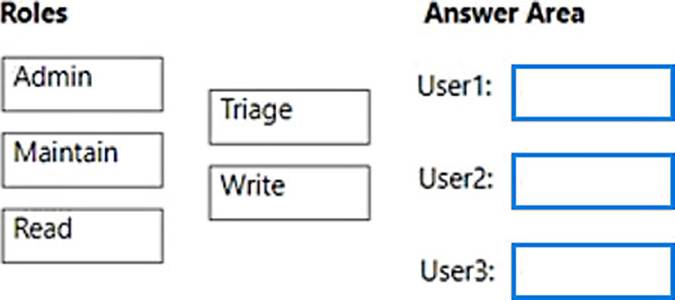
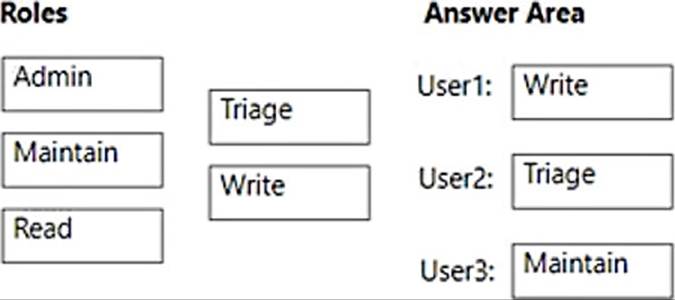
You have a GitHub organization that contains three users named User 1. User2. and User3. You have a project that contains a repository named repo1. You need to configure permissions for repo1.
The solution must meet the following requirements:
• Ensure that User 1 can actively push to repo1.
• Ensure that Usef2 can manage issues and pull requests for repo1.
• Ensure that User3 can manage repo1.
• Prevent User3 from accessing sensitive data in repo1.
Which role should you assign to each use?
HOTSPOT
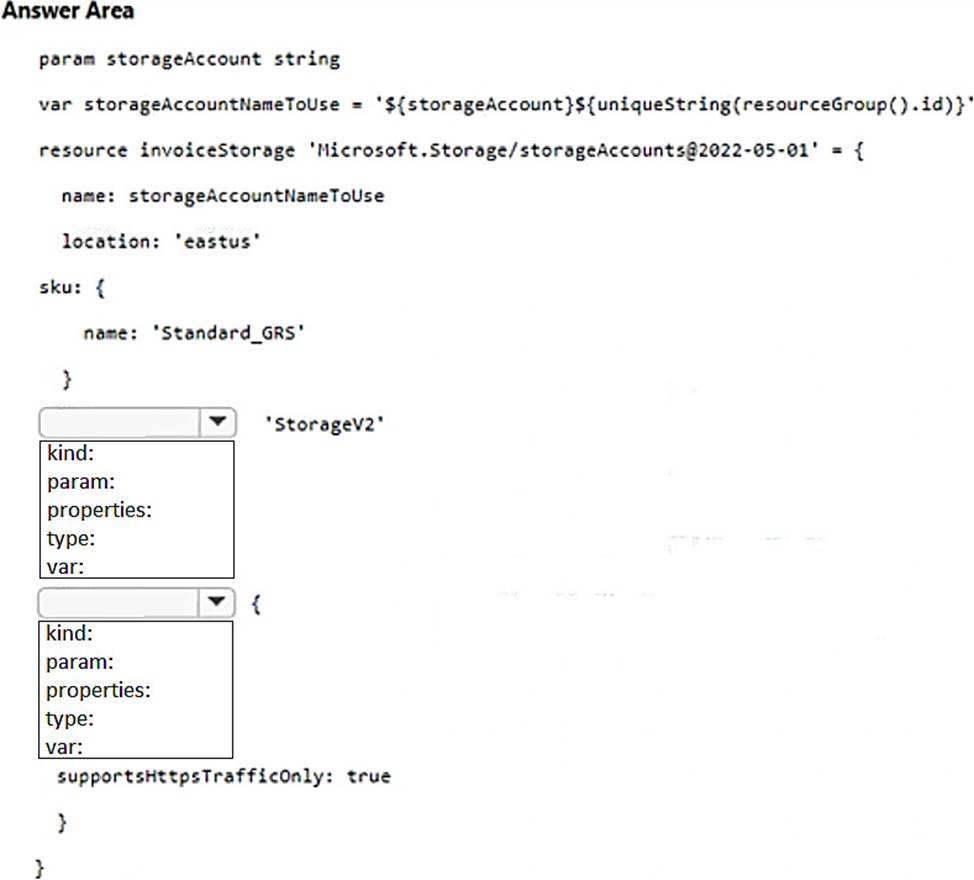
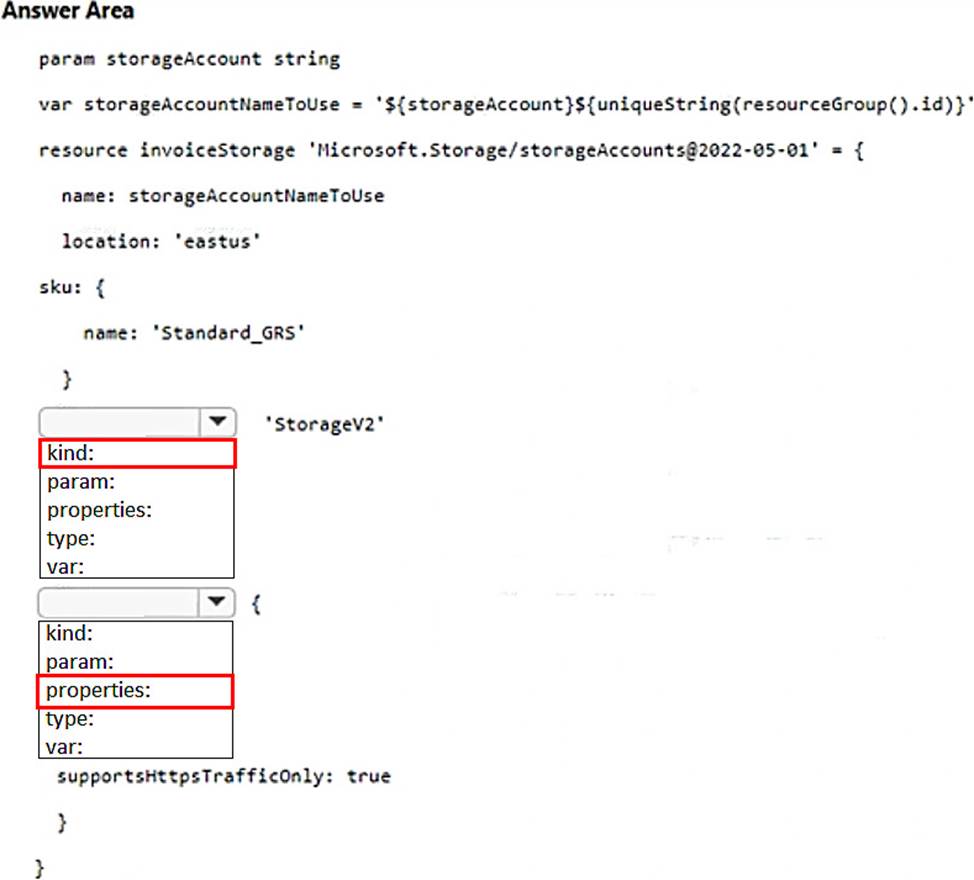
You have an Azure subscription.
You need to create a storage account by using a Bicep file.
How should you complete the file? To answer, select the appropriate options in the answer area. NOTE: Each correct selection is worth one point.
You are developing an open source solution that uses a GitHub repository.
You create a new public project in Azure DevOps.
You plan to use Azure Pipelines for continuous build. The solution will use the GitHub Checks API.
Which authentication type should you use?
- A . a personal access token
- B . SAML
- C . GitHub App
- D . OAuth
C
Explanation:
https://docs.microsoft.com/en-us/azure/devops/pipelines/repos/github?view=azure-devops&tabs=yaml
https://developer.github.com/v3/checks/
Topic 5, Labs & Tasks
SIMULATION
Task 1
You need to ensure that an Azure Web App named az400-38443478-main can retrieve secrets from an Azure key vault named az400-3844J478-kv1 by using a system managed identity The solution must use the principle of least privilege.
Enable a System Managed Identity for the Azure Web App:
Navigate to the Azure Portal.
Go to the Azure Web Appaz400-38443478-main.
SelectIdentityunder theSettingssection.
In theSystem assignedtab, switch theStatustoOn.
ClickSaveto apply the changes.
Grant the Web App Access to the Key Vault:
Go to the Azure Key Vaultaz400-3844J478-kv1.
SelectAccess policiesunder theSettingssection.
Click onAdd Access Policy.
ChooseSecret permissionsand selectGetandList. This grants the app the ability to read secrets, adhering to the principle of least privilege.
Click onSelect principal, search for your Web App nameaz400-38443478-main, and select it.
ClickAddto add the policy.
Don’t forget to clickSaveto save the access policy changes.
Retrieve Secrets in the Web App Code:
In your Web App’s code, use the Azure SDK to retrieve the secrets. For example, in a .NET application,you can use theAzure.IdentityandAzure.Security.KeyVault.Secretsnamespaces.
Utilize theDefaultAzureCredentialclass which will automatically use the system managed identity when running on Azure.
using Azure.Identity;
usingAzure.Security.KeyVault.Secrets;
var client = new SecretClient(new Uri("https://az400-3844J478-kv1.vault.azure.net/"), new DefaultAzureCredential());
KeyVaultSecret secret = await client.GetSecretAsync("my-secret-name"); string secretValue =secret.Value;
Replace"my-secret-name"with the actual name of the secret you want to retrieve.
By following these steps, your Azure Web App will be able to securely retrieve secrets from the Azure Key Vault using a system managed identity, without needing to store credentials in the code, and adhering to the principle of least privilege. Remember to replace the placeholder names with the actual names of your Web App and Key Vault.
DRAG DROP
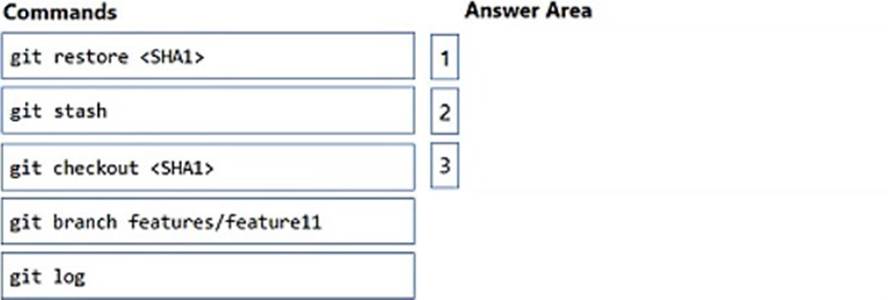
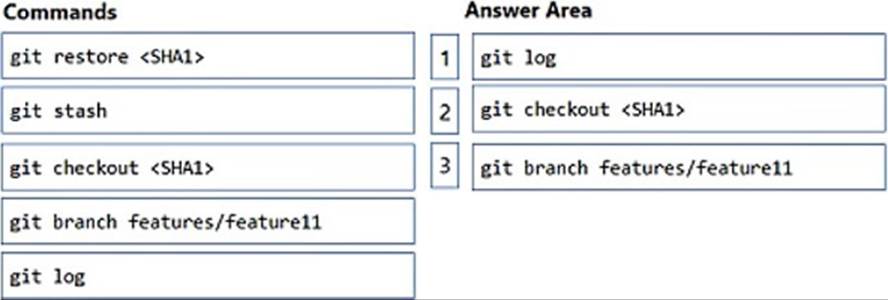
You have an Azure Repos repository namedrepo1.
You delete a branch named features/feature11.
You need to recover the deleted branch.
Which three commands should you run in sequence? To answer, move the appropriate commands from the list of commands to the answer area and arrange them in the correct order.
Your company is building a new solution in Java.
The company currently uses a SonarQube server to analyze the code of .NET solutions.
You need to analyze and monitor the code quality of the Java solution.
Which task types should you add to the build pipeline?
- A . Chef
- B . Gradle
- C . Octopus
- D . Gulp
B
Explanation:
SonarQube is a set of static analyzers that can be used to identify areas of improvement in your code. It allows you to analyze the technical debt in your project and keep track of it in the future. With Maven and Gradle build tasks, you can run SonarQube analysis with minimal setup in a new or existing Azure DevOps Services build task.
Reference: https://docs.microsoft.com/en-us/azure/devops/java/sonarqube?view=azure-devops
HOTSPOT
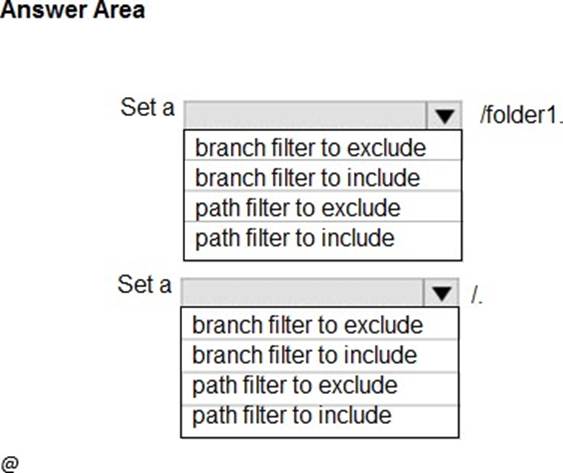
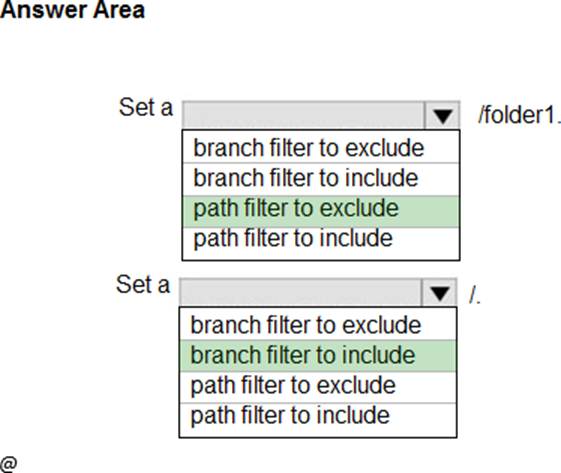
How should you configure the filters for the Project5 trigger? To answer, select the appropriate option in the answer area. NOTE: Each correct selection is worth one point.
Explanation:
Scenario:

Reference: https://docs.microsoft.com/en-us/azure/devops/pipelines/build/triggers
HOTSPOT
How should you configure the filters for the Project5 trigger? To answer, select the appropriate option in the answer area. NOTE: Each correct selection is worth one point.
Explanation:
Scenario:
Reference: https://docs.microsoft.com/en-us/azure/devops/pipelines/build/triggers