
Practice Free AZ-400 Exam Online Questions
You need to the merge the POC branch into the main branch. The solution must meet the technical requirements.
Which command should you run?
- A . git push
- B . git merge –squash
- C . git merge –allow-unrelated-histories
- D . git rebase
Note: This question is part of * series of questions that present the same scenario. Each question in the series contains a unique solution that might meet the stated goals. Some question sett might have more than one correct solution, while others might not have a correct solution.
After you answer a question in this section, you will NOT be able to return to it. As a result, these questions will not appear in the review screen.
You have an approval process that contains a condition. The condition requires that releases be approved by a team leader before they are deployed.
You have a poky stating that approvals must occur within eight hour.
You discover that deployments fail if the approvals take longer than two hours.
You need to ensure that the deployments only fail if the approvals take longer than eight hours. Solution: From Post-deployment conditions, you modify the Time between re-evaluation of gates option.
Does this meet the goal?
- A . Yes
- B . No
B
Explanation:
Use a gate From Pre-deployment conditions instead.
Reference: https://docs.microsoft.com/en-us/azure/devops/pipelines/release/approvals/gates
Note: This question is part of a series of questions that present the same scenario. Each question in the series contains a unit solution that might meet the stated goals. Some question sets might have more than one correct solution, while others might not have a correct solution.
After you answer a question in this section, you will NOT be able to return to it. As a result, these questions will not appear if the review screen.
You use an Azure Pipelines pipeline to build and release web apps.
You need to configure the pipeline to meet the following requirements:
• Only run when there is a change in the /webapp folder.
• Only run when a pr is created.
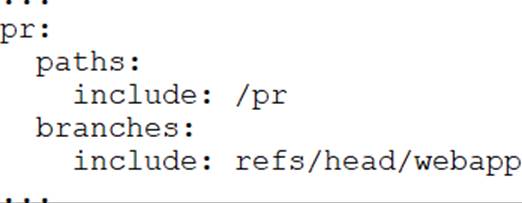
Solution: You configure the pipeline definition by using the following elements.
Does this meet the goal?
- A . Yes
- B . No
HOTSPOT
HOTSPOT
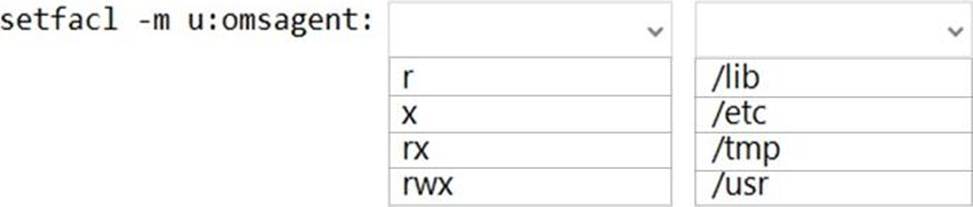
You have an Azure virtual machine named VM1 that runs Linux.
You plan to deploy the Desired State Configuration (DSC) extension to VM1.
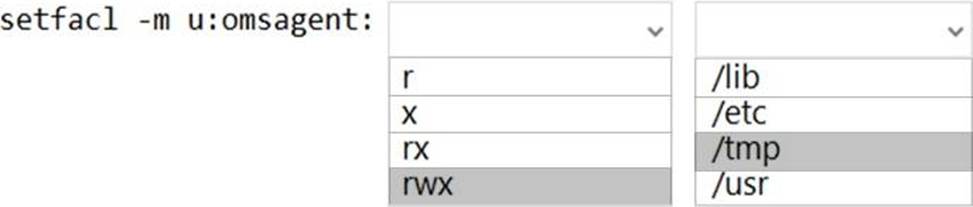
You need to grant the Log Analytics agent the appropriate directory permissions.
How should you complete the command? To answer, select the appropriate options in the answer area. NOTE: Each correct selection is worth one point.
Explanation:
Box 1: rwx
The Log Analytics agent for Linux runs as the omsagent user. To grant >write permission to the omsagent user, run the command setfacl -m u:omsagent:rwx /tmp.
Box 2: /tmp
Deploying DSC to a Linux node uses the /tmp folder.
Reference: https://docs.microsoft.com/en-us/azure/automation/automation-dsc-onboarding
You are building a Microsoft ASP.NET application that requires authentication.
You need to authenticate users by using Azure Active Directory (Azure AD).
What should you do first?
- A . Create a membership database in an Azure SQL database.
- B . Assign an enterprise application to users and groups.
- C . Create an app registration in Azure AD.
- D . Configure the application to use a SAML endpoint.
- E . Create a new OAuth token from the application.
C
Explanation:
Register your application to use Azure Active Directory. Registering the application means that your developers can use Azure AD to authenticate users and request access to user resources such as email, calendar, and documents.
Reference: https://docs.microsoft.com/en-us/azure/active-directory/manage-apps/developer-guidance-for-integrating-applications
https://docs.microsoft.com/en-us/azure/active-directory/develop/quickstart-v2-aspnet-webapp
You are building a Microsoft ASP.NET application that requires authentication.
You need to authenticate users by using Azure Active Directory (Azure AD).
What should you do first?
- A . Create a membership database in an Azure SQL database.
- B . Assign an enterprise application to users and groups.
- C . Create an app registration in Azure AD.
- D . Configure the application to use a SAML endpoint.
- E . Create a new OAuth token from the application.
C
Explanation:
Register your application to use Azure Active Directory. Registering the application means that your developers can use Azure AD to authenticate users and request access to user resources such as email, calendar, and documents.
Reference: https://docs.microsoft.com/en-us/azure/active-directory/manage-apps/developer-guidance-for-integrating-applications
https://docs.microsoft.com/en-us/azure/active-directory/develop/quickstart-v2-aspnet-webapp
HOTSPOT
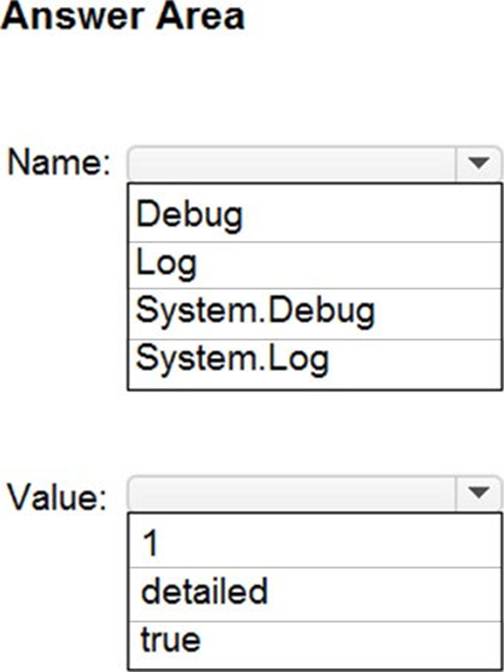
You have a project in Azure DevOps that contains a Continuous Integration/Continuous Deployment (CI/CD) pipeline.
You need to enable detailed logging by defining a pipeline variable.
How should you configure the variable? To answer, select the appropriate options in the answer area. NOTE: Each correct selection is worth one point.
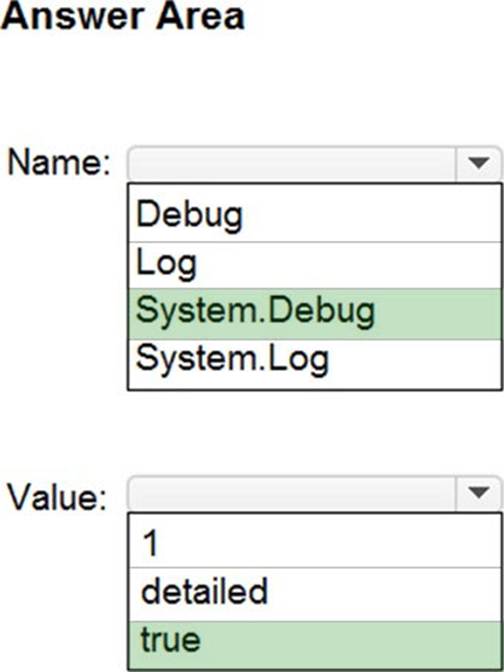
HOTSPOT
You have a project in Azure DevOps that contains a Continuous Integration/Continuous Deployment (CI/CD) pipeline.
You need to enable detailed logging by defining a pipeline variable.
How should you configure the variable? To answer, select the appropriate options in the answer area. NOTE: Each correct selection is worth one point.
You are integrating Azure Pipelines and Microsoft Teams.
You install the Azure Pipelines app in Microsoft Teams.
You have an Azure DevOps organization named Contoso that contains a project name Project1.
You subscribe to Project1 in Microsoft Teams.
You need to ensure that you only receive events about failed builds in Microsoft Teams.
What should you do first?
- A . From Microsoft Teams, tun @azure pipelines subscribehttps://dev.azure.com/Contoso/Project1.
- B . From Microsoft Teams, run @azure pipelines subscriptions.
- C . From Azure Pipelines, enable continuous integration for Project1.
- D . From Azure Pipelines, add a Publish Build Artifacts task to Project1.
A
Explanation:
To start monitoring all pipelines in a project, use the following command inside a channel:
@azure pipelines subscribe [project url]
The project URL can be to any page within your project (except URLs to pipelines).
For example:
@azure pipelines subscribe https://dev.azure.com/myorg/myproject/
Reference: https://docs.microsoft.com/en-us/azure/devops/pipelines/integrations/microsoft-teams
You use Azure Pipelines to build and deploy an app named Appl. You plan to monitor App1 by using Application Insights. You create an Application Insights instance named All. You need to configure App1 to use All.
Which file should you modify?
- A . appsettings.son
- B . launchSettings.json
- C . startup.cs
- D . project.son