
Practice Free AZ-400 Exam Online Questions
DRAG DROP
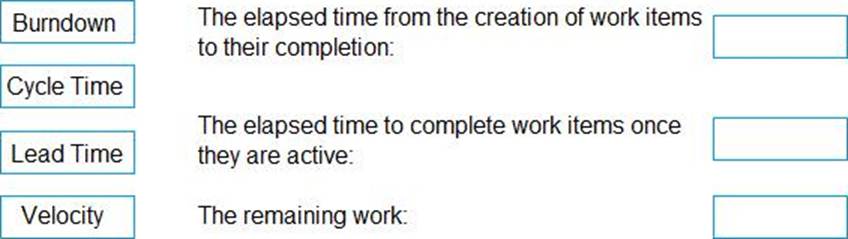
You need to recommend project metrics for dashboards in Azure DevOps.
Which chart widgets should you recommend for each metric? To answer, drag the appropriate chart widgets to the correct metrics. Each chart widget may be used once, more than once, or not at all. You may need to drag the split bar between panes or scroll to view content. NOTE: Each correct selection is worth one point.
Explanation:
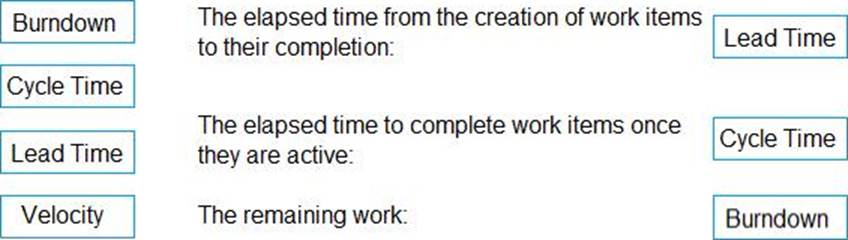
Box 1: Lead time
Lead time measures the total time elapsed from the creation of work items to their completion.
Box 2: Cycle time
Cycle time measures the time it takes for your team to complete work items once they begin actively working on them.
Box 3: Burndown
Burndown charts focus on remaining work within a specific time period.
Incorrect Answers:
A: guide for determining how well the team estimates and meets their planned commitments
Reference:
https://docs.microsoft.com/en-us/azure/devops/report/dashboards/velocity-guidance?view=vsts
https://docs.microsoft.com/en-us/azure/devops/report/dashboards/cycle-time-and-lead-time?view=vsts
https://docs.microsoft.com/en-us/azure/devops/report/dashboards/configure-burndown-burnup-widgets?view=vsts
Your company uses Service Now for incident management.
You develop an application that runs on Azure.
The company needs to generate a ticket in Service Now when the application fails to authenticate.
Which Azure Log Analytics solution should you use?
- A . Application Insights Connector
- B . Automation & Control
- C . IT Service Management Connector (ITSM)
- D . Insight & Analytics
C
Explanation:
The IT Service Management Connector (ITSMC) allows you to connect Azure and a supported IT Service Management (ITSM) product/service.
ITSMC supports connections with the following ITSM tools:
ServiceNow
System Center Service Manager
Provance
Cherwell
With ITSMC, you can
Create work items in ITSM tool, based on your Azure alerts (metric alerts, Activity Log alerts and Log Analytics alerts).
Optionally, you can sync your incident and change request data from your ITSM tool to an Azure Log Analytics workspace.
Reference: https://docs.microsoft.com/en-us/azure/azure-monitor/platform/itsmc-overview
SIMULATION
You have an Azure function hosted in an App Service plan named az400-9940427-func1.
You need to configure az400-9940427-func1 to upgrade the functions automatically whenever new code is committed to the master branch of https://github.com/Azure-Samples/functions-quickstart.
To complete this task, sign in to the Microsoft Azure portal.
SIMULATION
Task 10
You need to create a variable group named varGroup1 that will contain the following variables and default values:
• username: Userl-48901628
• password: aFpJ2j+6M!
The PASSWORD variable must be secret.
Step 1: Navigate to Library
In your Azure DevOps Project (Project1), click on the Pipelines section in the left menu.
In the Pipelines submenu, click on Library.
Step 2: Create a New Variable Group
Click on the + Variable group button.
Enter the Name:
nginx
Copy
varGroup1
Step 3: Add Variables
Add the first variable:
Click Add.
In the Name field, enter:
nginx
Copy
username
In the Value field, enter:
Copy
Userl-48901628
Add the second variable:
Click Add again.
In the Name field, enter:
nginx
Copy
password
In the Value field, enter:
Copy
aFpJ2j+6M!
Check the box Keep this value secret.
Step 4: Save the Variable Group
Click Save at the top to save the variable group.
DRAG DROP
You have an Azure subscription.
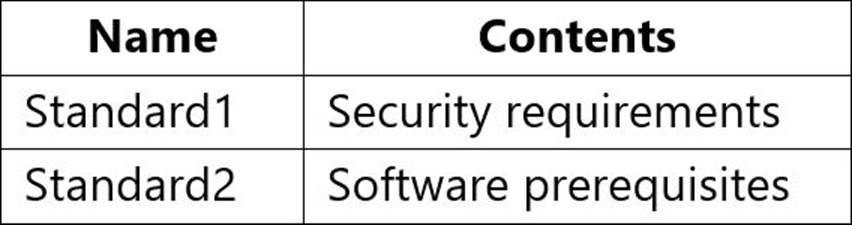
You have the standards shown in the following table.
You plan to use Azure Pipelines to build and release web apps.
You need to recommend a solution to build the pipelines.
The solution must meet the following requirements:
• Ensure that all new pipelines meet the security requirements defined in Standards
• Ensure that the first stage of all new pipelines contains the software prerequisites defined in Standard2.
• Minimize administrative effort.
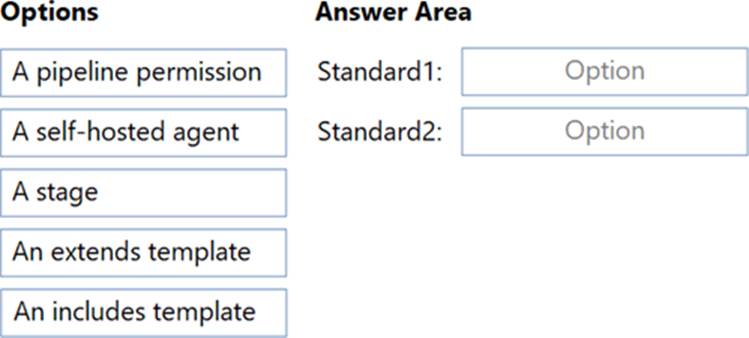
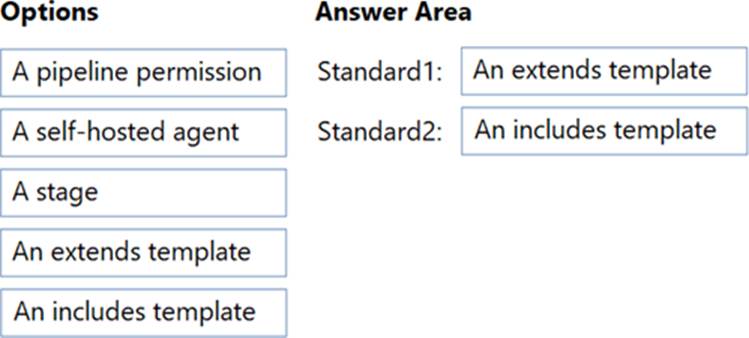
What should you use to implement each standard? To answer, drag the appropriate options to the correct standards. Each component may be used once, more than once, or not at all. You may need to drag the split bar between panes or scroll to view content. NOTE: Each correct selection is worth one point.
DRAG DROP
You have an Azure subscription.
You have the standards shown in the following table.
You plan to use Azure Pipelines to build and release web apps.
You need to recommend a solution to build the pipelines.
The solution must meet the following requirements:
• Ensure that all new pipelines meet the security requirements defined in Standards
• Ensure that the first stage of all new pipelines contains the software prerequisites defined in Standard2.
• Minimize administrative effort.
What should you use to implement each standard? To answer, drag the appropriate options to the correct standards. Each component may be used once, more than once, or not at all. You may need to drag the split bar between panes or scroll to view content. NOTE: Each correct selection is worth one point.
SIMULATION
Task 11
You need to write a KQL query that will count the number of inbound requests for each source IP address, for any connection made during the last three months of 2021. Open Azure Data Explorer by using the following link:
https//dataexploter azure.com/clusters/help/databases/Securiitylogs
The requests are contained in a table named InboundBrowsing in the Securitylogs connection.
The query must return two columns named NumberOfRequests and SourcelP.
Export the query result to C:Samples
Open Azure Data Explorer:
Navigate to Azure Data Explorer and sign in with your credentials.
Access the Securitylogs Database:
Open the Securitylogs database.
Write the Query:
Use the following KQL query to count the number of inbound requests for each source IP address:
InboundBrowsing
| where Timestamp between (datetime(2021-10-01) .. datetime(2021-12-31))
| summarize NumberOfRequests = count() by SourceIP
| project SourceIP, NumberOfRequests
Step 2: Export the Query Results
Run the Query:
Execute the query in Azure Data Explorer.
Export the Results:
Once the query results are displayed, click on the Export button.
Choose the export format (e.g., CSV) and specify the export path as C:Samples.
By following these steps, you will have successfully written a KQL query to count the number of inbound requests for each source IP address during the last three months of 2021 and exported the results to C:Samples
DRAG DROP
You need to recommend a procedure to implement the build agent for Project1.
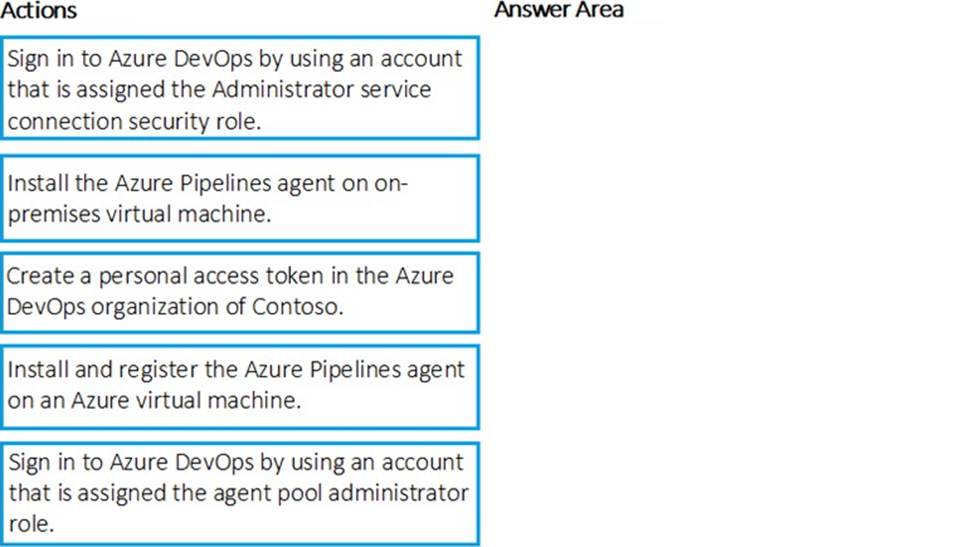
Which three actions should you recommend be performed in sequence? To answer, move the appropriate actions from the list of actions to the answer area and arrange them in the correct order.
Explanation:
Scenario:

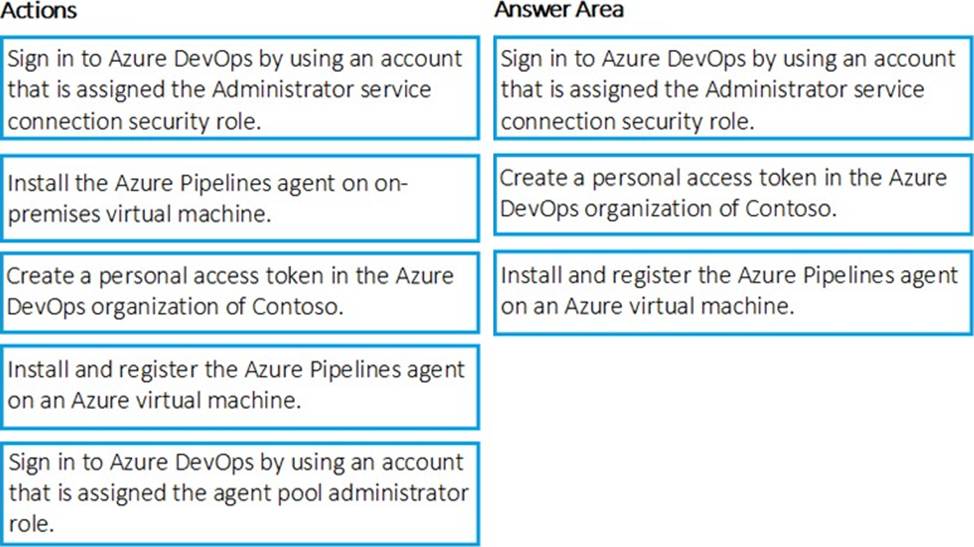
Step 1: Sign in to Azure Develops by using an account that is assigned the Administrator service connection security role.
Note: Under Agent Phase, click Deploy Service Fabric Application. Click Docker Settings and then click Configure Docker settings. In Registry Credentials Source, select Azure Resource Manager Service Connection. Then select your Azure subscription.
Step 2: Create a personal access token..
A personal access token or PAT is required so that a machine can join the pool created with the Agent Pools (read, manage) scope.
Step 3: Install and register the Azure Pipelines agent on an Azure virtual machine.
By running a Azure Pipeline agent in the cluster, we make it possible to test any service, regardless of type.
Reference:
https://docs.microsoft.com/en-us/azure/service-fabric/service-fabric-tutorial-deploy-container-app-with-cicd-vsts
https://mohitgoyal.co/2019/01/10/run-azure-devops-private-agents-in-kubernetes-clusters/
HOTSPOT
Your company is building a new web application.
You plan to collect feedback from pilot users on the features being delivered.
All the pilot users have a corporate computer that has Google Chrome and the Microsoft Test & Feedback extension installed. The pilot users will test the application by using Chrome.
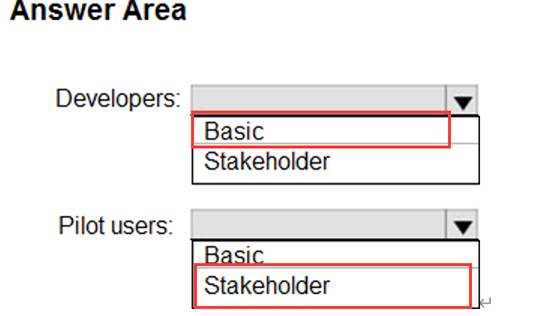
You need to identify which access levels are required to ensure that developers can request and gather feedback from the pilot users. The solution must use the principle of least privilege.
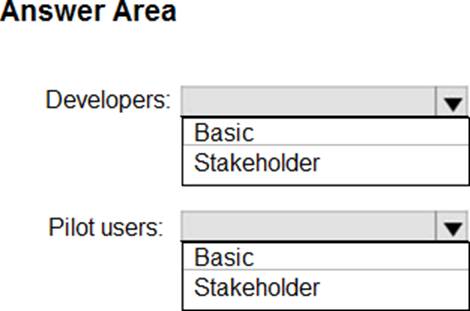
Which access levels m Azure DevOps should you identify? To answer, select the appropriate options in the answer area. NOTE: Each correct selection is worth one point.
Explanation:
Box 1: Basic
Assign Basic to users with a TFS CAL, with a Visual Studio Professional subscription, and to users for whom you are paying for Azure Boards & Repos in an organization.
Box 2: Stakeholder
Assign Stakeholders to users with no license or subscriptions who need access to a limited set of
features.
Note:
You assign users or groups of users to one of the following access levels:
Basic: provides access to most features
VS Enterprise: provides access to premium features
Stakeholders: provides partial access, can be assigned to unlimited users for free
Reference: https://docs.microsoft.com/en-us/azure/devops/organizations/security/access-levels?view=vsts
Topic 2, Contoso Case Study: 2
Overview
Existing Environment
Contoso, Ltd. is a manufacturing company that has a main office in Chicago.
Contoso plans to improve its IT development and operations processes by implementing Azure DevOps principles. Contoso has an Azure subscription and creates an Azure DevOps organization.
The Azure DevOps organization includes:
• The Docker extension
• A deployment pool named Pool7 that contains 10 Azure virtual machines that run Windows Server 2016
The Azure subscription contains an Azure Automation account.
Planned Changes
Contoso plans to create projects in Azure DevOps as shown in the following table.
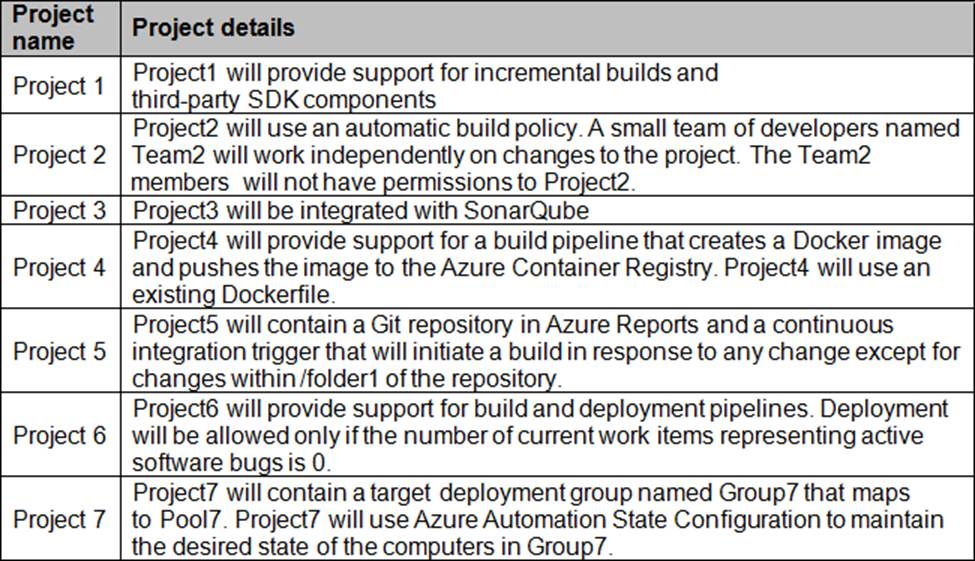
Technical Requirements
Contoso identities the following technical requirements:
• Implement build agents rot Project 1.
• Whenever possible, use Azure resources
• Avoid using deprecated technologies
• Implement a code flow strategy for Project2 that will:
• Enable Team 2 to submit pull requests for Project2.
• Enable Team 2 to work independently on changes to a copy of Project?
• Ensure that any intermediary changes performed by Tram2 on a copy of Project2 will be subject to the same restrictions as the ones defied in the build policy of Project2.
• Whenever possible. Implement automation and minimize administrative effort.
• Implement Protect3, Project5, Project6, and Project7 based on the planned changes.
• Implement Project4 and configure the project to push Docker images to Azure Container Reentry.
DRAG DROP
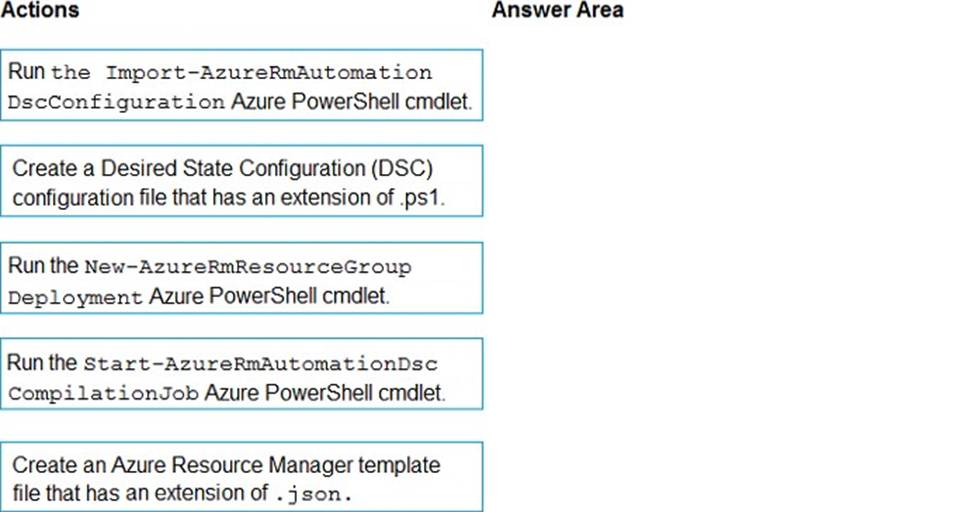
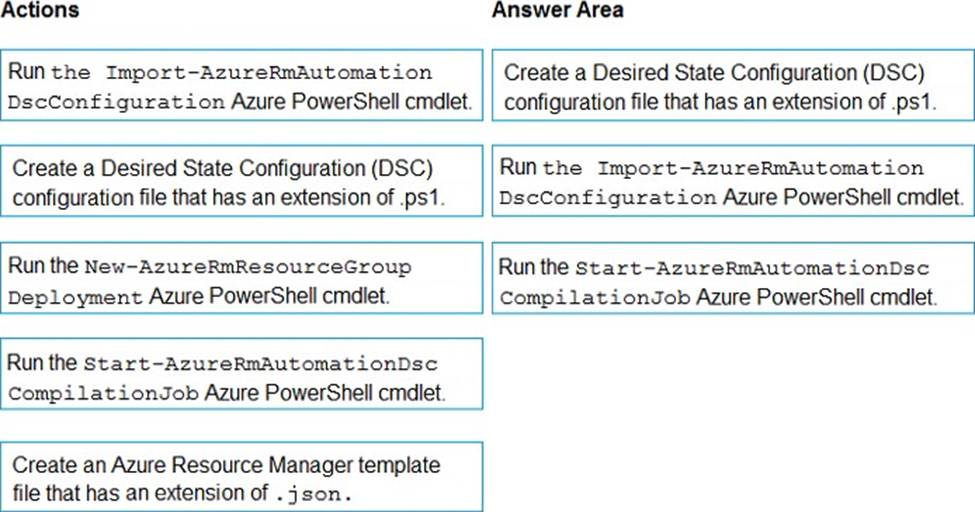
You need to configure Azure Automation for the computer in Group7.
Which three actions should you perform in sequence? To answer, move the appropriate actions from the list of actions to the answer area and arrange them in the correct order.
Explanation:
Step 1: Create a Desired State Configuration (DSC) configuration file that has an extension of .ps1.
Step 2: Run the Import-AzureRmAutomationDscConfiguration Azure Powershell cmdlet The Import-AzureRmAutomationDscConfiguration cmdlet imports an APS Desired State Configuration (DSC) configuration into Azure Automation. Specify the path of an APS script that contains a single DSC configuration.
Example:
PS C:>Import-AzureRmAutomationDscConfiguration -AutomationAccountName "Contoso17"-ResourceGroupName "ResourceGroup01" -SourcePath "C:DSCclient.ps1" – Force
This command imports the DSC configuration in the file named client.ps1 into the Automation account named Contoso17. The command specifies the Force parameter. If there is an existing DSC configuration, this command replaces it.
Step 3: Run the Start-AzureRmAutomationDscCompilationJob Azure Powershell cmdlet The Start-AzureRmAutomationDscCompilationJob cmdlet compiles an APS Desired State Configuration (DSC) configuration in Azure Automation.
References:
https://docs.microsoft.com/en-us/powershell/module/azurerm.automation/import-azurermautomationdscconfiguration
https://docs.microsoft.com/en-us/powershell/module/azurerm.automation/start-azurermautomationdsccompilationjob