
Practice Free 220-1201 Exam Online Questions
Which of the following should a technician check when the display of a computer Is flickering?
- A . LCD type
- B . Refresh rate
- C . Screen resolution
- D . Pixel density
B
Explanation:
Display flickering is most commonly caused by an incorrect or unstable refresh rate setting. The refresh rate is the number of times per second (measured in Hz) that a monitor redraws the image. CompTIA A+ teaches that LCD, LED, and especially older CRT displays can exhibit flickering if the refresh rate is set too low or to a value unsupported by the monitor.
For modern displays, typical refresh rates are 60 Hz, 75 Hz, 120 Hz, 144 Hz, and higher. If the refresh rate is mismatched―such as manually set above the monitor’s rated capability―the screen may flicker, blank intermittently, or show instability. Similarly, if the refresh rate is set too low, the user may perceive visible flicker, eye strain, or shimmering on the display.
Checking and adjusting the refresh rate through the operating system’s display settings (or GPU control panel) is the first and most direct troubleshooting step for flickering issues.
The LCD type (A) has no bearing on flickering once installed. Screen resolution (C) affects clarity and scaling but does not cause flicker by itself. Pixel density (D) is a hardware characteristic and cannot cause flickering.
Thus, the correct component to check when diagnosing display flicker is the refresh rate.
SIMULATION
A small ISP has hired a new technician Joe, the new technician, is being trained to configure customers* home networks The trailing instructor gives me technician a starter kit with cables, cable ends, and other network equipment and asks mm to build a working network.
The computer should be connected to have internet connectivity and the phone should be connected to have a dial tone.
INSTRUCTIONS
Use the appropriate cables. cable ends, tools and equipment to configure the network ana connect an components accordingly
There are 3 steps and the simulation starts on step 1.
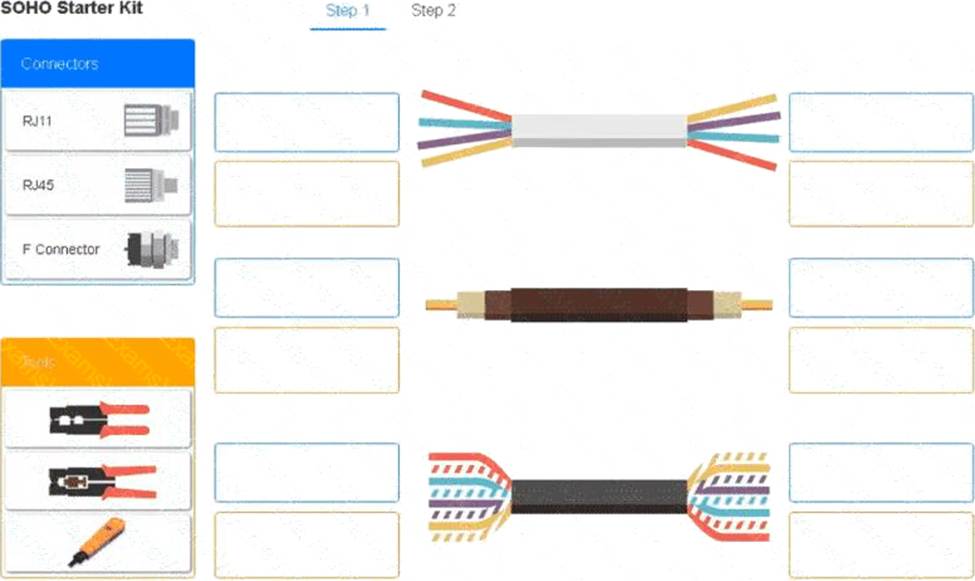
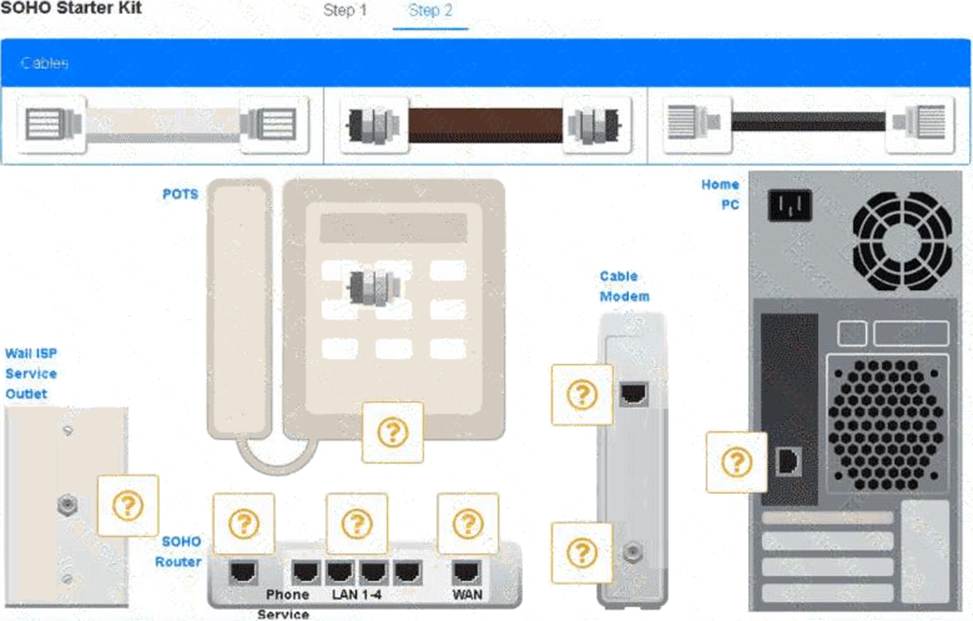
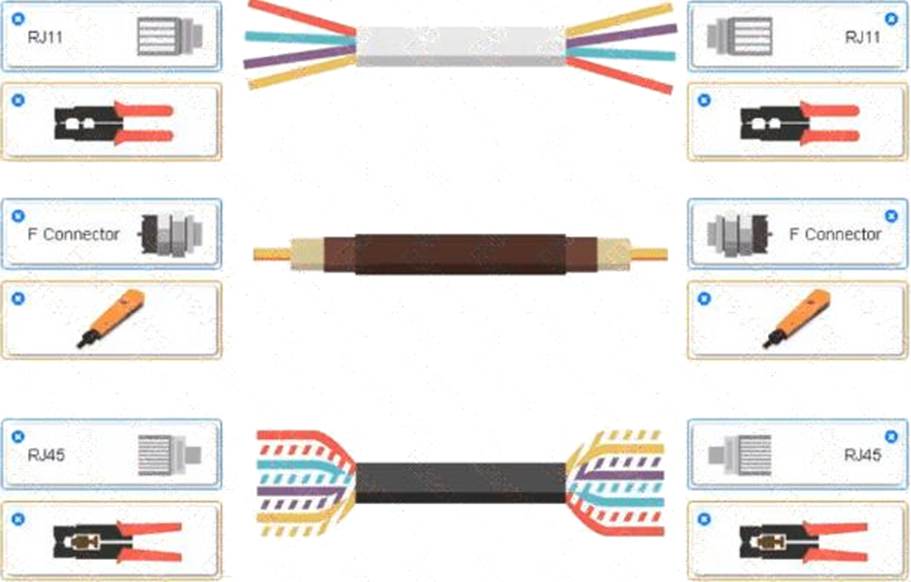
A group of wires with different colors AI-generated content may be incorrect.
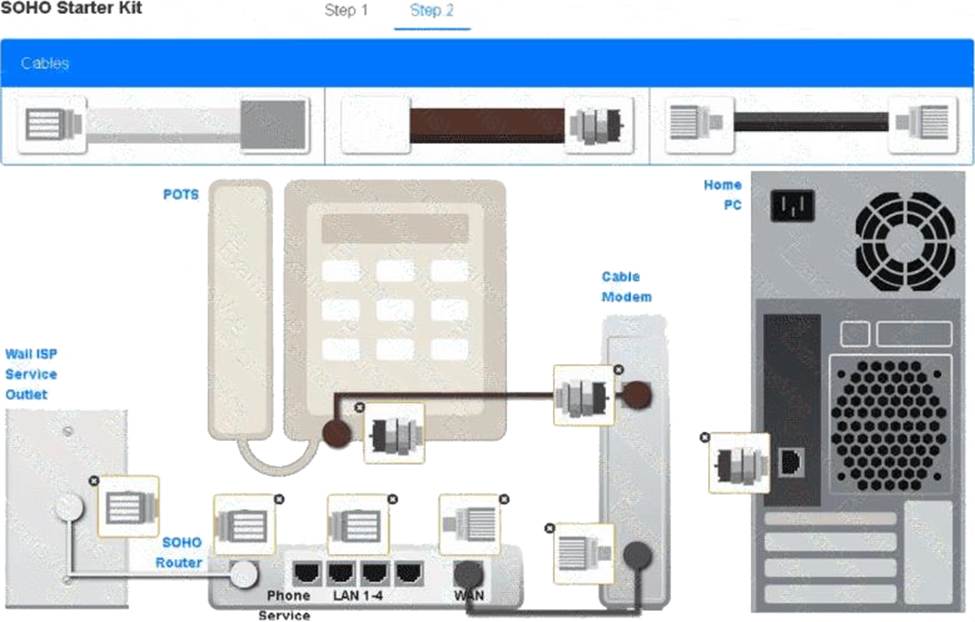
A screenshot of a computer AI-generated content may be incorrect.
A user is having issues when charging a device with a Lightning cable. The cable is not recognized when it is plugged into the device. This issue is usually resolved by flipping the cable over. This issue does not occur with other devices of the same type.
Which of the following would most likely cause the issue?
- A . The device needs to be restarted.
- B . The battery may be swelling and needs inspection.
- C . The cable is failing and needs to be replaced
- D . The charging port is dirty or damaged
D
Explanation:
If flipping the cable helps but the problem is isolated to this device (not others of the same type), the most likely cause is a dirty or damaged charging port on the device itself. Dirt or debris inside the port can prevent a good electrical connection, causing the cable to work intermittently.
Reference: CompTIA A+ Certification Exam Core 1 Objectives C Domain 1.0 Mobile Devices C Objective 1.6: Troubleshoot common mobile device issues.
A technician is troubleshooting an all-in-one laser printer that prints a vertical line when making copies and scans. When users print or receive faxes, the output from the printer is correct.
Which of the following should the technician examine to determine the cause of the issue?
- A . The pickup rollers
- B . The corona wire
- C . The document feeder
- D . The drum assembly
C
Explanation:
Since the issue only occurs during scanning and copying (not printing or faxing), the problem is isolated to the document feeder. A vertical line is typically caused by debris or damage on the glass under the ADF (Automatic Document Feeder), not on components related to printing.
Reference: "CompTIA A+ Complete Study Guide" by Quentin Docter C Chapter 4, page 261.
Which of the following could a user employ to maximize module bandwidth when selecting memory for a high-end gaming computer?
- A . Error correction
- B . RAM voltage
- C . Channel configuration
- D . Physical module size
C
Explanation:
Channel configuration (e.g.,dual-channel, quad-channel) determines how memory modules communicate with the memory controller. Using matched pairs in dual- or quad-channel setups can significantly increase memory bandwidth, improving performance especially for gaming and video-intensive tasks.
Option A (Error correction): ECC RAM is used in servers for reliability, not performance or gaming.
Option B (RAM voltage): Affects compatibility and overclocking but not bandwidth.
Option D (Physical size): Refers to module form factor (e.g., DIMM, SO-DIMM) and does not impact bandwidth.
CompTIA A+ Core 1 Exam Objective
Reference: Objective 3.2: Given a scenario, install RAM types.
Which of the following tools is best to track where an Ethernet cable is patched?
- A . Crimper
- B . Punchdown tool
- C . Cable stripper
- D . Toner probe
D
Explanation:
Atoner probe (also known as a tone generator and probe) is the best tool for tracing and identifying cables in a patch panel or wall jack. The tone generator sends a signal through the wire, and the probe helps locate the cable by detecting the tone.
Option A (Crimper): Used to attach connectors (e.g., RJ-45), not for tracing cables.
Option B (Punch down tool): Used to terminate cables into patch panels or keystone jacks.
Option C (Cable stripper): Used to remove insulation, not to trace cables.
CompTIA A+ Core 1 Exam Objective
Reference: Objective 5.1: Identify basic cable types, their connectors, and their features.
Which of the following wireless networking technologies primarily operates in the 5GHz frequency band?
- A . Bluetooth
- B . 802.11ac
- C . NFC
- D . RFID
B
Explanation:
A technician is troubleshooting stylus issues on identical, company-provided tablets. Users can purchase their own accessories. Some users have no issues, but others report that their styluses charge intermittently and die frequently.
Which of the following is the most likely cause of this issue?
- A . Certain cases are causing charging issues.
- B . The tablets need to be updated.
- C . Some of the tablets have manufacturing defects.
- D . The malfunctioning styluses need firmware updates.
A
Explanation:
The most likely cause is third-party or ill-fitting cases obstructing the contact between the stylus and the tablet charging mechanism. Some cases may not be designed with stylus charging in mind, particularly if users are purchasing their own accessories.
Option B: A software update might fix OS-related issues, but would not typically affect physical charging.
Option C: If some devices had defects, the issue would likely be consistent, not isolated to some users.
Option D: Firmware issues could be a factor but are less likely than physical obstructions when users are using different accessories.
CompTIA A+ Core 1 Exam Objective
Reference: Objective 1.4: Given a scenario, configure settings and use cases for laptops and mobile devices.
A customer has bare-metal servers running Windows, Linux, and Unix. They want consolidation while maintaining isolation and compatibility.
What should the technician recommend?
- A . IaaS
- B . Containers
- C . Type 2 hypervisor
- D . VDI
A
Explanation:
The customer wants to consolidate multiple physical servers running different operating systems, including Windows, Linux, and Unix, while maintaining strong isolation between systems. CompTIA A+ identifies Infrastructure as a Service (IaaS) as the best model for hosting fully isolated virtual machines in a cloud environment, allowing each OS to run independently on its own virtual hardware.
IaaS provides virtualized computing resources―CPU, RAM, networking, and storage―while allowing the customer full control over the OS and application layer. This means Windows, Linux, and Unix VMs can coexist without compatibility concerns because each VM runs its native OS without modification.
Containers (B) are unsuitable because they share the host OS kernel, meaning they cannot run different OS families. A Type 2 hypervisor (C) is workstation-based and not designed for enterprise server consolidation. VDI (D) provides user desktops, not server workload consolidation.
Thus, IaaS is the correct solution for compatibility, isolation, and consolidation across multiple OS types.
After a technician installs a new motherboard, the computer will not start and fails POST. The technician verifies the power supply is functioning as expected, and the CPU is installed correctly.
Which of the following steps should the technician complete next?
- A . Flash the BIOS.
- B . Check the CMOS battery.
- C . Reseat the RAM.
- D . Reinstall the old motherboard.
C
Explanation:
A common reason for a POST failure after a motherboard installation is improperly seated RAM. The system requires working memory to successfully complete POST. Reseating (removing and reinserting) the RAM ensures it’s making proper contact with the motherboard.
Option A: Flashing the BIOS is not possible if the system won’t POST.
Option B: A dead CMOS battery can cause BIOS settings to reset, but it usually won’t prevent POST entirely.
Option D: Reinstalling the old motherboard is premature basic troubleshooting steps should be completed first.
CompTIA A+ Core 1 Exam Objective
Reference: Objective 3.5: Given a scenario, troubleshoot problems related to motherboards, RAM, CPU, and power.