
Practice Free 220-1201 Exam Online Questions
Which of the following is the standard for Wi-Fi 7?
- A . 802.1X
- B . 802.3at
- C . 802.11be
- D . 802.15.1
C
Explanation:
The IEEE standard for Wi-Fi 7 is 802.11be, also known as Extremely High Throughput (EHT). According to CompTIA Core 1 (220-1201) networking standards objectives, each Wi-Fi generation corresponds to a specific IEEE 802.11 amendment. Wi-Fi 7 builds upon Wi-Fi 6/6E by offering significantly higher throughput, lower latency, and improved performance in high-density environments.
Option 802.11be is the only choice that represents a wireless LAN (WLAN) standard. 802.1X is an authentication framework used for network access control, not a Wi-Fi standard. 802.3at defines Power over Ethernet Plus (PoE+), which supplies electrical power over Ethernet cables. 802.15.1 is the IEEE standard for Bluetooth.
CompTIA expects candidates to recognize and differentiate wireless standards and their IEEE designations, especially newer technologies such as Wi-Fi 6, Wi-Fi 6E, and Wi-Fi 7. Identifying 802.11be as Wi-Fi 7 is essential for both exam success and real-world networking scenarios.
Reference: CompTIA A+ Core 1 (220-1201) Official Study Guide C Networking Standards and Wireless Technologies
Which of the following, when combined, are used to make sure a workstation always has the same IP address on a network managed with DHCP?
- A . Creating a new scope
- B . Enabling network address translation
- C . Assigning a reservation
- D . Configuring an automatic private IP address
C
Explanation:
To ensure a workstation always receives the same IP address while still using DHCP, the correct method is to configure a DHCP reservation. A reservation “combines” two key pieces: the workstation’s MAC address (hardware address) and a specific IP address within the DHCP scope. When the workstation requests an address, the DHCP server matches the request to the stored MAC address and consistently assigns the reserved IP each time the device connects. This provides the benefits of DHCP (central management, consistent options like gateway/DNS, easier changes) while giving the workstation a predictable IP, which is often needed for management, monitoring, or firewall rules.
Creating a new scope is used to define an address pool and options for an entire subnet, but it does not guarantee one device always gets the same IP. NAT translates private IPs to public IPs and is unrelated to consistent DHCP assignments for a specific workstation. APIPA automatic private IP addressing 169.254.x.x occurs when DHCP fails and is not a controlled way to ensure a consistent, usable network address. Therefore, assigning a reservation is the correct answer.
HOTSPOT
A customer built a computer for gaming, sourcing individual components and then assembling the system. The OS starts up, but within a few minutes the machine locks up. The customer brought the computer to a technician to diagnose the issue.
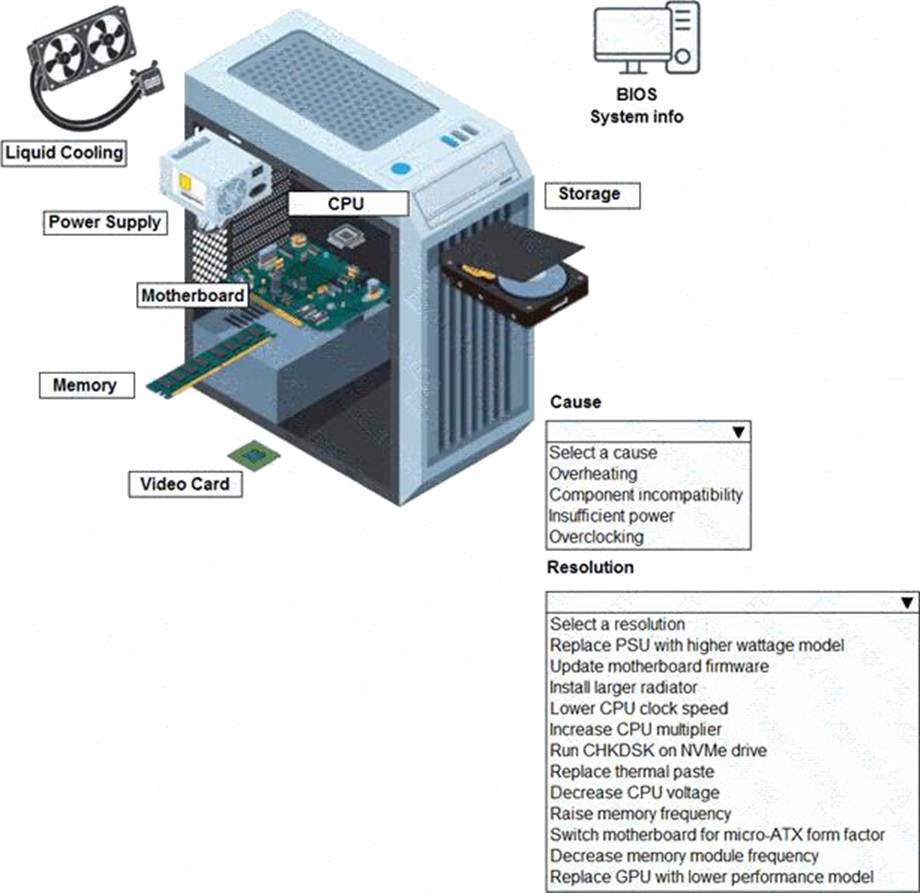
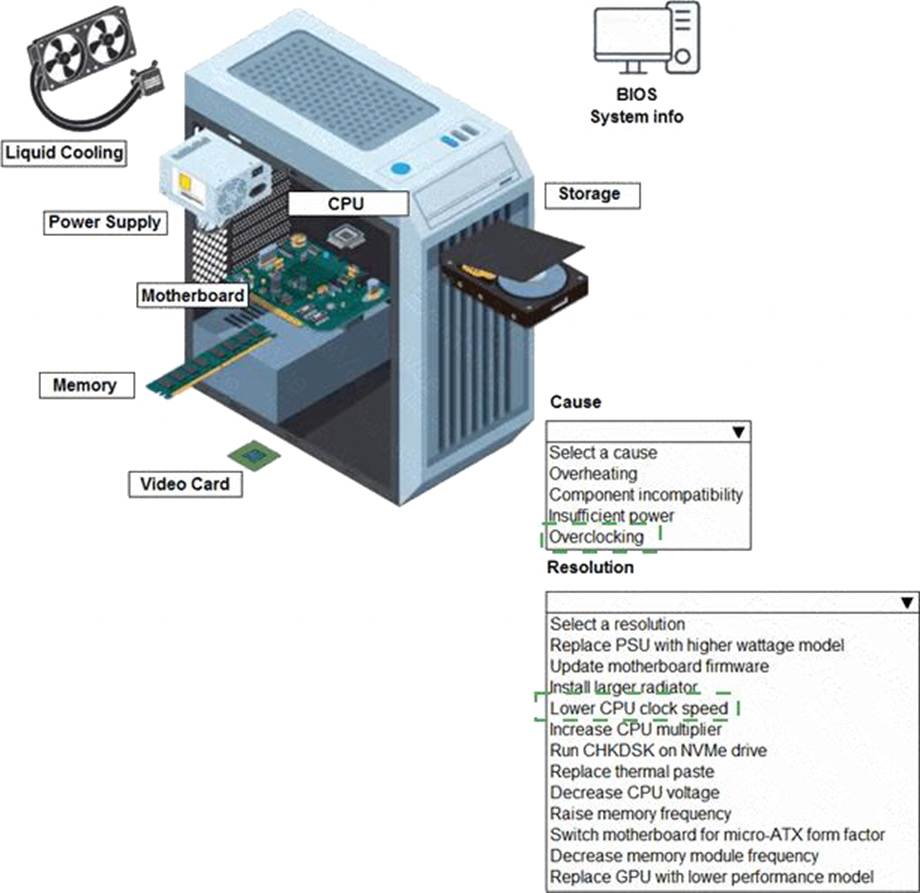
Explanation:
correct answer is "Overclocking" and "Reduce CPU Clock speed" CPU is at 4.5 Ghz when normal is 3.2 Ghz. Overclocking too much can cause freezes, and this is a gaming computer sothe user probably took it too far. http: //blog.logicalincrements.com/2018/12/4-troubleshooting-tips-overclocking-pc/
A technician is setting up a locally hosted environment for internal developers who need concurrent access to a wide array of test OSs.
Which of the following would best fulfill this requirement?
- A . Hypervisor
- B . SaaS platform
- C . Multiboot server computer
- D . Sandbox
A
Explanation:
A hypervisor allows multiple operating systems to run simultaneously on a single physical host, making it the ideal solution for providing concurrent access to different test environments. Developers can use virtual machines (VMs) for testing and development.
From CompTIA A+ 220-1101 Official Study Guide, Objective 3.7 C Compare and contrast cloud computing concepts:
“A hypervisor is software that enables multiple operating systems to run on a single host as virtual machines. This is commonly used in development and testing environments for flexibility and isolation.”
Verified Source:
CompTIA A+ Core 1 (220-1101) Official Study Guide, Chapter 3: Virtualization CompTIA Exam Objectives 220-1101, Domain 3.7
A user goes to their office and forgets their laptop charger. After borrowing a charger, the user notices that the battery is charging slowly.
Which of the following steps should a technician take first to charge the battery normally?
- A . Adjust laptop battery performance.
- B . Try a different charging port.
- C . Use a different power supply.
- D . Replace the laptop battery.
C
Explanation:
The most likely cause of slow charging after borrowing a charger is that the borrowed adapter is not the correct wattage or is not fully compatible with the laptop. Many laptops will still charge with an underpowered or non-matching adapter, but they often charge very slowly, may display a warning like “plugged in, not charging fast,” or may reduce performance to stay within the available power budget. In CompTIA A+ Core 1 troubleshooting, the first step is to check the simplest and most probable cause, especially when the symptom began immediately after a change. Using the proper manufacturer-recommended charger (correct voltage/amperage and connector type, or correct USB-C PD wattage profile if applicable) restores normal charging behavior in most cases.
Adjusting battery performance settings might reduce power draw but does not address the root cause of insufficient charger output. Trying a different charging port can help if a port is damaged, but the timing strongly points to the borrowed charger. Replacing the battery is the most invasive and least likely first step because the battery was presumably functioning before the charger change. Therefore, the technician should first use a different, known-good power supply with the correct specifications.
Which RAID type offers double parity?
- A . RAID 0
- B . RAID 1
- C . RAID 5
- D . RAID 6
D
Explanation:
CompTIA A+ teaches that RAID 6 is the RAID level that uses double parity, allowing the array to survive the failure of two drives simultaneously. RAID 6 stripes data across all disks like RAID 5 but stores two independent sets of parity information, making it far more fault-tolerant.
RAID 0 has no parity and provides only performance. RAID 1 mirrors data but uses no parity. RAID 5 uses single parity and can tolerate only one disk failure. Because the question explicitly asks for double parity, only RAID 6 is correct.
Which of the following network services is used to assign an IP address to a network host?
- A . DHCP
- B . DNS
- C . LDAP
- D . SMTP
A
Explanation:
DHCP (Dynamic Host Configuration Protocol) is the service used to automatically assign IP addresses to network hosts. It dynamically manages the distribution of IP addresses and configuration details (like subnet mask, gateway, and DNS servers), ensuring no two devices are assigned the same address on the network.
Option B (DNS): Incorrect. DNS translates domain names into IP addresses but does not assign them.
Option C (LDAP): Incorrect. LDAP is a protocol used for accessing and maintaining directory services, such as user information and permissions.
Option D (SMTP): Incorrect. SMTP is used for sending and receiving email, not for IP address assignment.
Reference: CompTIA A+ Core 1 Objectives: 2.5 (Network configuration)
A technician checks a RAID 5 array and sees a S.M.A.R.T. alert on one disk, but the array still shows healthy.
What should the technician do next?
- A . Run chkdsk /f
- B . Disable write caching
- C . Rebuild the RAID array
- D . Replace the failing drive
D
Explanation:
CompTIA A+ teaches that S.M.A.R.T. warnings indicate imminent drive failure. Even if the RAID controller reports the array as “healthy,” a S.M.A.R.T. alert means the drive should be replaced immediately.
RAID 5 provides redundancy for one drive failure, but technicians should replace the degrading drive before it fails fully, ensuring the rebuild happens proactively.
Running chkdsk affects file systems, not drive health. Disabling write caching is unrelated. Rebuilding the array should only occur after replacing the faulty drive.
Replacing the drive prevents a catastrophic dual-drive failure scenario, which RAID 5 cannot survive.
This approach aligns with CompTIA troubleshooting guidelines for RAID maintenance and S.M.A.R.T.
diagnostics.
A user returns from a trip and discovers a computer that is connected to the LAN times out intermittently Upon investigation, a technician finds the RJ45 pin is not property terminated.
Which of the following networking tools is most appropriate to fix the issue?
- A . Toner probe
- B . Cable tester
- C . Punchdown
- D . Crimper
D
Explanation:
D. Crimper:
A crimper is used to terminate an RJ45 cable properly by attaching the connector to the twisted-pair wires.
If the termination is not done correctly, the connection will be intermittent or fail entirely.
Incorrect Options:
A technician replaces a laptop’s failed motherboard. During validation testing, the wireless is slow and shows a weak signal.
Which of the following should the technician do first to verify the source of the issue?
- A . Contact the manufacturer
- B . Reseat antenna connections
- C . Restart the access point
- D . Install a new wireless adapter
B
Explanation:
Comprehensive and Detailed
Laptop Wi-Fi antennas run through the display bezel and connect via small coaxial clips. After motherboard replacement, these are often not fully seated, causing weak or unstable Wi-Fi.
CompTIA Concepts:
Laptop hardware troubleshooting
Antenna connector checks after repair
WLAN performance issues caused by antenna misalignment