
Practice Free 220-1201 Exam Online Questions
Which of the following is the best to use when testing a file for potential malware?
- A . Multitenancy
- B . Test development
- C . Cross-platform virtualization
- D . Sandbox
D
Explanation:
A sandbox is a secure, isolated environment used to test potentially harmful software or code. It prevents the software from affecting the main system, allowing safe malware testing. Thismethod is standard in cybersecurity best practices.
Reference: "CompTIA A+ Certification All-in-One Exam Guide" by Mike Meyers C Chapter 28, page 1230.
A technician needs to replace a laptop’s display assembly.
Which of the following should the technician do to complete this task?
- A . Reattach the heat sinks.
- B . Reconnect the wireless antennas.
- C . Install a new CPU fan.
- D . Reset the BIOS to default settings.
B
Explanation:
Laptop display assemblies typically include not only the LCD panel but also the webcam, microphone, display cable, and critically, the Wi-Fi antennas. In most laptops, Wi-Fi antennas are built into the display bezel, because the elevated position allows for stronger wireless signal reception. When replacing the entire display assembly, the antennas must be carefully disconnected and reconnected during reinstallation.
CompTIA A+ emphasizes proper cable routing and antenna reattachment as essential steps in laptop hardware disassembly and reassembly. Failing to reconnect these antennas results in weak or nonfunctional wireless connectivity, even though the display replacement itself may be successful.
Heat sinks and CPU fans are located on the motherboard and are unrelated to display assembly replacement. Resetting BIOS settings is unnecessary unless troubleshooting firmware-related issues, not replacing hardware components like a display. Therefore, the only action that aligns with standard laptop design and CompTIA A+ procedures is ensuring that the wireless antennas are reconnected.
Thus, the correct answer is B.
Which of the following devices forwards data between different networks by analyzing the headers of packets?
- A . Hub
- B . Router
- C . Repeater
- D . Unmanaged switch
B
Explanation:
A router is a network device that forwards data between different networks by examining packet headers, specifically the IP address information contained in Layer 3 (Network Layer) of the OSI model. According to the CompTIA A+ Core 1 (220-1201) networking objectives, routers use routing tables and packet header analysis to determine the best path for data to travel from a source network to a destination network. When a packet arrives at a router interface, the router reads the destination IP address in the packet header, compares it against its routing table, and then forwards the packet to the appropriate next hop or network interface. This function allows routers to connect multiple networks such as LANs, WANs, and the internet.
The other options do not perform this function. A hub operates at Layer 1 (Physical Layer) and simply broadcasts incoming signals to all connected ports without inspecting any packet information. A repeater also operates at the physical layer and is used only to regenerate or amplify signals to extend network distance. An unmanaged switch operates mainly at Layer 2 (Data Link Layer) and forwards frames based on MAC addresses, not IP packet headers. Because only routers analyze packet headers and forward traffic between different networks, Router is the correct answer.
A user’s phone does not respond to touch. A technician inspects the phone but does not see any evidence of physical damage. The technician restarts the device, which does not fix the issue.
Which of the following components should the technician examine next?
- A . Battery
- B . Screen
- C . Stylus
- D . Digitizer
D
Explanation:
The digitizer is the component responsible for detecting touch input on a screen. If touch is not registering and there’s no physical damage, the digitizer may be faulty.
From CompTIA A+ 220-1101 Official Study Guide, Objective 3.1 C Mobile device hardware:
“If a touchscreen device does not respond to input and the screen is intact, the digitizer (touch sensor) may be defective.”
Verified Source:
CompTIA A+ Core 1 (220-1101) Official Study Guide, Chapter 3: Mobile Hardware CompTIA Exam Objectives 220-1101, Domain 3.1
Which of the following port numbers are associated with email traffic? (Select two).
- A . 23
- B . 25
- C . 67
- D . 110
- E . 137
- F . 443
B,D
Explanation:
Comprehensive and Detailed Step-by-Step
To answer this question, we need to identify the port numbers associated with email protocols used in client-server communication.
Port 25 (SMTP – Simple Mail Transfer Protocol):
This port is primarily used for sending emails between mail servers and from mail clients to mail servers (sending outbound mail).
SMTP is an essential protocol for email traffic.
Reference: CompTIA A+ Core 1 Exam Objectives (220-1201), Domain 2.5 C Explain basic wired and wireless networking concepts, including ports and protocols.
Port 110 (POP3 – Post Office Protocol v3):
POP3 is used for retrieving emails from a mail server. It is commonly used for downloading email messages to a local client, after which the messages are deleted from the server.
While not as commonly used today (due to IMAP being preferred), POP3 is still a recognized email protocol, and its association with port 110 makes it a valid answer.
Reference: CompTIA A+ Core 1 Exam Objectives (220-1201), Domain 2.5 C Explain basic wired and wireless networking concepts, including ports and protocols.
Incorrect Options:
Some users are unable to access their workstations.
An administrator runs ipconfig on one of the workstations and sees the following:

The administrator runs the following command and receives this output:
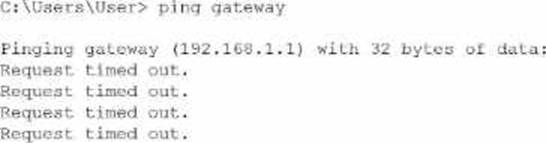
Which of the following is the source of issue?
- A . Web server
- B . Router
- C . DNS
- D . DHCP
B
Explanation:
The workstation’s IP configuration (192.168.1.27/24 with gateway 192.168.1.1) shows that it has a correct IP address, correct subnet mask, and expected default gateway for a typical small office network. Because the IP is in the correct private range and not an APIPA address (169.254.x.x), this also confirms that DHCP is functioning properly. Therefore, option D (DHCP) cannot be the cause.
The user then pings the default gateway at 192.168.1.1, which should be the router―the device providing routing between local devices and outside networks. The repeated "Request timed out" responses indicate the workstation cannot reach the router at all. This type of failure points directly to a router outage, a powered-off router, a failed router interface, or a physical disconnection of the router from the switch.
If DNS (C) were the issue, the user would still be able to ping the IP address of the gateway because DNS is not required for IP-to-IP connectivity. A web server (A) has no relation to local gateway communication and does not affect workstation access.
Since the workstation has a valid IP but cannot reach its default gateway, the failure point is the router.
Which of the following services is used to allocate IP addresses in an enterprise-wide environment?
- A . DNS
- B . Syslog
- C . Telnet
- D . DHCP
D
Explanation:
Dynamic Host Configuration Protocol (DHCP) is a network service used to automatically assign IP addresses and other network configuration details (such as subnet masks and default gateways) to devices on an enterprise-wide network.
Why Not A (DNS): DNS resolves domain names to IP addresses but does not allocate IP addresses.
Why Not B (Syslog): Syslog is used for logging system events, not IP address management.
Why Not C (Telnet): Telnet is a protocol for remote access, not for IP allocation.
CompTIA A+ Exam
Reference: Core 1 (220-1201), Section 2.6, DHCP concepts.
A company is testing the latest model of a laptop. After turning on the laptop, there is a noticeable burning smell.
Which of the following steps should a technician take to troubleshoot the laptop issue? (Select two).
- A . Turn it off and disconnect all power sources.
- B . Submit an emergency request to the local facilities manager.
- C . Check for foreign objects, liquid spills, and internal damage.
- D . Contact the vendor and submit a return request.
- E . Remove the device from the MDM.
- F . Try an alternate AC adapter.
A,C
Explanation:
When a technician encounters a burning smell, it is a critical safety issue. The first response must be to immediately power down and disconnect the device from all power sources to prevent electric shock, fire, or further hardware damage.
From the CompTIA A+ 220-1101 Official Study Guide, Objective 4.1 C Troubleshoot common hardware problems:
"Signs of electrical issues such as burning smells, smoke, or sparks require an immediate shutdown of the system and disconnection from any power source."
After ensuring safety, the technician should inspect the hardware for visible signs of damage:
From the same Objective (4.1):
"Inspect for foreign objects, liquid damage, or burnt components. These can cause short circuits or thermal events that may damage the motherboard or other internal components."
These steps are standard practice in the industry to ensure safe and accurate diagnosis of faulty devices. Trying a different adapter (Option F) may make the problem worse, and contacting vendors (Option D) comes after initial safety and inspection.
Verified Source:
CompTIA A+ Core 1 (220-1101) Official Study Guide, Chapter 4: Troubleshooting Hardware Problems CompTIA Exam Objectives 220-1101, Domain 4.0 C Hardware and Network Troubleshooting
A company wants to enable access to corporate email on smartphones. Employees must install software that separates corporate and personal data.
Which should the company implement?
- A . Encryption
- B . Network access control
- C . Mobile device management
- D . Endpoint protection
C
Explanation:
The requirement to separate corporate and personal data on employee smartphones is a core function of Mobile Device Management (MDM). CompTIA A+ describes MDM as an enterprise toolset used to enforce security policies, manage applications, configure email profiles, and separate work-related data from personal user data. This separation is typically achieved through features such as containerization, where corporate data is stored in a protected, encrypted workspace that is isolated from the personal side of the device.
This ensures security, prevents data leakage, and enables IT administrators to remotely wipe corporate data without affecting the user’s personal information. MDM solutions are widely used in BYOD (Bring Your Own Device) environments and corporate-issued devices.
Encryption (A) protects data but does not create separation. Network access control (B) restricts network access but does not manage mobile apps or data separation. Endpoint protection (D) refers to antivirus/antimalware, not data partitioning.
Thus, Mobile Device Management (MDM) is the correct solution.
SIMULATION
A user reports poor performance on the application server.
INSTRUCTIONS
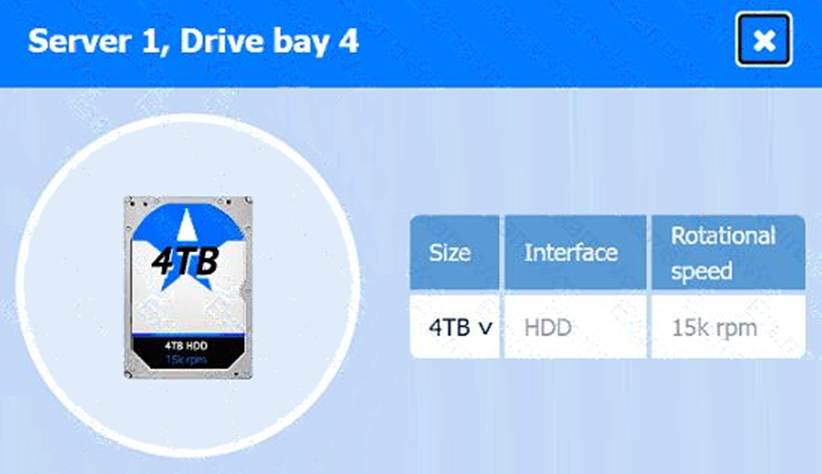
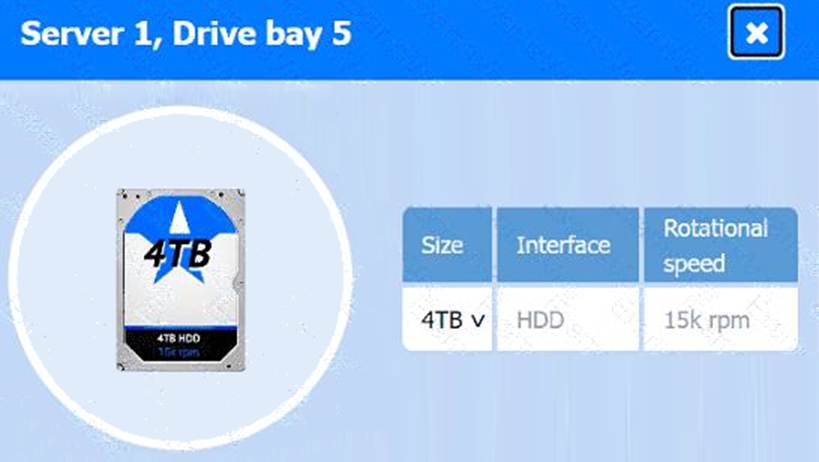
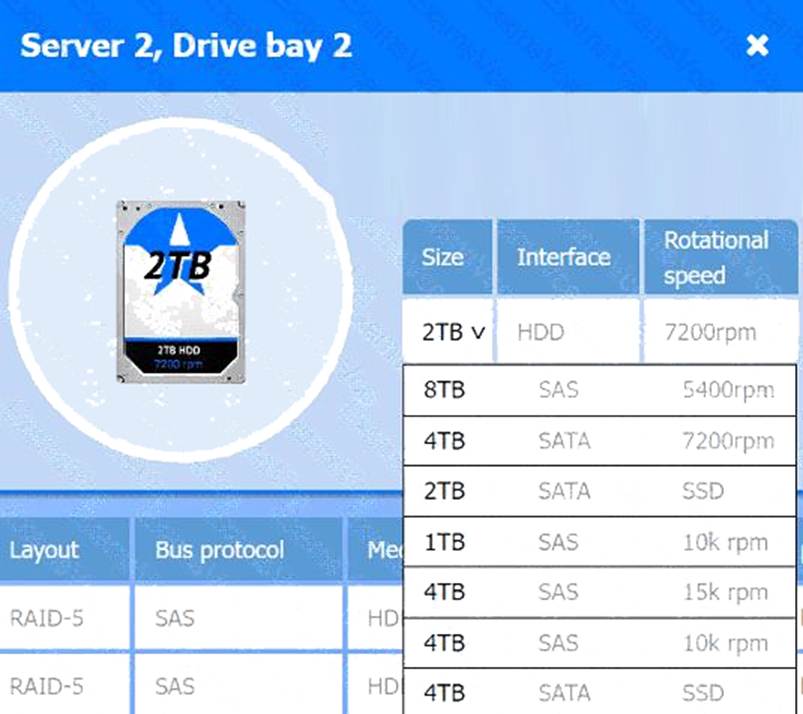
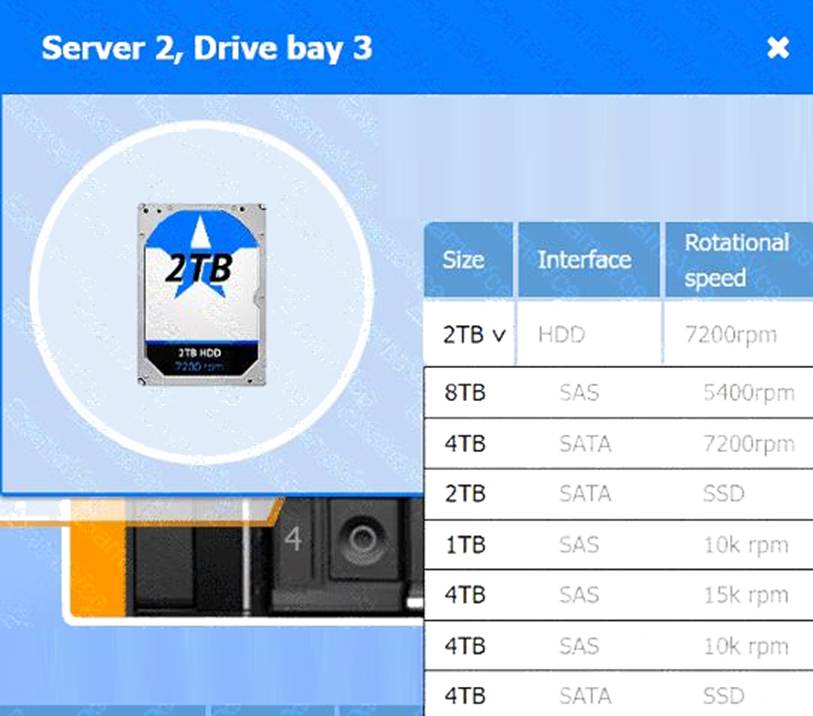
Click on Server 1 and Server 2 and review the information presented in each chart to determine which drives need to be replaced.
Select the appropriate replacement drive that should be used, for the least performance degradation to the server.
If at any time you would like to bring back the initial state of the simulation, please click the Reset All button.
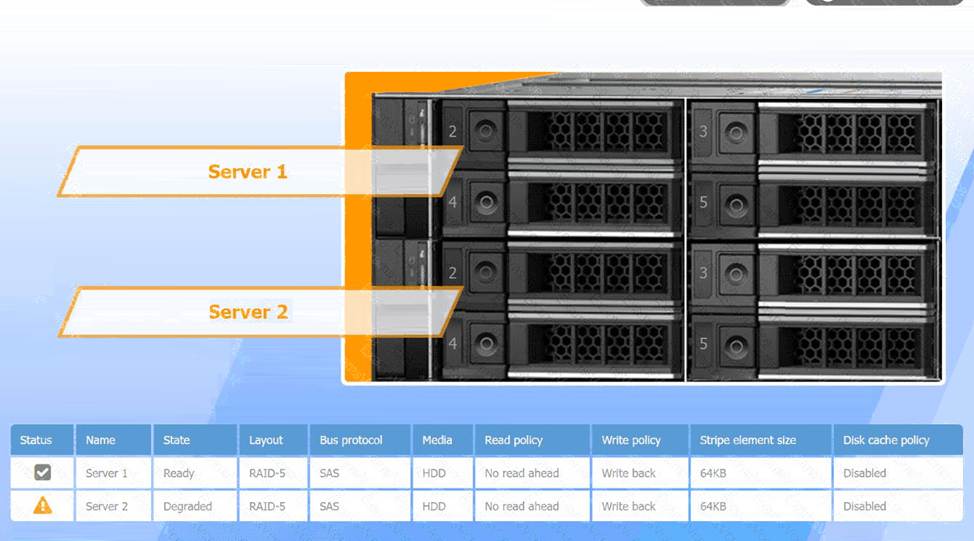
Recommended Replacement Drive:
To minimize performance degradation, the replacement drive should be:
SAS HDD with the same specifications (64KB stripe size, no read-ahead, and write-back policy).
Matching the configuration exactly ensures seamless integration and optimizes recovery speed in the RAID-5 array.
In RAID-5, degraded performance is expected when one drive fails, as parity data needs to rebuild missing information during each read/write process. Replacing the failed drive restores the RAID array to optimal status, reducing the load on existing drives and returning the system to normal read/write performance. The write-back policy and disabled disk cache settings are designed to reduce latency and increase efficiency, essential for handling real-time applications.
A user reports poor performance on the application server.
INSTRUCTIONS
Click on Server 1 and Server 2 and review the information presented in each chart to determine which drives need to be replaced.
Select the appropriate replacement drive that should be used, for the least performance degradation to the server.
A computer server with many black and silver parts AI-generated content may be incorrect.
A computer server with many black boxes Description automatically generated with medium confidence
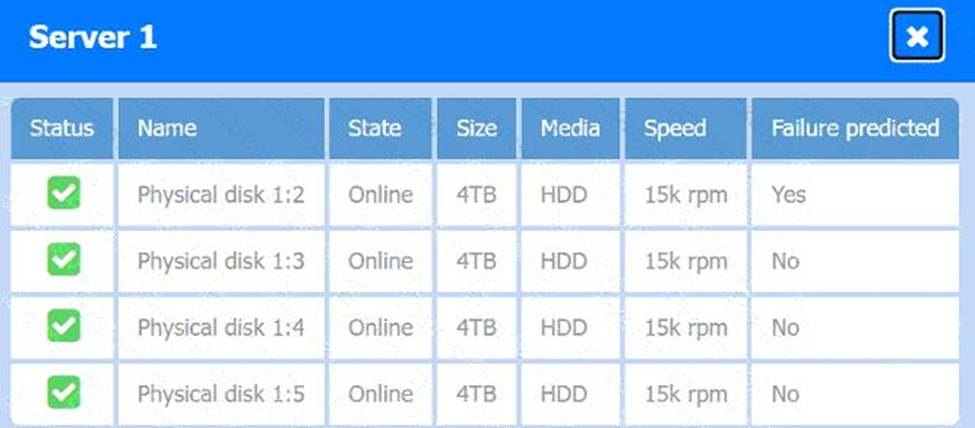
A screen shot of a computer AI-generated content may be incorrect.
A screen shot of a computer Description automatically generated
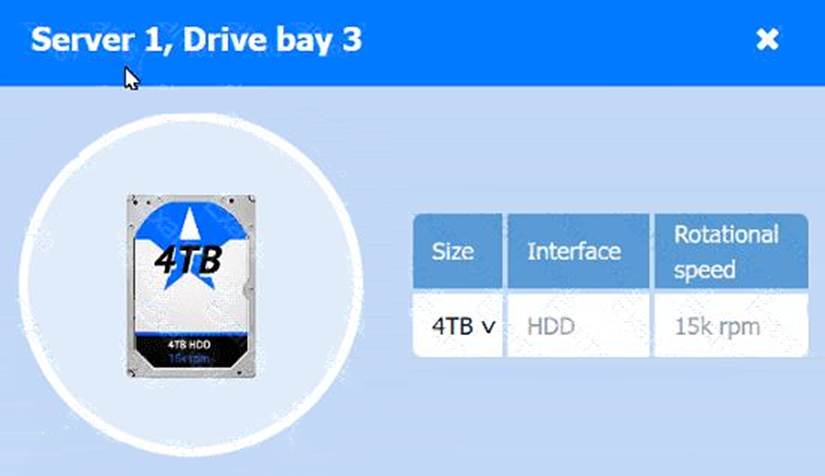
A computer screen shot of a computer AI-generated content may be incorrect.
A computer screen shot of a computer Description automatically generated
A computer screen shot of a computer AI-generated content may be incorrect.
A computer screen shot of a computer Description automatically generated
A computer screen shot of a computer AI-generated content may be incorrect.
A computer screen shot of a computer Description automatically generated
A screenshot of a computer AI-generated content may be incorrect.
A screenshot of a computer Description automatically generated
A screenshot of a computer AI-generated content may be incorrect.
A screenshot of a computer Description automatically generated