
Practice Free 220-1201 Exam Online Questions
A technician is troubleshooting a workstation that repeatedly shuts down within ten minutes of being turned on. The technician notices a loud clicking sound coming from inside the case.
Which of the following components should the technician check first?
- A . Exhaust fan
- B . Capacitors
- C . CPU fan
- D . Intake fan
C
Explanation:
A failing CPU fan may make unusual noises (including clicking) and, if it is not cooling the CPU, the system will quickly overheat and shut down to prevent damage.
From CompTIA A+ 220-1101 Official Study Guide, Objective 4.1 C Troubleshooting hardware problems:
“Overheating due to a failed or obstructed CPU fan can cause frequent shutdowns. Loud noises are a sign the fan should be checked first.”
Verified Source:
CompTIA A+ Core 1 (220-1101) Official Study Guide, Chapter 4: PC Hardware Troubleshooting CompTIA Exam Objectives 220-1101, Domain 4.1
A technician needs to figure out why a laser printer is intermittently not feeding paper to print. The technician verifies the issue by running several copy-and-print tests.
Which of the following should the technician do next?
- A . Update the printer drivers.
- B . Select the correct paper size.
- C . Clean the pickup rollers.
- D . Replace the toner cartridge.
C
Explanation:
When a laser printer intermittently fails to feed paper, the most common hardware cause is worn or dirty pickup rollers. These rollers grab the paper from the tray and move it into the printer. Over time, dust, paper debris, or worn rubber reduces their effectiveness, causing feeding issues.
From the CompTIA A+ 220-1101 Official Study Guide, Objective 4.3 C Troubleshoot printing problems:
“If the printer is not picking up paper correctly or is experiencing paper jams, check and clean or replace the pickup rollers and separation pads as these are responsible for feeding paper into the
print path.”
Other options like updating drivers, selecting paper size, or replacing toner will not resolve a mechanical paper feed problem.
Verified Source:
CompTIA A+ Core 1 (220-1101) Official Study Guide, Chapter 4: Troubleshooting Printing Problems
CompTIA Exam Objectives 220-1101, Domain 4.3
A technician needs to select PC components with a minimal number of visible internal cables.
Which of the following should the technician use?
- A . SATA drive connections
- B . Liquid cooling
- C . Modular power supply
- D . Wireless NIC
C
Explanation:
A modular power supply allows a technician to connect only the power cables that are needed,
reducing clutter and improving airflow. This is ideal when aiming for a clean build with minimal visible internal cables.
Option A (SATA drive connections): Still require both power and data cables, adding to cable count.
Option B (Liquid cooling): May reduce some bulk from large air coolers, but adds tubing and still needs cabling.
Option D (Wireless NIC): Adds wireless capability but has no relation to internal cabling cleanliness.
CompTIA A+ Core 1 Exam Objective
Reference: Objective 3.3: Given a scenario, apply the appropriate PC configuration.
Which of the following systems most likely contains ECC memory?
- A . A high-end gaming console
- B . A file server
- C . A smartphone
- D . A laptop
B
Explanation:
Error-Correcting Code (ECC) memory is designed to detect and correct single-bit memory errors, increasing system reliability and data integrity. According to CompTIA Core 1 (220-1201) hardware and memory objectives, ECC memory is most commonly used in servers and enterprise-grade systems where uptime and data accuracy are critical.
A file server is responsible for storing, managing, and serving data to many users simultaneously. Memory errors in such systems could lead to data corruption, crashes, or security issues. For this reason, servers frequently use ECC memory in combination with server-class CPUs and motherboards that support error correction.
High-end gaming consoles prioritize performance and cost efficiency rather than fault tolerance, and they do not use ECC memory. Smartphones rely on low-power mobile RAM without error correction, and laptops typically use non-ECC memory unless they are specialized workstation-class systems, which is not indicated in this question.
CompTIA emphasizes that ECC memory is associated with mission-critical environments, particularly servers and enterprise systems, making a file server the most appropriate answer.
Reference: CompTIA A+ Core 1 (220-1201) Official Study Guide C RAM Types, ECC Memory, and Server Hardware
Marketing department users report network performance degradation in the morning and early afternoon, but sales and customer service department users do not report any issues. All structured cabling Is Cat 5e. All departments are connected to a core switch.
The running network configuration shows the following:
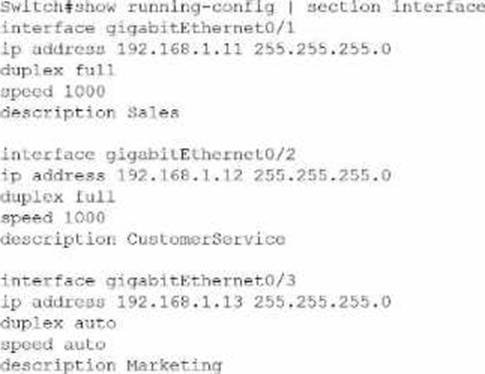
Which of the following is the most likely cause of the performance issues?
- A . The marketing department subnet has an error.
- B . The structured Cat 5e cabling is outdated.
- C . The interfaces are configured with Incorrect IP addresses.
- D . The marketing department Interface is running at 10/100.
D
Explanation:
From the configuration, the Sales and Customer Service ports are hard-set to full duplex, 1000 Mbps, while the Marketing interface (GigabitEthernet0/3) is set to duplex auto and speed auto. CompTIA A+ explains that mismatched or lower-negotiated speeds and duplex settings can cause noticeable network slowdowns, collisions, and retransmissions―especially at busy times of the day when utilization is high.
Because all cabling is Cat 5e, it fully supports Gigabit Ethernet, so the cabling is not the limiting factor. The IP addresses are all in the same subnet (192.168.1.0/24) and formatted correctly, so there is no subnet or addressing problem. That rules out options A and C.
With speed auto, the Marketing port may be negotiating only 10/100 Mbps, or even a duplex mismatch (e.g., half duplex vs full). This would severely limit throughput compared to the gigabit links used by the other departments. In peak periods, that slower link would become congested first, which matches the users’ reports of performance degradation only in Marketing.
Therefore, the most likely cause is that the Marketing interface is operating at 10/100 instead of 1000 Mbps, making option D correct.
While using a laptop and Bluetooth headset for conference calls, a user notices intermittent sound issues. The user frequently walks between office rooms during calls, leaving the laptop in place. The office network uses fiber internet and has two connected APs.
What is the MOST likely cause?
- A . The number of available APs is inadequate.
- B . The user is moving in and out of range.
- C . The APs are not in mesh mode.
- D . The internet connection is too slow.
B
Explanation:
Bluetooth audio issues are typically related to distance and signal strength, not internet connectivity or Wi-Fi access points. Bluetooth devices―especially headsets―generally have a limited effective range of around 10 meters (33 feet) for Class 2 Bluetooth, which is common in consumer laptops and headsets. When the user leaves the room and walks into adjacent offices, they are likely moving beyond the optimal Bluetooth range or passing through walls that weaken the signal.
CompTIA A+ highlights that Bluetooth uses low-power radio frequencies easily disrupted by physical obstructions, distance, and interference. Since the laptop remains stationary and the user moves, the headset becomes progressively further from the laptop, causing intermittent audio dropouts, stuttering, or loss of connection.
The number of APs (A) is irrelevant because the headset is not using Wi-Fi. Mesh mode (C) applies only to wireless AP-to-AP communication. The internet connection (D) is high-quality fiber and conference calls work fine when stationary, so the issue is not bandwidth or WAN throughput.
Thus, the most likely cause is that the user is moving in and out of Bluetooth range.
Which of the following is a characteristic to consider when selecting a satellite internet connection?
- A . Necessary proximity to urban infrastructure
- B . eSIM requirement
- C . Line of sight to nearby tower
- D . Increased latency
D
Explanation:
In the CompTIA A+ Core 1 (220-1201) networking concepts, satellite internet is commonly associated with higher (increased) latency compared with terrestrial options like cable, fiber, or DSL. Latency is the delay between sending data and receiving a response. With satellite, signals must travel from the user’s dish up to a satellite and then back down to a ground station (and return again for responses). That long travel distance adds noticeable delay, which can affect real-time activities such as VoIP, video conferencing, and online gaming. Even though newer low-earth-orbit (LEO) systems can reduce latency compared with older geostationary systems, satellite service is still generally discussed in A+ as having higher latency characteristics to consider.
The other options do not best fit satellite internet. Proximity to urban infrastructure (A) is more relevant to cable/fiber availability. An eSIM requirement (B) relates to cellular/mobile service, not satellite broadband. Line of sight to a nearby tower (C) describes cellular or fixed wireless services that depend on tower connectivity; satellite instead needs a clear view of the sky toward the satellite (not a nearby tower). Therefore, increased latency is the best characteristic to consider.
Which of the following best describes a Type 2 hypervisor?
- A . It works as a firewall to control network traffic.
- B . It interacts with the underlying hardware.
- C . It runs on a host operating system.
- D . It brings higher CPU capabilities to virtual machines.
C
Explanation:
A Type 2 hypervisor is defined as a hypervisor that runs on top of a host operating system, rather than directly on the system’s hardware. According to CompTIA Core 1 (220-1201) virtualization concepts, Type 2 hypervisors are also referred to as hosted hypervisors and are commonly used in desktop, lab, and testing environments.
In this model, the host operating system (such as Windows, macOS, or Linux) is installed first, and the hypervisor runs as an application within that OS. The hypervisor then manages virtual machines by requesting hardware resources through the host OS. Examples of Type 2 hypervisors include VirtualBox, VMware Workstation, and Parallels Desktop.
Option B describes a Type 1 (bare-metal) hypervisor, which runs directly on the hardware without a host OS. Type 1 hypervisors are typically used in enterprise environments and offer higher performance and isolation.
Option A is unrelated to virtualization, as firewall functionality controls network traffic.
Option D is incorrect because hypervisors do not inherently increase CPU capabilities; they allocate existing resources.
CompTIA emphasizes understanding the distinction between Type 1 and Type 2 hypervisors, particularly that Type 2 hypervisors rely on a host operating system, making option C the correct answer.
Reference: CompTIA A+ Core 1 (220-1201) Official Study Guide C Virtualization Concepts, Hypervisor Types, and Cloud Computing
A user attempts to print diagrams on 11×17 inch (28×43 cm) paper. The correct paper is loaded, but the printer keeps prompting for paper. Another identical printer prints successfully.
What is the MOST likely cause?
- A . Tray settings
- B . Incorrect driver
- C . Connectivity issues
- D . Insufficient permissions
A
Explanation:
When a printer refuses to use paper that is physically present in the tray, CompTIA A+ identifies tray configuration settings as the most likely cause. Printers require a match between tray settings (paper size, paper type, orientation) and the incoming print job’s specifications. If the tray is incorrectly configured―such as being set to Letter (8.5×11 in) or A4―then the printer will keep prompting for the correct paper even though 11×17 paper is loaded.
The fact that the technician successfully prints the same diagram on another identical printer proves that the driver, print job format, and user permissions are correct. This isolates the issue to the local printer’s configuration. Incorrect drivers (B) would affect printing on both printers. Connectivity issues (C) would prevent printing entirely, not cause paper prompts. Permissions (D) do not affect paper-size recognition.
Therefore, the most likely cause is improper tray settings on the user’s printer.
Which of the following internet connection types provides the fastest speeds and greatest coverage in less populated areas with minimal infrastructure?
- A . Fiber
- B . Cable
- C . DSL
- D . Cellular
D
Explanation:
Cellular networks offer broad coverage in rural or less populated areas where laying fiber, cable, or DSL lines may not be feasible or cost-effective. Cellular broadband (4G LTE/5G) provides fast speeds using existing mobile network infrastructure.
From CompTIA A+ 220-1101 Official Study Guide, Objective 2.7 C Compare and contrast Internet connection types:
"Cellular connections offer high speed and extensive coverage, especially in areas where other wired infrastructure may not exist or be practical."
Verified Source:
CompTIA A+ Core 1 (220-1101) Official Study Guide, Chapter 2: Internet Connections CompTIA Exam Objectives 220-1101, Domain 2.7