
Practice Free 220-1201 Exam Online Questions
A multifunction printer in a small office recently had issues with scan-to-email functionality. The manufacturer has an update ready to fix the printer issues.
Which of the following would a technician most likely deploy to remediate the issue?
- A . Firmware
- B . Driver
- C . OS update
- D . HSM
A
Explanation:
Firmware is the embedded software on a device such as a printer. Manufacturers often release firmware updates to resolve hardware-specific functionality issues, such as scan-to-email or security vulnerabilities.
From CompTIA A+ 220-1101 Official Study Guide, Objective 3.4 C Printer installation and maintenance:
“Firmware updates provide bug fixes and add new features for multifunction printers. Apply firmware updates to resolve device-specific issues.”
Verified Source:
CompTIA A+ Core 1 (220-1101) Official Study Guide, Chapter 3: Printer Maintenance CompTIA Exam Objectives 220-1101, Domain 3.4
A customer reports a problem connecting to network resources. After asking open-ended questions, the technician determines the issue likely exists on the remote server.
Which of the following should the technician do next?
- A . Document the findings.
- B . Test the theory
- C . Gather information
- D . Establish a plan of action
B
Explanation:
After determining the issue is likely on the remote server, the technician should test the theory to confirm the root cause before proceeding.
Why Not A (Document the findings): Documentation comes after confirming the issue.
Why Not C (Gather information): Information gathering is already completed.
Why Not D (Establish a plan of action): This is done after confirming the issue.
CompTIA A+ Exam
Reference: Core 2 (220-1102), Section 3.1, troubleshooting methodology.
After troubleshooting a computer’s connectivity, the network team determines there is a port-mapping issue. After plugging the patch cable into a different port, the issue persists.
Which of the following troubleshooting steps should a technician take next to resolve the issue?
- A . Convert the patch cable to a crossover cable.
- B . Test the patch cable from the computer to the network closet.
- C . Verify the length of the patch cable meets current standards.
- D . Replace the patch cable from the device to the wall.
B
Explanation:
When port issues persist after moving to a different switch port, the next logical troubleshooting step is to test the patch cable. Faulty or damaged cables are a common cause of network connectivity problems. Using a cable tester between the computer and the network closet verifies the integrity of the cable and rules out a physical layer issue.
From CompTIA A+ 220-1101 Official Study Guide, Objective 4.2 C Troubleshoot wired and wireless networks:
“If a device continues to experience connectivity issues after switching ports, test the cabling with a cable tester to check for continuity, shorts, or pinout issues before replacing hardware.”
Verified Source:
CompTIA A+ Core 1 (220-1101) Official Study Guide, Chapter 4: Troubleshooting Network Connectivity
CompTIA Exam Objectives 220-1101, Domain 4.2
Which of the following allows a physical server to host multiple virtual machines?
- A . Cross-platform virtualization
- B . Hypervisor
- C . Sandbox
- D . SaaS
B
Explanation:
A hypervisor is software or firmware that allows multiple operating systems (virtual machines) to run on a single physical host. It manages the allocation of resources and isolation of each VM.
From CompTIA A+ 220-1101 Official Study Guide, Objective 3.7 C Virtualization concepts:
“A hypervisor is the key component of virtualization, enabling a physical server to host multiple virtual machines (VMs), each with its own OS and resources.”
Verified Source:
CompTIA A+ Core 1 (220-1101) Official Study Guide, Chapter 3: Virtualization CompTIA Exam Objectives 220-1101, Domain 3.7
SIMULATION
A user reports poor performance on the application server.
INSTRUCTIONS
Click on Server 1 and Server 2 and review the information presented in each chart to determine which drives need to be replaced.
Select the appropriate replacement drive that should be used, for the least performance degradation to the server.
If at any time you would like to bring back the initial state of the simulation, please click the Reset All button.
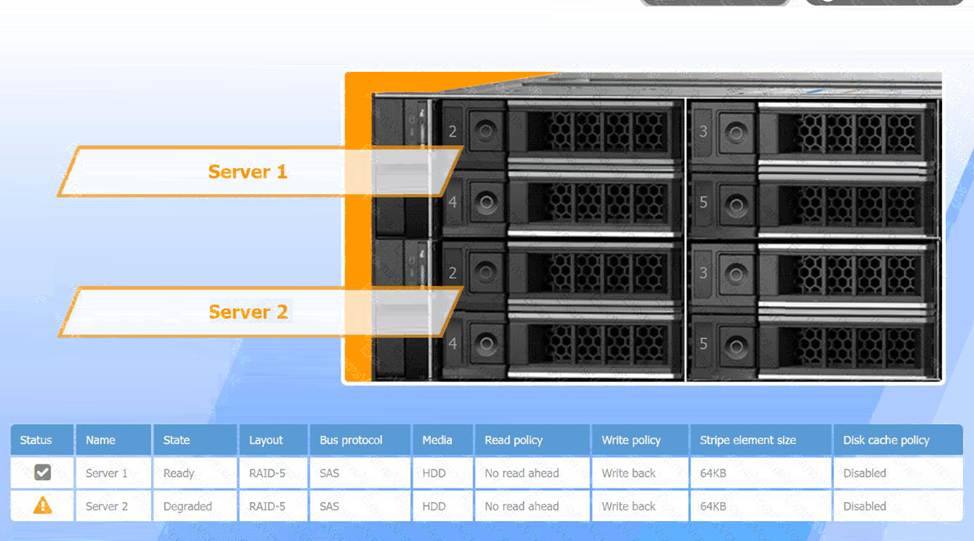
Recommended Replacement Drive:
To minimize performance degradation, the replacement drive should be:
SAS HDD with the same specifications (64KB stripe size, no read-ahead, and write-back policy).
Matching the configuration exactly ensures seamless integration and optimizes recovery speed in the RAID-5 array.
In RAID-5, degraded performance is expected when one drive fails, as parity data needs to rebuild missing information during each read/write process. Replacing the failed drive restores the RAID array to optimal status, reducing the load on existing drives and returning the system to normal read/write performance. The write-back policy and disabled disk cache settings are designed to reduce latency and increase efficiency, essential for handling real-time applications.
A user reports poor performance on the
application server.
INSTRUCTIONS
Click on Server 1 and Server 2 and review the information presented in each chart to determine which drives need to be replaced.
Select the appropriate replacement drive that should be used, for the least performance degradation to the server.
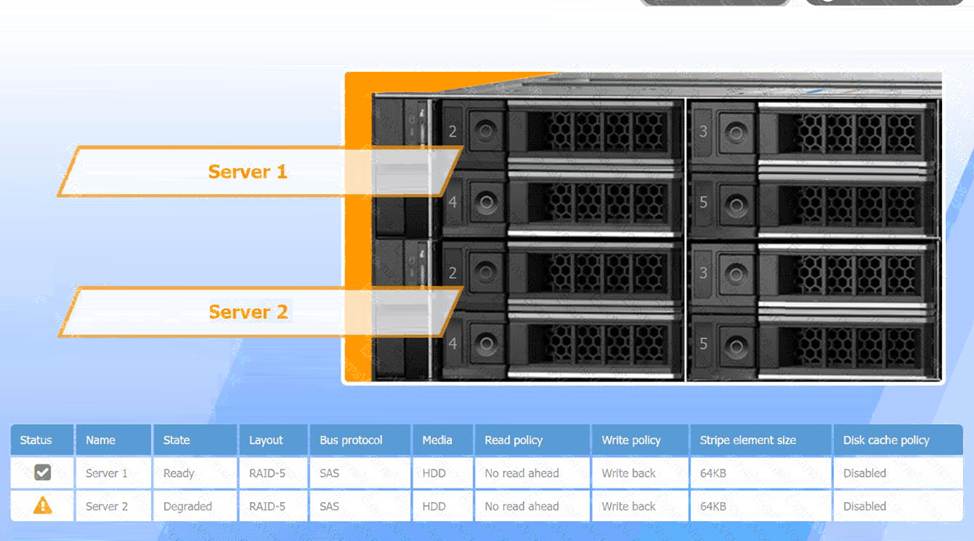
A computer server with many black and silver parts AI-generated content may be incorrect.
A computer server with many black boxes Description automatically generated with medium confidence
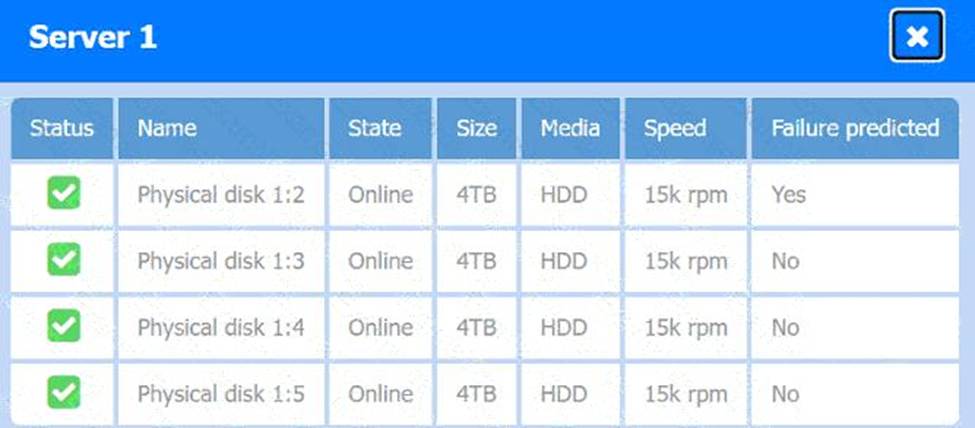
A screen shot of a computer AI-generated content may be incorrect.
A screen shot of a computer Description automatically generated
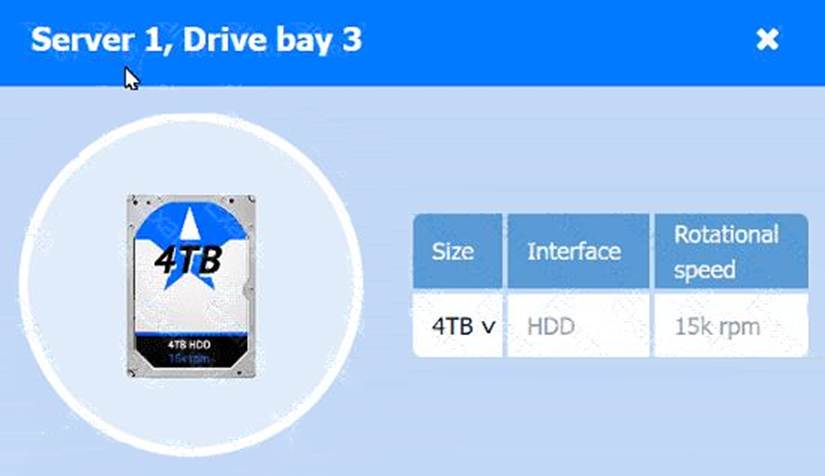
A computer screen shot of a computer AI-generated content may be incorrect.
A computer screen shot of a computer Description automatically generated
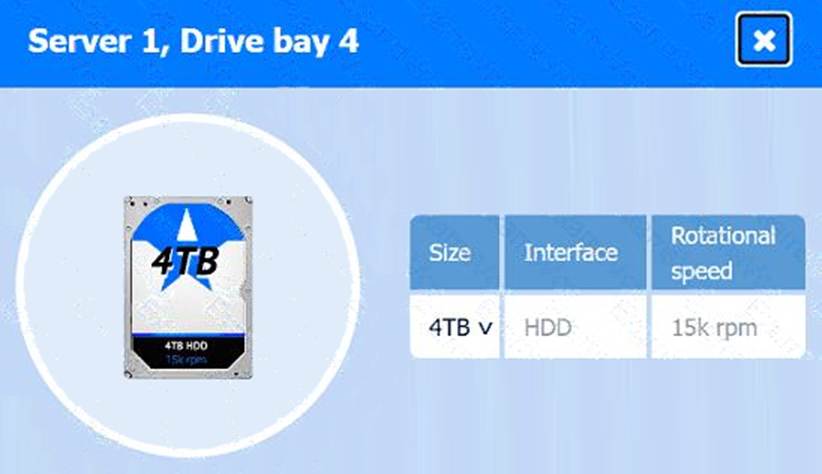
A computer screen shot of a computer AI-generated content may be incorrect.
A computer screen shot of a computer Description automatically generated
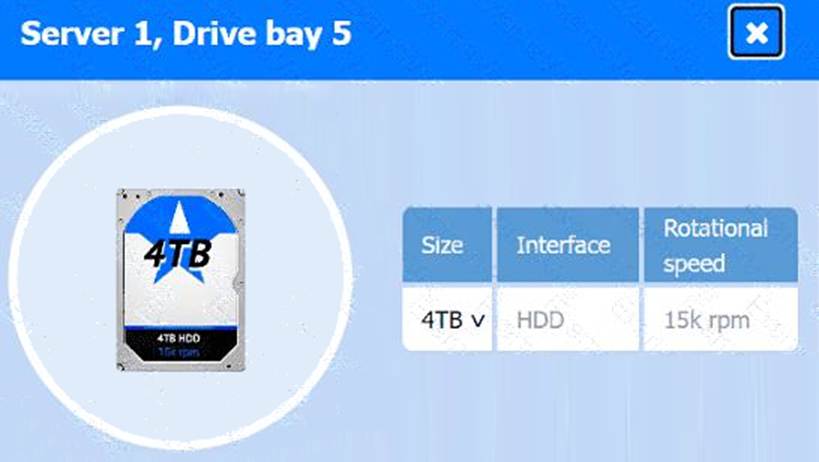
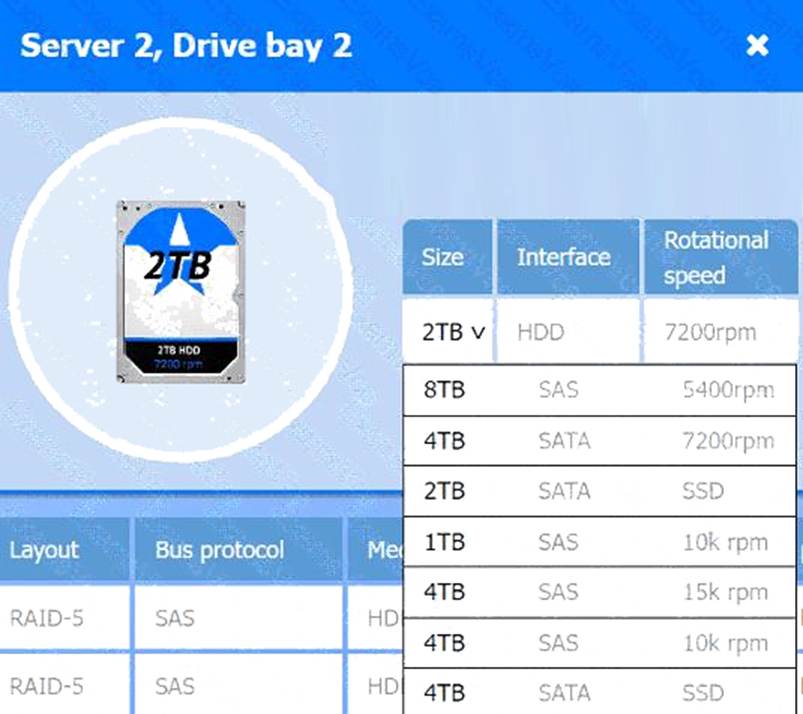
A screenshot of a computer AI-generated content may be incorrect.
A screenshot of a computer Description automatically generated
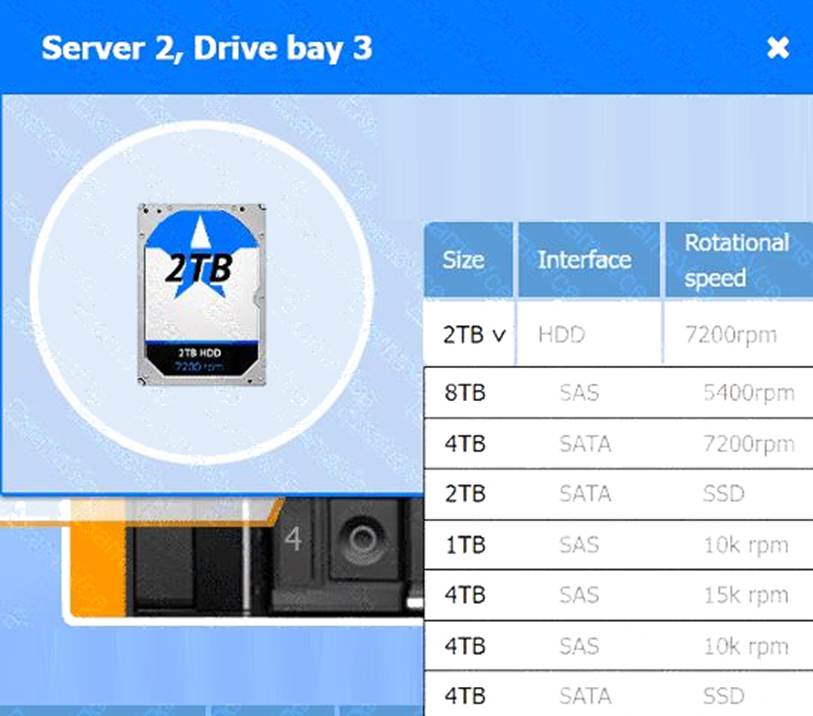
A screenshot of a computer AI-generated content may be incorrect.
A screenshot of a computer Description automatically generated
A systems administrator deploys BitLocker to all devices. However, one of the desktop PCs is not able to encrypt the boot drive.
Which of the following should the administrator check?
- A . TPM
- B . CPU
- C . RAM
- D . HDD
A
Explanation:
BitLocker Drive Encryption in Windows requires a Trusted Platform Module (TPM) to encrypt the boot drive securely. The TPM is a dedicated microcontroller designed to secure hardware through integrated cryptographic keys. It validates system integrity during boot and securely stores the encryption keys. If BitLocker cannot find a TPM or it is disabled in BIOS/UEFI, drive encryption cannot
proceed.
BitLocker can function without TPM using a USB startup key, but this compromises some security and is not recommended for managed enterprise environments.
Reference: "CompTIA A+ Certification All-in-One Exam Guide, Eleventh Edition" by Travis Everett and Andrew Hutz C Chapter 13, page 536C537.
"CompTIA A+ Guide to Managing and Troubleshooting PCs" by Mark Soper C Chapter 13, page 446C 447.
"CompTIA A+ Complete Study Guide" by Quentin Docter C Chapter 1, page 36C38.
A user cannot access the internet from a corporate laptop. All other employees can.
The technician reviews the laptop’s configuration:
IP Address: 169.254.2.162
Which explains the reason the user cannot access the internet?
- A . The subnet mask is misconfigured.
- B . The NIC is not using the latest driver.
- C . Network settings are only configured to IPv6.
- D . The DHCP server is unable to assign an address.
D
Explanation:
An IP address beginning with 169.254.x.x is an APIPA address (Automatic Private IP Addressing). CompTIA A+ explains that APIPA is assigned automatically by Windows when the NIC cannot reach a DHCP server. This indicates the laptop requested an IP lease but never received one.
APIPA addresses allow only local subnet communication and cannot access the internet, because no default gateway, DNS, or valid subnet configuration is provided. Since all other employees can access the internet, the DHCP server is functioning generally, but it is not delivering an address to this specific laptop―possibly due to cable issues, Wi-Fi authentication failure, DHCP scope exhaustion, or NIC misconfiguration.
A subnet mask misconfiguration (A) would still show a normal IP, not APIPA. IPv6-only configuration (C) would not produce a 169.254 address. An outdated NIC driver (B) could cause network instability but does not directly generate APIPA.
Thus, the root cause is that the DHCP server did not assign an IP address.
A company deploys its infrastructure in self-operated data centers. The company recently migrated some of its applications to a public cloud.
Which of the following most accurately describes the cloud model the company is following?
- A . Public
- B . Hybrid
- C . Community
- D . Private
B
Explanation:
A hybrid cloud combines private infrastructure (on-premises, self-operated data centers) with public cloud services, providing flexibility and scalability.
From CompTIA A+ 220-1101 Official Study Guide, Objective 3.7 C Cloud concepts:
“A hybrid cloud model integrates private and public cloud infrastructure to allow applications and data to be shared between them.”
Verified Source:
CompTIA A+ Core 1 (220-1101) Official Study Guide, Chapter 3: Cloud Computing CompTIA Exam Objectives 220-1101, Domain 3.7
A recently installed printer is incorrectly aligning printed documents.
Which of the following should the technician do first to fix this issue?
- A . Run the maintenance application.
- B . Clean the rollers
- C . Upgrade the firmware
- D . Reinstall the drivers
A
Explanation:
A user connects a PC to a projector and configures the projector to use HDMI. However, when the user tries to use the projector, the projector shows a black screen with the message “HDMI2 no signal found.” The user reports that the projector worked properly during a previous meeting.
Which of the following should the user do to fix the issue?
- A . Replace the bulb.
- B . Swap the video cable.
- C . Change the input source.
- D . Update the video drivers.
C
Explanation:
The error message “HDMI2 no signal found” indicates that the projector is set to an input source that is not currently receiving a video signal. According to CompTIA Core 1 (220-1201) display and troubleshooting objectives, input source selection is one of the first items to verify when an external display shows a black screen but powers on correctly.
Many projectors have multiple HDMI ports (HDMI1, HDMI2, etc.). If the PC is connected to a different HDMI port than the one currently selected, the projector will display a “no signal” message even though the cable and device are functioning properly. Changing the input source to match the connected HDMI port resolves the issue quickly.
Replacing the bulb would not fix a “no signal” message, as the projector is clearly powered on and displaying text. Swapping the video cable is a valid troubleshooting step, but the explicit HDMI2 message points to an incorrect input selection. Updating video drivers is unnecessary when the device worked previously and the issue is isolated to input detection.
CompTIA emphasizes verifying correct input selection as a primary step when troubleshooting external display issues.
Reference: CompTIA A+ Core 1 (220-1201) Official Study Guide C Display Devices and Troubleshooting