
Practice Free N10-009 Exam Online Questions
SIMULATION
You are tasked with verifying the following requirements are met in order to ensure network security.
Requirements:
Datacenter
Ensure network is subnetted to allow all devices to communicate properly while minimizing address space usage
Provide a dedicated server to resolve IP addresses and hostnames correctly and handle port 53 traffic Building A
Ensure network is subnetted to allow all devices to communicate properly while minimizing address space usage
Provide devices to support 5 additional different office users
Add an additional mobile user
Replace the Telnet server with a more secure solution
Screened subnet
Ensure network is subnetted to allow all devices to communicate properly while minimizing address space usage
Provide a server to handle external 80/443 traffic
Provide a server to handle port 20/21 traffic
INSTRUCTIONS
Drag and drop objects onto the appropriate locations. Objects can be used multiple times and not all placeholders need to be filled.
Available objects are located in both the Servers and Devices tabs of the Drag & Drop menu.
If at any time you would like to bring back the initial state of the simulation, please click the Reset All button.
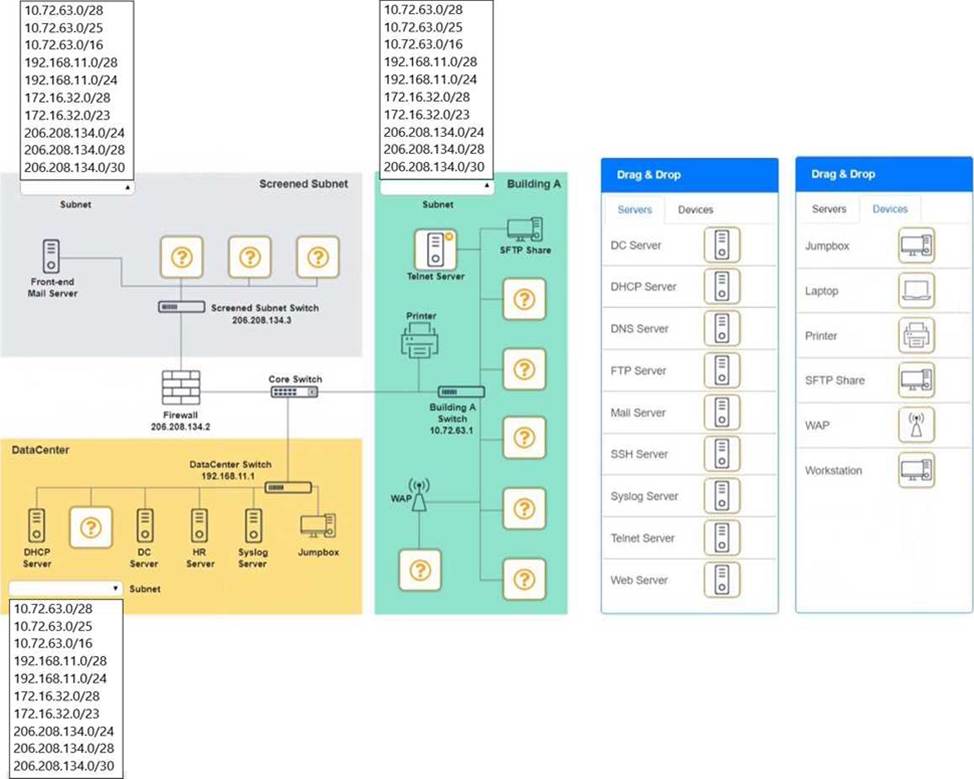
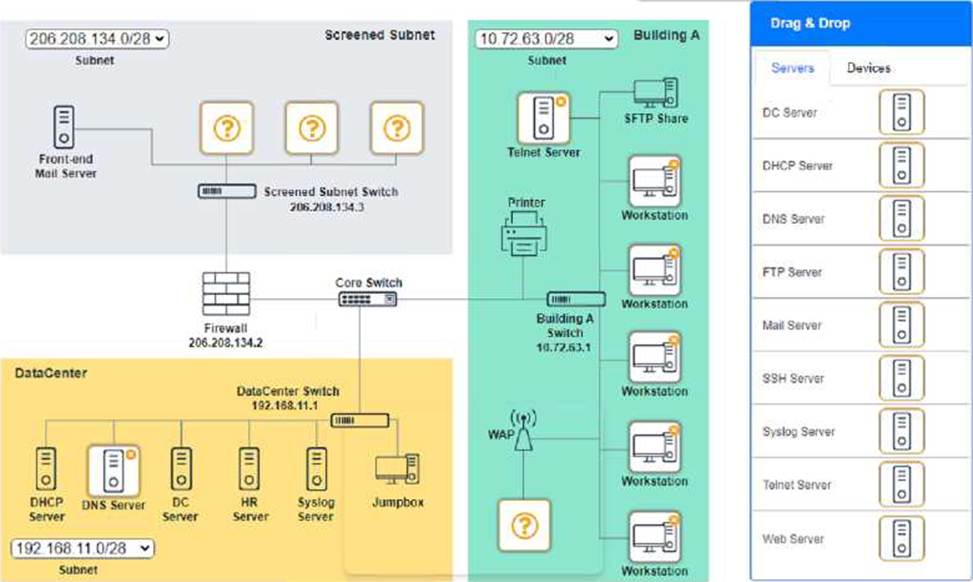
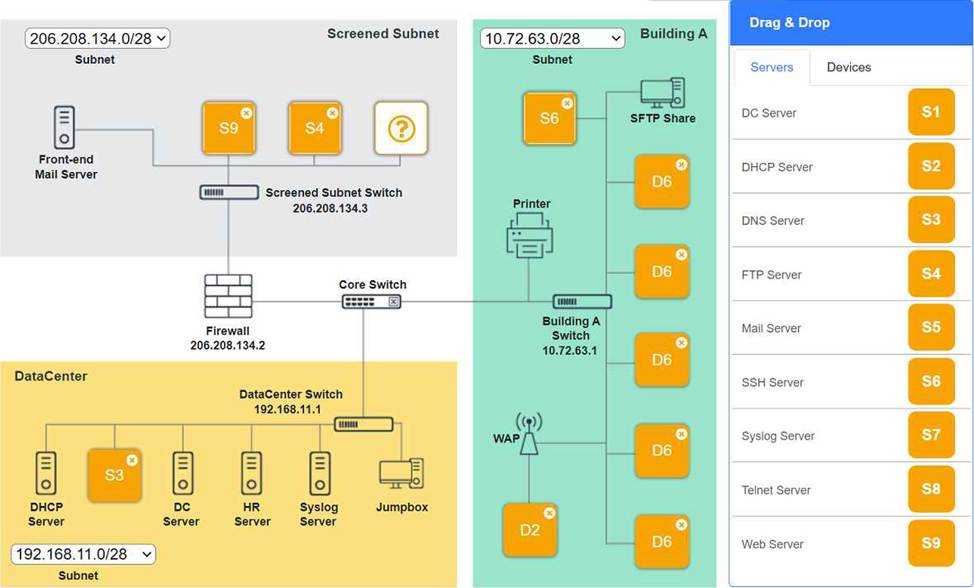
Building A devices C SSH server top left, workstations on all 5 on the right, laptop on bottom left DataCenter devices C DNS server.
A screenshot of a computer AI-generated content may be incorrect.
A screenshot of a computer AI-generated content may be incorrect.
Which of the following protocols is used to send networking status messages between clients and servers?
- A . SSH
- B . DHCP
- C . NTP
- D . SNMP
D
Explanation:
The correct answer is SNMP (Simple Network Management Protocol) because it is specifically designed to collect and transmit network management and status information between managed devices and management systems. According to CompTIA Network+ (N10-009) objectives, SNMP is used for monitoring and managing network devices such as routers, switches, servers, and printers.
SNMP operates using a manager-agent model. The SNMP manager (such as a network monitoring server) communicates with SNMP agents installed on network devices. Agents send traps and inform messages, which are unsolicited status alerts indicating events such as device failures, high CPU usage, or link outages. The manager can also poll agents to retrieve performance metrics and configuration details stored in the Management Information Base (MIB).
SSH (Option A) is used for secure remote administration. DHCP (Option B) dynamically assigns IP addresses. NTP (Option C) synchronizes time between devices. None of these protocols are designed for network status monitoring and alert messaging.
Therefore, SNMP is the correct protocol for sending networking status messages between devices and management systems.
Bottom of Form
Which of the following would an adversary do while conducting an evil twin attack?
- A . Trick users into using an AP with an SSID that is identical to a legitimate network
- B . Manipulate address resolution to point devices to a malicious endpoint
- C . Present an identical MAC to gain unauthorized access to network resources
- D . Capture data in transit between two legitimate endpoints to steal data
A
Explanation:
An evil twin attack sets up a rogue AP with the same SSID as a legitimate wireless network, tricking users into connecting. Once connected, the attacker can intercept traffic or harvest credentials.
B. Describes ARP spoofing.
C. Describes MAC spoofing.
D. Describes on-path attacks, which may follow, but the evil twin method begins with SSID impersonation.
Reference (CompTIA Network+ N10-009):
Domain: Network Security ― Wireless threats, rogue APs, evil twin.
Which of the following attacks would most likely cause duplicate IP addresses in a network?
- A . Rogue DHCP server
- B . DNS poisoning
- C . Social engineering
- D . Denial-of-service
A
Explanation:
Definition of a Rogue DHCP Server:
A rogue DHCP server is an unauthorized DHCP server on a network, which can assign IP addresses to devices without proper control, leading to IP address conflicts.
Impact of a Rogue DHCP Server:
IP Address Conflicts: Multiple devices may receive the same IP address from different DHCP servers, causing network connectivity issues.
Network Disruption: Devices may be assigned incorrect network configuration settings, disrupting network services and connectivity.
Comparison with Other Attacks:
DNS poisoning: Alters DNS records to redirect traffic to malicious sites, but does not cause IP address conflicts.
Social engineering: Involves manipulating individuals to gain unauthorized access or information, not directly related to IP address conflicts.
Denial-of-service (DoS): Floods a network or service with excessive traffic to disrupt operations, but does not cause duplicate IP addresses.
Prevention and Detection:
Implement network access control measures to prevent unauthorized devices from acting as DHCP servers.
Use DHCP snooping on switches to allow DHCP responses only from authorized DHCP servers.
Reference: CompTIA Network+ study materials on network security threats and mitigation techniques.
A company is hosting a secure that requires all connections to the server to be encrypted. A junior administrator needs to harded the web server. The following ports on the web server.
The following ports on the web server are open:
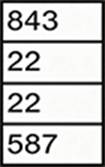
Which of the following ports should be disabled?
- A . 22
- B . 80
- C . 443
- D . 587
B
Explanation:
For a web server that requires all connections to be encrypted, port 80 (HTTP) should be disabled. Port 80 is used for unencrypted web traffic, whereas port 443 is used for HTTPS, which provides encrypted communication.
Port 80 (HTTP): This port is used for unsecured web traffic. Disabling this port ensures that all web traffic must use HTTPS, which encrypts the data in transit.
Port 443 (HTTPS): This port is used for secure web traffic via SSL/TLS encryption. Keeping this port open ensures that secure connections can be made to the web server.
Other Ports:
Port 22: Used for SSH, providing secure remote access and file transfers.
Port 587: Used for secure email submission (SMTP) with encryption.
Network
Reference: CompTIA Network+ N10-007 Official Certification Guide: Discusses the roles and security implications of various ports and protocols.
Cisco Networking Academy: Provides training on secure web server configuration and port management.
Network+ Certification All-in-One Exam Guide: Covers port security and best practices for securing web servers.
A network engineer is deploying switches at a new remote office.
The switches have been preconfigured with hostnames and STP priority values. Based on the following table:
Switch Name
Priority
core-sw01
24576
access-sw01
28672
distribution-sw01
32768
access-sw02
36864
Which of the following switches will become the root bridge?
- A . core-sw01
- B . access-sw01
- C . distribution-sw01
- D . access-sw02
A
Explanation:
The switch with the lowest STP priority becomes the root bridge. In the given table, core-sw01 has the lowest priority value of 24576. Therefore, it will be elected as the root bridge in the Spanning Tree Protocol topology.
Reference: Section 2.2 C Switching Technologies and Features C “Spanning Tree Protocol (STP)”
A network administrator notices interference with industrial equipment in the 2.4GHz range.
Which of the following technologies would most likely mitigate this issue? (Select two).
- A . Mesh network
- B . 5GHz frequency
- C . Omnidirectional antenna
- D . Non-overlapping channel
- E . Captive portal
- F . Ad hoc network
B
Explanation:
Understanding 2.4GHz Interference:
The 2.4GHz frequency range is commonly used by many devices, including Wi-Fi, Bluetooth, and various industrial equipment. This can lead to interference and degraded performance.
Mitigation Strategies:
5GHz Frequency:
The 5GHz frequency band offers more channels and less interference compared to the 2.4GHz band. Devices operating on 5GHz are less likely to encounter interference from other devices, including industrial equipment.
Non-overlapping Channels:
In the 2.4GHz band, using non-overlapping channels (such as channels 1, 6, and 11) can help reduce interference. Non-overlapping channels do not interfere with each other, providing clearer communication paths for Wi-Fi signals.
Why Other Options are Less Effective:
Mesh Network: While useful for extending network coverage, a mesh network does not inherently address interference issues.
Omnidirectional Antenna: This type of antenna broadcasts signals in all directions but does not mitigate interference.
Captive Portal: A web page that users must view and interact with before accessing a network, unrelated to frequency interference.
Ad Hoc Network: A decentralized wireless network that does not address interference issues directly.
Implementation:
Switch Wi-Fi devices to the 5GHz band if supported by the network infrastructure and client devices.
Configure Wi-Fi access points to use non-overlapping channels within the 2.4GHz band to minimize interference.
Reference: CompTIA Network+ study materials on wireless networking and interference mitigation.
Which of the following can be implemented to add an additional layer of security between a corporate network and network management interfaces?
- A . Jump box
- B . Console server
- C . API interface
- D . In-band management
A
Explanation:
A jump box is a hardened, isolated system that provides secure access to critical infrastructure devices like routers and firewalls.
Reference: CompTIA Network+ (N10-009) Official Study Guide C Domain 4.3: Explain network security techniques.
Which of the following should be configured so users can authenticate to a wireless network using company credentials?
- A . SSO
- B . SAML
- C . MFA
- D . RADIUS
D
Explanation:
RADIUS (Remote Authentication Dial-In User Service) is a networking protocol that provides centralized Authentication, Authorization, and Accounting (AAA) management for users who connect and use a network service. RADIUS is often used to manage access to wireless networks, enabling users to authenticate with their company credentials, ensuring secure access to the network.
Reference: CompTIA Network+ study materials.
Which of the following connector types is most commonly associated with Wi-Fi antennas?
- A . BNC
- B . SFP
- C . MPO
- D . RJ45
A
Explanation:
BNC (Bayonet NeillCConcelman) connectors are commonly used with coaxial cables in RF and wireless applications, including some older Wi-Fi antennas and specialized networking equipment.
The document says:
“BNC (Bayonet NeillCConcelman) connectors are typically used with coaxial cables, especially in radio frequency (RF) and some Wi-Fi antenna applications, providing a secure and quick connect/disconnect.”