
Practice Free MD-102 Exam Online Questions
HOTSPOT
You have the on-premises servers shown in the following table.
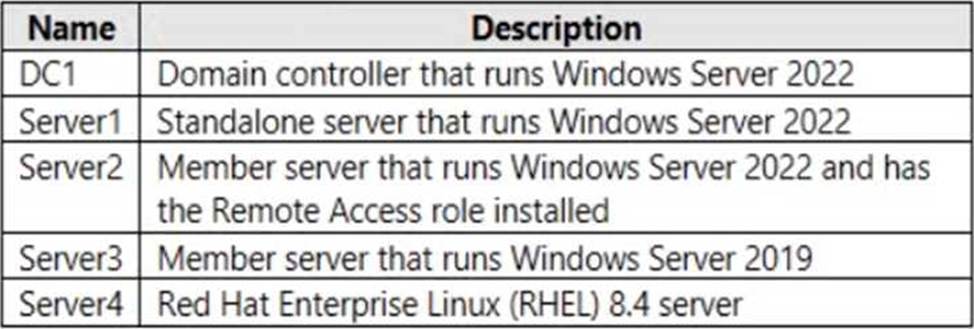
You have a Microsoft 365 E5 subscription that contains Android and iOS devices. All the devices are managed by using Microsoft Intune.
You need to implement Microsoft Tunnel for Intune. The solution must minimize the number of open firewall ports.
To which server can you deploy a Tunnel Gateway server, and which inbound ports should be allowed on the server to support Microsoft Tunnel connections? To answer, select the appropriate options in the answer area. NOTE: Each correct selection is worth one point.
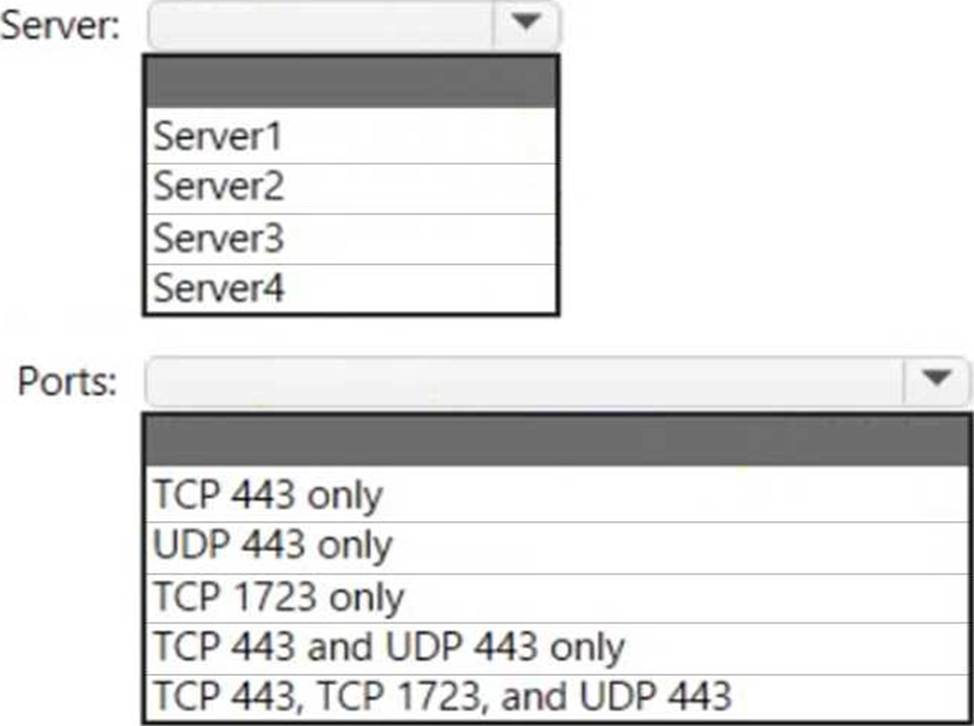
Explanation:
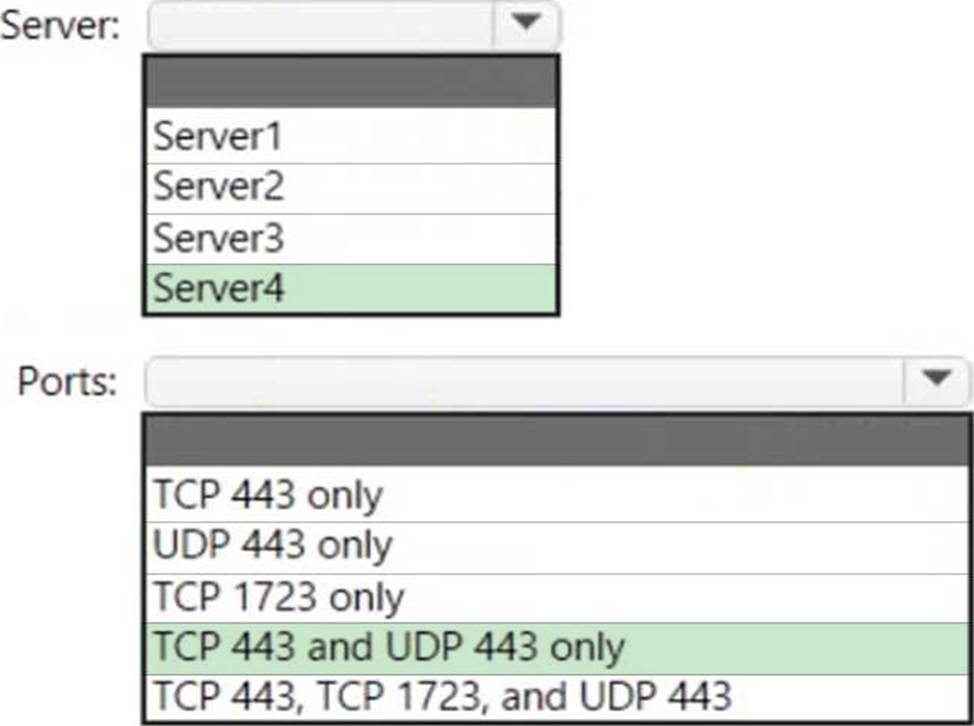
Box 1: Server4
Microsoft Tunnel is a VPN gateway solution for Microsoft Intune that runs in a container on Linux and allows access to on-premises resources from iOS/iPadOS and Android Enterprise devices using modern authentication and Conditional Access.
Box 2: TCP 443 and UDP 443 only
Some traffic goes to your public facing IP address for the Tunnel. The VPN channel will use TCP, TLS, UDP, and DTLS over port 443.
By default, port 443 is used for both TCP and UDP, but this can be customized via the Intune Saerver Configuration C Server port setting. If changing the default port (443) ensure your inbound firewall rules are adjusted to the custom port.
Incorrect:
TCP 1723 is not used.
Reference: https://docs.microsoft.com/en-us/mem/intune/protect/microsoft-tunnel-overview
Which devices are registered by using the Windows Autopilot deployment service?
- A . Device1 only
- B . Device3 only
- C . Device1 and Device3 only
- D . Device1, Device2, and Device3
C
Explanation:
Scenario: Windows Autopilot Configuration
Assignments
Included groups: Group1
Excluded groups: Group2
Device1 is member of Group1.
Device2 is member of Group1 and member of Group2.
Device3 is member of Group1.
Group1 and Group2 have a Membership type of Assigned.
Exclusion takes precedence over inclusion in the following same group type scenarios.
Reference: https://learn.microsoft.com/en-us/mem/intune/apps/apps-inc-exl-assignments
Your network contains an Active Directory domain named contoso.com. The domain contains a computer named Computer1 that runs Windows 10.
You have the groups shown in the following table.

Which groups can you add to Group4?
- A . Group2only
- B . Group1 and Group2 only
- C . Group2 and Group3 only
- D . Group1, Group2, and Group3
Topic 3, Contoso Ltd, Case 2
Overview
Contoso, Ltd, is a consulting company that has a main office in Montreal and two branch offices in Seattle and New York.
Contoso has the users and computers shown in the following table.

The company has IT, human resources (HR), legal (LEG), marketing (MKG) and finance (FIN)
departments.
Contoso uses Microsoft Store for Business and recently purchased a Microsoft 365 subscription.
The company is opening a new branch office in Phoenix. Most of the users in the Phoenix office will work from home.
Existing Environment
The network contains an Active Directory domain named contoso.com that is synced to Microsoft Azure Active Directory (Azure AD).
All member servers run Windows Server 2016. All laptops and desktop computers run Windows 10 Enterprise.
The computers are managed by using Microsoft System Center Configuration Manager. The mobile devices are managed by using Microsoft Intune.
The naming convention for the computers is the department acronym, followed by a hyphen, and then four numbers, for example, FIN-6785. All the computers are joined to the on-premises Active Directory domain.
Each department has an organization unit (OU) that contains a child OU named Computers. Each computer account is in the Computers OU of its respective department.
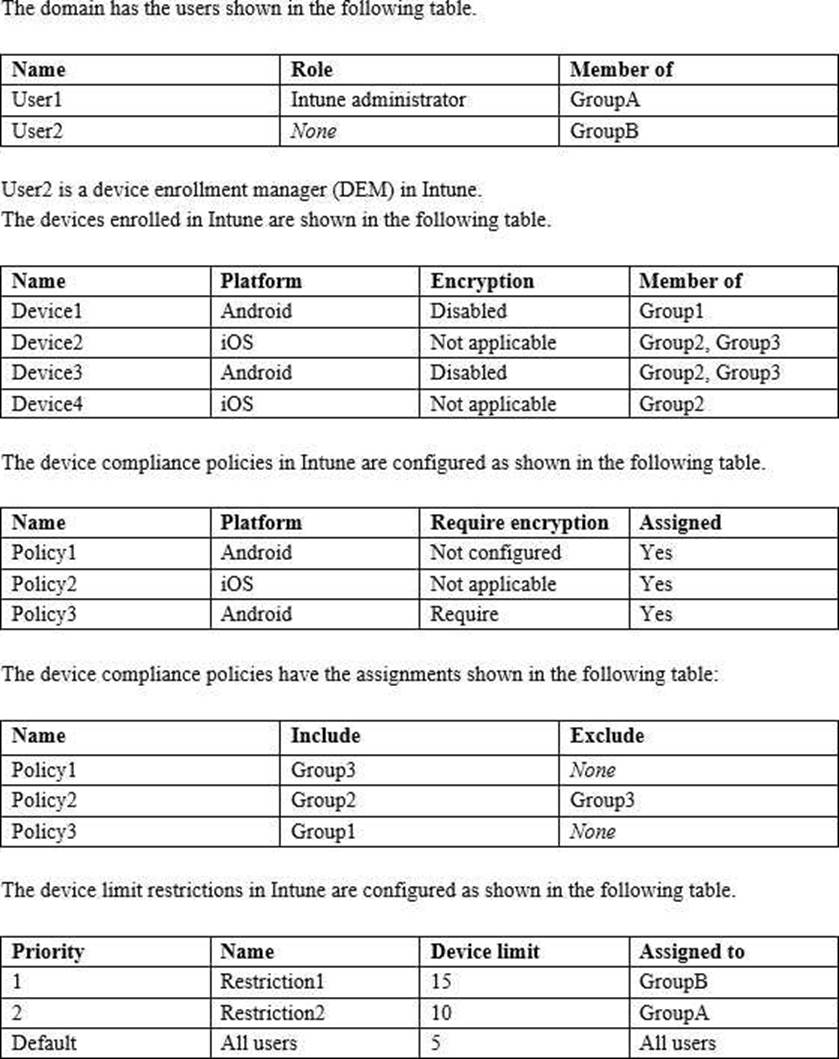
Intune Configuration
Requirements
Planned changes
Contoso plans to implement the following changes:
– Provide new computers to the Phoenix office users. The new computers have Windows 10 Pro preinstalled and were purchased already.
– Implement co-management for the computers.
Technical Requirements
Contoso must meet the following technical requirements:
– Ensure that the users in a group named Group4 can only access Microsoft Exchange Online from devices that are enrolled in Intune.
– Deploy Windows 10 Enterprise to the computers of the Phoenix office users by using Windows Autopilot.
– Create a provisioning package for new computers in the HR department.
– Block iOS devices from sending diagnostic and usage telemetry data.
– Use the principle of least privilege whenever possible.
– Enable the users in the MKG department to use App1.
– Pilot co-management for the IT department.
HOTSPOT
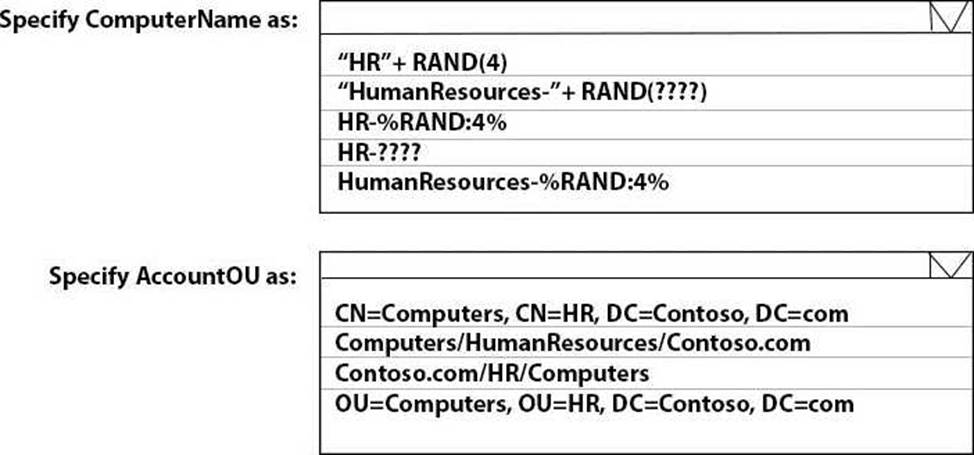
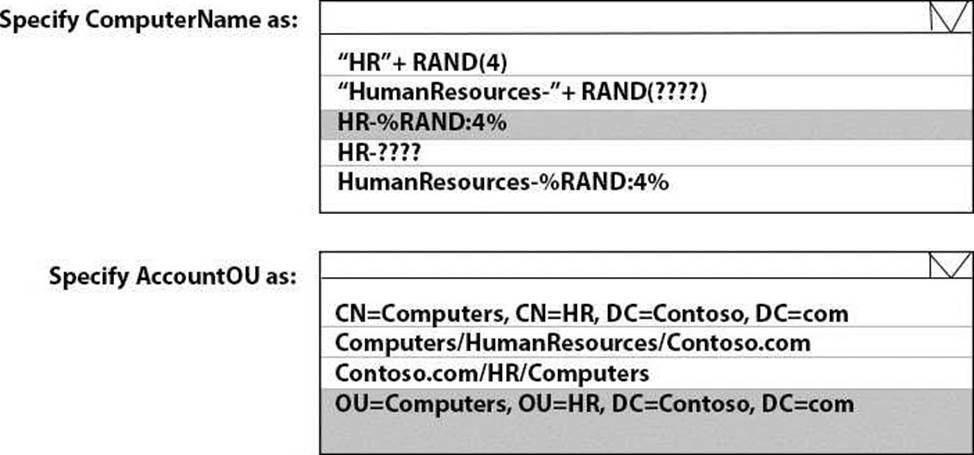
You need to meet the technical requirements for the new HR department computers.
How should you configure the provisioning package? To answer, select the appropriate options in the answer area. NOTE: Each correct selection is worth one point.
Explanation:
Reference: https://docs.microsoft.com/en-us/windows/configuration/wcd/wcd-accounts
You use Microsoft Intune and Intune Data Warehouse.
You need to create a device inventory report that includes the data stored in the data warehouse.
What should you use to create the report?
- A . the Azure portal app
- B . Endpoint analytics
- C . the Company Portal app
- D . Microsoft Power Bl
D
Explanation:
You can use the Power BI Compliance app to load interactive, dynamically generated reports for your Intune tenant.
Additionally, you can load your tenant data in Power BI using the OData link. Intune provides connection settings to your tenant so that you can view the following sample reports and charts related to:
Devices
Enrollment
App protection policy
Compliance policy
Device configuration profiles
Software updates
Device inventory logs
Note: Load the data in Power BI using the OData link
With a client authenticated to Azure AD, the OData URL connects to the RESTful endpoint in the Data Warehouse API that exposes the data model to your reporting client. Follow these instructions to use Power BI Desktop to connect and create your own reports.
Sign in to the Microsoft Endpoint Manager admin center. Select Reports > Intune Data warehouse > Data warehouse. Retrieve the custom feed URL from the reporting blade, for example: https://fef.{yourtenant}.manage.microsoft.com/ReportingService/DataWarehouseFEService/dates?a pi-version=v1.0
Open Power BI Desktop.
Choose File > Get Data. Select OData feed.
Choose Basic.
Type or paste the OData URL into the URL box.
Select OK.
If you have not authenticated to Azure AD for your tenant from the Power BI desktop client, type your credentials. To gain access to your data, you must authorize with Azure Active Directory (Azure AD) using OAuth 2.0.
Select Organizational account.
Type your username and password.
Select Sign In.
Select Connect.
Select Load.
Reference: https://docs.microsoft.com/en-us/mem/intune/developer/reports-proc-get-a-link-powerbi
You have an on-premises server named Server! that hosts a Microsoft Deployment Toolkit (MDT) deployment share named MDT1. You need to ensure that MDT1 supports multicast deployments.
What should you install on Server1?
- A . Multipath I/O (MPIO)
- B . Multipoint Connector
- C . Windows Deployment Services (WDS)
- D . Windows Server Update Services (WSUS)
HOTSPOT
You have a Microsoft 365 E5 subscription that contains 100 Windows 10 devices enrolled in Microsoft Intune.
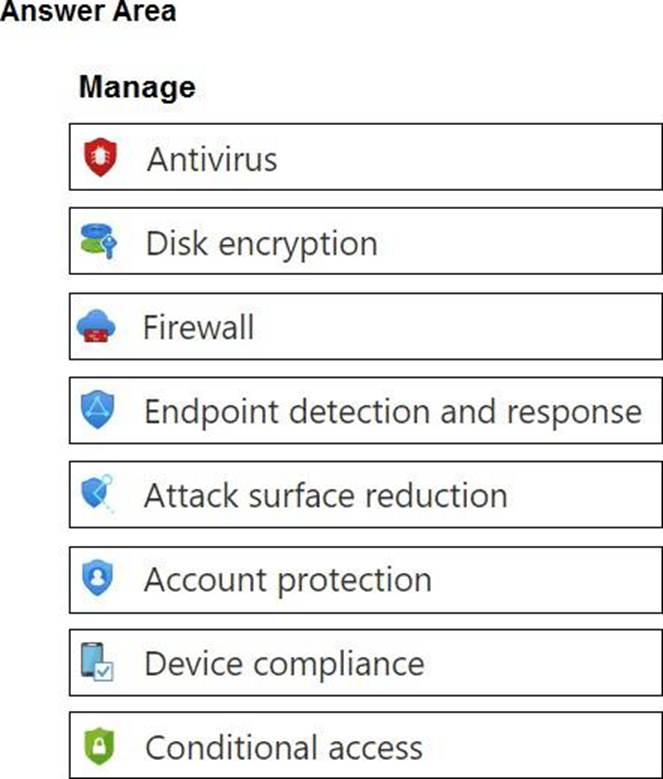
You need to create Endpoint security policies to meet the following requirements:
• Hide the Firewall & network protection area in the Windows Security app.
• Disable the provisioning of Windows Hello for Business on the devices.
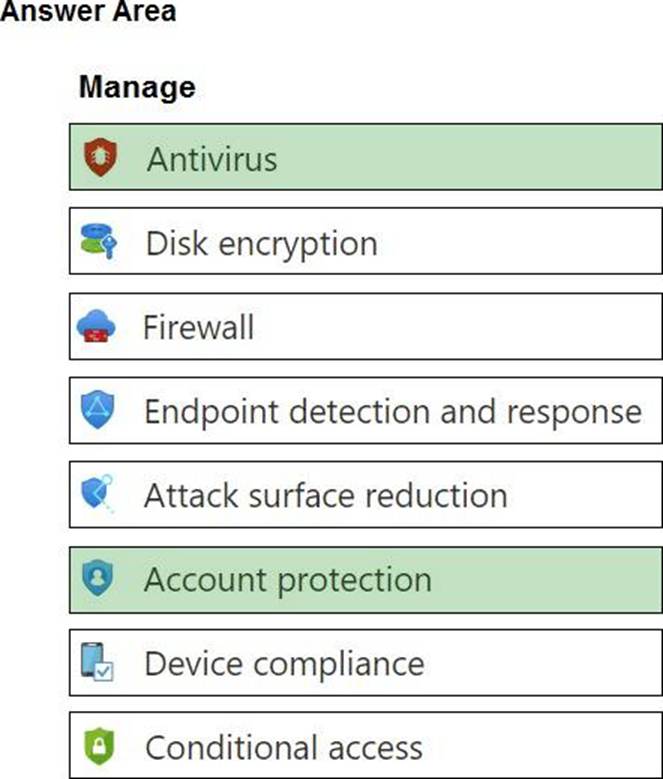
Which two policy types should you use? To answer, select the policies in the answer area. NOTE: Each correct selection is worth one point.
Explanation:
In the Antivirus policy settings, you can hide the Firewall and network protection area in the Windows Security app.
Windows Hello for Business settings are configured in Identity protection.
Reference:
https://docs.microsoft.com/en-us/mem/intune/protect/antivirus-security-experience-windows-settings
https://docs.microsoft.com/en-us/mem/intune/protect/identity-protection-windows-settings
HOTSPOT
Your network contains an Active Directory domain.
The domain contains four computers named Computer1, Computer2, Computer3, and Computer4 that run Windows 10.
You perform the following actions:
• On Computer1, you install Windows Admin Center and configure Windows Defender Firewall to allow incoming communication over TCP ports 80,443, and 6516.
• On Computer2, you run the Enable-PSRemoting cmdlet.
• On Computer3, you configure Windows Defender Firewall to allow Windows Remote Management (WinRM) traffic.
• On Computer4, you run the winrm quickconfig command.
You need to manage the computers remotely by using Windows Admin Center.
From which computers can you connect to Windows Admin Center, and which computers can you manage by using Windows Admin Center? To answer, select the appropriate options in the answer are. NOTE: Each correct selection is worth one point.
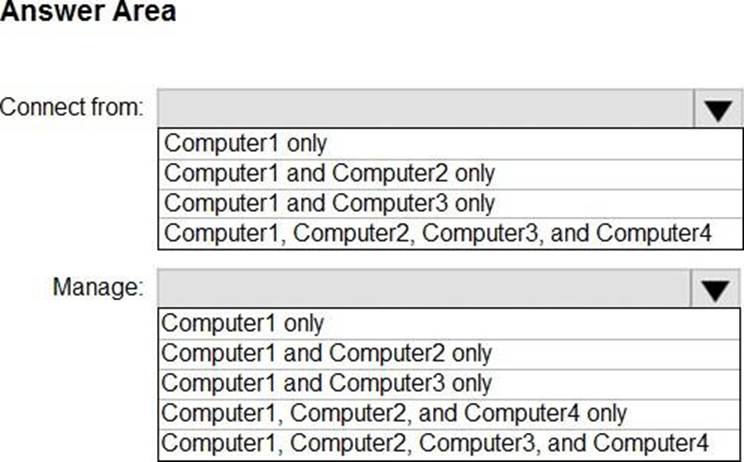
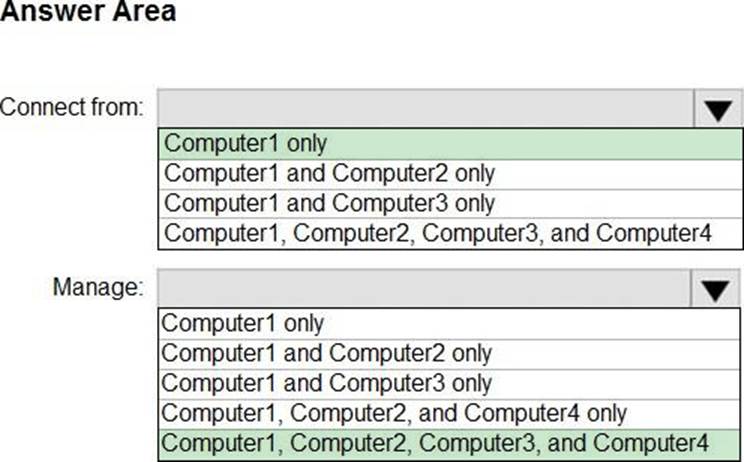
You have a Windows 10 device named Computer1 enrolled in Microsoft Intune.
You need to configure Computer1 as a public workstation that will run a single customer-facing, full-screen application.
Which configuration profile type template should you use in Microsoft Intune admin center?
- A . Shared multi-user device
- B . Device restrictions
- C . Kiosk
- D . Endpoint protection
You have computers that run Windows 11 Pro. The computers are joined to Azure AD and enrolled in Microsoft Intune. You need to upgrade the computers to Windows 11 Enterprise.
What should you configure in Intune?
- A . a device compliance policy
- B . a device cleanup rule
- C . a device enrollment policy
- D . a device configuration profile