
Practice Free MD-102 Exam Online Questions
You have a Microsoft 365 subscription that includes Microsoft Intune.
You plan to use Windows Autopilot to deploy Windows 11 devices.
You need to meet the following requirements during Autopilot provisioning:
• Display the app and profile configuration progress.
• Block users from using the devices until all apps and profiles are installed
What should you configure?
- A . an app configuration policy
- B . an app protection policy
- C . an enrollment device platform restriction
- D . an enrollment status page
D
Explanation:
https://learn.microsoft.com/en-us/mem/intune/enrollment/windows-enrollment-status
You have a Microsoft 365 E5 subscription that uses Microsoft Intune.
You add apps to Intune as shown in the following table.
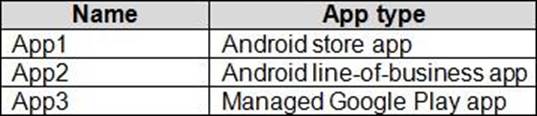
You need to create an app configuration policy named Policy1 for the Android Enterprise platform.
Which apps can you manage by using Policyl1?
- A . App2 only
- B . App3 only
- C . App1 and App3 only
- D . App2 and App3 only
- E . App1, App2, and App3
HOTSPOT
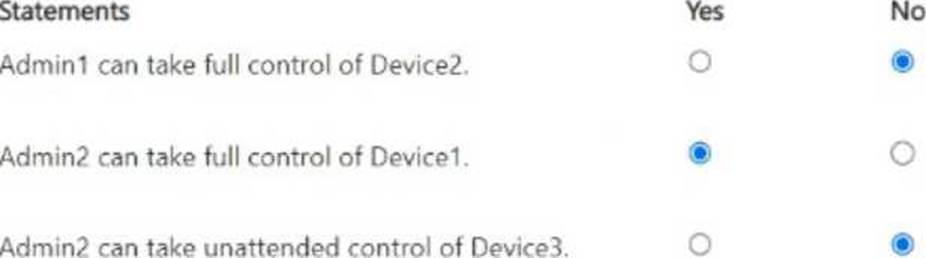
You have a Microsoft 365 E5 subscription that contains devices enrolled in Microsoft Intune as shown in the following table.
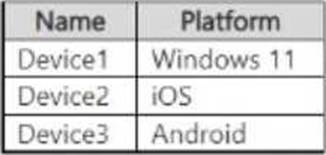
The subscription contains shown in the following table.

The Remote Help Tier1 role is configured as shown in the following exhibit.
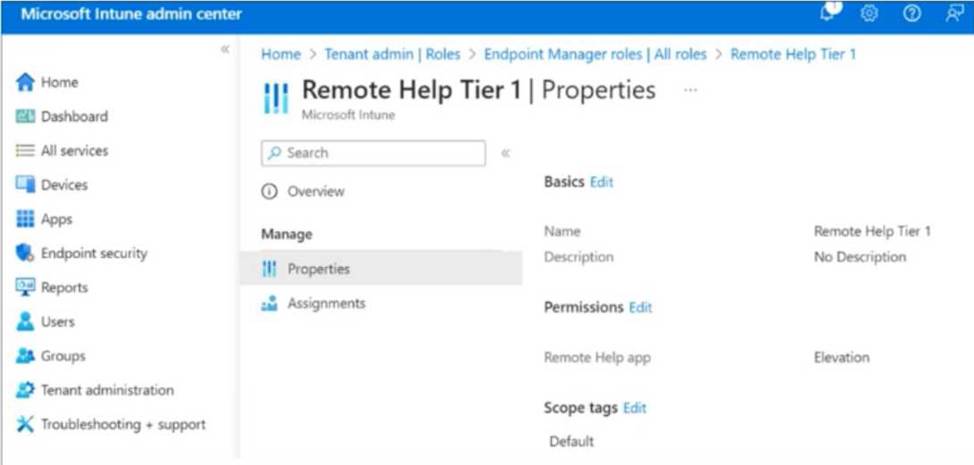
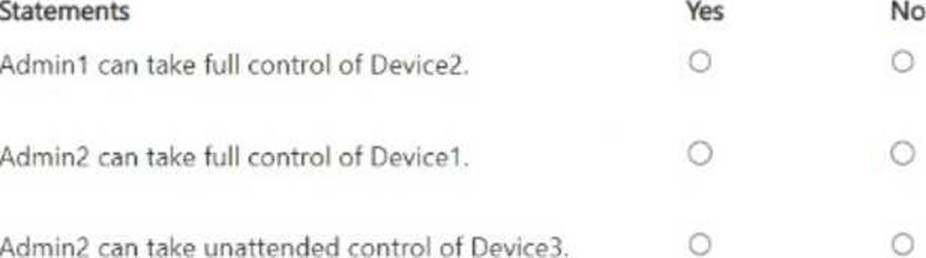
For each of the following statements, select Yes if the statement is true. Otherwise, select No. NOTE: Each correct selection is worth one point.
HOTSPOT
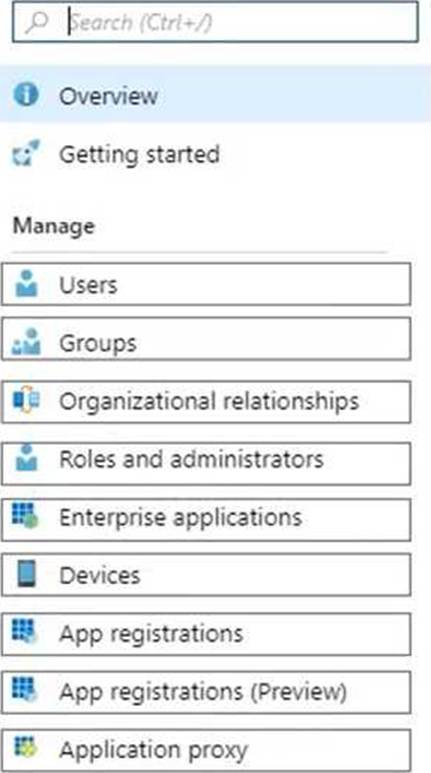
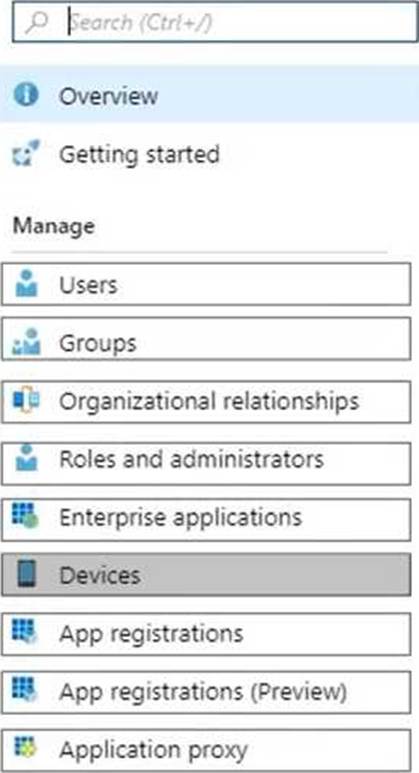
You need to meet the technical requirements for Windows AutoPilot.
Which two settings should you configure from the Azure Active Directory blade? To answer, select the appropriate settings in the answer area. NOTE: Each correct selection is worth one point.
Explanation:
Reference: https://docs.microsoft.com/en-us/windows/deployment/windows-autopilot/windows-autopilot-reset
DRAG DROP
You have SOO Windows 10 devices enrolled in Microsoft Intune.
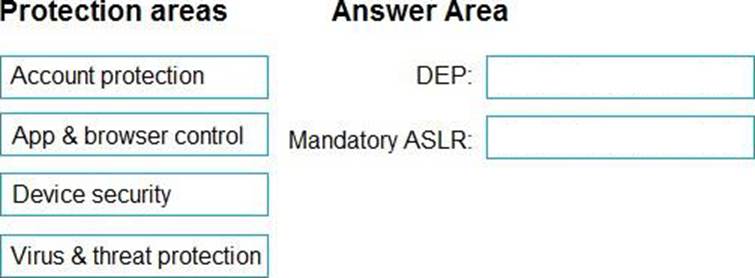
You plan to use Exploit protection in Microsoft Intune to enable the following system settings on the devices:
• Data Execution Prevention (DEP)
• Force randomization for images (Mandatory ASlR)
You need to configure a Windows 10 device that will be used to create a template file.
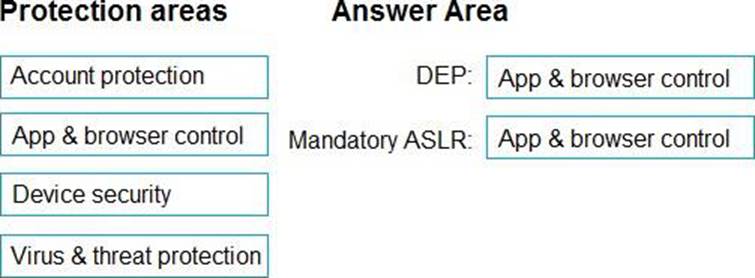
Which protection areas on the device should you configure in the Windows Security app before you create the template file? To answer, drag the appropriate protection areas to the correct settings. Each protection area may be used once, more than once, or not at all. You may need to drag the split bar between panes or scroll to view content. NOTE: Each correct selection is worth one point.
Explanation:
Exploit protection is a feature that helps protect against malware that uses exploits to infect devices and spread. Exploit protection consists of many mitigations that can be applied to either the operating system or individual apps1.
To configure a Windows 10 device that will be used to create a template file for Exploit protection, you need to configure the following protection areas on the device in the Windows Security app: DEP: Device security. Data Execution Prevention (DEP) is a mitigation that prevents code from running in memory regions marked as non-executable. You can enable DEP system-wide or for specific apps in the Device security section of the Windows Security app1.
Mandatory ASLR: App & browser control. Force randomization for images (Mandatory ASLR) is a mitigation that randomizes the location of executable images in memory, making it harder for attackers to predict where to inject code. You can enable Mandatory ASLR system-wide or for specific apps in the App & browser control section of the Windows Security app1.
What should you use to meet the technical requirements for Azure DevOps?
- A . An app protection policy
- B . Windows Information Protection (WIP)
- C . Conditional access
- D . A device configuration profile
C
Explanation:
Reference: https://docs.microsoft.com/en-us/azure/devops/organizations/accounts/manage-conditional-access?view=azure-devops
HOTSPOT
You have a Microsoft 365 E5 subscription that uses Microsoft Intune.
You have the Windows 11 devices shown in the following table.

You deploy the device compliance policy shown in the exhibit. (Click the Exhibit tab.)
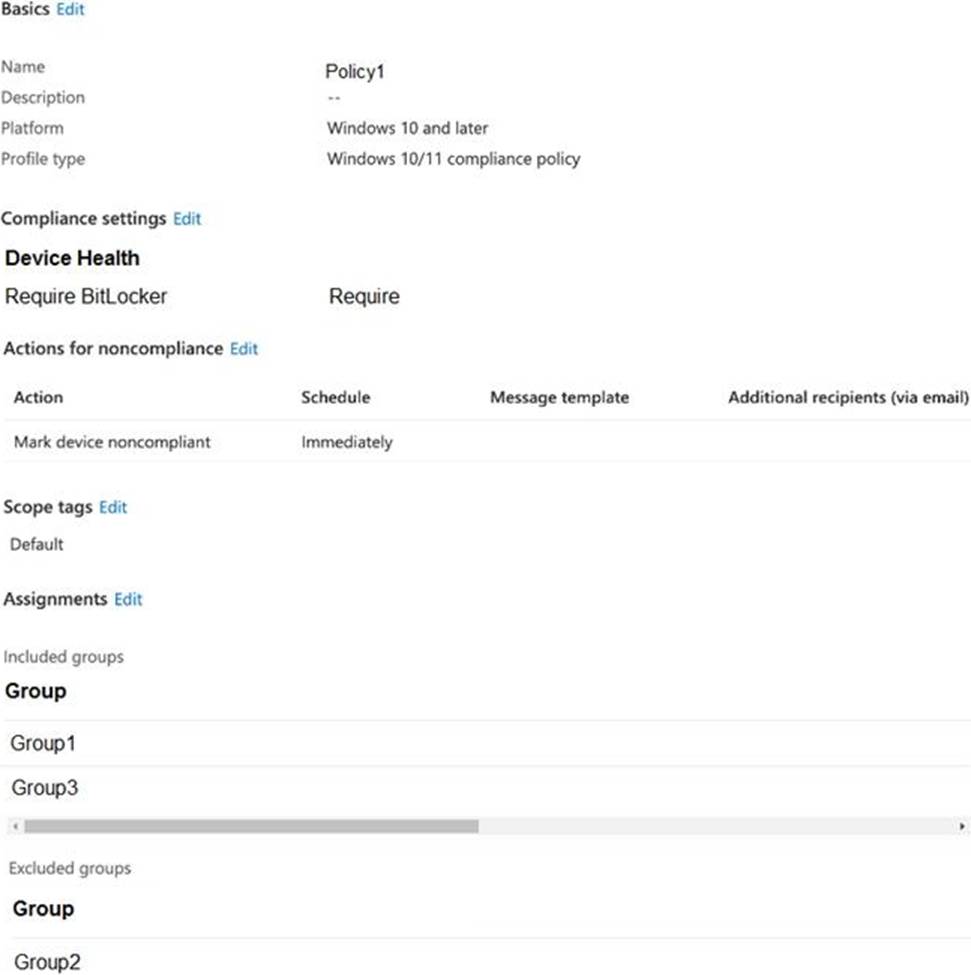
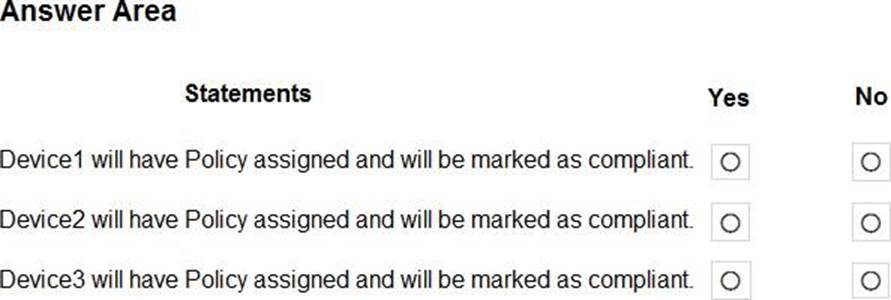
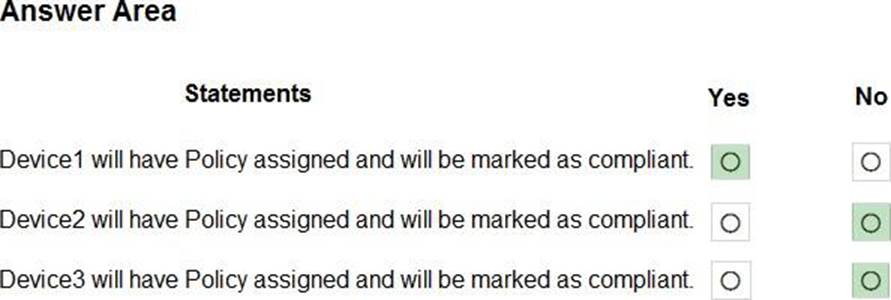
For each of the following statements, select Yes if the statement is true. Otherwise, select No. NOTE: Each correct selection is worth one point.
You have devices enrolled in Microsoft Intune as shown in the following table.
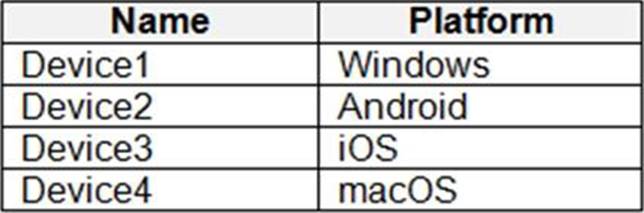
For which devices can you manage updates by using intune?
- A . Devic1l only
- B . Device1 and Oevice2 only
- C . Device 1 and Device3 only
- D . Device 1. Device3, and Device4 only
- E . Device 1. Device2, Device3, and Device4
HOTSPOT
You have a Microsoft Deployment Toolkit (MDT) deployment share named Share 1.
You add Windows 10 images to Share! as shown in the following table.
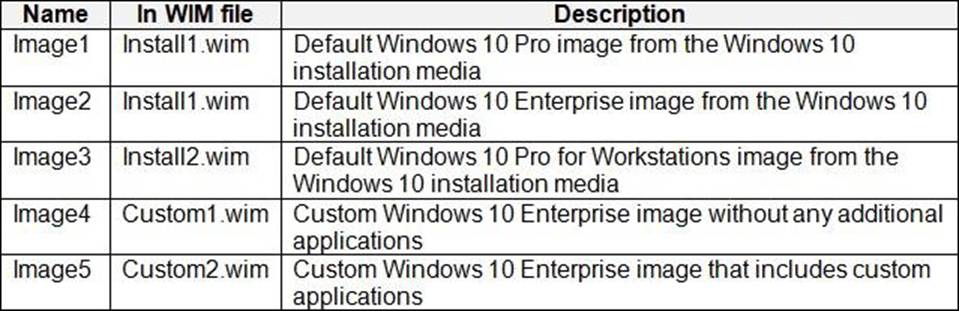
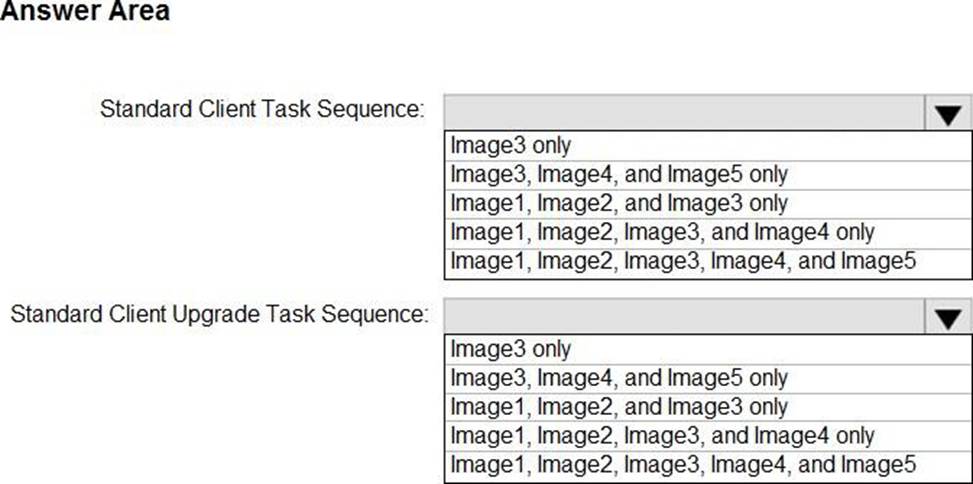
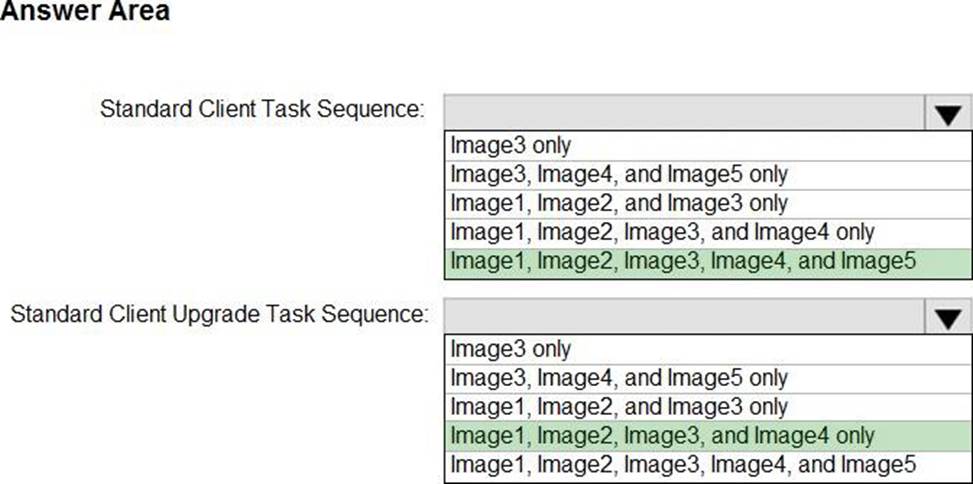
Which images can be used in the Standard Client Task Sequence, and which images can be used in the Standard Client Upgrade Task Sequence? NOTE: Each correct selection is worth one point.
Your company standardizes on Windows 10 Enterprise for all users.
Some users purchase their own computer from a retail store. The computers run Windows 10 Pro.
You need to recommend a solution to upgrade the computers to Windows 10 Enterprise, join the computers to Azure AD, and install several Microsoft Store apps.
The solution must meet the following requirements:
• Ensure that any applications installed by the users are retained.
• Minimize user intervention.
What is the best recommendation to achieve the goal? More than one answer choice may achieve the goal. Select the BEST answer.
- A . Windows Autopilot
- B . Microsoft Deployment Toolkit (MDT)
- C . a Windows Configuration Designer provisioning package
- D . Windows Deployment Services (WDS)