
Practice Free MD-102 Exam Online Questions
You have a Microsoft 365 subscription that includes Microsoft Intune. The subscription contains corporate-owned, fully managed Android Enterprise devices.
You plan to deploy a configuration profile that will have a device restrictions profile type named Profile1. Profile1 will assign maintenance windows for system updates.
What should you configure from the Configuration settings for Profile1?
- A . Device experience
- B . General
- C . Connectivity
- D . Power Settings
HOTSPOT
Your company has computers that run Windows 10 and are Microsoft Azure Active Directory (Azure AD)-joined.
The company purchases an Azure subscription.
You need to collect Windows events from the Windows 10 computers in Azure. The solution must enable you to create alerts based on the collected events.
What should you create in Azure and what should you configure on the computers? To answer, select the appropriate options in the answer area. NOTE: Each correct selection is worth one point.
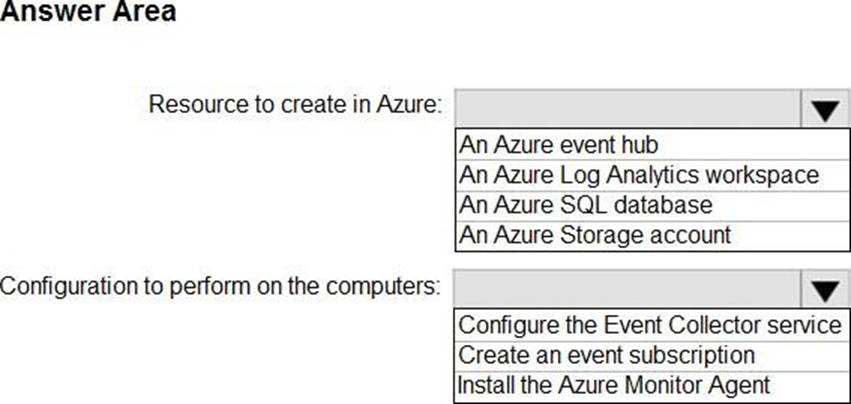
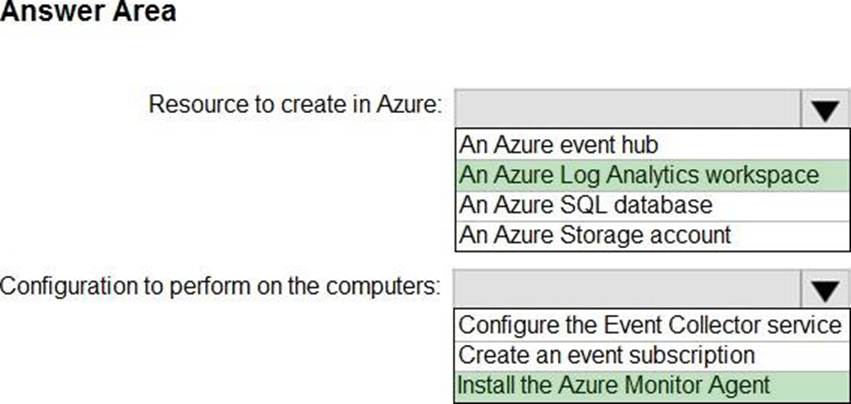
Explanation:
Reference: https://docs.microsoft.com/en-us/azure/azure-monitor/platform/log-analytics-agent
You have a Microsoft 365 Business Standard subscription and 100 Windows 10 Pro devices.
You purchase a Microsoft 365 E5 subscription.
You need to upgrade the Windows 10 Pro devices to Windows 10 Enterprise. The solution must minimize administrative effort.
Which upgrade method should you use?
- A . Windows Autopilot
- B . a Microsoft Deployment Toolkit (MDT) lite-touch deployment
- C . Subscription Activation
- D . an in-place upgrade by using Windows installation media
C
Explanation:
Subscription Activation is a feature that allows you to upgrade from Windows 10 Pro or Windows 11 Pro to Windows 10 Enterprise or Windows 11 Enterprise without needing a product key or reinstallation. You just need to assign a subscription license (such as Microsoft 365 E5) to the user in Azure AD, and then sign in to the device with that user account. The device will automatically activate Windows Enterprise edition using the firmware-embedded activation key for Windows Pro edition. This method minimizes administrative effort and simplifies the upgrade process.
Reference: Windows subscription activation, Deploy Windows Enterprise licenses
You have a Microsoft Entra tenant named contoso.com. You purchase an Android device named Device1. You need to register Device1 in contoso.com.
Solution: You use Microsoft Entra Connect Sync.
Does this meet the goal?
- A . Yes
- B . No
You have a Microsoft 365 E5 subscription and use Microsoft Intune Suite.
You plan to use Intune to run remediation script packages.
What should you do first in the Microsoft Intune admin center?
- A . Enable Windows diagnostic data in processor configuration.
- B . Upload a Windows enterprise certificate.
- C . Enable Windows license verification.
- D . Configure the Derived Credential settings.
You have a Microsoft 365 E5 subscription.
You purchase the following types of devices:
• Windows
• Android
• iOS
You plan to enroll the devices in Microsoft Intune. You need to configure enrollment restrictions.
For which device types can you configure device manufacturer restrictions?
- A . Android only
- B . Windows only
- C . Android and iOS only
- D . Windows and iOS only
- E . Windows. Android, and iOS
DRAG DROP
You have a Microsoft 365 subscription that contains devices enrolled in Microsoft Intune.
You need to create Endpoint security policies to enforce the following requirements:
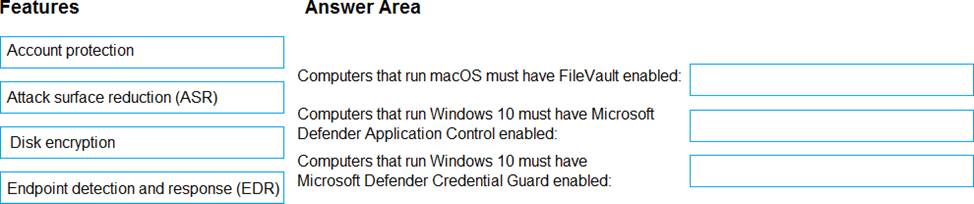
• Computers that run macOS must have FileVault enabled.
• Computers that run Windows 10 must have Microsoft Defender Credential Guard enabled.
• Computers that run Windows 10 must have Microsoft Defender Application Control enabled.
Which Endpoint security feature should you use for each requirement? To answer, drag the appropriate features to the correct requirements. Each feature may be used once, more than once, or not at all. You may need to drag the split bar between panes or scroll to view content.
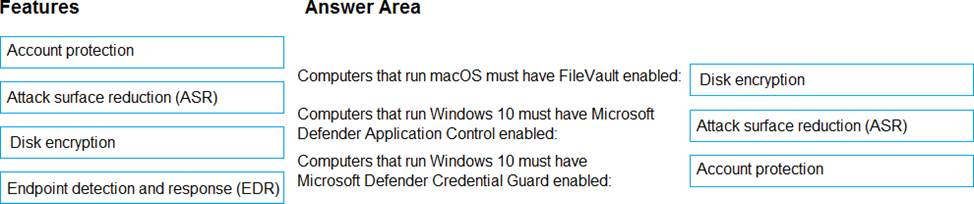
Explanation:
Disk Encryption
ASR – Ref https://learn.microsoft.com/en-us/mem/intune/protect/endpoint-security-asr-policy#:~:text=Application%20control%20%2D%20Application,Constrained%20Language%20Mode.
Account Protection – Ref https://learn.microsoft.com/en-us/windows/security/identity-protection/credential-guard/configure?tabs=intune#:~:text=You%20can%20also%20configure%20Credential%20Guard%20by%20using%20an%20account%20protection%20profile%20in%20endpoint%20security.
You have the Windows 10 devices shown in the following table.
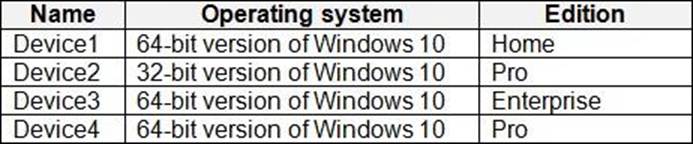
You plan to upgrade the devices to Windows 11 Enterprise.
On which devices can you perform a direct in-place upgrade to Windows 11 Enterprise?
- A . Device3 only
- B . Device 3 and Device 4 only
- C . Device2. Device3. and Devtce4 only
- D . Device1. Device3, and Devtce4 only
- E . Device1, Device2. Device3. and Devke4 only
A
Explanation:
https://learn.microsoft.com/en-us/windows/deployment/upgrade/windows-upgrade-paths
https://learn.microsoft.com/en-us/windows/deployment/upgrade/windows-edition-upgrades
You have a Microsoft 365 E5 subscription that contains the devices shown in the following table.
All devices have Microsoft Edge installed.
From the Microsoft Intune admin center, you create a Microsoft
You need to apply Edge1 to all the supported devices.
To which devices should you apply Edge1?
- A . Device1 only
- B . Device1 and Device2 only
- C . Device1, Device2, and Device3 only
- D . Device1, Device2, and Device4 only
- E . Device1, Device2, Device3, and Device4
You have an Azure AD tenant named contoso.com.
You have a workgroup computer named Computer! that runs Windows 11.
You need to add Computer1 to contoso.com.
What should you use?
- A . dsreecmd.exe
- B . Computer Management
- C . netdom.exe
- D . the Settings app