Practice Free MD-102 Exam Online Questions
Your company has 200 computers that run Windows 10. The computers are managed by using Microsoft Intune. Currently, Windows updates are downloaded without using Delivery Optimization. You need to configure the computers to use Delivery Optimization.
What should you create in Intune?
- A . a device compliance policy
- B . a Windows 10 update ring
- C . a device configuration profile
- D . an app protection policy
You use Microsoft Intune and Intune Data Warehouse.
You need to create a device inventory report that includes the data stored in the data warehouse.
What should you use to create the report?
- A . the Azure portal app
- B . Endpoint analytics
- C . the Company Portal app
- D . Microsoft Power Bl
D
Explanation:
You can use the Power BI Compliance app to load interactive, dynamically generated reports for your Intune tenant. Additionally, you can load your tenant data in Power BI using the OData link. Intune provides connection settings to your tenant so that you can view the following sample reports and charts related to:
Devices
Enrollment
App protection policy
Compliance policy
Device configuration profiles
Software updates
Device inventory logs
Note: Load the data in Power BI using the OData link
With a client authenticated to Azure AD, the OData URL connects to the RESTful endpoint in the Data Warehouse API that exposes the data model to your reporting client. Follow these instructions to use Power BI Desktop to connect and create your own reports.
Sign in to the Microsoft Endpoint Manager admin center. Select Reports > Intune Data warehouse > Data warehouse. Retrieve the custom feed URL from the reporting blade, for example: https://fef.{yourtenant}.manage.microsoft.com/ReportingService/DataWarehouseFEService/dates?a pi-version=v1.0
Open Power BI Desktop.
Choose File > Get Data. Select OData feed.
Choose Basic.
Type or paste the OData URL into the URL box.
Select OK.
If you have not authenticated to Azure AD for your tenant from the Power BI desktop client, type your credentials. To gain access to your data, you must authorize with Azure Active Directory (Azure AD) using OAuth 2.0.
Select Organizational account.
Type your username and password.
Select Sign In.
Select Connect.
Select Load.
Reference: https://docs.microsoft.com/en-us/mem/intune/developer/reports-proc-get-a-link-powerbi
You need to meet the requirements for the MKG department users.
What should you do?
- A . Assign the MKG department users the Purchaser role in Microsoft Store for Business
- B . Download the APPX file for App1 from Microsoft Store for Business
- C . Add App1 to the private store
- D . Assign the MKG department users the Basic Purchaser role in Microsoft Store for Business
- E . Acquire App1 from Microsoft Store for Business
E
Explanation:
Reference: https://docs.microsoft.com/en-us/microsoft-store/distribute-apps-from-your-private-store
Enable the users in the MKG department to use App1.
The private store is a feature in Microsoft Store for Business and Education that organizations receive during the signup process. When admins add apps to the private store, all employees in the organization can view and download the apps. Your private store is available as a tab in Microsoft Store app, and is usually named for your company or organization. Only apps with online licenses can be added to the private store.
Reference: https://docs.microsoft.com/en-us/microsoft-store/distribute-apps-from-your-private-store
HOTSPOT
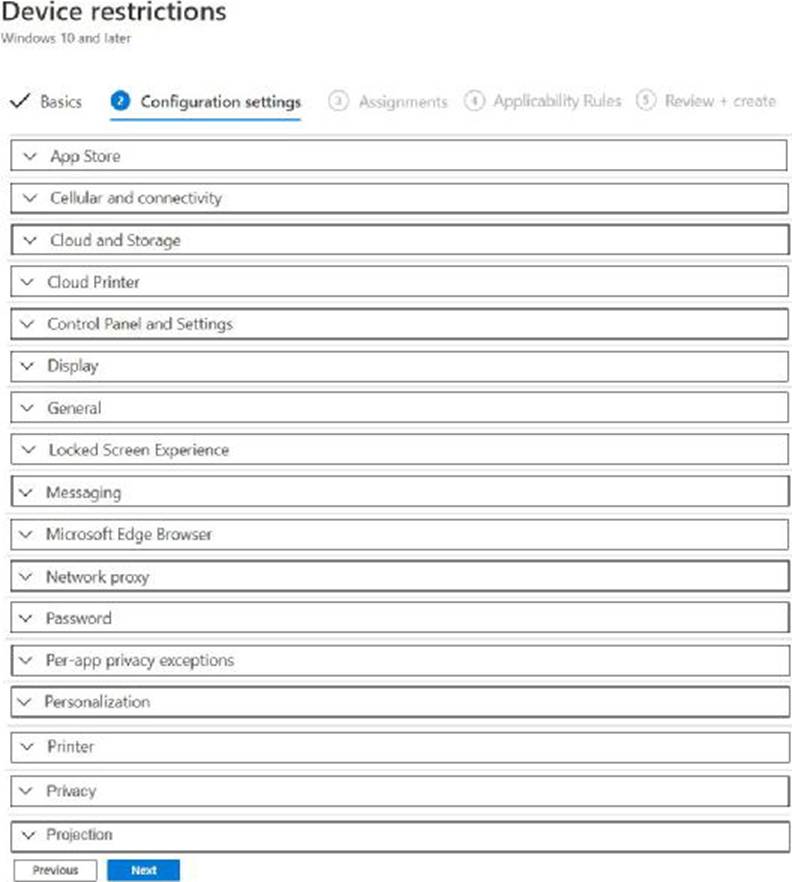
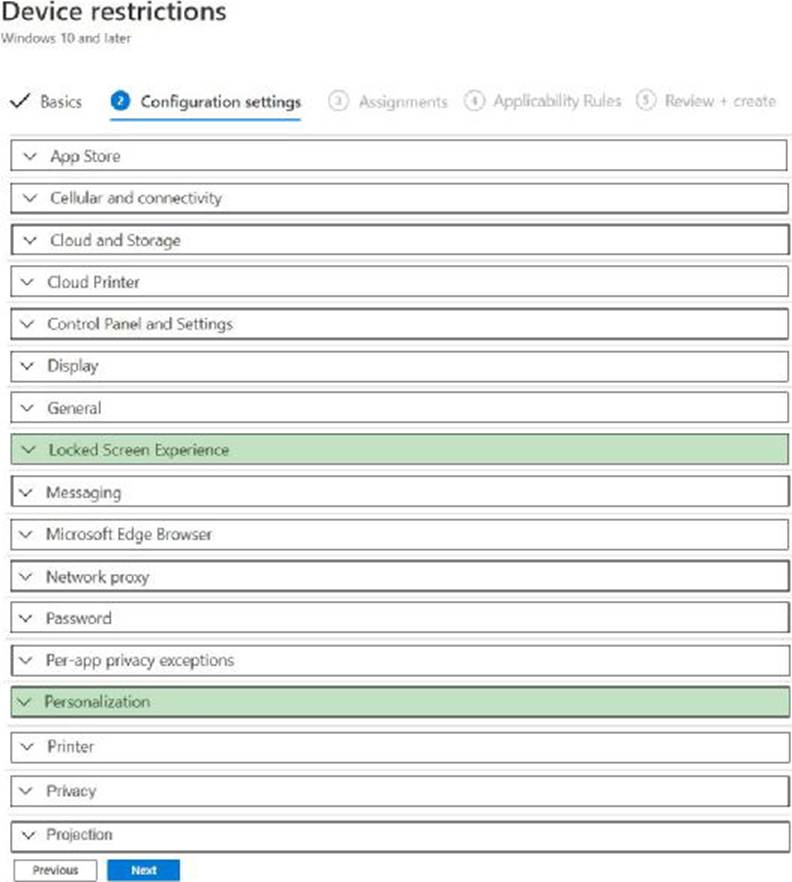
You have 200 computers that run Windows 10. The computers are joined to Azure AD and enrolled in Microsoft Intune. You need to set a custom image as the wallpaper and sign-in screen.
Which two settings should you configure in the Device restrictions configuration profile? To answer, select the appropriate settings in the answer area. NOTE: Each correct selection is worth one point.
Your company uses Microsoft Intune.
More than 500 Android and iOS devices are enrolled in the Intune tenant.
You plan to deploy new Intune policies. Different policies will apply depending on the version of Android or iOS installed on the device.
You need to ensure that the policies can target the devices based on their version of Android or iOS.
What should you configure first?
- A . groups that have dynamic membership rules in Azure AD
- B . Device categories in Intune
- C . Corporate device identifiers in Intune
- D . Device settings in Azure AD
Your company has a Remote Desktop Gateway (RD Gateway).
You have a server named Server1 that is accessible by using Remote Desktop Services (RDS) through the RD Gateway.
You need to configure a Remote Desktop connection to connect through the gateway.
Which setting should you configure?
- A . Connect from anywhere
- B . Server authentication
- C . Connection settings
- D . Local devices and resources
A
Explanation:
To connect to a remote server through the RD Gateway, you need to configure the Connect from anywhere setting in the Remote Desktop Connection client. This setting allows you to specify the domain name and port of the RD Gateway server, as well as the authentication method. The other settings are not related to the RD Gateway connection.
Reference: Configure Remote Desktop Connection Settings for Remote Desktop Gateway
HOTSPOT
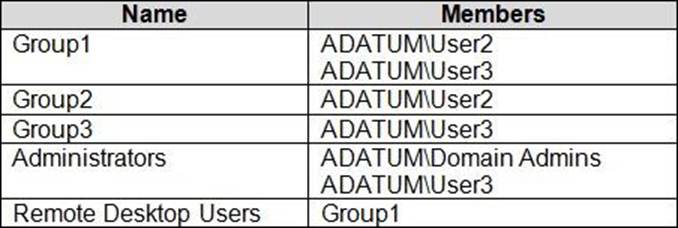
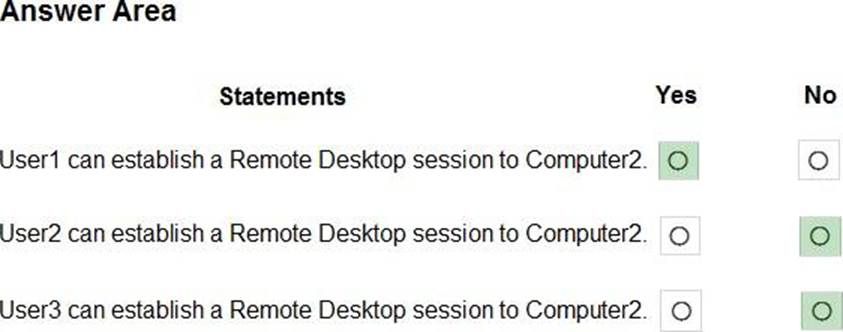
Your network contains an Active Directory domain named adatum.com. The domain contains two computers named Computer1 and Computer2 that run Windows 10. Remote Desktop is enabled on Computer2.
The domain contains the user accounts shown in the following table.
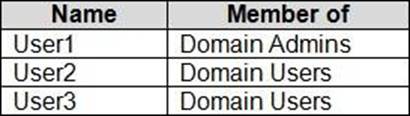
Computer2 contains the local groups shown in the following table.
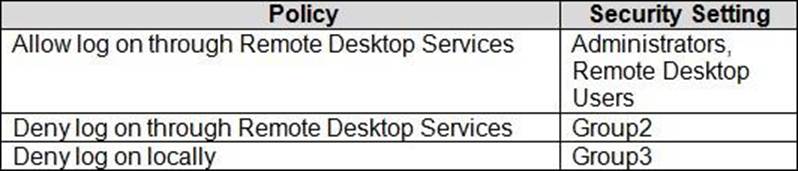
The relevant user rights assignments for Computed are shown in the following table.
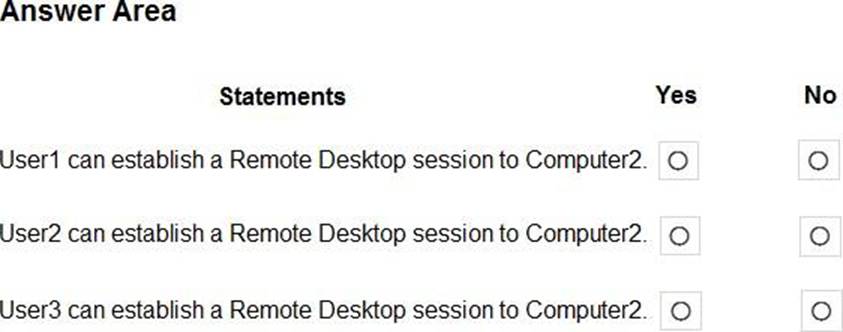
For each of the following statements, select Yes if the statement is true. Otherwise, select No. NOTE: Each correct selection is worth one point.
You ate implementing Microsoft Intune Suite.
You enroll devices in Intune as shown in the following table.
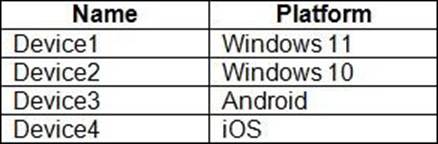
The performance of which devices can be analyzed by using Endpoint analytics?
- A . Device1 only
- B . Device1 and Device2 only
- C . Device1. Device2. and Device} only
- D . Device1. Device2, and Device4 only
- E . Device1. Device2. Device3. and Device4
B
Explanation:
https://learn.microsoft.com/en-us/mem/analytics/overview#bkmk_prereq
HOTSPOT
You have a Microsoft 365 subscription that uses Microsoft Intune Suite.
You use Microsoft Intune to manage devices.
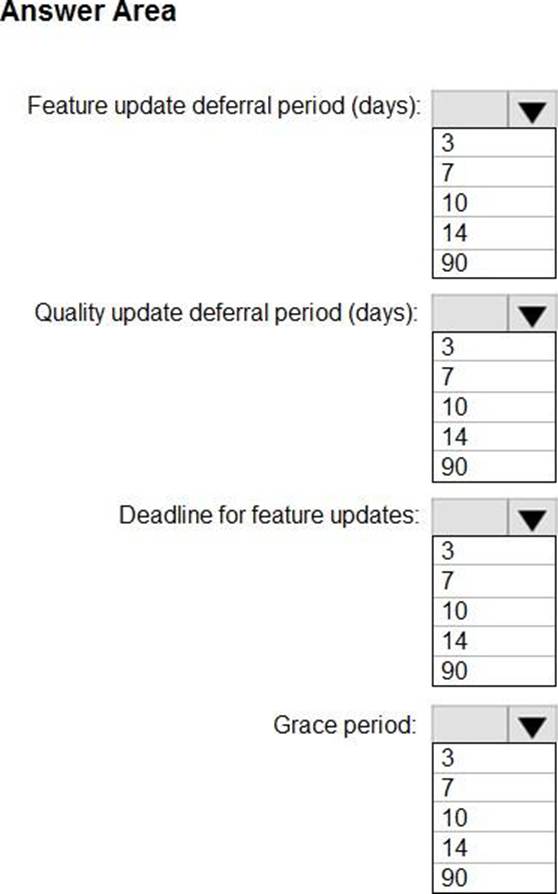
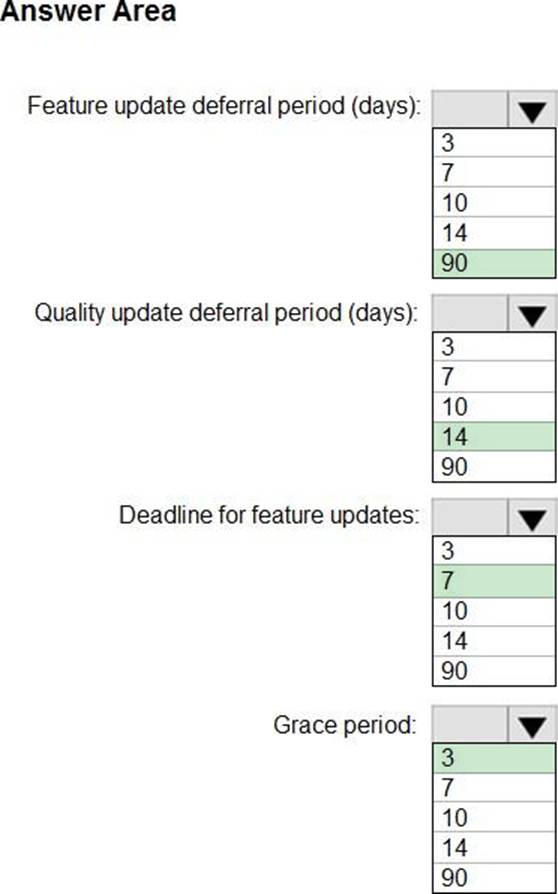
You need to configure an update ring that meets the following requirements:
• Fixes and improvements to existing Windows functionality can be deferred for 14 days but will install automatically seven days after that date.
• The installation of new Windows features can be deferred for 90 days but will install automatically
10 days after that date.
• Devices must restart automatically three days after an update is installed.
How should you configure the update ring? To answer, select the appropriate options in the answer area. NOTE: Each correct selection is worth one point.
HOTSPOT
You have a Microsoft Entra tenant named contoso.com.
You manage devices by using Microsoft Intune. Automatic Intune enrollment is disabled.
Users report that they must enter the mobile device management (MDM) server address during device enrollment.
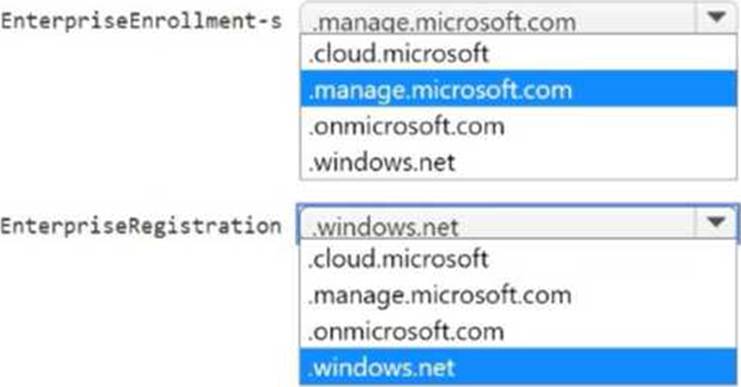
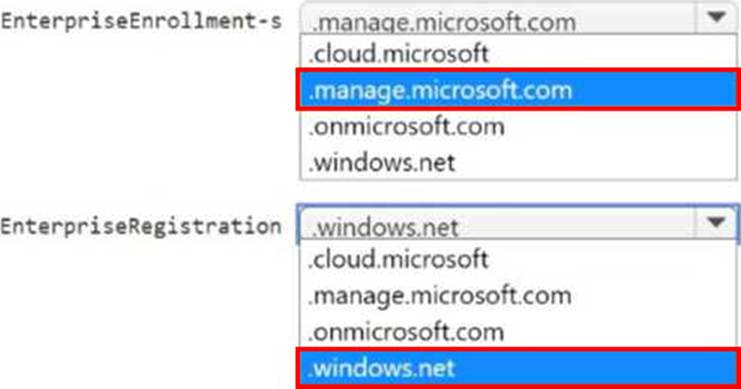
To reduce user interaction during device enrollment, you plan to create the following CNAME DNS hostname records:
– EnterpriseEnrollment.contoso.com
– EnterpriseRegistration.contoso.com
You need to configure a fully qualified domain name (FQDN) for each CNAME record to redirect enrollment requests to the Intune servers.
How should you configure each FQDN? To answer, select the appropriate options in the answer area. NOTE: Each correct selection is worth one point.