
Practice Free MD-102 Exam Online Questions
You have a Microsoft 365 E5 subscription. The subscription contains devices that are Microsoft Entra
joined and enrolled in Microsoft Intune.
You create a user named User1.
You need to ensure that User1 can rotate Bitlocker recovery keys by using Intune.
Solution: From the Microsoft Intune admin center, you assign the Endpoint Security Manager role to User1.
Does this meet the goal?
- A . Yes
- B . No
Your network contains an on-premises Active Directory domain. The domain contains two computers named Computer1 and Computer? that run Windows 10. You install Windows Admin Center on Computer1.
You need to manage Computer2 from Computer1 by using Windows Admin Center.
What should you do on Computed?
- A . Update the TrustedHosts list
- B . Run the Enable-PSRemoting cmdlet
- C . Allow Windows Remote Management (WinRM) through the Microsoft Defender firewall.
- D . Add an inbound Microsoft Defender Firewall rule.
B
Explanation:
To manage a remote computer from Windows Admin Center, you need to enable PowerShell remoting on the remote computer. You can do this by running the Enable-PSRemoting cmdlet, which configures the WinRM service, creates a listener, and allows inbound firewall rules for PowerShell remoting. The other options are not sufficient or necessary for this task.
Reference: Installation and configuration for Windows Remote Management
HOTSPOT
You have a Microsoft 365 E5 subscription. All devices are enrolled in Microsoft Intune.
You have a device group named Group1 that contains five Windows 11 devices.
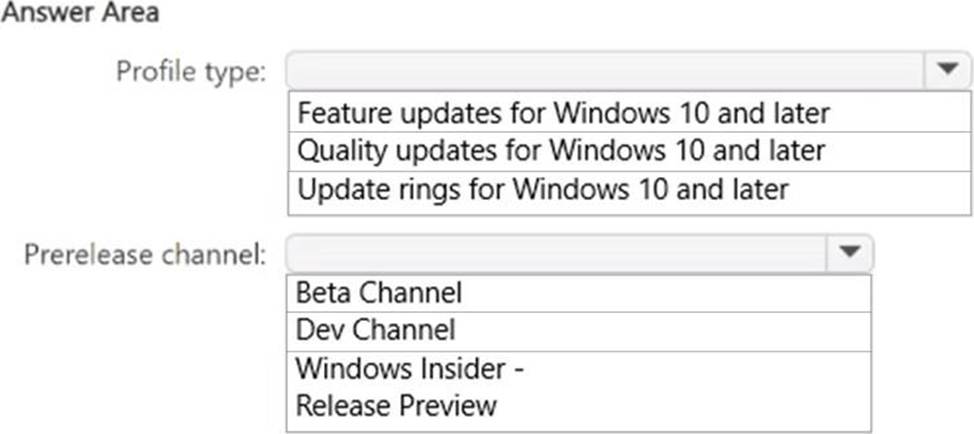
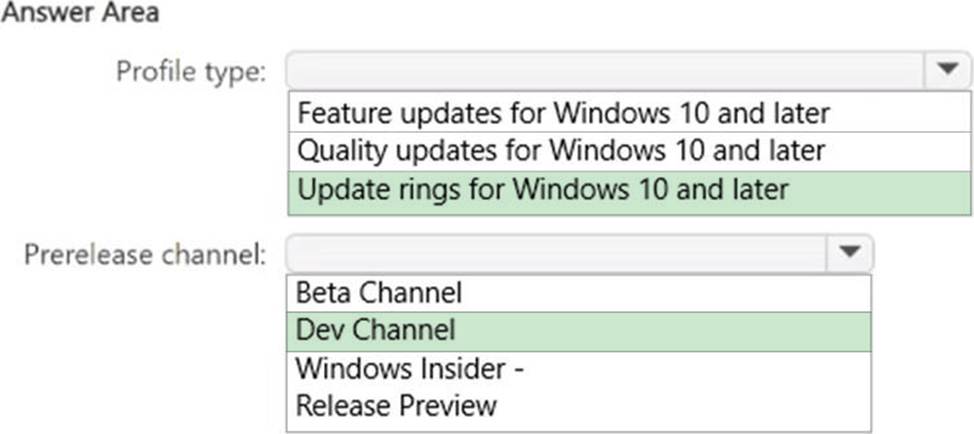
You need to ensure that the devices in Group1 automatically receive new Windows 11 builds before the builds are released to the public.
What should you configure in Intune? To answer, select the appropriate options in the answer area. NOTE: Each correct selection is worth one point.
You have a Microsoft 365 subscription that contains Windows 11 devices enrolled in Microsoft Intune.
You need to use Device query to identify whether a critical security patch was installed on a device.
Which table should you target?
- A . Fileinfo
- B . OsVersion
- C . WindowsQfe
- D . Systemlnfo
- E . WindowsRegistry
HOTSPOT
You have a Microsoft 365 subscription that includes Microsoft Intune.
You have computers that run Windows 11 as shown in the following table.

You have the groups shown in the following table.

You create and assign the compliance policies shown in the following table.

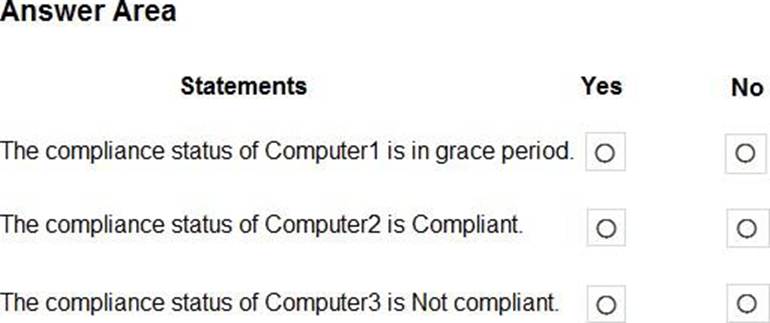
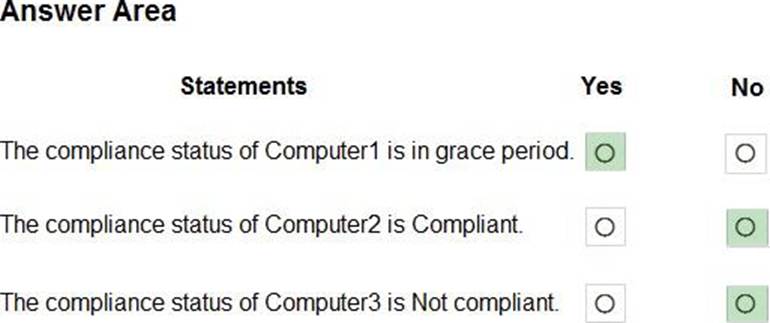
The next day, you review the compliance status of the computers.
For each of the following statements, select Yes if the statement is true. Otherwise, select No. NOTE: Each correct selection is worth one point.
You have 100 computers that run Windows 10 and connect to an Azure Log Analytics workspace.
Which three types of data can you collect from the computers by using Log Analytics? Each correct answer a complete solution. NOTE: Each correct selection is worth one point.
- A . error events from the System log
- B . failure events from the Security log
- C . third-party application logs stored as text files
- D . the list of processes and their execution times
- E . the average processor utilization
A, C, E
Explanation:
You can collect error events from the System log, third-party application logs stored as text files, and the average processor utilization from the computers by using Log Analytics. These are some of the types of data that you can collect by using data sources such as Windows event logs, custom logs, and performance counters. You cannot collect failure events from the Security log or the list of processes and their execution times by using Log Analytics.
Reference: https://docs.microsoft.com/en-us/azure/azure-monitor/agents/data-sources-overview
You have a Microsoft 365 subscription that contains a user named User1 and uses Microsoft Intune Suite.
You use Microsoft Intune to manage devices that run Windows 11.
User1 provides remote support for 75 devices in the marketing department.
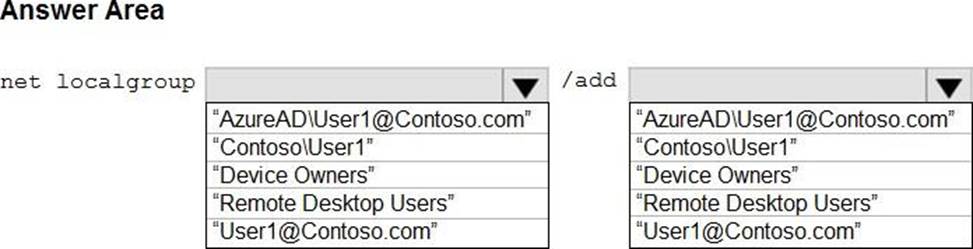
You need to add User1 to the Remote Desktop Users group on each marketing department device.
What should you configure?
- A . an app configuration policy
- B . a device compliance policy
- C . an account protection policy
- D . a device configuration profile
HOTSPOT
You have a Microsoft Entra tenant that contains the following:
• Windows 11 devices that are joined to Microsoft Entra
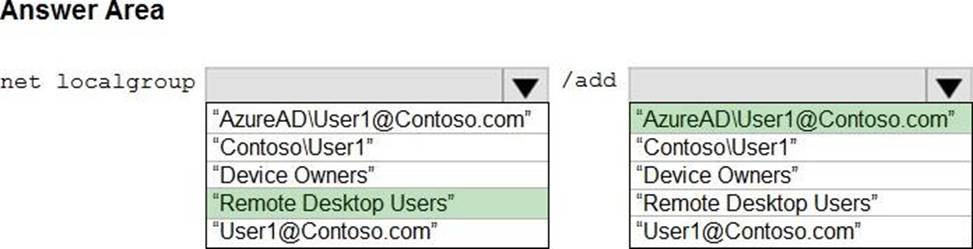
• A user that has a display name of User1 and a UPN of [email protected] You enable Remote Desktop on the Windows 11 devices.
You need to ensure that User1 can use Remote Desktop to connect to the devices.
How should you complete the command that must be run on each device? To answer, select the appropriate options in the answer area. NOTE: Each correct selection is worth one point.
Your company has an Azure AD tenant named contoso.com that contains several Windows 10 devices.
When you join new Windows 10 devices to contoso.com, users are prompted to set up a four-digit pin.
You need to ensure that the users are prompted to set up a six-digit pin when they join the Windows 10 devices to contoso.com.
Solution: From the Microsoft Entra admin center, you configure automatic mobile device management (MDM) enrollment. From the Microsoft Intune admin center, you create and assign a device restrictions profile.
Does this meet the goal?
- A . Yes
- B . No
You have devices enrolled in Microsoft Intune as shown in the following table.
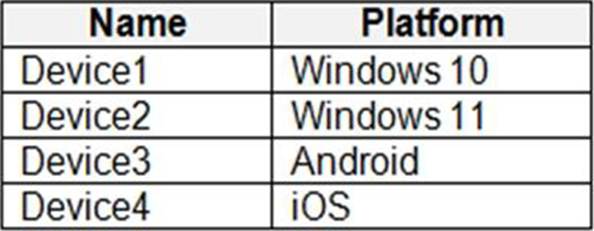
On which devices can you apply app configuration policies?
- A . Device2 only
- B . Device1 and Device2 only
- C . Device3 and Device4 only
- D . Device2, Device3, and Device4 only
- E . Device1, Device2, Device B, and Device4
D
Explanation:
The correct answer is D because app configuration policies can be applied to managed devices and managed apps1. Managed devices are enrolled and managed by Intune, while managed apps are integrated with Intune App SDK or wrapped using the Intune Wrapping Tool1. Device2, Device3, and Device4 are either enrolled in Intune or have managed apps installed, so they can receive app configuration policies2. Device1 is not enrolled in any MDM solution and does not have any managed apps installed, so it cannot receive app configuration policies2.
Reference:
1: App configuration policies for Microsoft Intune | Microsoft Learn https://learn.microsoft.com/en-us/mem/intune/apps/app-configuration-policies-overview
2: Policy sets – Microsoft Intune | Microsoft Learn https://learn.microsoft.com/en-us/mem/intune/fundamentals/policy-sets