
Practice Free AZ-120 Exam Online Questions
HOTSPOT
You have an SAP landscape on Azure.
You plan to deploy a new SAP application server by using an Azure Resource Manager template.
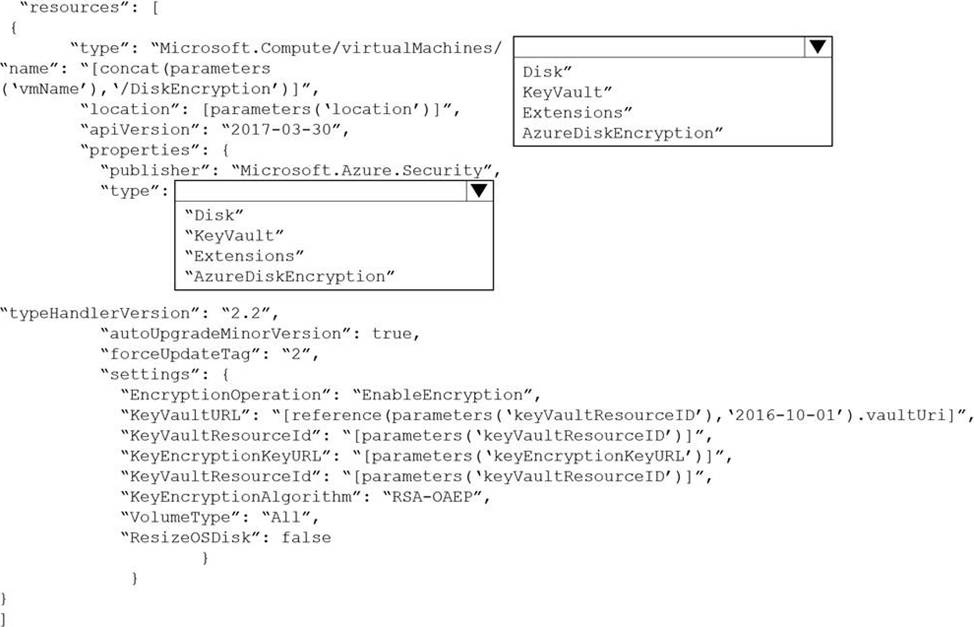
You need to ensure that all new servers are deployed with Azure Disk Encryption enabled.
How should you complete the relevant component of the template? To answer, select the appropriate options in the answer area. NOTE: Each correct selection is worth one point.
Explanation:
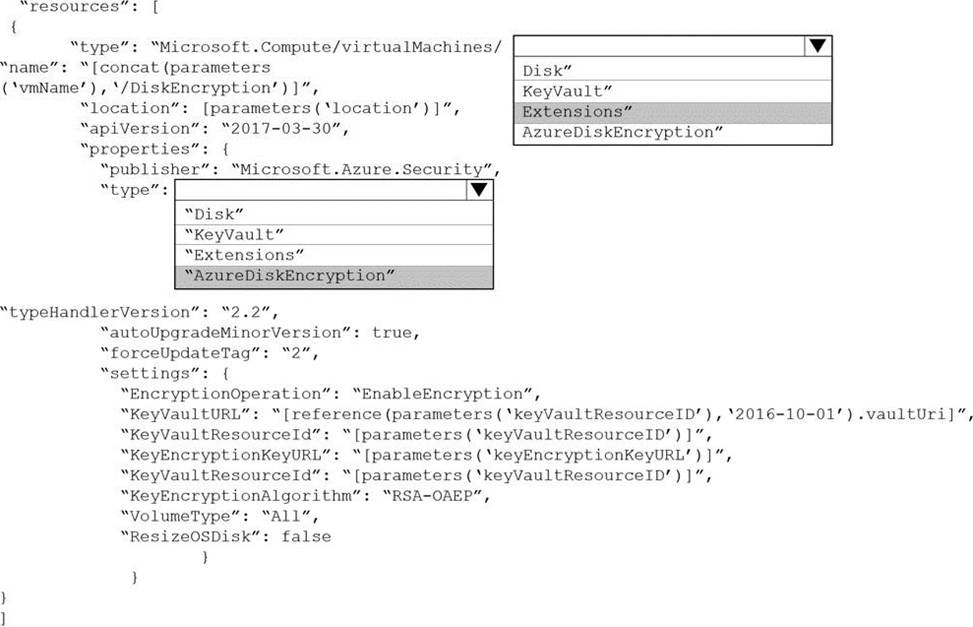
Box 1: extensions
Azure Disk Encryption can be enabled via Azure PowerShell or Azure CLI. That is normally seen in remediation. In a real-world scenario you would like to see a virtual machine during its creation include disk encryption process. This is technically possible thanks to Disk Encryption VM extension.
Box 2: AzureDiskEncryption
Example:
..
"type": "Microsoft.Compute/virtualMachines/extensions",
"name": "[concat(parameters(‘vmName’),’/diskEncryption’)]",
"apiVersion": "2019-03-01",
"location": "[parameters(‘location’)]",
"dependsOn": [
"[resourceId(‘Microsoft.Compute/virtualMachines/’, parameters(‘vmName’))]"
],
"properties": {
"publisher": "Microsoft.Azure.Security",
"type": "AzureDiskEncryption",
..
Reference: https://azsec.azurewebsites.net/2019/12/28/azure-disk-encryption-arm-template-for-windows-vm/
HOTSPOT
You have an Azure subscription.
You plan to deploy an SAP landscape.
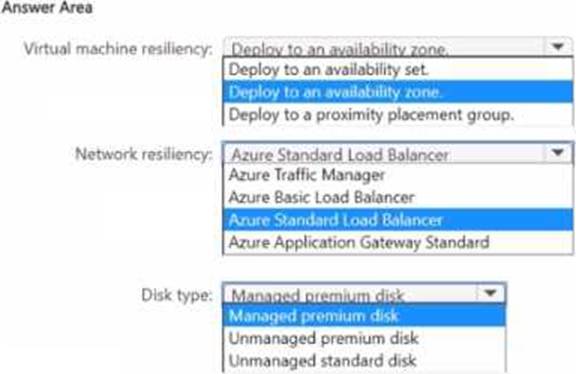
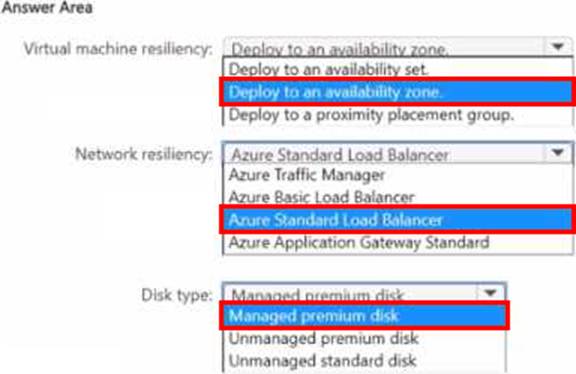
You need to configure an NFS cluster that will host the storage for the landscape. The solution must ensure that the cluster is available if an Azure datacenter fails.
How should you configure the cluster? To answer, select the appropriate options in the answer area. NOTE: Each correct selection is worth one point.
You are planning a highly available SAP HANA deployment on Azure virtual machines.
You need to recommend a solution for monitoring TCP latency between the SAP application and the database tiers on the TCP socket layer.
What should you include in the recommendation?
- A . the Azure Network Watcher reachability report
- B . Azure Extension for SAP
- C . the NIPING command
- D . the PING command
You have an Azure subscription named Sub1 that is linked to a Microsoft Entra tenant named contoso.com. You have an on-premises deployment of SAP Landscape Management (LaMa). You need to ensure that the on-premises LaMa deployment is authorized to manage the SAP resources provisioned to Sub1.
What should you create first?
- A . a user-assigned managed identity in Sub1
- B . a system-assigned managed identity in Sub1
- C . an externalidentityprovidenncontoso.com
- D . an app registration in contoso.com
You plan to deploy a high availability SAP environment that will use a failover clustering solution.
You have an Azure Resource Manager template that you will use for the deployment.
You have the following relevant portion of the template.
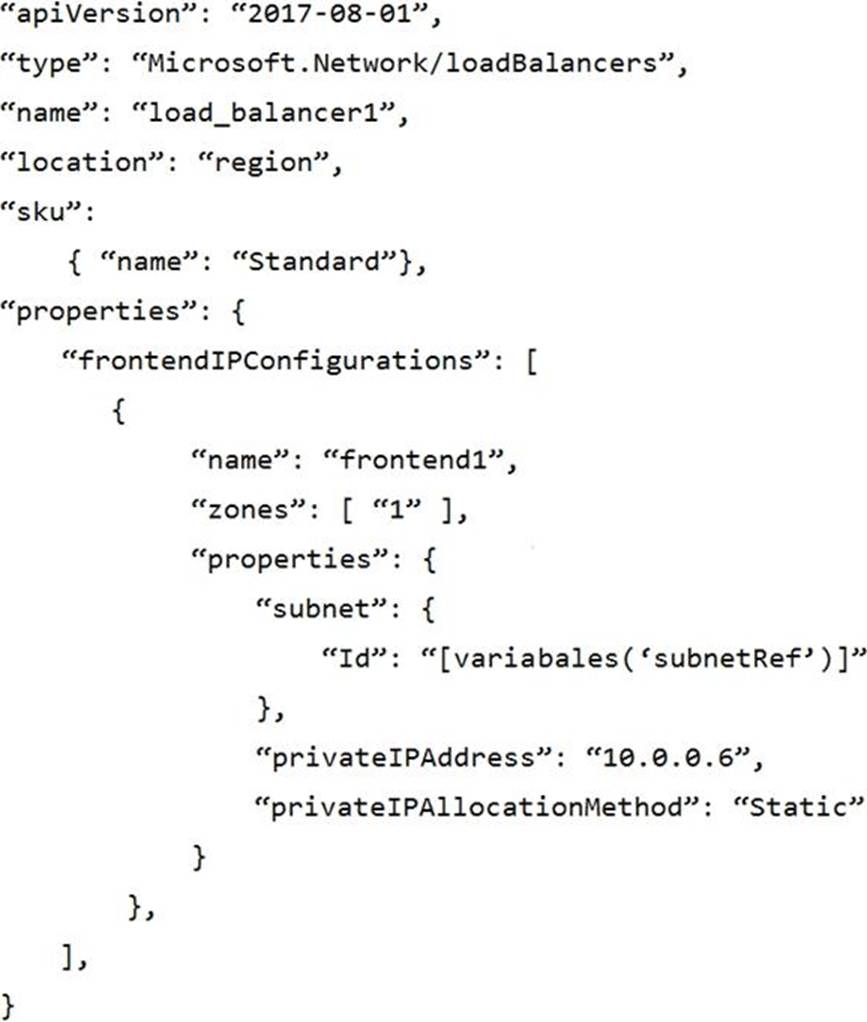
What is created by the template?
- A . a zonal frontend IP address for the internal Azure Standard Load Balancer
- B . a zone-redundant frontend IP address for the internal Azure Basic Load Balancer
- C . a zone -redundant public IP address for the internal load balancer
- D . a zone-redundant frontend IP address for the internal Azure Standard Load Balancer
A
Explanation:
https://docs.microsoft.com/en-us/azure/load-balancer/load-balancer-standard-availability-zones
Your on-premises network contains a Microsoft SQL server named DCSQL1.
You have an Azure subscription that contains an SAP production landscape and a SQL server named AZSQL1. The SAP landscape uses DCSQLl and AZSQL1. The on-premises network is connected to Azure by using ExpressRoute.
You need to monitor network latency between A2SQL1 and DCSQL1 by using Connection Monitor.
What should you install on AZSQL1?
- A . the Azure Diagnostics extension
- B . the Log Analytics agent
- C . the Azure VM extension for SAP solutions
- D . the Network Watcher extension
HOTSPOT
You have an SAP production landscape on Azure that contains the virtual machines shown in the following table.
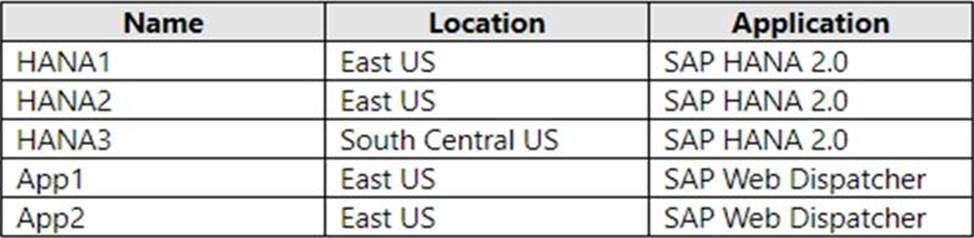
You configure HANA system replication as shown in the following table.

You configure two load balancers as shown in the following table.

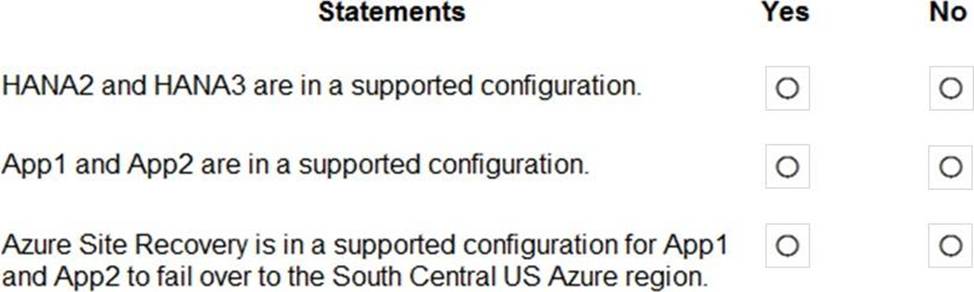
For each of the following statements, select Yes if the statement is true. Otherwise, select No. NOTE: Each correct selection is worth one point.
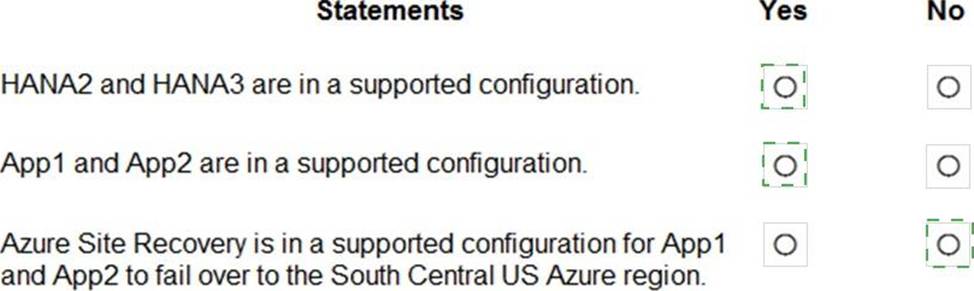
Explanation:
Reference:
https://help.sap.com/viewer/6b94445c94ae495c83a19646e7c3fd56/2.0.02/en-US/f730f308fede4040bcb5ccea6751e74d.html
https://docs.microsoft.com/en-us/azure/virtual-machines/workloads/sap/sap-hana-high-availability
You have an SAP ERP Central Component (SAP ECQ) environment on Azure.
You need to add an additional SAP application server to meet the following requirements:
• Provide the highest availability.
• Provide the fastest speed between the new server and the database.
What should you do?
- A . Place the new server in a different Azure Availability Zone than the database.
- B . Place the new server in the same Azure Availability Set a? the database and the other application servers.
- C . Place the new server in the same Azure Availability Zone as the database and the other application servers.
You have an SAP environment on Azure that uses multiple subscriptions.
To meet GDPR requirements, you need to ensure that virtual machines are deployed only to the West Europe and North Europe Azure regions.
Which Azure components should you use?
- A . Azure resource locks and the Compliance admin center
- B . Azure resource groups and role-based access control (RBAC)
- C . Azure management groups and Azure Policy
- D . Azure Security Center and Azure Active Directory (Azure AD) groups
C
Explanation:
Azure Policy enables you to set policies to conform to the GDPR. Azure Policy is generally available today at no additional cost to Azure customers. You can use Azure Policy to define and enforce policies that help your cloud environment become compliant with internal policies as well as external regulations.
Azure Policy is deeply integrated into Azure Resource Manager and applies across all resources in Azure. Individual policies can be grouped into initiatives to quickly implement multiple rules. You can also use Azure Policy in a wide range of compliance scenarios, such as ensuring that your data is encrypted or remains in a specific region as part of GDPR compliance. Microsoft is the only hyperscale cloud provider to offer this level of policy integration built in to the platform for no additional charge.
Reference: https://azure.microsoft.com/de-de/blog/new-capabilities-to-enable-robust-gdpr-compliance/
DRAG DROP
You plan to deploy multiple SAP HANA virtual machines to Azure by using an Azure Resource Manager template.
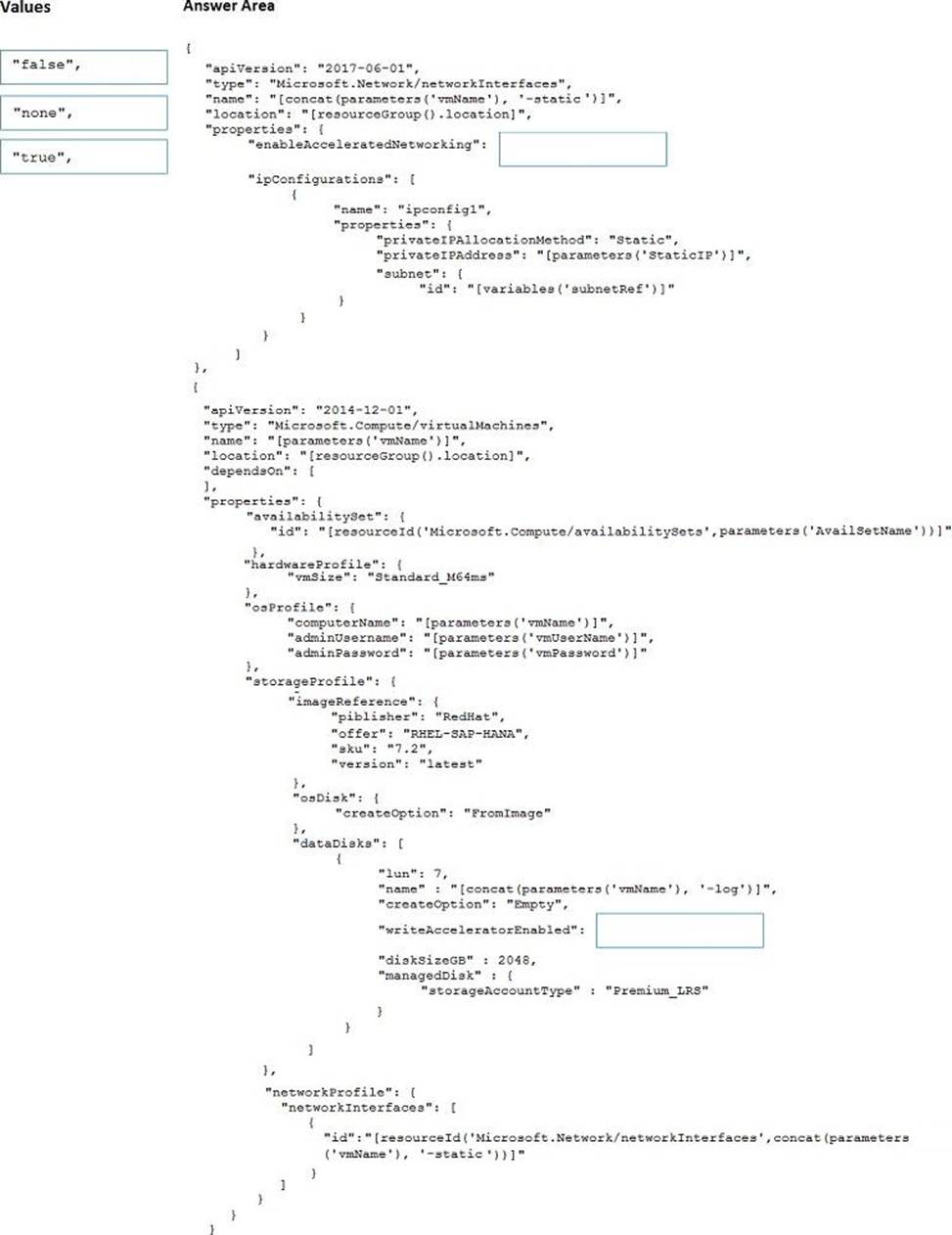
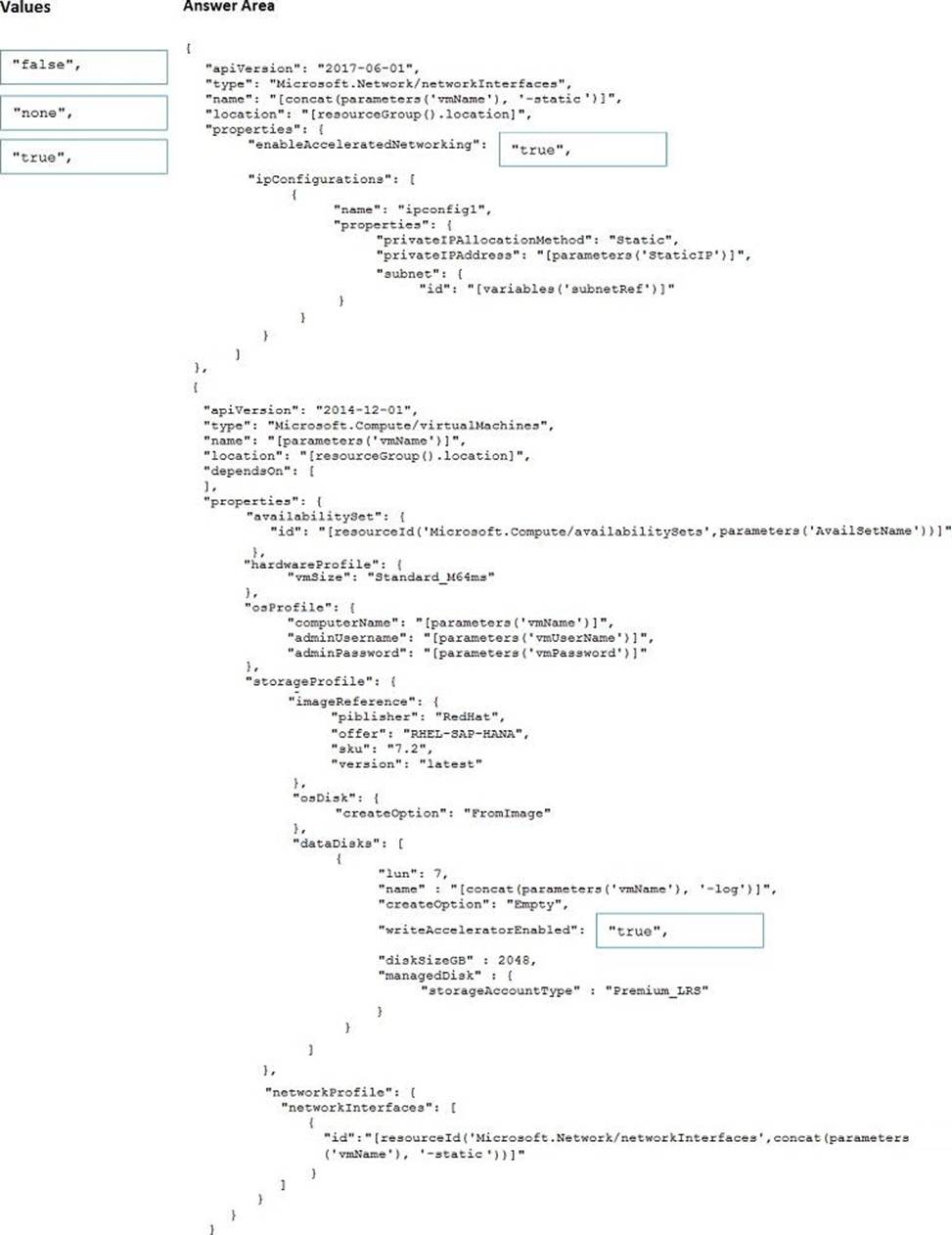
How should you configure Accelerated Networking and Write Accelerator in the template? To answer, drag the appropriate values to the correct targets. Each value may be used once, more than once, or not at all. You may need to drag the split bar between panes or scroll to view content. NOTE: Each correct selection is worth one point.
Explanation:
Box 1: true
enableAcceleratedNetworking: If the network interface is accelerated networking enabled.
To further reduce network latency between Azure VMs, we [Micorosoft] recommend that you choose Azure Accelerated Networking. Use it when you deploy Azure VMs for an SAP workload, especially for the SAP application layer and the SAP DBMS layer.
Box 2: true
Write Accelerator should be used for the volumes that contain the transaction log or redo logs of a DBMS. It is not recommended to use Write Accelerator for the data volumes of a DBMS as the feature has been optimized to be used against log disks.
Reference: https://docs.microsoft.com/en-us/azure/virtual-machines/workloads/sap/dbms_guide_general