Practice Free AZ-120 Exam Online Questions
You plan to migrate an SAP HANA instance to Azure.
You need to gather CPU metrics from the last 24 hours from the instance.
Solution: You use Monitoring from the SAP HANA Cockpit.
Does this meet the goal?
- A . Yes
- B . No
A
Explanation:
The SAP HANA cockpit provides a single point of access to a range of SAP HANA administration and monitoring tasks. It is used to monitor and ensure the overall health of the system.
The HANA Monitoring dashboard also visualizes key HANA Metrics of SAP HANA system.
Reference:
https://developers.sap.com/tutorials/dt-monitoring-hana-part1.html
https://help.sap.com/viewer/afa922439b204e9caf22c78b6b69e4f2/2.10.0.0/en-US
https://www.hanatutorials.com/p/hana-monitoring-dashboard.html
Note: This section contains one or more sets of questions with the same scenario and problem. Each question presents a unique solution to the problem. You must determine whether the solution meets the stated goals. More than one solution in the set might solve the problem. It is also possible that none of the solutions in the set solve the problem.
After you answer a question in this section, you will NOT be able to return. As a result, these questions do not appear on the Review Screen. You have an on-premises datacenter.
You have an Azure subscription that contains a virtual network named VNet1.
You have an SAP RISE managed workload.
You need to ensure transitive connectivity between the datacenter. VNet1, and the managed workload.
Solution: You configure a Site-to-Site (S2S) VPN connection between the datacenter and VNet1 and an S2S VPN connection between VNet1 and the managed workload.
Does this meet the goal?
- A . Yes
- B . NO
You have an Azure subscription that contains a virtual machine named VM1. VM1 runs SUSE Linux Enterprise Server (SLES) and hosts an SAP workload. You deploy Azure Monitor for SAP solutions.
You need to configure the Linux OS provider. The solution must ensure that you can collect monitoring data by using the Prometheus endpoint on VM1.
Which firewall port should you open on VM1?
- A . 22
- B . 80
- C . 443
- D . 9100
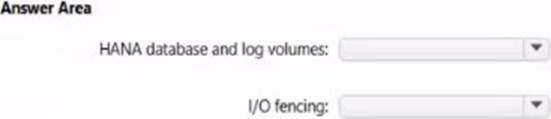
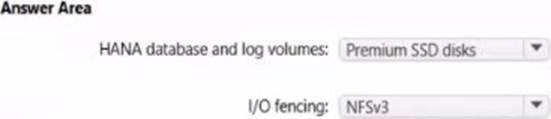
You are implementing a highly available deployment of SAP HANA on Azure virtual machines.
You need to ensure that the deployment meets the following requirements:
• Supports host auto-failover
• Minimizes cost
How should you configure the highly available components of the deployment? To answer, select the appropriate options in the answer area. NOTE: Each correct selection is worth one point.
HOTSPOT
You have SAP ERP on Azure.
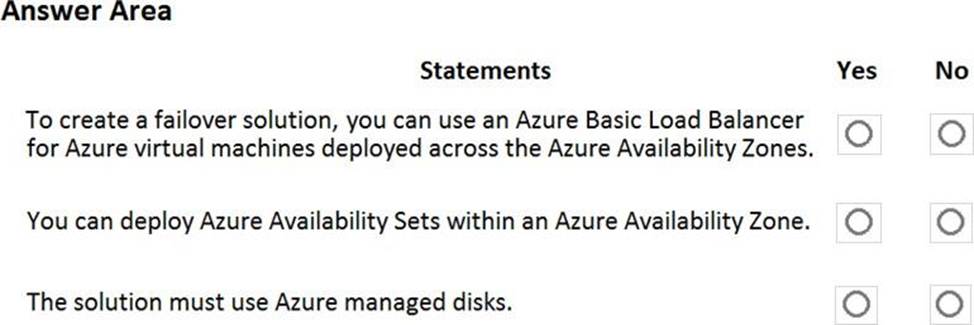
For SAP high availability, you plan to deploy ASCS/ERS instances across Azure Availability Zones and to use failover clusters.
For each of the following statements, select Yes if the statement is true. Otherwise, select No. NOTE: Each correct selection is worth one point.
Explanation:
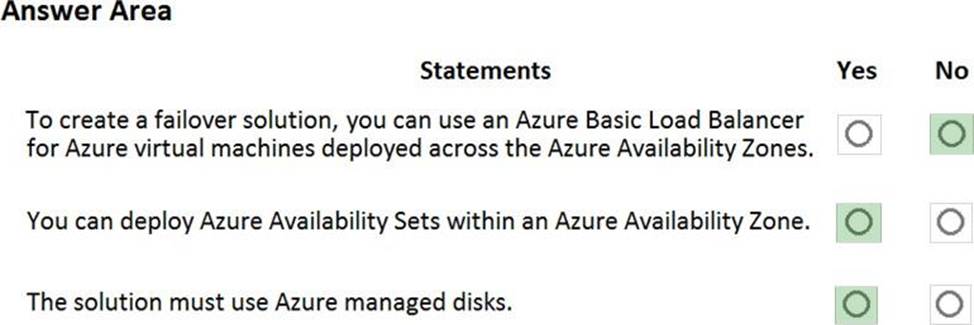
Box 1: No
You can’t use an Azure Basic Load Balancer to create failover cluster solutions based on Windows Server Failover Clustering or Linux Pacemaker. Instead, you need to use the Azure Standard Load Balancer SKU.
Box 2: Yes
Azure Availability Zones is one of the high-availability features that Azure provides. Using Availability Zones improves the overall availability of SAP workloads on Azure.
The SAP application layer is deployed across one Azure availability set. For high availability of SAP Central Services, you can deploy two VMs in a separate availability set.
Box 3: Yes
You must use Azure Managed Disks when you deploy to Azure Availability Zones.
Reference:
https://docs.microsoft.com/en-us/azure/virtual-machines/workloads/sap/sap-ha-availability-zones
https://docs.microsoft.com/en-us/azure/virtual-machines/workloads/sap/sap-proximity-placement-scenarios#combine-availability-sets-and-availability-zones-with-proximity-placement-groups https://docs.microsoft.com/en-us/azure/architecture/reference-architectures/sap/sap-netweaver
Once the migrate completes, to which size should you set the ExpressRoute circuit to the New York office to meet the business goals and technical requirements?
- A . 500 Mbps
- B . 1,000 Mbps
- C . 2,000 Mbps
- D . 5,000 Mbps
C
Explanation:
ExpressRoute circuits are configured to allow you to burst up to two times the bandwidth limit you procured for no additional cost.
Scenario: It is estimated that during the migration, the bandwidth required between Azure and the New York office will be 1 Gbps. After the migration, a traffic burst of up to 3 Gbps will occur.
Reference: https://docs.microsoft.com/en-us/azure/expressroute/expressroute-faqs
HOTSPOT
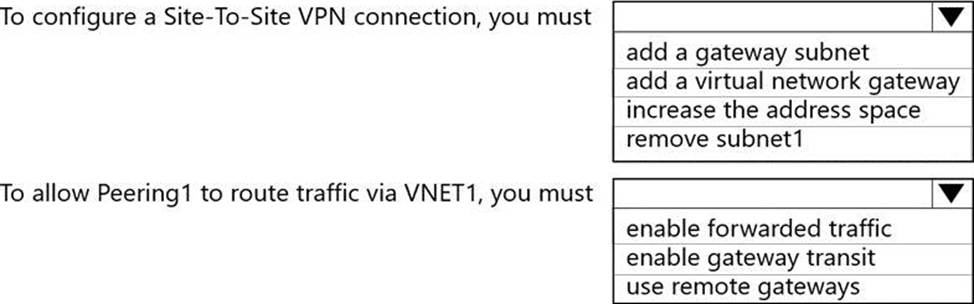
You have an on-premises SAP landscape and an Azure subscription that contains a virtual network named VNET1. VNET1 has the following settings.

You plan to migrate the landscape to Azure.
You need to configure VNET1 to support the SAP landscape.
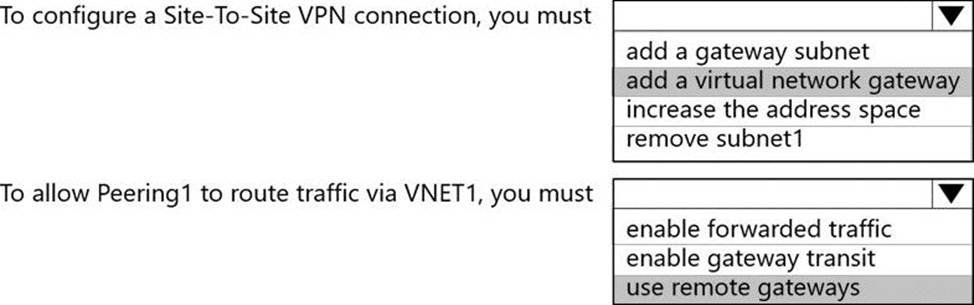
Use the drop-down menus to select the answer choice that completes each statement based on the information presented in the settings. NOTE: Each correct selection is worth one point.
Explanation:
Box 1: add a virtual network gateway
Box 2: use remote gateways
Each virtual network, regardless of whether peered with another virtual network, can still have its own gateway to connect to an on-premises network. When you peer virtual networks, you can also configure the gateway in the peered virtual network as a transit point to an on-premises network. In this case, the virtual network that uses a remote gateway cannot have its own gateway. A virtual network can have only one gateway that can be either a local or remote gateway (in the peered virtual network).
Reference: https://docs.microsoft.com/en-us/azure/virtual-network/virtual-network-peering-overview
You have an on-premises SAP production landscape.
You plan to migrate to SAP on Azure.
You need to generate an SAP Early Watch Alert report.
What should you use?
- A . Azure Advisor
- B . SAP HANA Cockpit
- C . SAP Software Provisioning Manager
- D . SAP Solution Manager
DRAG DROP
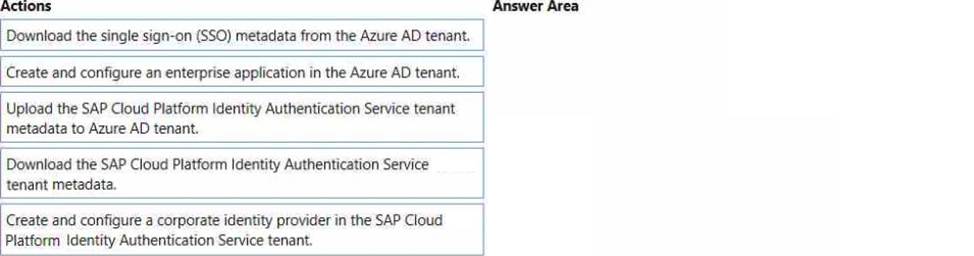
You have an Azure Active Directory (Azure AD) tenant and an SAP Cloud Platform Identity Authentication Service tenant.
You need to ensure that users can use their Azure AD credentials to authenticate to SAP applications and services that trust the SAP Cloud Platform Identity Authentication Service tenant.
In which order should you perform the actions? To answer, move all actions from the list of actions to the answer area and arrange them in the correct order.
Explanation:
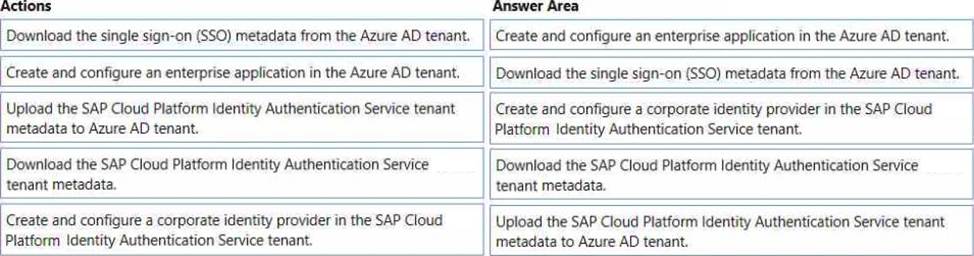
Step 1: Create and configure an enterprise application in the Azure AD tentant
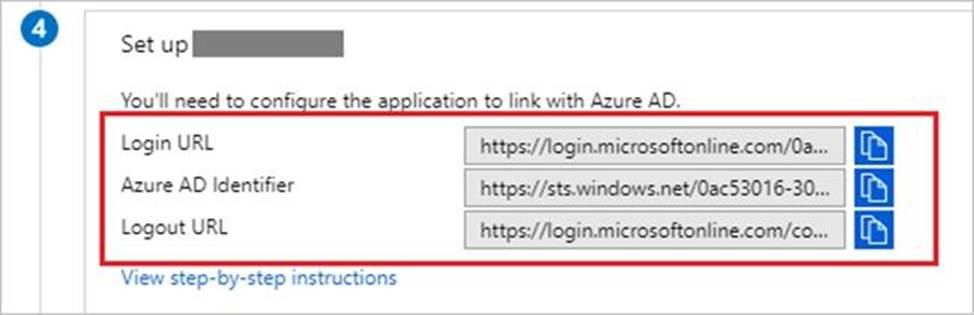
To configure the integration of SAP Cloud Platform Identity Authentication into Azure AD, you need to add SAP Cloud Platform Identity Authentication from the gallery to your list of managed SaaS apps.
Sign in to the Azure portal using either a work or school account, or a personal Microsoft account.
On the left navigation pane, select the Azure Active Directory service.
Navigate to Enterprise Applications and then select All Applications.
To add new application, select New application.
In the Add from the gallery section, type SAP Cloud Platform Identity Authentication in the search box.
Select SAP Cloud Platform Identity Authentication from results panel and then add the app. Wait a few seconds while the app is added to your tenant.
Step 2: Download the single sign-on (SSO) metadata from the Azure AD tenant.
Download single sign-on metadata from Azure Active Directory.
Step 3: Create and configure a corporate identity provider.
Create corporate identity provider.
Step 4: Download the SAP Cloud Platform Identity Authentication Service tenant metadata.
Download Identity Authentication service tenant metadata.
Step 5: Upload the SAP Cloud Platform Identity Authentication Service tenant metadata to Azure AD tenant.
Upload Identity Authentication service tenant metadata to Azure Active Directory.
You have already uploaded the metadata file from Azure Active Directory to Identity Authentication service. It’s time to do it the other way round now and upload the metadata of Identity Authentication service to Azure Active Directory.
Reference: https://developers.sap.com/tutorials/cp-ias-azure-ad.html
HOTSPOT
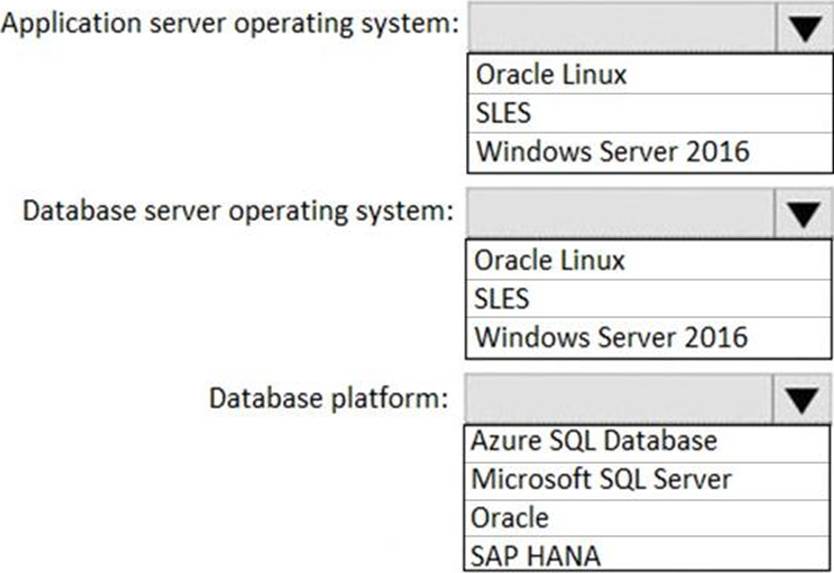
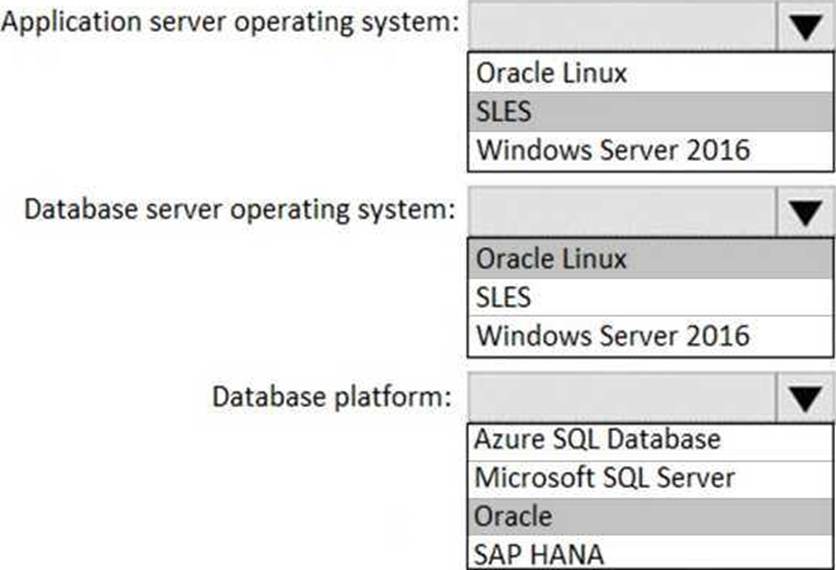
You have an on-premises SAP environment. Application servers run on SUSE Linux Enterprise Server (SLES) servers. Databases run on SLES servers that have Oracle installed.
You need to recommend a solution to migrate the environment to Azure. The solution must use currently deployed technologies whenever possible and support high availability.
What should you include in the recommendation? To answer, select the appropriate options in the answer area. NOTE: Each correct selection is worth one point.