
Practice Free Databricks Certified Professional Data Engineer Exam Online Questions
A data engineer needs to capture pipeline settings from an existing in the workspace, and use them to create and version a JSON file to create a new pipeline.
Which command should the data engineer enter in a web terminal configured with the Databricks CLI?
- A . Use the get command to capture the settings for the existing pipeline; remove the pipeline_id and rename the pipeline; use this in a create command
- B . Stop the existing pipeline; use the returned settings in a reset command
- C . Use the alone command to create a copy of an existing pipeline; use the get JSON command to get the pipeline definition; save this to git
- D . Use list pipelines to get the specs for all pipelines; get the pipeline spec from the return results parse and use this to create a pipeline
A
Explanation:
The Databricks CLI provides a way to automate interactions with Databricks services. When dealing with pipelines, you can use the databricks pipelines get –pipeline-id command to capture the settings of an existing pipeline in JSON format. This JSON can then be modified by removing the pipeline_id to prevent conflicts and renaming the pipeline to create a new pipeline. The modified JSON file can then be used with the databricks pipelines create command to create a new pipeline with those settings.
Reference: Databricks Documentation on CLI for Pipelines: Databricks CLI – Pipelines
A data engineer is using Auto Loader to read incoming JSON data as it arrives. They have configured Auto Loader to quarantine invalid JSON records but notice that over time, some records are being quarantined even though they are well-formed JSON.
The code snippet is:
df = (spark.readStream
.format("cloudFiles")
.option("cloudFiles.format", "json")
.option("badRecordsPath", "/tmp/somewhere/badRecordsPath")
.schema("a int, b int")
.load("/Volumes/catalog/schema/raw_data/"))
What is the cause of the missing data?
- A . At some point, the upstream data provider switched everything to multi-line JSON.
- B . The badRecordsPath location is accumulating many small files.
- C . The source data is valid JSON but does not conform to the defined schema in some way.
- D . The engineer forgot to set the option "cloudFiles.quarantineMode" = "rescue".
C
Explanation:
Comprehensive and Detailed Explanation From Exact Extract of Databricks Data Engineer Documents:
Databricks Auto Loader quarantines records that fail schema validation, even if they are syntactically valid JSON. The documentation explains that “records that do not match the defined schema are considered corrupt and written to the bad records path.” In this case, the data likely contains valid JSON fields whose structure or data types differ from the declared schema (a int, b int). For example, if a field expected as an integer arrives as a string, Auto Loader will quarantine it. The presence of badRecordsPath confirms this behavior. The cloudFiles.quarantineMode option controls quarantine behavior but is unrelated to valid data that fails schema validation. Thus, the correct cause is C.
The data engineering team maintains the following code:
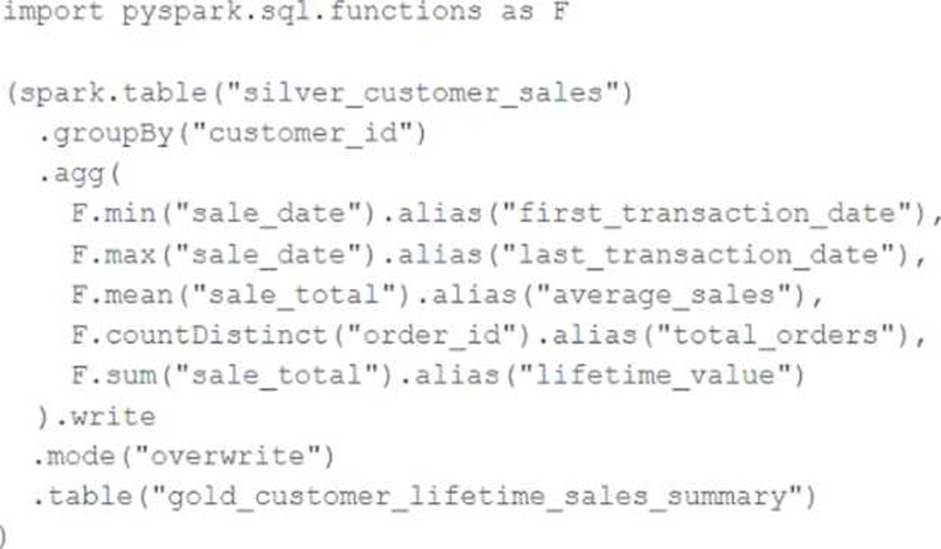
Assuming that this code produces logically correct results and the data in the source table has been de-duplicated and validated, which statement describes what will occur when this code is executed?
- A . The silver_customer_sales table will be overwritten by aggregated values calculated from all records in the gold_customer_lifetime_sales_summary table as a batch job.
- B . A batch job will update the gold_customer_lifetime_sales_summary table, replacing only those rows that have different values than the current version of the table, using customer_id as the primary key.
- C . The gold_customer_lifetime_sales_summary table will be overwritten by aggregated values calculated from all records in the silver_customer_sales table as a batch job.
- D . An incremental job will leverage running information in the state store to update aggregate values in the gold_customer_lifetime_sales_summary table.
- E . An incremental job will detect if new rows have been written to the silver_customer_sales table; if new rows are detected, all aggregates will be recalculated and used to overwrite the gold_customer_lifetime_sales_summary table.
C
Explanation:
This code is using the pyspark.sql.functions library to group the silver_customer_sales table by customer_id and then aggregate the data using the minimum sale date, maximum sale total, and sum of distinct order ids. The resulting aggregated data is then written to the gold_customer_lifetime_sales_summary table, overwriting any existing data in that table. This is a batch job that does not use any incremental or streaming logic, and does not perform any merge or update operations. Therefore, the code will overwrite the gold table with the aggregated values from the silver table every time it is executed.
Reference:
https://docs.databricks.com/spark/latest/dataframes-datasets/introduction-to-dataframes-python.html
https://docs.databricks.com/spark/latest/dataframes-datasets/transforming-data-with-dataframes.html
https://docs.databricks.com/spark/latest/dataframes-datasets/aggregating-data-with-dataframes.html
A data team is automating a daily multi-task ETL pipeline in Databricks. The pipeline includes a notebook for ingesting raw data, a Python wheel task for data transformation, and a SQL query to update aggregates. They want to trigger the pipeline programmatically and see previous runs in the GUI. They need to ensure tasks are retried on failure and stakeholders are notified by email if any task fails.
Which two approaches will meet these requirements? (Choose 2 answers)
- A . Use the REST API endpoint /jobs/runs/submit to trigger each task individually as separate job runs and implement retries using custom logic in the orchestrator.
- B . Create a multi-task job using the UI, Databricks Asset Bundles (DABs), or the Jobs REST API (/jobs/create) with notebook, Python wheel, and SQL tasks. Configure task-level retries and email notifications in the job definition.
- C . Trigger the job programmatically using the Databricks Jobs REST API (/jobs/run-now), the CLI (databricks jobs run-now), or one of the Databricks SDKs.
- D . Create a single orchestrator notebook that calls each step with dbutils.notebook.run(), defining a job for that notebook and configuring retries and notifications at the notebook level.
- E . Use Databricks Asset Bundles (DABs) to deploy the workflow, then trigger individual tasks directly by referencing each task’s notebook or script path in the workspace.
B, C
Explanation:
Comprehensive and Detailed Explanation From Exact Extract of Databricks Data Engineer Documents:
Databricks Jobs supports defining multi-task workflows that include notebooks, SQL statements, and Python wheel tasks. These can be configured with retry policies, dependency chains, and failure notifications. The correct practice, as stated in the documentation, is to use the Jobs REST API (/jobs/create) or Databricks Asset Bundles to define multi-task jobs, and then trigger them programmatically using /jobs/run-now, CLI, or SDK. This allows the team to maintain full job history, handle retries automatically, and receive alerts via configured email notifications. Using /jobs/runs/submit creates one-off ad hoc runs without maintaining dependency visibility. Therefore,
options B and C together satisfy the operational, automation, and governance requirements.
A data engineer wants to ingest a large collection of image files (JPEG and PNG) from cloud object storage into a Unity CatalogCmanaged table for analysis and visualization.
Which two configurations and practices are recommended to incrementally ingest these images into the table? (Choose 2 answers)
- A . Move files to a volume and read with SQL editor.
- B . Use Auto Loader and set cloudFiles.format to "BINARYFILE".
- C . Use Auto Loader and set cloudFiles.format to "TEXT".
- D . Use Auto Loader and set cloudFiles.format to "IMAGE".
- E . Use the pathGlobFilter option to select only image files (e.g., "*.jpg,*.png").
B, E
Explanation:
Comprehensive and Detailed Explanation From Exact Extract of Databricks Data Engineer Documents:
Databricks Auto Loader supports ingestion of binary file formats using the cloudFiles.format option. For ingesting JPEG or PNG image files, the correct setting is "BINARYFILE", which loads the raw binary content and file metadata into a DataFrame. Additionally, when processing files from object storage, it is best practice to apply pathGlobFilter to limit ingestion to specific file types and reduce unnecessary scanning of non-image files. Options like "IMAGE" or "TEXT" are invalid, and using volumes with SQL editors does not provide incremental ingestion. Therefore, combining Auto Loader
with cloudFiles.format="BINARYFILE" and pathGlobFilter ensures scalable, incremental ingestion of image data into Unity Catalog tables.
The data governance team is reviewing code used for deleting records for compliance with GDPR.
They note the following logic is used to delete records from the Delta Lake table named users.

Assuming that user_id is a unique identifying key and that delete_requests contains all users that have requested deletion, which statement describes whether successfully executing the above logic guarantees that the records to be deleted are no longer accessible and why?
- A . Yes; Delta Lake ACID guarantees provide assurance that the delete command succeeded fully and permanently purged these records.
- B . No; the Delta cache may return records from previous versions of the table until the cluster is restarted.
- C . Yes; the Delta cache immediately updates to reflect the latest data files recorded to disk.
- D . No; the Delta Lake delete command only provides ACID guarantees when combined with the merge into command.
- E . No; files containing deleted records may still be accessible with time travel until a vacuum command is used to remove invalidated data files.
E
Explanation:
The code uses the DELETE FROM command to delete records from the users table that match a condition based on a join with another table called delete_requests, which contains all users that have requested deletion. The DELETE FROM command deletes records from a Delta Lake table by creating a new version of the table that does not contain the deleted records. However, this does not guarantee that the records to be deleted are no longer accessible, because Delta Lake supports time travel, which allows querying previous versions of the table using a timestamp or version number. Therefore, files containing deleted records may still be accessible with time travel until a vacuum command is used to remove invalidated data files from physical storage.
Verified Reference: [Databricks Certified Data Engineer Professional], under “Delta Lake” section; Databricks Documentation, under “Delete from a table” section; Databricks Documentation, under “Remove files no longer referenced by a Delta table” section.
A data engineering team needs to implement a tagging system for their tables as part of an automated ETL process, and needs to apply tags programmatically to tables in Unity Catalog.
Which SQL command adds tags to a table programmatically?
- A . ALTER TABLE table_name SET TAGS (‘key1’ = ‘value1’, ‘key2’ = ‘value2’);
- B . APPLY TAGS ON table_name VALUES (‘key1’ = ‘value1’, ‘key2’ = ‘value2’);
- C . COMMENT ON TABLE table_name TAGS (‘key1’ = ‘value1’, ‘key2’ = ‘value2’);
- D . SET TAGS FOR table_name AS (‘key1’ = ‘value1’, ‘key2’ = ‘value2’);
A
Explanation:
Comprehensive and Detailed Explanation from Databricks Documentation:
Unity Catalog in Databricks provides the ability to attach tags (key-value metadata pairs) to securable objects such as catalogs, schemas, tables, volumes, and functions. Tags are critical for governance, compliance, and automation, as they allow organizations to track metadata like sensitivity, ownership, business purpose, and retention policies directly at the object level.
According to the official Databricks SQL reference for Unity Catalog, the correct way to programmatically add tags to a table is by using the ALTER TABLE … SET TAGS command.
The syntax is:
ALTER TABLE table_name SET TAGS (‘tag_name’ = ‘tag_value’, …);
This command can be used within ETL workflows or jobs to automatically apply metadata during or after ingestion, ensuring that governance and compliance rules are embedded in the pipeline itself.
Option A is correct because it uses the supported syntax for applying tags.
Option B (APPLY TAGS) is not valid SQL in Unity Catalog and is not recognized by Databricks.
Option C confuses COMMENT with TAGS. While COMMENT can add descriptive text to a table, it does not handle tags.
Option D (SET TAGS FOR) is not a valid SQL construct in Databricks for applying tags.
Thus, Option A is the only valid and documented way to programmatically set tags on a table in Unity Catalog.
Reference: Databricks SQL Language Reference ― ALTER TABLE … SET TAGS (Unity Catalog)
A transactions table has been liquid clustered on the columns product_id, user_id, and event_date.
Which operation lacks support for cluster on write?
- A . spark.writestream.format(‘delta’).mode(‘append’)
- B . CTAS and RTAS statements
- C . INSERT INTO operations
- D . spark.write.format(‘delta’).mode(‘append’)
A
Explanation:
Delta Lake’s Liquid Clustering is an advanced feature that improves query performance by dynamically clustering data without requiring costly compaction steps like traditional Z-ordering.
When performing writes to a Liquid Clustered table, some write operations automatically maintain clustering, while others do not.
Explanation of Each Option:
(A) spark.writestream.format(‘delta’).mode(‘append’) (Correct Answer)
Reason: Streaming writes (writestream) do not support Liquid Clustering because streaming data arrives in micro-batches.
Since Liquid Clustering needs efficient global reorganization of files, streaming append operations don’t provide sufficient data volume at a time to be effectively clustered.
Delta Lake documentation states that Liquid Clustering is only supported for batch writes.
(B) CTAS and RTAS statements
Reason: CREATE TABLE AS SELECT (CTAS) and REPLACE TABLE AS SELECT (RTAS) are batch operations and can enforce Liquid Clustering.
These operations create or replace a table based on a query result, and since they are batch-based, Liquid Clustering applies.
(C) INSERT INTO operations
Reason: INSERT INTO is supported for Liquid Clustering because it is a batch operation.
While it may not be as efficient as MERGE or COPY INTO, clustering is applied upon execution.
(D) spark.write.format(‘delta’).mode(‘append’)
Reason: Batch append operations are supported for Liquid Clustering.
Unlike streaming append, batch writes allow the optimizer to re-cluster data efficiently.
Conclusion:
Since streaming append operations do not support Liquid Clustering, option (A) is the correct answer.
Reference: Liquid Clustering in Delta Lake – Databricks Documentation
A data engineer created a daily batch ingestion pipeline using a cluster with the latest DBR version to store banking transaction data, and persisted it in a MANAGED DELTA table called prod.gold.all_banking_transactions_daily. The data engineer is constantly receiving complaints from business users who query this table ad hoc through a SQL Serverless Warehouse about poor query performance. Upon analysis, the data engineer identified that these users frequently use high-cardinality columns as filters. The engineer now seeks to implement a data layout optimization technique that is incremental, easy to maintain, and can evolve over time.
Which command should the data engineer implement?
- A . Alter the table to use Hive-Style Partitions + Z-ORDER and implement a periodic OPTIMIZE command.
- B . Alter the table to use Liquid Clustering and implement a periodic OPTIMIZE command.
- C . Alter the table to use Hive-Style Partitions and implement a periodic OPTIMIZE command.
- D . Alter the table to use Z-ORDER and implement a periodic OPTIMIZE command.
B
Explanation:
Comprehensive and Detailed Explanation From Exact Extract of Databricks Data Engineer Documents:
Databricks recommends Liquid Clustering for optimizing data layout in large Delta tables where query filters involve high-cardinality columns. Liquid Clustering automatically manages file organization and supports incremental maintenance without the need to rewrite data when clustering keys evolve. This is a key advantage over static partitioning or Z-ordering, which require costly file rewrites whenever optimization keys change. By combining Liquid Clustering with a periodic OPTIMIZE command, Databricks automatically compacts small files and maintains efficient data skipping performance. As stated in the Delta Lake optimization guide, Liquid Clustering is designed for scalability, minimal maintenance, and adaptability for analytical workloads with evolving query patterns―making B the correct answer.
What is the correct way to handle parameter passing through the Databricks Jobs API for date variables in scheduled notebooks?
- A . date = spark.conf.get("date")
- B . input_dict = input(); date = input_dict["date"]
- C . import sys; date = sys.argv[1]
- D . date = dbutils.notebooks.getParam("date")