
Practice Free Databricks Certified Professional Data Engineer Exam Online Questions
A data engineer is tasked with ensuring that a Delta table in Databricks continuously retains deleted files for 15 days instead of the default 7 days, in order to comply with the organization’s data retention policy.
Which code snippet correctly sets this retention period for deleted files?
- A . spark.sql("""
ALTER TABLE my_table
SET TBLPROPERTIES (‘delta.deletedFileRetentionDuration’ = ‘interval 15 days’)
""") - B . from delta.tables import *
deltaTable = DeltaTable.forPath(spark, "/mnt/data/my_table")
deltaTable.deletedFileRetentionDuration = "interval 15 days" - C . spark.sql("VACUUM my_table RETAIN 15 HOURS")
- D . spark.conf.set("spark.databricks.delta.deletedFileRetentionDuration", "15 days")
A
Explanation:
Databricks documents delta.deletedFileRetentionDuration as a Delta table property and shows that Delta table properties are modified with SET TBLPROPERTIES. The documented value format is an interval expression such as ‘interval 7 days’, so ‘interval 15 days’ is the correct way to set the retention window on the table itself. (Databricks Documentation)
Option C controls a specific VACUUM run and is shown in hours here, not as a persistent table-level retention setting.
Option D sets a Spark configuration rather than the table property required by the question.
Option B is not the documented API for setting this Delta retention property. (Databricks Documentation)
A data engineer is configuring Delta Sharing for a Databricks-to-Databricks scenario to optimize read performance. The recipient needs to perform time travel queries and streaming reads on shared sales data.
Which configuration will provide the optimal performance while enabling these capabilities?
- A . Share tables WITH HISTORY, ensure tables don’t have partitioning enabled, and enable CDF before sharing.
- B . Share tables WITHOUT HISTORY and enable partitioning for better query performance.
- C . Share the entire schema WITHOUT HISTORY and rely on recipient-side caching for performance.
- D . Use the open sharing protocol instead of Databricks-to-Databricks sharing for better performance.
A
Explanation:
The official Delta Sharing guidance specifies that in order for recipients to use time travel queries and streaming reads, providers must share Delta tables WITH HISTORY. Sharing history ensures the Delta log is included, which enables efficient access to table snapshots and incremental data streams.
Additionally, Change Data Feed (CDF) must be enabled prior to sharing if downstream consumers require streaming CDC queries. Without history, recipients cannot perform time travel or streaming queries. Open sharing supports static Delta tables but lacks streaming support. Therefore, sharing tables WITH HISTORY and enabling CDF is the required configuration for both performance and functionality.
A data governance team at a large enterprise is improving data discoverability across its organization. The team has hundreds of tables in their Databricks Lakehouse with thousands of columns that lack proper documentation. Many of these tables were created by different teams over several years, with missing context about column meanings and business logic. The data governance team needs to quickly generate comprehensive column descriptions for all existing tables to meet compliance requirements and improve data literacy across the organization. They want to leverage modern capabilities to automatically generate meaningful descriptions rather than manually documenting each column, which would take months to complete.
Which approach should the team use in Databricks to automatically generate column comments and descriptions for existing tables?
- A . Navigate to the table in Databricks Catalog Explorer, select the table schema view, and use the AI Generate option which leverages artificial intelligence to automatically create meaningful column descriptions based on column names, data types, sample values, and data patterns.
- B . Use Delta Lake’s DESCRIBE HISTORY command to analyze table evolution and infer column purposes from historical changes.
- C . Use the DESCRIBE TABLE command to extract existing schema information and manually write descriptions based on column names and data types.
- D . Write custom PySpark code using df.describe() and df.schema to programmatically generate basic statistical descriptions for each column.
A
Explanation:
Databricks Catalog Explorer provides a feature called AI Generate that automatically produces intelligent comments for columns. This feature uses metadata such as column names, types, patterns, and sampled values to generate human-readable documentation. According to the documentation, this is the recommended method to rapidly enrich schema metadata and improve data discoverability, especially at enterprise scale. Unlike DESCRIBE HISTORY or DESCRIBE TABLE, which only surface technical schema details, AI Generate directly produces business-oriented descriptions. PySpark statistical functions (df.describe) only return numeric statistics and cannot generate descriptive metadata. Thus, AI Generate in Catalog Explorer is the correct approach.
Which statement describes the correct use of pyspark.sql.functions.broadcast?
- A . It marks a column as having low enough cardinality to properly map distinct values to available partitions, allowing a broadcast join.
- B . It marks a column as small enough to store in memory on all executors, allowing a broadcast join.
- C . It caches a copy of the indicated table on attached storage volumes for all active clusters within a Databricks workspace.
- D . It marks a DataFrame as small enough to store in memory on all executors, allowing a broadcast join.
- E . It caches a copy of the indicated table on all nodes in the cluster for use in all future queries during the cluster lifetime.
D
Explanation:
https://spark.apache.org/docs/3.1.3/api/python/reference/api/pyspark.sql.functions.broadcast.html
Review the following error traceback:
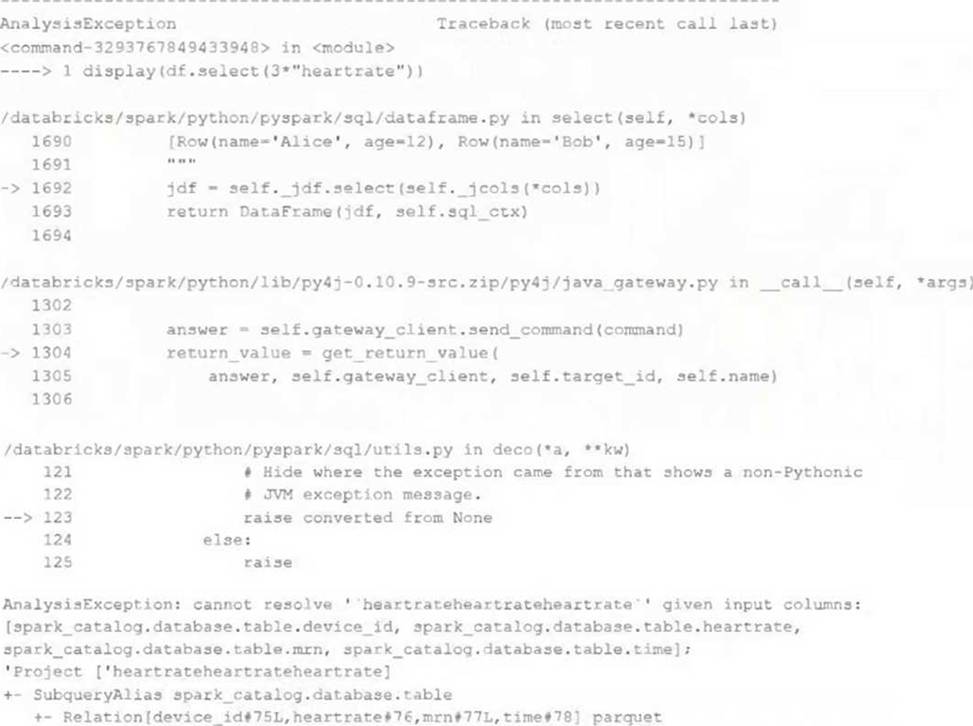
Which statement describes the error being raised?
- A . The code executed was PvSoark but was executed in a Scala notebook.
- B . There is no column in the table named heartrateheartrateheartrate
- C . There is a type error because a column object cannot be multiplied.
- D . There is a type error because a DataFrame object cannot be multiplied.
- E . There is a syntax error because the heartrate column is not correctly identified as a column.
B
Explanation:
The error being raised is an AnalysisException, which is a type of exception that occurs when Spark SQL cannot analyze or execute a query due to some logical or semantic error1. In this case, the error message indicates that the query cannot resolve the column name ‘heartrateheartrateheartrate’ given the input columns ‘heartrate’ and ‘age’. This means that there is no column in the table named ‘heartrateheartrateheartrate’, and the query is invalid. A possible cause of this error is a typo or a copy-paste mistake in the query. To fix this error, the query should use a valid column name that exists in the table, such as ‘heartrate’.
Reference: AnalysisException