
Practice Free Databricks Certified Professional Data Engineer Exam Online Questions
The following code has been migrated to a Databricks notebook from a legacy workload:

The code executes successfully and provides the logically correct results, however, it takes over 20 minutes to extract and load around 1 GB of data.
Which statement is a possible explanation for this behavior?
- A . %sh triggers a cluster restart to collect and install Git. Most of the latency is related to cluster startup time.
- B . Instead of cloning, the code should use %sh pip install so that the Python code can get executed in parallel across all nodes in a cluster.
- C . %sh does not distribute file moving operations; the final line of code should be updated to use %fs instead.
- D . Python will always execute slower than Scala on Databricks. The run.py script should be refactored to Scala.
- E . %sh executes shell code on the driver node. The code does not take advantage of the worker nodes or Databricks optimized Spark.
E
Explanation:
https://www.databricks.com/blog/2020/08/31/introducing-the-databricks-web-terminal.html
The code is using %sh to execute shell code on the driver node. This means that the code is not taking advantage of the worker nodes or Databricks optimized Spark. This is why the code is taking longer to execute. A better approach would be to use Databricks libraries and APIs to read and write data from Git and DBFS, and to leverage the parallelism and performance of Spark. For example, you can use the Databricks Connect feature to run your Python code on a remote Databricks cluster, or you can use the Spark Git Connector to read data from Git repositories as Spark DataFrames.
An upstream system has been configured to pass the date for a given batch of data to the Databricks Jobs API as a parameter.
The notebook to be scheduled will use this parameter to load data with the following code:
df = spark.read.format("parquet").load(f"/mnt/source/(date)")
Which code block should be used to create the date Python variable used in the above code block?
- A . date = spark.conf.get("date")
- B . input_dict = input()date= input_dict["date"]
- C . import sysdate = sys.argv[1]
- D . date = dbutils.notebooks.getParam("date")
- E . dbutils.widgets.text("date", "null")date = dbutils.widgets.get("date")
E
Explanation:
The code block that should be used to create the date Python variable used in the above code block is:
dbutils.widgets.text(“date”, “null”) date = dbutils.widgets.get(“date”)
This code block uses the dbutils.widgets API to create and get a text widget named “date” that can accept a string value as a parameter1. The default value of the widget is “null”, which means that if no parameter is passed, the date variable will be “null”. However, if a parameter is passed through the Databricks Jobs API, the date variable will be assigned the value of the parameter. For example, if the parameter is “2021-11-01”, the date variable will be “2021-11-01”. This way, the notebook can use the date variable to load data from the specified path.
The other options are not correct, because:
Option A is incorrect because spark.conf.get(“date”) is not a valid way to get a parameter passed through the Databricks Jobs API. The spark.conf API is used to get or set Spark configuration properties, not notebook parameters2.
Option B is incorrect because input() is not a valid way to get a parameter passed through the Databricks Jobs API. The input() function is used to get user input from the standard input stream, not from the API request3.
Option C is incorrect because sys.argv1 is not a valid way to get a parameter passed through the Databricks Jobs API. The sys.argv list is used to get the command-line arguments passed to a Python script, not to a notebook4.
Option D is incorrect because dbutils.notebooks.getParam(“date”) is not a valid way to get a parameter passed through the Databricks Jobs API. The dbutils.notebooks API is used to get or set notebook parameters when running a notebook as a job or as a subnotebook, not when passing parameters through the API5.
Reference: Widgets, Spark Configuration, input(), sys.argv, Notebooks
A data ingestion task requires a one-TB JSON dataset to be written out to Parquet with a target part-file size of 512 MB. Because Parquet is being used instead of Delta Lake, built-in file-sizing features such as Auto-Optimize and Auto-Compaction cannot be used.
Which strategy will yield the best performance without shuffling data?
- A . Set spark.sql.files.maxPartitionBytes to 512 MB, ingest the data, execute the narrow transformations, and then write to parquet.
- B . Set spark.sql.shuffle.partitions to 2,048 partitions (1TB*1024*1024/512), ingest the data, execute the narrow transformations, optimize the data by sorting it (which automatically repartitions the data), and then write to parquet.
- C . Set spark.sql.adaptive.advisoryPartitionSizeInBytes to 512 MB bytes, ingest the data, execute the narrow transformations, coalesce to 2,048 partitions (1TB*1024*1024/512), and then write to parquet.
- D . Ingest the data, execute the narrow transformations, repartition to 2,048 partitions (1TB* 1024*1024/512), and then write to parquet.
- E . Set spark.sql.shuffle.partitions to 512, ingest the data, execute the narrow transformations, and then write to parquet.
A
Explanation:
For this scenario where a one-TB JSON dataset needs to be converted into Parquet format without employing Delta Lake’s auto-sizing features, the goal is to avoid unnecessary data shuffles and yet ensure optimal file sizes for the output Parquet files. Here’s a breakdown of why option A is most suitable:
Setting maxPartitionBytes: The spark.sql.files.maxPartitionBytes configuration controls the size of
blocks that Spark reads from the data source (in this case, the JSON files) but also influences the output size of files when data is written without repartition or coalesce operations. Setting this parameter to 512 MB directly addresses the requirement to manage the output file size effectively.
Data Ingestion and Processing:
Ingesting Data: Load the JSON dataset into a DataFrame.
Applying Transformations: Perform any required narrow transformations that do not involve shuffling data (like filtering or adding new columns).
Writing to Parquet: Directly write the transformed DataFrame to Parquet files. The setting for maxPartitionBytes ensures that each part-file is approximately 512 MB, meeting the requirement for part-file size without additional steps to repartition or coalesce the data.
Performance Consideration: This approach is optimal because:
It avoids the overhead of shuffling data, which can be significant, especially with large datasets.
It directly ties the read/write operations to a configuration that matches the target output size, making it efficient in terms of both computation and I/O operations.
Alternative Options Analysis:
Option B and D: Involves repartitioning, which would trigger a shuffle of the data, contradicting the requirement to avoid shuffling for performance reasons.
Option C: Uses coalesce, which is less intensive than repartition but can still lead to uneven partition sizes and does not directly control the output file size as effectively as setting maxPartitionBytes.
Option E: Setting shuffle partitions to 512 doesn’t directly control the output file size for writing to Parquet and could lead to smaller files depending on the dataset’s partitioning post-transformations.
Reference
Apache Spark Configuration
Writing to Parquet Files in Spark
A data team’s Structured Streaming job is configured to calculate running aggregates for item sales to update a downstream marketing dashboard. The marketing team has introduced a new field to track the number of times this promotion code is used for each item. A junior data engineer suggests updating the existing query as follows: Note that proposed changes are in bold.
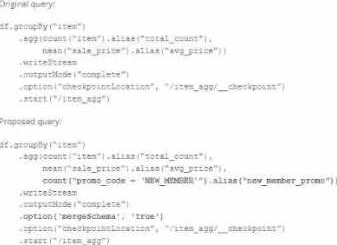
Which step must also be completed to put the proposed query into production?
- A . Increase the shuffle partitions to account for additional aggregates
- B . Specify a new checkpointlocation
- C . Run REFRESH TABLE delta, /item_agg’
- D . Remove .option (mergeSchema’, true’) from the streaming write
B
Explanation:
When introducing a new aggregation or a change in the logic of a Structured Streaming query, it is generally necessary to specify a new checkpoint location. This is because the checkpoint directory contains metadata about the offsets and the state of the aggregations of a streaming query. If the logic of the query changes, such as including a new aggregation field, the state information saved in the current checkpoint would not be compatible with the new logic, potentially leading to incorrect results or failures. Therefore, to accommodate the new field and ensure the streaming job has the correct starting point and state information for aggregations, a new checkpoint location should be specified.
Databricks documentation on Structured Streaming:
https://docs.databricks.com/spark/latest/structured-streaming/index.html
Databricks documentation on streaming checkpoints:
https://docs.databricks.com/spark/latest/structured-streaming/production.html#checkpointing
A Delta Lake table with Change Data Feed (CDF) enabled in the Lakehouse named customer_churn_params is used in churn prediction by the machine learning team. The table contains information about customers derived from a number of upstream sources. Currently, the data engineering team populates this table nightly by overwriting the table with the current valid values derived from upstream data sources. The churn prediction model used by the ML team is fairly stable in production. The team is only interested in making predictions on records that have changed in the past 24 hours.
Which approach would simplify the identification of these changed records?
- A . Apply the churn model to all rows in the customer_churn_params table, but implement logic to perform an upsert into the predictions table that ignores rows where predictions have not changed.
- B . Modify the overwrite logic to include a field populated by calling current_timestamp() as data are being written; use this field to identify records written on a particular date.
- C . Replace the current overwrite logic with a MERGE statement to modify only those records that have changed; write logic to make predictions on the changed records identified by the Change Data Feed.
- D . Convert the batch job to a Structured Streaming job using the complete output mode; configure a Structured Streaming job to read from the customer_churn_params table and incrementally predict against the churn model.
C
Explanation:
Exact extract: “Change data feed (CDF) provides row-level change information for Delta tables.”
Exact extract: “Use table_changes to query the set of rows that were inserted, updated, or deleted between two versions (or timestamps).”
Reference: Delta Lake Change Data Feed; Delta Lake MERGE INTO.
Which statement regarding stream-static joins and static Delta tables is correct?
- A . Each microbatch of a stream-static join will use the most recent version of the static Delta table as of each microbatch.
- B . Each microbatch of a stream-static join will use the most recent version of the static Delta table as of the job’s initialization.
- C . The checkpoint directory will be used to track state information for the unique keys present in the join.
- D . Stream-static joins cannot use static Delta tables because of consistency issues.
- E . The checkpoint directory will be used to track updates to the static Delta table.
A
Explanation:
This is the correct answer because stream-static joins are supported by Structured Streaming when one of the tables is a static Delta table. A static Delta table is a Delta table that is not updated by any concurrent writes, such as appends or merges, during the execution of a streaming query. In this case, each microbatch of a stream-static join will use the most recent version of the static Delta table as of each microbatch, which means it will reflect any changes made to the static Delta table before the start of each microbatch.
Verified Reference: [Databricks Certified Data Engineer Professional], under “Structured Streaming” section; Databricks Documentation, under “Stream and static joins” section.
A data team is automating a daily multi-task ETL pipeline in Databricks. The pipeline includes a notebook for ingesting raw data, a Python wheel task for data transformation, and a SQL query to update aggregates. They want to trigger the pipeline programmatically and see previous runs in the GUI. They need to ensure tasks are retried on failure and stakeholders are notified by email if any task fails.
Which two approaches will meet these requirements? (Choose 2 answers)
- A . Use the REST API endpoint /jobs/runs/submit to trigger each task individually as separate job runs and implement retries using custom logic in the orchestrator.
- B . Create a multi-task job using the UI, Databricks Asset Bundles (DABs), or the Jobs REST API (/jobs/create) with notebook, Python wheel, and SQL tasks. Configure task-level retries and email notifications in the job definition.
- C . Trigger the job programmatically using the Databricks Jobs REST API (/jobs/run-now), the CLI (databricks jobs run-now), or one of the Databricks SDKs.
- D . Create a single orchestrator notebook that calls each step with dbutils.notebook.run(), defining a job for that notebook and configuring retries and notifications at the notebook level.
- E . Use Databricks Asset Bundles (DABs) to deploy the workflow, then trigger individual tasks directly by referencing each task’s notebook or script path in the workspace.
B,C
Explanation:
Databricks Jobs supports defining multi-task workflows that include notebooks, SQL statements, and Python wheel tasks. These can be configured with retry policies, dependency chains, and failure notifications. The correct practice, as stated in the documentation, is to use the Jobs REST API (/jobs/create) or Databricks Asset Bundles to define multi-task jobs, and then trigger them programmatically using /jobs/run-now, CLI, or SDK. This allows the team to maintain full job history, handle retries automatically, and receive alerts via configured email notifications. Using /jobs/runs/submit creates one-off ad hoc runs without maintaining dependency visibility.
Therefore, options B and C together satisfy the operational, automation, and governance requirements.
Which approach demonstrates a modular and testable way to use DataFrame.transform for ETL code in PySpark?
- A . class Pipeline:def transform(self, df):return df.withColumn("value_upper", upper(col("value")))pipeline = Pipeline()assertDataFrameEqual(pipeline.transform(test_input), expected)
- B . def upper_value(df):return df.withColumn("value_upper", upper(col("value")))def
filter_positive(df):return df.filter(df["id"] > 0)pipeline_df = df.transform(upper_value).transform(filter_positive) - C . def upper_transform(df):return df.withColumn("value_upper", upper(col("value")))actual = test_input.transform(upper_transform)assertDataFrameEqual(actual, expected)
- D . def transform_data(input_df):# transformation logic herereturn output_dftest_input = spark.createDataFrame([(1, "a")], ["id", "value"])assertDataFrameEqual(transform_data(test_input), expected)
B
Explanation:
Databricks and Apache Spark recommend building modular and reusable ETL transformations by leveraging the DataFrame.transform() API. This method allows you to chain multiple transformation functions in a clean and testable way.
Option A: Encapsulating the logic in a class (Pipeline) works, but it reduces modularity and flexibility. It does not show the true intended use of DataFrame.transform() which is chaining functional transformations.
Option B: This is the correct approach. It defines small, reusable functions (upper_value,
filter_positive) that each take a DataFrame and return a transformed DataFrame. By chaining them with df.transform(func), you can compose ETL pipelines in a clear and declarative manner. This enables unit testing of individual functions and makes the ETL pipeline modular, testable, and production-ready.
Option C: This shows a single transformation wrapped in a function and tested, but it lacks pipeline composition ― it is not demonstrating modular chaining across multiple transformations.
Option D: This simply defines a transformation function with hardcoded logic. It does not leverage DataFrame.transform() nor demonstrate modularity through composition.
Therefore, Option B is the best demonstration of how to use DataFrame.transform() in PySpark ETL pipelines.
Databricks documentation explicitly highlights that DataFrame.transform() allows developers to “chain together reusable functions in a readable and modular way, improving testability and maintainability of ETL code.” This makes B the correct and officially supported pattern.
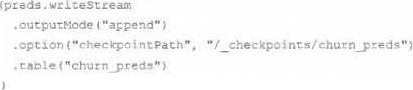
The data science team has created and logged a production model using MLflow. The following code correctly imports and applies the production model to output the predictions as a new DataFrame named preds with the schema "customer_id LONG, predictions DOUBLE, date DATE".
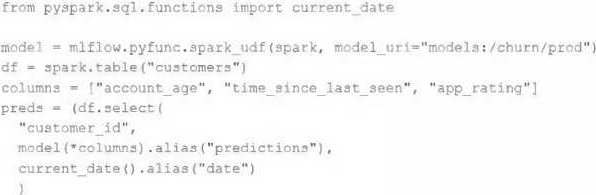
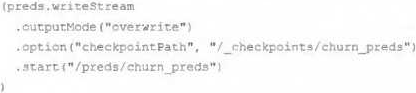
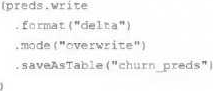
The data science team would like predictions saved to a Delta Lake table with the ability to compare all predictions across time. Churn predictions will be made at most once per day.
Which code block accomplishes this task while minimizing potential compute costs?
A) preds.write.mode("append").saveAsTable("churn_preds")
B) preds.write.format("delta").save("/preds/churn_preds")
C)
D)
E)
- A . Option A
- B . Option B
- C . Option C
- D . Option D
- E . Option E
The data architect has mandated that all tables in the Lakehouse should be configured as external Delta Lake tables.
Which approach will ensure that this requirement is met?
- A . Whenever a database is being created, make sure that the location keyword is used
- B . When configuring an external data warehouse for all table storage. leverage Databricks for all ELT.
- C . Whenever a table is being created, make sure that the location keyword is used.
- D . When tables are created, make sure that the external keyword is used in the create table statement.
- E . When the workspace is being configured, make sure that external cloud object storage has been mounted.
C
Explanation:
This is the correct answer because it ensures that this requirement is met. The requirement is that all tables in the Lakehouse should be configured as external Delta Lake tables. An external table is a table that is stored outside of the default warehouse directory and whose metadata is not managed by Databricks. An external table can be created by using the location keyword to specify the path to an existing directory in a cloud storage system, such as DBFS or S3. By creating external tables, the data engineering team can avoid losing data if they drop or overwrite the table, as well as leverage existing data without moving or copying it.
Verified Reference: [Databricks Certified Data Engineer Professional], under “Delta Lake” section; Databricks Documentation, under “Create an external table” section.