
Practice Free 220-1202 Exam Online Questions
Due to recent security issues, the finance department requires a shorter screensaver timeout.
Which of the following should a technician use to accomplish this task?
- A . gpedit.msc
- B . certmgr.msc
- C . devmgmt.msc
- D . perfmon.msc
A
Explanation:
The correct answer is A. gpedit.msc, which opens the Local Group Policy Editor. Group Policy allows administrators to configure and enforce security-related settings, including screensaver timeout, password protection, and automatic locking, across systems or user accounts.
According to the Quentin Docter C CompTIA A+ Complete Study Guide, Group Policy is commonly used to enforce security policies such as inactivity timeouts, especially in departments handling sensitive data like finance or HR.
The Travis Everett & Andrew Hutz C All-in-One Exam Guide explains that screensaver timeout settings can be configured under User Configuration → Administrative Templates → Control Panel → Personalization, ensuring systems lock automatically after a defined period of inactivity.
The Mike Meyers / Mark Soper Lab Manual reinforces that tools like certmgr.msc manage certificates, devmgmt.msc manages hardware devices, and perfmon.msc monitors system performance. None of these tools control user security policies.
Because the requirement is to enforce a shorter screensaver timeout for security, Group Policy Editor is the correct and professional tool, making A the correct answer.
SIMULATION
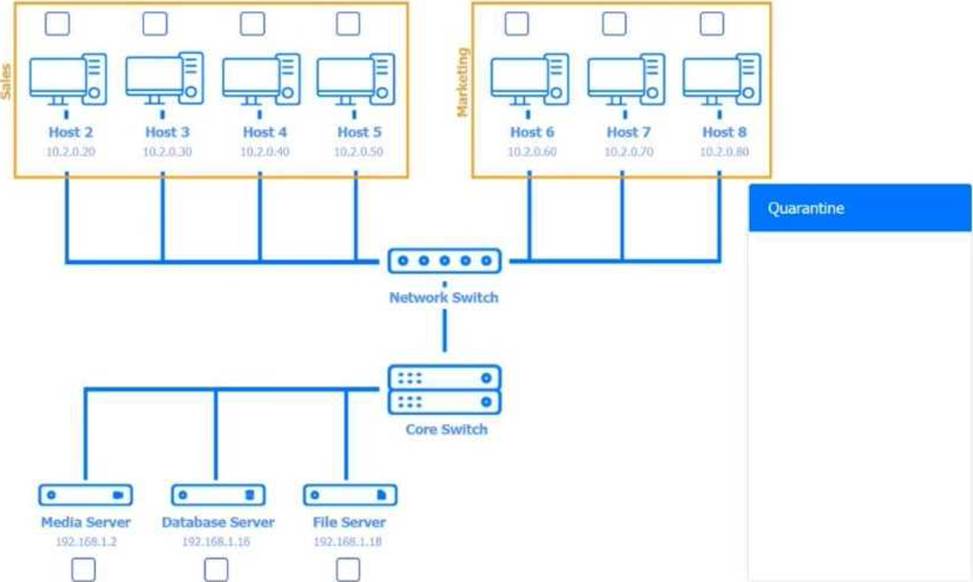
Multiple users are reporting audio issues as well as performance issues after downloading unauthorized software. You have been dispatched to identify and resolve any issues on the network using best practice procedures.
INSTRUCTIONS
Quarantine and configure the appropriate device (s) so that the users’ audio issues are resolved using best practice procedures.
Multiple devices may be selected for quarantine.
Click on a host or server to configure services.
If at any time you would like to bring back the initial state of the simulation, please click the Reset All button.










Explanation below
for complete
solution.
Explanation:
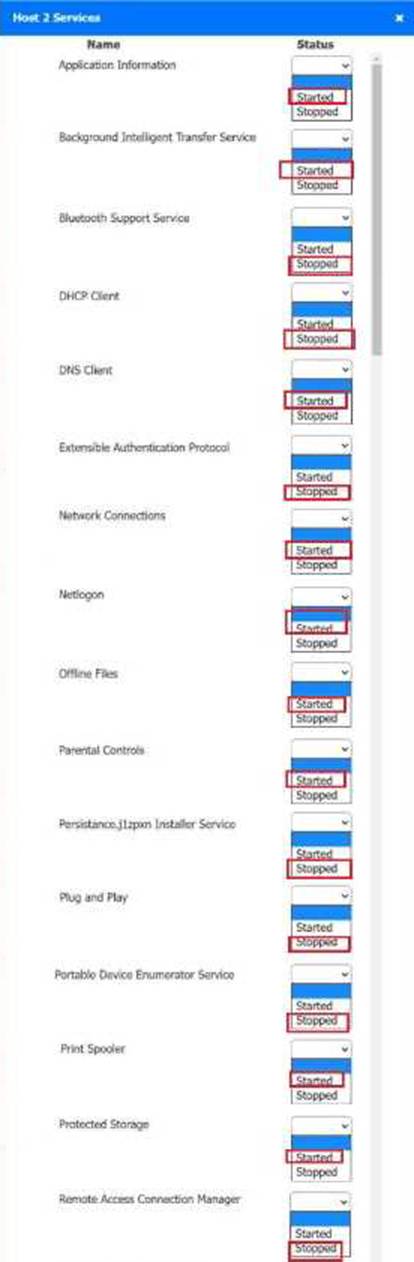
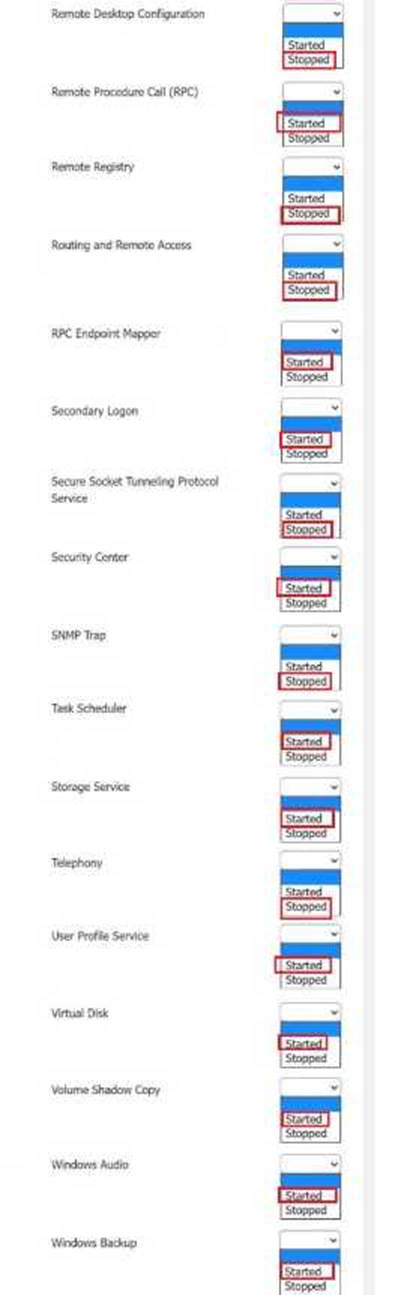
Host 2, Host 3, Host 4, Host 5, Host 6, Host 7, Host 8, Media Server – Stop All unwanted and malicious service (Persistance.j1zpxn Installer Service) from all the listed host and Media servers
Refer screenshot below on the required service started/stopped on host2, same service to be started and stopped across all host servers.
Which of the following malware types typically has very high computing resource usage?
- A . Rootkit
- B . Cryptominer
- C . Boot sector virus
- D . Trojan
B
Explanation:
Crypto miners exploit system resources to mine cryptocurrency, often without user consent, leading to high CPU and GPU usage.
From Quentin Docter C CompTIA A+ Complete Study Guide:
“Cryptomining malware can cause significant performance degradation by monopolizing system resources like CPU and GPU to mine digital currency.”
A small office reported a phishing attack that resulted in a malware infection.
A technician is investigating the incident and has verified the following:
● All endpoints are updated and have the newest EDR signatures.
● Logs confirm that the malware was quarantined by EDR on one system.
● The potentially infected machine was reimaged.
Which of the following actions should the technician take next?
- A . Install network security tools to prevent downloading infected files from the internet
- B . Discuss the cause of the issue and educate the end user about security hygiene
- C . Flash the firmware of the router to ensure the integrity of network traffic
- D . Suggest alternate preventative controls that would include more advanced security software
B
Explanation:
After containment and remediation, one of the final steps in incident response is user education. Since the root cause was a phishing attack, it is essential to educate users about identifying phishing attempts, safe browsing practices, and how to handle suspicious communications. This improves overall security posture and helps prevent future incidents.
A user cannot upload files to corporate servers from their mobile device when outside the office, but uploads work fine in-office.
What should a technician do to determine the root cause?
- A . Check the data usage limit
- B . Enable airplane mode
- C . Verify the last device reboot
- D . Enable Bluetooth connectivity
A
Explanation:
If uploading fails only offsite, mobile data limits or restrictions are the likely cause. Data caps or network management can interfere with uploads.
From Travis Everett C All-in-One Exam Guide:
“When mobile users experience network issues, always check if the device has reached a data cap or roaming restriction.”
A user cannot upload files to corporate servers from their mobile device when outside the office, but uploads work fine in-office.
What should a technician do to determine the root cause?
- A . Check the data usage limit
- B . Enable airplane mode
- C . Verify the last device reboot
- D . Enable Bluetooth connectivity
A
Explanation:
If uploading fails only offsite, mobile data limits or restrictions are the likely cause. Data caps or network management can interfere with uploads.
From Travis Everett C All-in-One Exam Guide:
“When mobile users experience network issues, always check if the device has reached a data cap or roaming restriction.”
Technicians are failing to document user contact information, device asset tags, and a clear description of each issue in the ticketing system.
Which of the following should a help desk management team implement for technicians to use on every call?
- A . Service-level agreements
- B . Call categories
- C . Standard operating procedures
- D . Knowledge base articles
C
Explanation:
Standard Operating Procedures (SOPs) define the mandatory steps and expectations technicians must follow during support calls. This includes documentation standards such as logging user info, asset details, and issue descriptions in the ticketing system. Implementing SOPs ensures consistency and accountability.
Technicians are failing to document user contact information, device asset tags, and a clear description of each issue in the ticketing system.
Which of the following should a help desk management team implement for technicians to use on every call?
- A . Service-level agreements
- B . Call categories
- C . Standard operating procedures
- D . Knowledge base articles
C
Explanation:
Standard Operating Procedures (SOPs) define the mandatory steps and expectations technicians must follow during support calls. This includes documentation standards such as logging user info, asset details, and issue descriptions in the ticketing system. Implementing SOPs ensures consistency and accountability.
Users are reporting that an unsecured network is broadcasting with the same name as the normal wireless network. They are able to access the internet but cannot connect to the file share servers.
Which of the following best describes this issue?
- A . Unreachable DNS server
- B . Virtual local area network misconfiguration
- C . Incorrect IP address
- D . Rogue wireless access point
D
Explanation:
This scenario describes a rogue access point ― a malicious or unauthorized wireless access point that uses the same SSID as the legitimate network. Users may connect to it unknowingly, which can result in limited network access, data interception, or redirection of traffic. The inability to reach internal file servers supports this being an unauthorized AP with no connection to internal resources.
An employee receives a message urging them to scan an image with their company-owned smartphone that will access the account management portal in order to reset their password.
Which of the following describes this type of social engineering attack?
- A . Whaling
- B . Vishing
- C . Quishing
- D . Smishing
C
Explanation:
This scenario is phishing delivered through a QR code (scan an image to reach a portal), which is best
described as quishing. Quentin Docter defines phishing as a social engineering method where the attacker makes a message look legitimate and convinces the user to click a link to “correct” an account problem; after the click, the victim is taken to a site controlled by the attacker and asked for credentials. A QR code in a message is simply an alternate way to deliver that same malicious “link” without showing the URL clearly.
The Mike Meyers Lab Manual distinguishes related social engineering types: vishing is done by phone calls, and whaling targets high-level executives. Smishing is phishing delivered via SMS text messages, but the prompt specifically centers on scanning an image (QR-style workflow), not a text-message attack vector.
Docter also notes QR codes are commonly used in authentication workflows (for example, adding accounts to authenticator apps), which is why attackers mimic this behavior to make the scam seem normal. Therefore, QR-based phishing is best labeled quishing.