
Practice Free 220-1202 Exam Online Questions
A user’s computer is running slowly.
Task Manager shows:
Disk: 2%
Network: 12%
GPU: 15%
CPU: 70%
Memory: 97%
Which of the following would a technician most likely do to resolve the issue?
- A . Clear browser cached data
- B . Upgrade the network connection
- C . Close unnecessary programs
- D . Delete temporary files
C
Explanation:
Memory usage is critically high, suggesting many applications or background processes. Closing unnecessary programs will immediately free up RAM.
From Travis Everett C All-in-One Exam Guide:
“High memory usage with moderate CPU load usually means too many applications are open. Close unnecessary apps or use Task Manager to end processes.”
SIMULATION
As a corporate technician, you are asked to evaluate several suspect email messages on a client’s computer.
Corporate policy requires the following:
>All phishing attempts must be reported.
>Future spam emails to users must be prevented.
INSTRUCTIONS
Review each email and perform the following within the email:
>Classify the emails
>Identify suspicious items, if applicable, in each email
>Select the appropriate resolution
If at any time you would like to bring back the initial state of the simulation, please click the Reset All button.
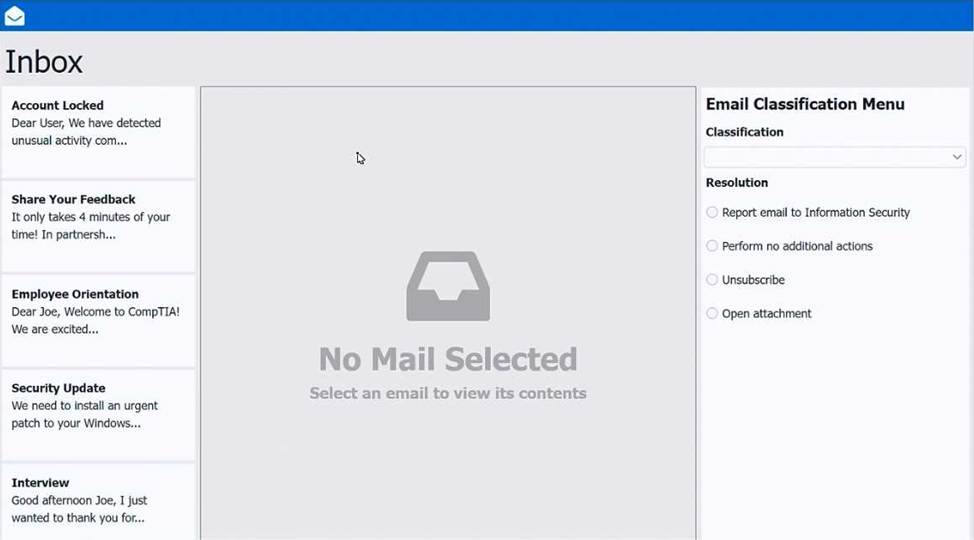
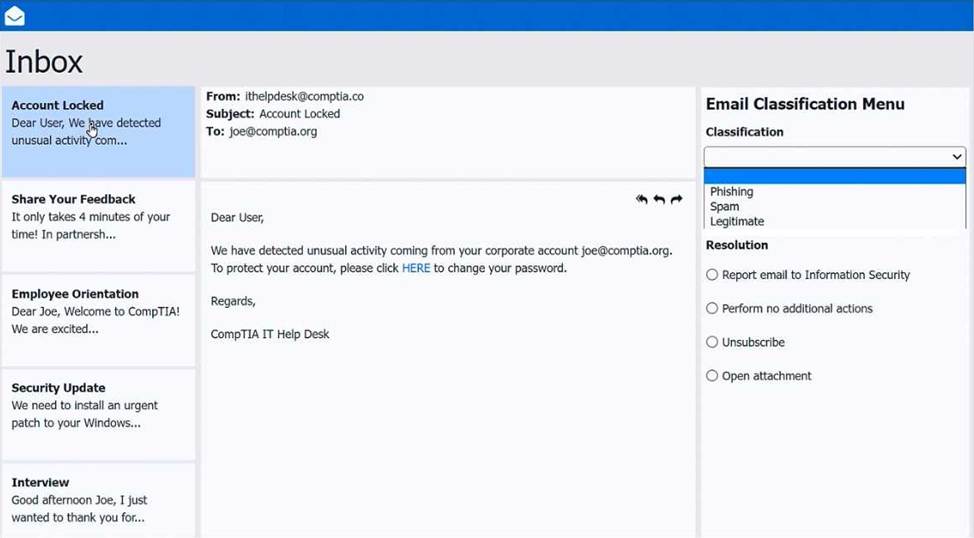
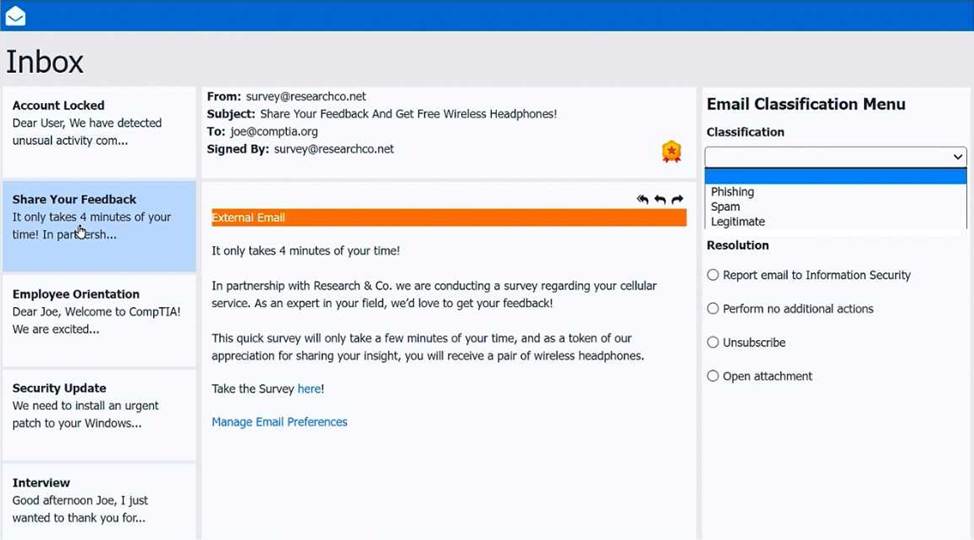
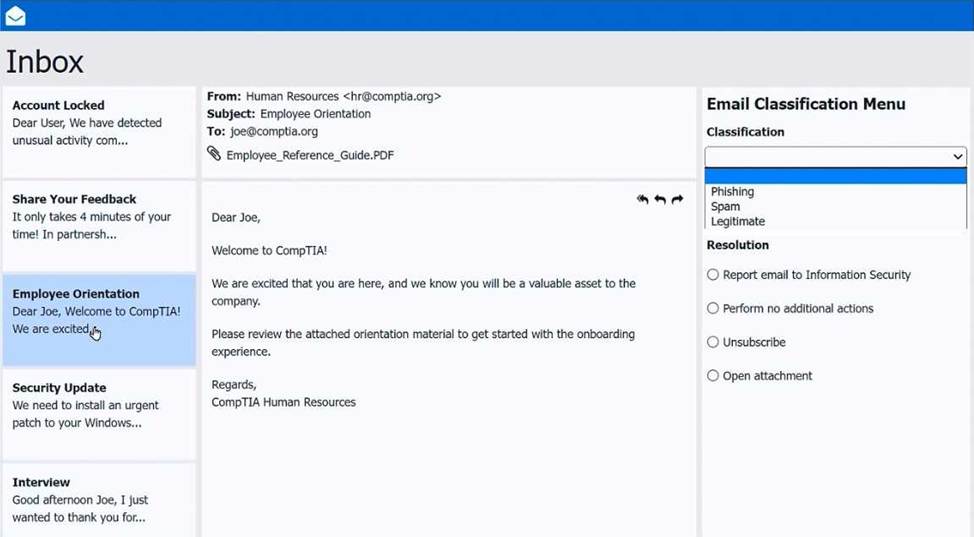
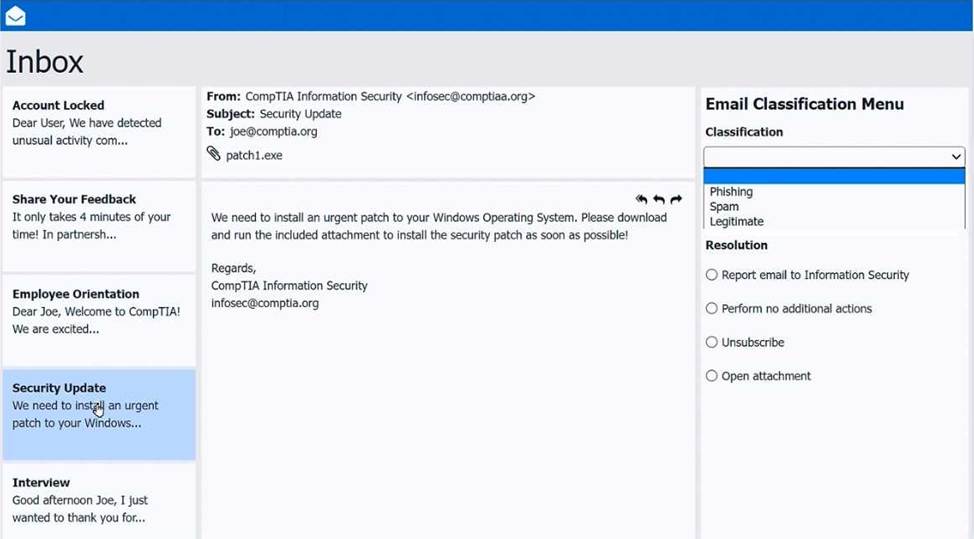
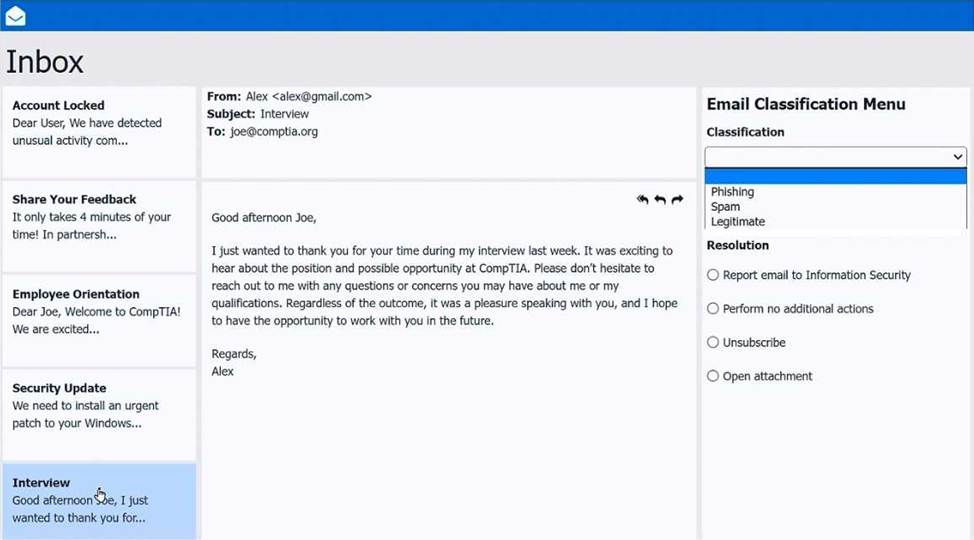
Inbox mail 2 -Share your feedback – Legitimate – Perform no additional actions
Inbox mail 3 CEmployee orientation – Legitimate – Perform no additional actions
Inbox mail 4 CSecurity Update C Spam – Report email to Information Security
Inbox mail 5 CInterview – Legitimate – Perform no additional actions
SIMULATION
As a corporate technician, you are asked to evaluate several suspect email messages on a client’s computer.
Corporate policy requires the following:
>All phishing attempts must be reported.
>Future spam emails to users must be prevented.
INSTRUCTIONS
Review each email and perform the following within the email:
>Classify the emails
>Identify suspicious items, if applicable, in each email
>Select the appropriate resolution
If at any time you would like to bring back the initial state of the simulation, please click the Reset All button.
Inbox mail 2 -Share your feedback – Legitimate – Perform no additional actions
Inbox mail 3 CEmployee orientation – Legitimate – Perform no additional actions
Inbox mail 4 CSecurity Update C Spam – Report email to Information Security
Inbox mail 5 CInterview – Legitimate – Perform no additional actions
An administrator is creating user accounts for a new vendor contract. The contract states that the users can work only during certain times.
Which of the following should the administrator implement to comply with this requirement?
- A . Timeout policies by GPO user objects
- B . Alerts on authentication attempts outside of SLA requirements
- C . Expirations on the contractors’ accounts
- D . Account login restrictions set to the specified hours
D
Explanation:
The requirement is that vendor users can work only during certain times, which is enforced by setting logon-hour restrictions on the accounts. Quentin Docter explicitly describes this control under “Setting Time Restrictions,” stating: “Configure user accounts so that logins can occur only during times that the user can be expected to be working,” and explains that in Active Directory you can open the user account and click Logon Hours to configure permitted and denied hours. This directly matches option D.
Option C (account expiration) is useful for contractors, and Docter even notes account expiration is “best used on contractor accounts,” but that controls the end date of access, not daily working hours. Alerts (B) would only notify after the fact, and timeout policies (A) are about inactivity/session controls rather than restricting when logons are allowed. Mike Meyers also lists “login time restrictions” as an account management best practice, reinforcing that restricting logon times is a valid security control.
A technician installs a Bluetooth headset for a user. During testing, the sound still comes from the speaker on the computer. The technician verifies the headset shows up in Device Manager.
Which of the following would the technician most likely do to fix this issue?
- A . Update the drivers for the wireless headset
- B . Replace the battery on the headset and try again later
- C . Verify that the sound is not muted in the control panel
- D . Change the headset as the default device in sound settings
D
Explanation:
Just recognizing the device isn’t enough―audio output must be routed to it manuallyby setting it as the default playback device in sound settings.
From Mark Soper C Mike Meyers’ Lab Manual:
“If audio is still playing through the internal speaker, verify that the Bluetooth headset is set as the default playback device. This can be configured under Windows Sound Settings.”
A help desk technician recently installed an SSH client on a workstation in order to access remote servers.
What does this enable?
- A . To utilize an SSO connection
- B . To securely establish a console session
- C . To encrypt and decrypt protected messages
- D . To facilitate device log reviews
B
Explanation:
SSH (Secure Shell) allows encrypted console sessions to access and administer remote servers.
From Quentin Docter C Complete Study Guide:
“Secure Shell (SSH) provides an encrypted console session to manage Linux, UNIX, or network devices securely over TCP port 22.”.
Which of the following is an example of an application publisher including undisclosed additional software in an installation package?
- A . Virus
- B . Ransomware
- C . Potentially unwanted program
- D . Trojan
C
Explanation:
A Potentially Unwanted Program (PUP) is software that a user may not have knowingly installed. It often gets bundled with legitimate software and installs without full disclosure. PUPs can affect performance, change system settings, or display unwanted ads but are not necessarily malicious like viruses or ransomware.
A user decides to switch to Windows from Linux and is trying to migrate data using an external USB hard disk. However, when the user connects the cable to the Windows machine, an error message appears stating the device must be formatted before it can be used. The hard disk works as expected when connected to the Linux machine.
Which of the following should the user do to resolve this issue?
- A . Configure Windows firewall to allow data from Linux systems
- B . Replace the cable with Windows-supported hardware
- C . Apply a firmware update from the PC manufacturer
- D . Update the file allocation system to exFAT
D
Explanation:
The Linux machine likely formatted the drive in a file system like ext4, which Windows cannot natively read. Reformatting the drive to exFAT allows cross-platform compatibility.
From All-in-One Exam Guide:
“When migrating data between OSes, using a file system like exFAT ensures compatibility. Windows cannot read Linux-native file systems such as ext4 without third-party tools.”
A desktop technician is hardening a newly installed company workstation.
Which of the following actions should the technician take? (Select two).
- A . Implement a disclaimer on the log-in screen.
- B . Disable the guest account.
- C . Disable the screensaver.
- D . Install remote collaboration tools.
- E . Change the default administrator password.
- F . Enable a virtual assistant.
B,E
Explanation:
Hardening focuses on reducing default attack surface and removing predictable access paths. Quentin Docter explains that default accounts are risky and highlights that Windows creates a Guest account that “represents a weakness that can be exploited,” so you “should disable all accounts that are not needed, especially the Guest account.” That directly supports option B.
Docter also emphasizes changing defaults as part of hardening: “Changing the default password to a complex password is also a good practice in hardening the device.” That maps to option E (change the default administrator password). These actions reduce common credential-based attacks and limit unauthorized access.
Other options are either unrelated to workstation hardening (remote collaboration tools, virtual assistants) or weaken security (disabling screensavers may remove automatic lock behavior). Thus, the best two hardening steps are disable Guest and change the default admin password.
A technician needs to install Windows 11 on a 4TB SSD. The company requires that the drive be partitioned with at least five primary partitions.
Which of the following should the technician use? (Select two).
- A . FAT16
- B . XFS
- C . GPT
- D . MBR
- E . NTFS
- F . APFS
C,E
Explanation:
The correct answers are C. GPT and E. NTFS. The GUID Partition Table (GPT) partitioning scheme is required because it supports more than four primary partitions and disks larger than 2TB. Since the SSD is 4TB and requires at least five primary partitions, MBR is not suitable.
According to the Quentin Docter C CompTIA A+ Complete Study Guide, MBR is limited to four primary partitions and a maximum disk size of 2TB. GPT removes these limitations and is required for modern systems using UEFI firmware, including Windows 11.
The Travis Everett & Andrew Hutz C All-in-One Exam Guide explains that Windows installations on large disks should use GPT in combination with NTFS, which is the preferred Windows file system due to its support for large files, permissions, encryption, and reliability features.
The Mike Meyers / Mark Soper Lab Manual clarifies that FAT16 cannot support large volumes, XFS is a Linux file system, and APFS is designed for Apple systems. None of these are appropriate for a Windows 11 installation.
Because the requirement involves disk size, partition count, and Windows compatibility, the correct combination is GPT for partitioning and NTFS for the file system, making C and E the correct answers.