
Practice Free SC-401 Exam Online Questions
DRAG DROP
You have a Microsoft 365 E5 subscription that has data loss prevention (DLP) implemented.
You need to create a custom sensitive info type. The solution must meet the following requirements:
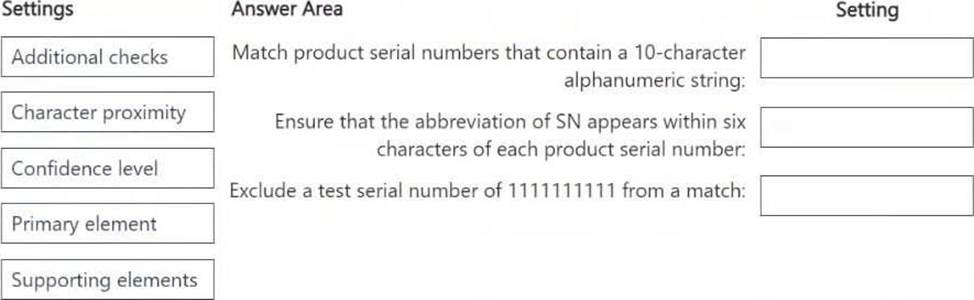
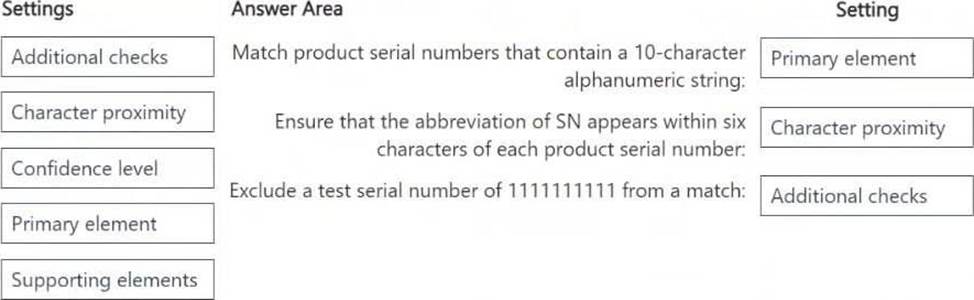
Match product serial numbers that contain a 10-character alphanumeric string.
Ensure that the abbreviation of SN appears within six characters of each product serial number.
Exclude a test serial number of 1111111111 from a match.
Which pattern settings should you configure for each requirement? To answer, drag the appropriate settings to the correct requirements. Each setting may be used once, more than once, or not at all. You may need to drag the split bar between panes or scroll to view content . NOTE: Each correct selection is worth one point.
You have a Microsoft 365 E5 subscription. The subscription contains 500 Windows devices that are onboarded to Microsoft Purview.
You need to prevent users from sharing sensitive information with third-party generative AI websites.
Which Microsoft Purview solution should you use?
- A . Data Loss Prevention
- B . Insider Risk Management
- C . Information Protection
- D . Information Barriers
HOTSPOT
Case Study
Instructions
This is a case study. Case studies are not timed separately from other exam sections. You can use as much exam time as you would like to complete each case study. However, there might be additional case studies or other exam sections. Manage your time to ensure that you can complete all the exam sections in the time provided. Pay attention to the Exam Progress at the top of the screen so you have sufficient time to complete any exam sections that follow this case study.
To answer the case study questions, you will need to reference information that is provided in the case. Case studies and associated questions might contain exhibits or other resources that provide more information about the scenario described in the case. Information provided in an individual question does not apply to the other questions in the case study.
A Review Screen will appear at the end of this case study. From the Review Screen, you can review and change your answers before you move to the next exam section. After you leave this case study, you will NOT be able to return to it.
To start the case study
To display the first question in this case study, select the "Next" button. To the left of the question, a menu provides links to information such as business requirements, the existing environment, and problem statements. Please read through all this information before answering any questions. When you are ready to answer a question, select the "Question" button to return to the question.
Overview
Contoso, Ltd. is a consulting company that has a main office in Montreal and three branch offices in Seattle, Boston, and Johannesburg.
Existing Environment
Microsoft 365 Environment
Contoso has a Microsoft 365 E5 tenant.
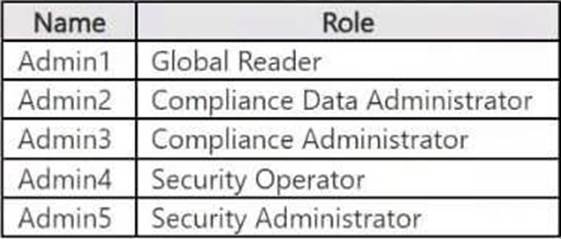
The tenant contains the administrative user accounts shown in the following table.
Users store data in the following locations:
● SharePoint sites
● OneDrive accounts
● Exchange email
● Exchange public folders
● Teams chats
● Teams channel messages
When users in the research department create documents, they must add a 10-digit project code to each document. Project codes that start with the digits 999 are confidential.
SharePoint Online Environment
Contoso has four Microsoft SharePoint Online sites named Site1, Site2, Site3, and Site4.
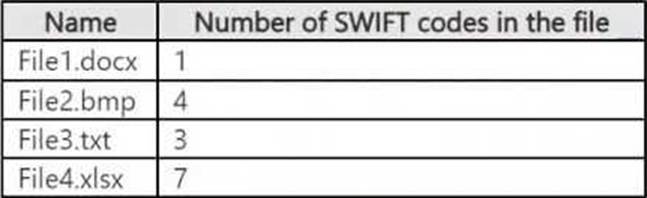
Site2 contains the files shown in the following table.
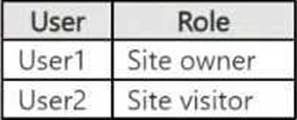
Two users named User1 and User2 are assigned roles for Site2 as shown in the following table.
Site3 stores documents related to the company’s projects. The documents are organized in a folder hierarchy based on the project.
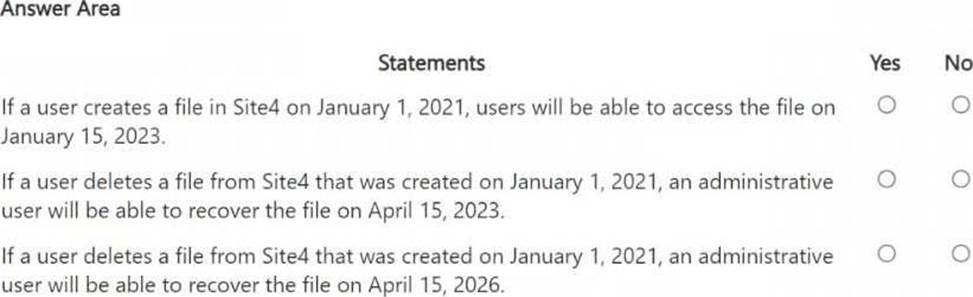
Site4 has the following two retention policies applied:
● Name: Site4RetentionPolicy1
● Locations to apply the policy: Site4
● Delete items older than: 2 years
● Delete content based on: When items were created
● Name: Site4RetentionPolicy2
● Locations to apply the policy: Site4
● Retain items for a specific period: 4 years
● Start the retention period based on: When items were created
● At the end of the retention period: Do nothing
Problem Statements
Management at Contoso is concerned about data leaks. On several occasions, confidential research department documents were leaked.
Requirements
Planned Changes
Contoso plans to create the following data loss prevention (DLP) policy:
● Name: DLPpolicy1
● Locations to apply the policy: Site2
● Conditions:
● Content contains any of these sensitive info types: SWIFT Code
● Instance count: 2 to any
● Actions: Restrict access to the content
Technical Requirements
Contoso must meet the following technical requirements:
● All administrative users must be able to review DLP reports.
● Whenever possible, the principle of least privilege must be used.
● For all users, all Microsoft 365 data must be retained for at least one year.
● Confidential documents must be detected and protected by using Microsoft 365.
● Site1 documents that include credit card numbers must be labeled automatically.
● All administrative users must be able to create Microsoft 365 sensitivity labels.
● After a project is complete, the documents in Site3 that relate to the project must be retained for
10 years.
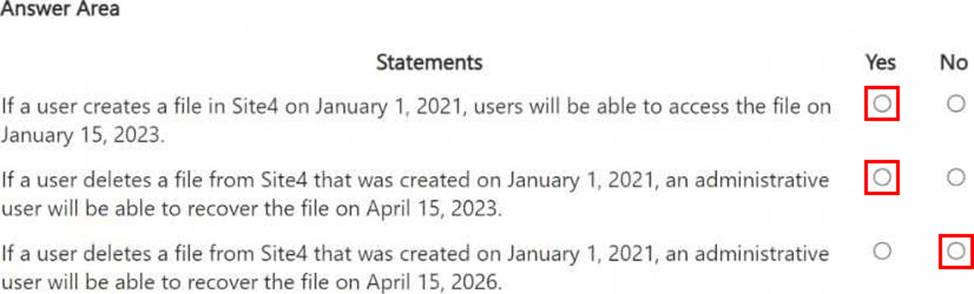
You are reviewing policies for the SharePoint Online environment.
For each of the following statements, select Yes if the statement is true. Otherwise, select No . NOTE: Each correct selection is worth one point.
You have a Microsoft 365 E5 subscription that contains a user named User 1.
All users are assigned Microsoft 365 Copilot licenses.
You deploy Microsoft Purview Data Security Posture Management for AI (DSPM for Al).
You need to ensure that User1 can analyze prompts and responses for AI interaction events. The solution must follow the principle of least privilege.
To which two role groups should you add User1? Each correct answer presents part of the solution . NOTE: Each correct selection is worth one point.
- A . Security Reader
- B . Content Explorer List Viewer
- C . Insider Risk Management Investigators
- D . Information Protection Analysts
- E . Content Explorer Content Viewer
You have a Microsoft 365 E5 subscription.
You plan to use insider risk management to collect and investigate forensic evidence.
You need to enable forensic evidence capturing.
What should you do first?
- A . Configure the information protection scanner.
- B . Claim capacity
- C . Enable Adaptive Protection
- D . Create priority user groups.
HOTSPOT
You have a Microsoft 365 E5 subscription.
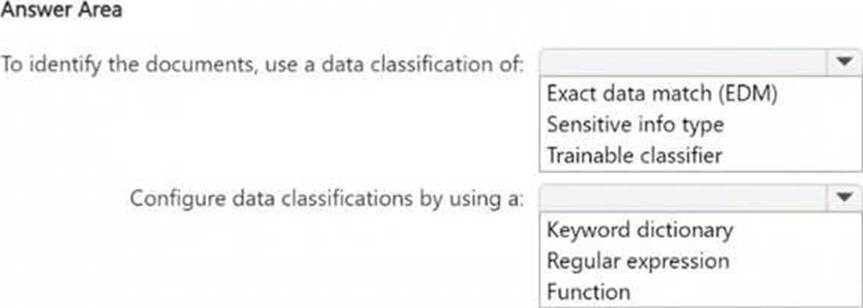
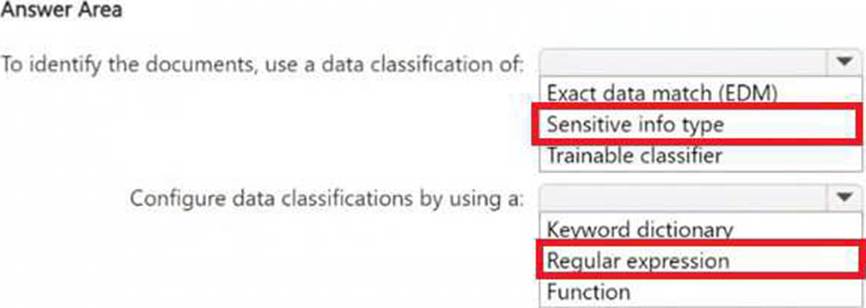
You need to identify documents that contain patent application numbers containing the letters PA followed by eight digits, for example, PA 12345678. The solution must minimize administrative effort.
What should you do? To answer, select the appropriate options in the answer area . NOTE: Each correct selection is worth one point.
HOTSPOT
You have a Microsoft 365 E5 tenant that contains a published sensitivity label named Sensitivity 1.
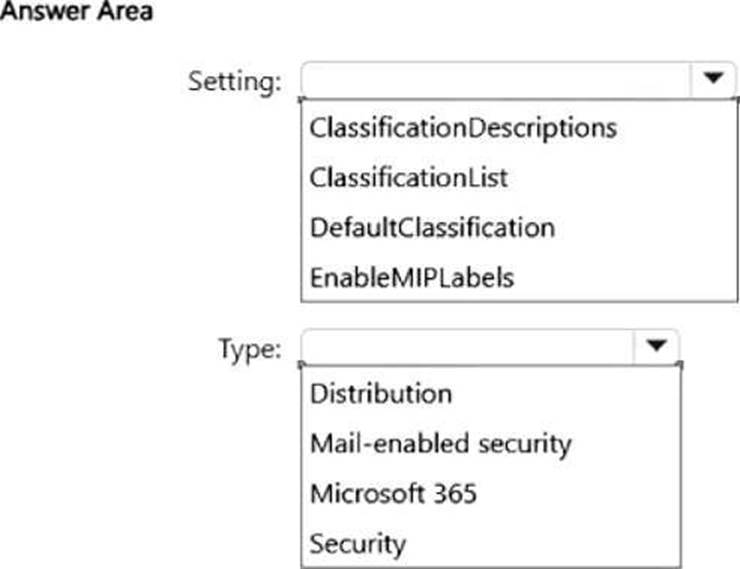
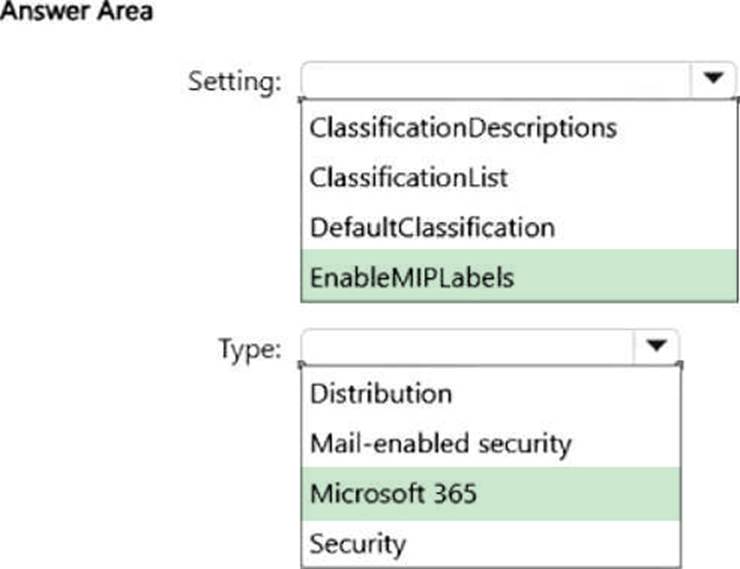
You plan to create a Microsoft Entra group named Group1 and assign Sensitivity1 to Group 1.
How should you configure Group1? To answer, select the appropriate options in the answer area . NOTE: Each correct selection is worth one point.
You have a Microsoft 365 tenant that is opt-in for trainable classifiers.
You need to ensure that a user named User1 can create custom trainable classifiers. The solution must use the principle of least privilege.
Which role should you assign to User1?
- A . Security Administrator
- B . Compliance Administrator
- C . Global Administrator
- D . Security Operator
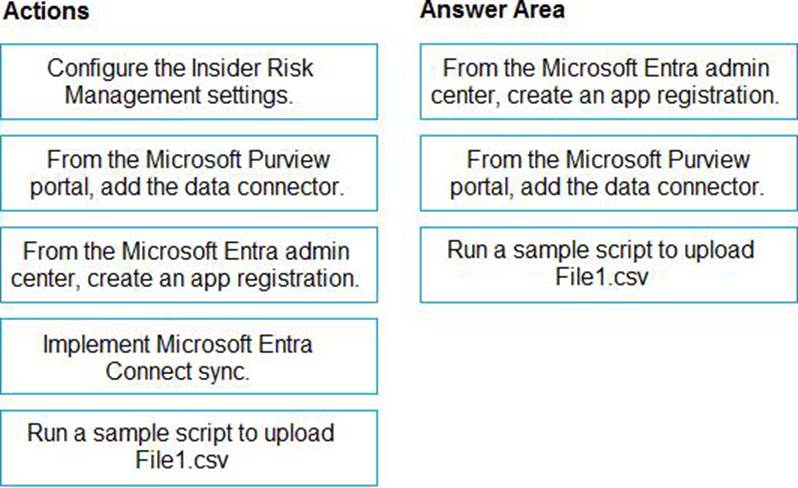
DRAG DROP
You have a Microsoft 365 E5 subscription.
You plan to implement Microsoft Purview Insider Risk Management.
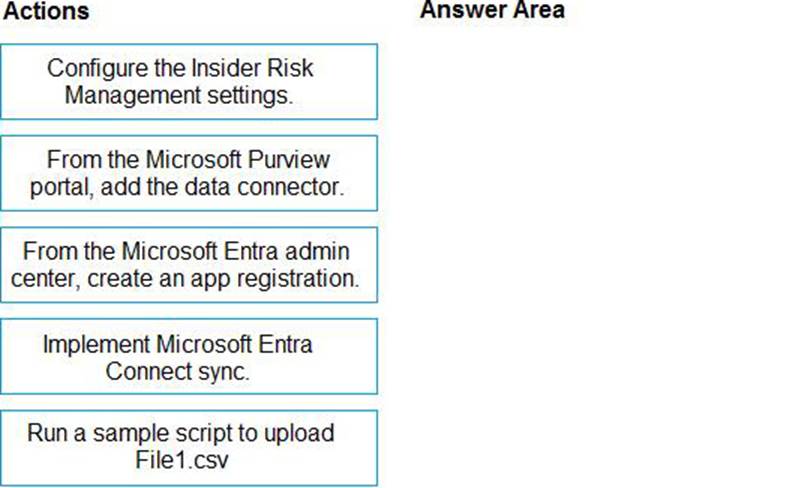
You obtain a file named File 1. csv that contains employee resignation data.
You need to implement the HR data connector and upload File 1. csv by using the connector.
Which three actions should you perform in sequence? To answer, move the appropriate actions from the list of actions to the answer area and arrange them in the correct order.
You have a Microsoft 365 E5 subscription.
You create a sensitivity label named Label1 and publish Label1 to all users and groups.
You have the following files in a SharePoint site:
• File 1. doc
• File2.docx
• File3.xlsx
• File4.txt
You need to identify which files can have Label1 applied.
Which files should you identify?
- A . File2.docx only
- B . File2.docx and File3.xlsx only
- C . File 1. doc, File2.docx, and File3.xlsx only
- D . File 1. doc, File2.doc, File3.xlsx, and File4.txt