Practice Free SC-401 Exam Online Questions
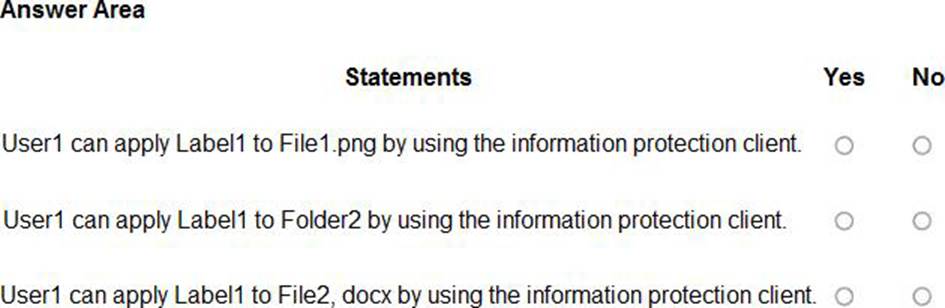
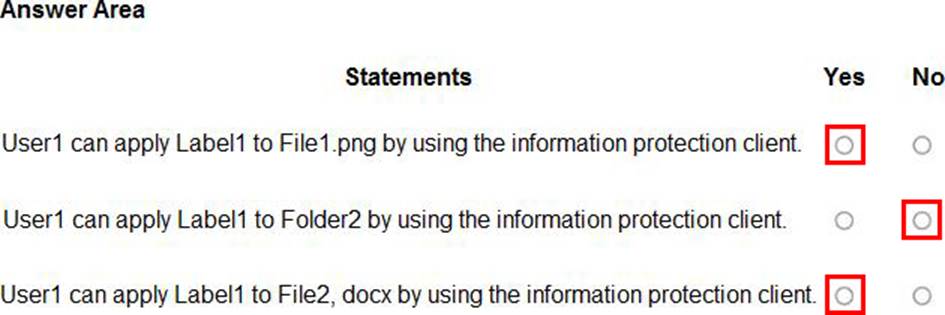
HOTSPOT
You have a Microsoft 365 E5 subscription that contains the resources shown in the following table.
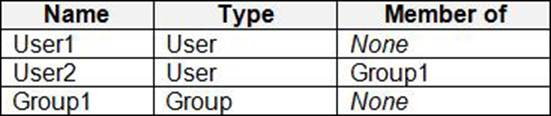
The subscription contains a Windows 11 device named Device1 and has the Microsoft Purview Information Protection client installed.
Device1 contains the resources shown in the following table.
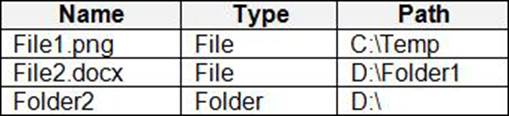
You publish a sensitivity label named Label1 to User1 and Group 1.
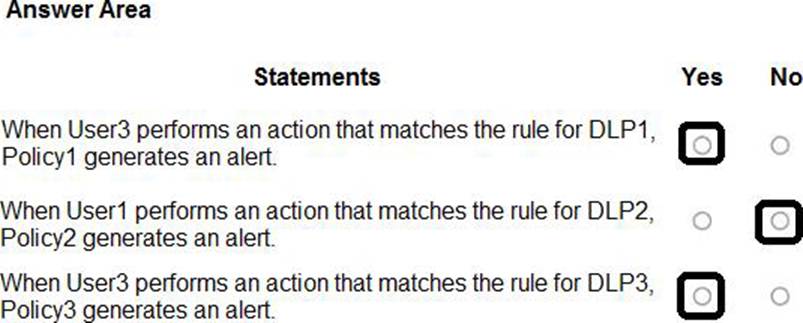
For each of the following statements, select Yes if the statement is true, Otherwise, select No . NOTE: Each correct selection is worth one point.
HOTSPOT
You have a Microsoft 365 E5 subscription that contains the users shown in the following table.
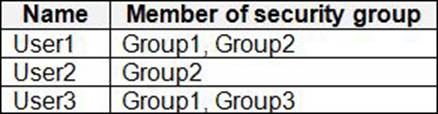
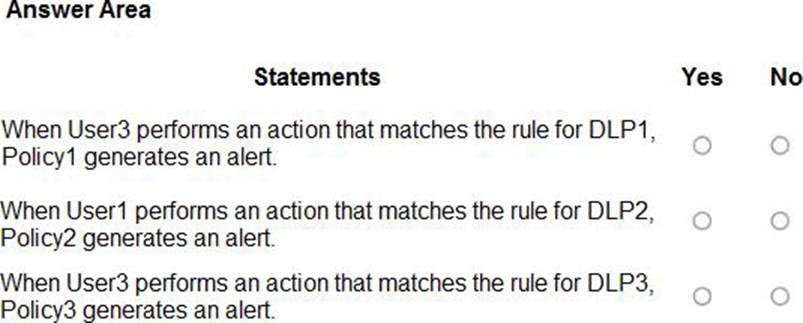
You have the data loss prevention (DLP) policies shown in the following table.

From Insider risk management, you configure a priority user group named PriGroup1 that contains User3 as a member.
You have the insider risk policies shown in the following table.

For each of the following statements, select Yes if the statement is true. Otherwise, select No . NOTE: Each correct selection is worth one point.
You have a Microsoft 365 subscription.
You plan to retain the following audit log record types and activities for the next three years:
• CopilotInteraction: All activities selected (1/1) o Interacted with Copilot
• ComplianceDLPEndpoint: All activities selected (2/2)
o Matched DLP rule
o Removed DLP rule from document
• AzureActiveDirectory: 2 of 25 activities selected (2/25)
o Reset user password
o Changed user password
What is the minimum number of audit retention policies you should create to retain only the selected record types and activities?
- A . 1
- B . 2
- C . 3
- D . 5
You have a Microsoft 365 E5 subscription that contains four users named User1, User2, User3, and User4 and a file named File 1. docx. File1 has a sensitivity label applied.
The label is configured as shown in the following table.
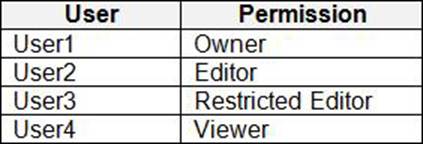
Which users can summarize File1 by using Microsoft 365 Copilot?
- A . User1 only
- B . User1 and User2 only
- C . User1, User2, and User3 only
- D . User1, User2, User3, and User4
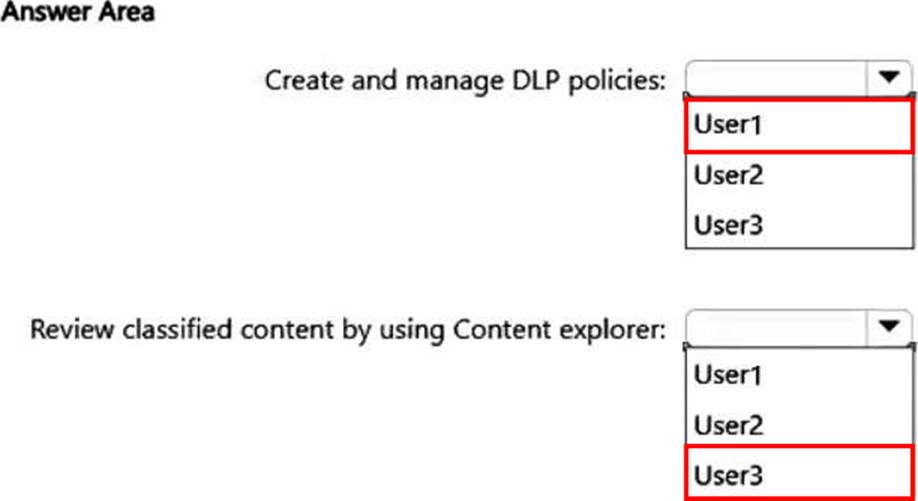
HOTSPOT
You have a Microsoft 365 E5 subscription that contains the users shown in the following table.
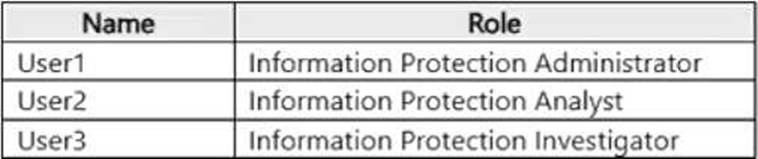
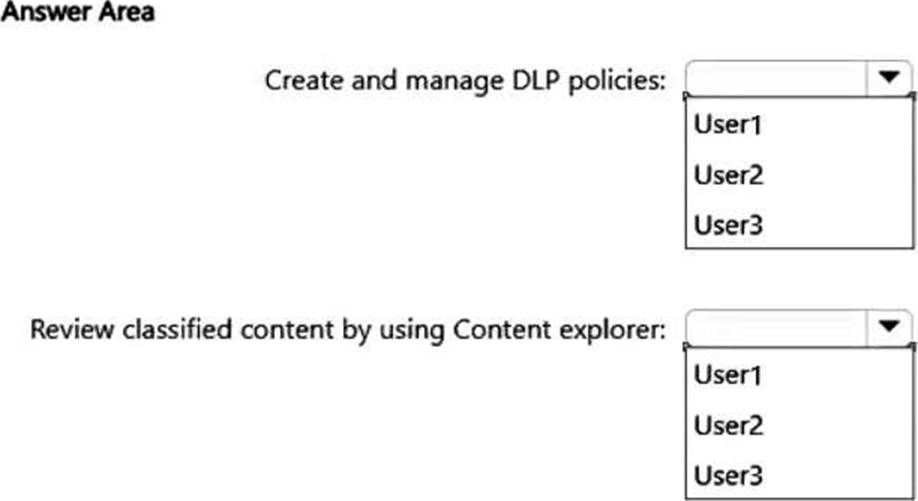
You need to delegate the following tasks:
• Create and manage data loss prevention (DLP) policies.
• Review classified content by using Content explorer.
The solution must use the principle of least privilege.
Which user should perform each task? To answer, select the appropriate options in the answer area . NOTE: Each correct selection is worth one point.
SIMULATION
Username and password
Use the following login credentials as needed:
To enter your username, place your cursor in the Sign in box and select the username below.
To enter your password, place your cursor in the Enter password box and select the password below.
Microsoft 365 Username:
[email protected]
Microsoft 365 Password: XXXXXXXXX
If the Microsoft Edge browser or Microsoft 365 portal does not load successfully, select the Microsoft Edge browser icon from the task bar, type the URL “https://admin microsoft.com”, and press Enter.
The following information is for technical support purposes only:
Lab Instance: XXXXXXXX.
Task 6
You plan to implement Endpoint data loss prevention (Endpoint DLP) policies for computers that run Windows.
Users have an application named App1 that stores data locally in a folder named C:app1data
You need to prevent the folder from being monitored by Endpoint DLP.
Many aspects of Endpoint data loss prevention (DLP) behavior are controlled by centrally configured settings that are applied to all DLP policies for devices.
Use these settings to control the following behaviors:
Cloud egress restrictions
Various types of restrictive actions on user activities per application.
* → > File path exclusions for Windows and macOS devices.
Browser and domain restrictions.
How business justifications for overriding policies appear in policy tips.
Whether actions performed on Office, PDF, and CSV files are automatically audited.
Step 1: Navigate to Microsoft Purview compliance portal
File path exclusions
If you want to exclude certain paths from DLP monitoring, DLP alerts, and DLP policy enforcement on your devices, you can turn off those configuration settings by setting up file path exclusions. Files in excluded locations aren’t audited and any files that are created or modified in those locations aren’t subject to DLP policy enforcement. To configure path exclusions in DLP settings, navigate to Microsoft Purview compliance portal >Data loss prevention>Overview>Data loss prevention settings>Endpoint settings>File path exclusions for Windows.
Step 2: Select Data loss prevention
Step 3: Click Overview
Step 4: Select Data loss prevention settings
Step 5: Click
Step 6: Endpoint settings
Step 7: Select File path exclusions for Windows
Step 8: Specify the exclusion: C:app1data.
Windows 10/11 devices
You can use the following logic to construct your exclusion paths for Windows 10/11 devices:
Valid file path that ends with, means only files directly under the specified folder are excluded.
Example: C: Temp
Reference: https://learn.microsoft.com/en-us/purview/dlp-configure-endpoint-settings#file-path-exclusions
You have a Microsoft 365 E5 subscription that contains two Microsoft SharePoint Online sites named Site1 and Site2.
You plan to configure a retention label named Label1 and apply Label1 to all the files in Site 1.
You need to ensure that two years after a file is created in Site1, the file moves automatically to Site2.
How should you configure the Choose what happens after the retention period setting for Label1?
- A . Deactivate retention settings
- B . Run a Power Automate flow
- C . Start a disposition review
- D . Change the label
You receive an email that contains a list of words that will be used for a sensitive information type.
You need to create a file that can be used as the source of a keyword dictionary.
In which format should you save the list?
- A . a JSON file that has an element for each word
- B . a DOCX file that has one word on each line
- C . a CSV file that contains words separated by commas
- D . an ACCDB database file that contains a table named Dictionary
You have a Microsoft 365 E5 subscription.
The subscription contains a user named User1 and the sensitivity labels shown in the following table.

You publish the labels to User 1.
The subscription contains the files shown in the following table.
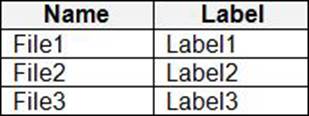
Which files can Microsoft 365 Copilot summarize for User1?
- A . File2 only
- B . File3 only
- C . File2 and File3 only
- D . File1, File2, and File3
DRAG DROP
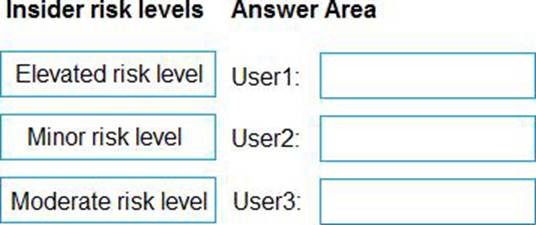
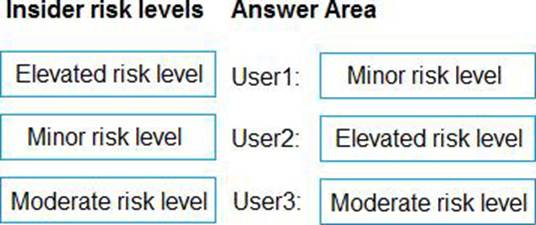
You have a Microsoft 365 5 subscription that uses Microsoft Purview insider risk management and contains three users named User1, User2, and User3.
All insider risk management policies have adaptive protection enabled and the default conditions for insider risk levels configured.
The users perform the following activities, which trigger insider risk policy alerts:
• User1 performs at least one data exfiltration activity that results in a high severity risk score.
• User2 performs at least three risky user activities within seven days, that each results in a high severity risk score.
• User3 performs at least two data exfiltration activities within seven days, that each results in a high severity risk score.
Which insider risk level is assigned to each user? To answer, drag the appropriate levels to the correct users. Each level may be used once, more than once, or not at all. You may need to drag the split bar between panes or scroll to view content . NOTE: Each correct selection is worth one point.