
Practice Free SC-401 Exam Online Questions
Note: This question is part of a series of questions that present the same scenario. Each question in the series contains a unique solution that might meet the stated goals. Some question sets might have more than one correct solution, while others might not have a correct solution.
After you answer a question in this section, you will NOT be able to return to it. As a result, these questions will not appear in the review screen.
You recently discovered that the developers at your company emailed Azure Storage Account keys in plain text to third parties.
You need to ensure that when Azure Storage Account keys are emailed, the emails are encrypted.
Solution: You create a data loss prevention (DLP) policy that has Exchange email, SharePoint sites, OneDrive accounts, and Teams chat and channel messages selected.
Does this meet the goal?
- A . Yes
- B . No
You have a Microsoft 365 E5 subscription.
You create a data loss prevention (DLP) policy and select Use Notifications to inform your users and help educate them on the proper use of sensitive info.
Which apps will show the policy tip?
- A . Outlook on the web only
- B . Outlook Win32 only
- C . Outlook for iOS and Android only
- D . Outlook on the web and Outlook Win32 only
- E . Outlook Win32 and Outlook for iOS and Android only
- F . Outlook on the web, Outlook Win32, and Outlook for iOS and Android
HOTSPOT
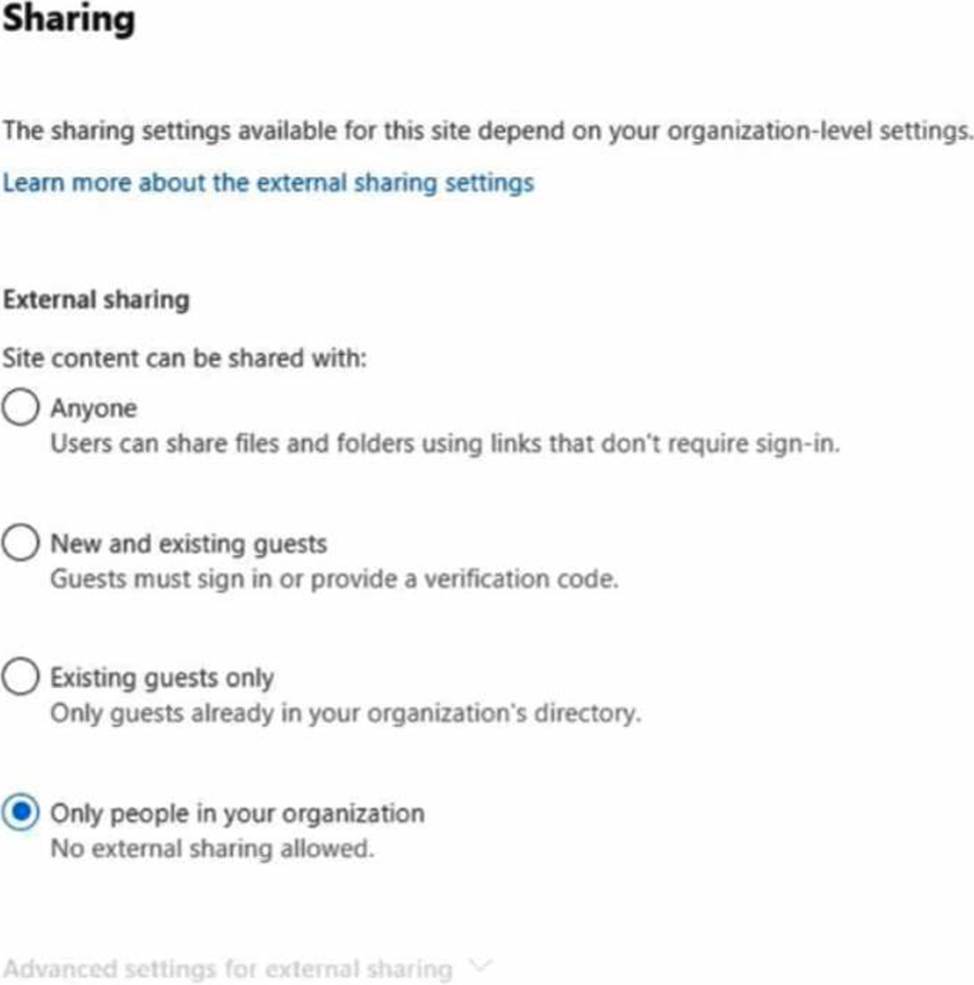
You have a Microsoft 365 E5 subscription that contains a Microsoft SharePoint Online site named Site1 and a sensitivity label named Label 1.
The external sharing settings for Site1 are configured as shown in the Site1 exhibit. (Click the Site1 tab.)
The external sharing settings for Label1 are configured as shown in the Label1 exhibit. (Click the Label1 tab.)
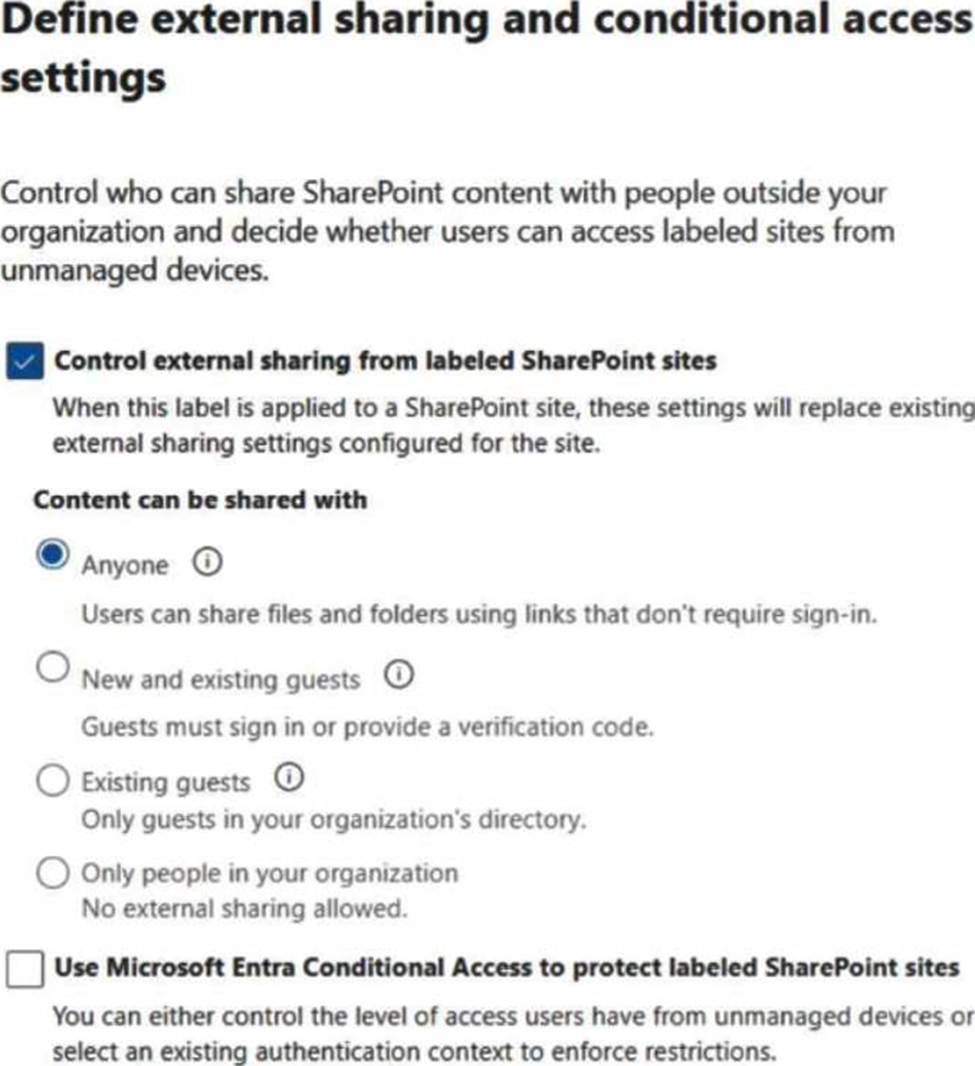
Label1 is applied to Site 1.
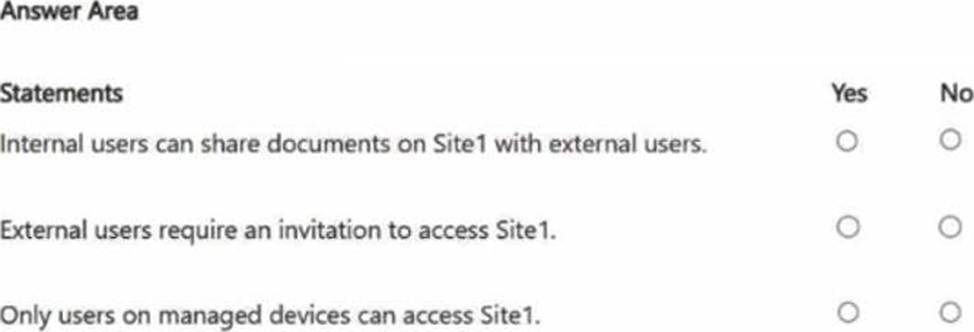
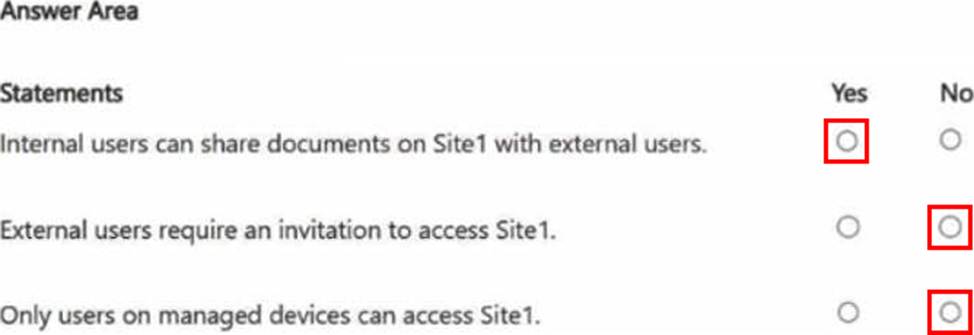
For each of the following statements, select Yes if the statement is true. Otherwise, select No . NOTE: Each correct selection is worth one point.
DRAG DROP
You have a Microsoft 365 E5 subscription.
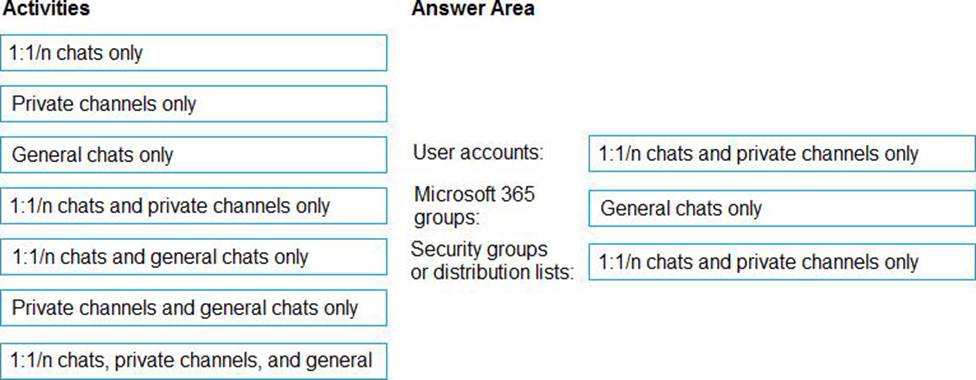
You need to prevent the sharing of sensitive information in Microsoft Teams.
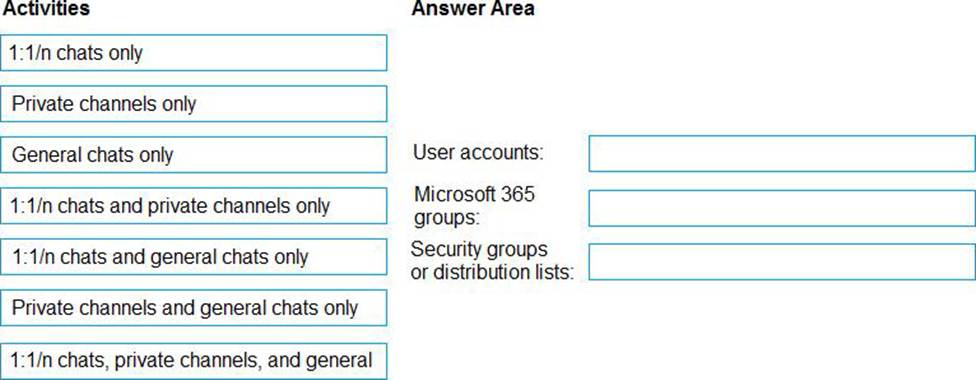
Which entities can you protect by applying a data loss prevention (DLP) policy to each resource? To answer, drag the appropriate activities to the correct entity. Each activity may be used once, more than once, or not at all. You may need to drag the split bar between panes or scroll to view content . NOTE: Each correct selection is worth one point.
DRAG DROP
You have a Microsoft 365 tenant.
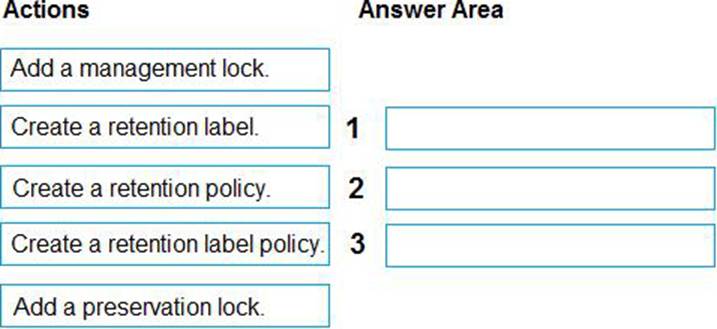
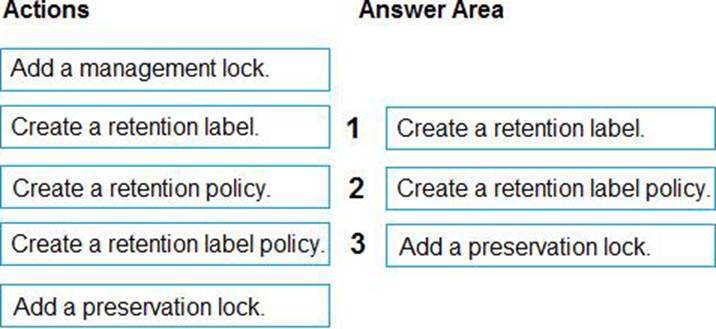
A new regulatory requirement states that all documents containing a patent ID be labeled, retained for 10 years, and then deleted.
The policy used to apply the retention settings must never be disabled or deleted by anyone.
You need to implement the regulatory requirement.
Which three actions should you perform in sequence? To answer, move the appropriate actions from the list of actions to the answer area and arrange them in the correct order.
HOTSPOT
You have Microsoft 365 subscription that is enabled to support trainable classifiers.
You plan to create a custom trainable classifier based on an organizational form template.
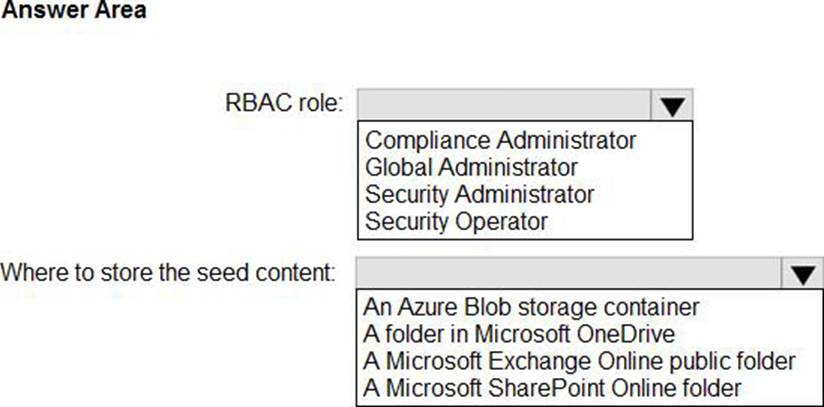
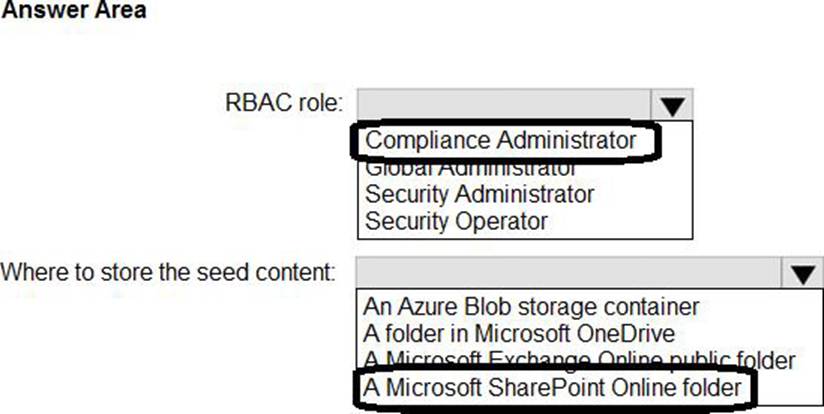
You need to identify which role-based access control (RBAC) role is required to create the trainable classifier and where to store the seed content for the trainable classifier. The solution must use the principle of least privilege.
What should you identify? To answer, select the appropriate options in the answer area . NOTE: Each correct selection is worth one point.
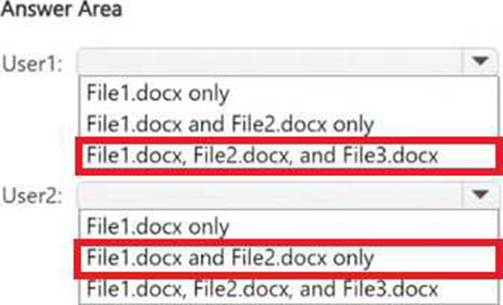
HOTSPOT
You have a Microsoft SharePoint Online site that contains the following files.

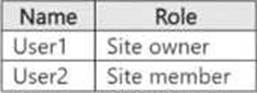
Users are assigned roles for the site as shown in the following table.
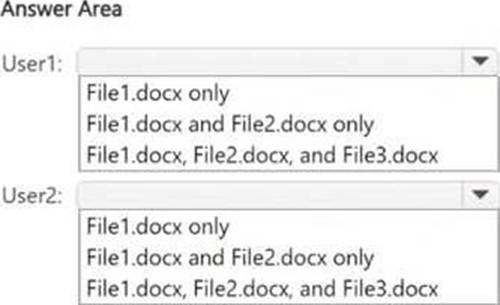
Which files can User1 and User2 open? To answer, select the appropriate options in the answer area . NOTE: Each correct selection is worth one point.
You have a Microsoft 365 E5 subscription that contains a Windows 11 device named Device1 and three users named User1, User2, and User3.
You plan to deploy Azure information Protection (AIP) and the Microsoft Purview information Protection client to Device 1.
You need to ensure that the users can perform the following actions on Device1 as part of the planned deployment:
• User1 will test the functionality of the client.
• User2 will install and configure the Microsoft Rights Management connector.
• User3 will be configured as the service account for the information protection scanner.
The solution must maximize the security of the sign-in process for the users.
What should you do?
- A . Exclude User1 and User2 from multifactor authentication (MFA).
- B . Enable User2 and User3 for passwordless authentication.
- C . Exclude User2 and User3 from multifactor authentication (MFA).
- D . Enable User1, User2, and User3 for passkey (FIDO2) authentication.
SIMULATION
Username and password
Use the following login credentials as needed:
To enter your username, place your cursor in the Sign in box and select the username below.
To enter your password, place your cursor in the Enter password box and select the password below.
Microsoft 365 Username:
[email protected]
Microsoft 365 Password: XXXXXXXXX
If the Microsoft Edge browser or Microsoft 365 portal does not load successfully, select the Microsoft Edge browser icon from the task bar, type the URL “https://admin.microsoft.com”, and press Enter.
The following information is for technical support purposes only:
Lab Instance: XXXXXXXXX
Task 7
You need to publish the Product Retired retention label only to Exchange mailboxes and SharePoint classic and communication sites.
For Exchange, you can select "All Exchange mailboxes" or choose specific mailboxes. For SharePoint. you must add classic and communication sites one by one in the policy’s settings.
Publish the label with a static policy
Step 1: In the Microsoft Purview portal, go to Data lifecycle management > Policies>Label policies.
Step 2: Click Publish labels and then Choose labels to publish to select the Product Retired label.
Step 3: In the Policy scope section, choose Static and click Next.
Step 4: In the Choose where to publish labels screen. select Let me choose specific locations.
Step 5: For Exchange:
Select Exchange mailboxes. You can choose to apply it to All Exchange mailboxes or select specific ones from the list.
Step 6: For SharePoint:
Select SharePoint sites. You’ll need to manually add the specific site collection addresses for both your classic and communication sites. A checkmark will appear next to the sites you add, and you can search for them in the next screen.
Step 7: Click Next, provide a name and description for the policy, and click Submit to create the policy.
Reference: https://learn.microsoft.com/en-us/purview/create-apply-retention-labels
You have a Microsoft 365 subscription.
You create a new trainable classifier.
You need to train the classifier.
Which source can you use to train the classifier?
- A . an on-premises Microsoft SharePoint Server site
- B . an Azure Files share
- C . a Microsoft SharePoint Online site
- D . an NFS file share