
Practice Free SC-401 Exam Online Questions
You have a Microsoft 365 E5 tenant that has a retention label named Label 1.
You need to create an auto-labeling policy that will apply Label 1.
To which location can Label1 be applied?
- A . OneDrive accounts
- B . Microsoft Entra security groups
- C . Microsoft Defender for Cloud Apps
- D . Teams chats
DRAG DROP
You have a Microsoft 365 subscription that contains 20 data loss prevention (DLP) policies.
You need to identify the following:
● Rules that are applied without triggering a policy alert
● The top 10 files that have matched DLP policies
● Alerts that are miscategorized
Which report should you use for each requirement? To answer, drag the appropriate reports to the correct requirements. Each report may be used once, more than once, or not at all. You may need to drag the split bar between panes or scroll to view content . NOTE: Each correct selection is worth one point.


HOTSPOT
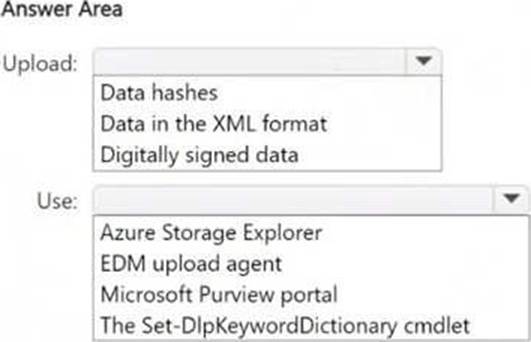
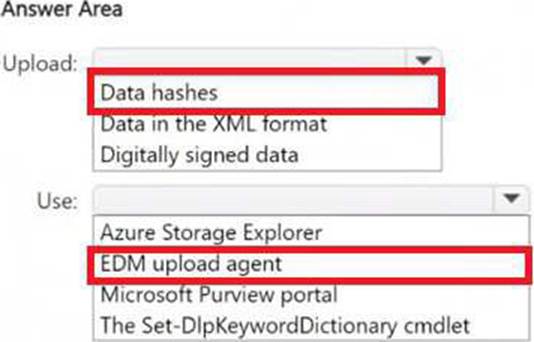
You plan to create a custom sensitive information type that will use Exact Data Match (EDM).
You need to identify what to upload to Microsoft 365, and which tool to use for the upload.
What should you identify? To answer, select the appropriate options in the answer area . NOTE: Each correct selection is worth one point.
You have a Microsoft 365 E5 subscription that contains the users shown in the following table.
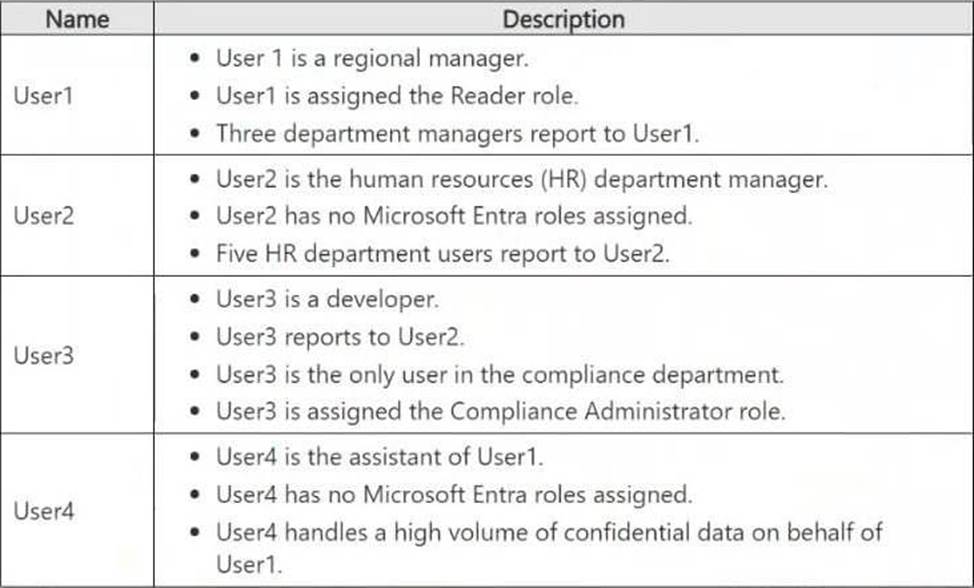
Which users will Microsoft Purview insider risk management flag as potential high-impact users?
- A . User1 and User2 only
- B . User2 and User3 only
- C . User1, User2, and User3 only
- D . User1, User2, User3, and User4
You have a Microsoft 365 E5 subscription.
You need to ensure that encrypted email messages sent to an external recipient can be revoked or will expire within seven days .
What should you configure first?
- A . a custom branding template
- B . a mail flow rule
- C . a sensitivity label
- D . a Conditional Access policy
You have a Microsoft 365 subscription that contains 100 users and a Microsoft 365 group named Group 1.
All users have Windows 11 devices and use Microsoft SharePoint Online and Exchange Online.
A sensitivity label named Label1 is published as the default label for Group 1.
You add two sublabels named Sublabel1 and Sublabel2 to Label 1.
You need to ensure that the settings in Sublabel1 are applied by default to Group 1.
What should you do?
- A . Modify the policy of Label 1.
- B . Duplicate all the settings from Sublabel1 to Label 1.
- C . Delete the policy of Label1 and publish Sublabel 1.
- D . Change the order of Sublabel 1.
Note: This question is part of a series of questions that present the same scenario. Each question in the series contains a unique solution that might meet the stated goals. Some question sets might have more than one correct solution, while others might not have a correct solution.
After you answer a question in this section, you will NOT be able to return to it. As a result, these questions will not appear in the review screen.
You have a Microsoft 365 subscription.
You have a user named User 1. Several users have full access to the mailbox of User 1.
Some email messages sent to User1 appear to have been read and deleted before the user viewed them.
When you search the audit log in the Microsoft Purview portal to identify who signed in to the mailbox of User1, the results are blank.
You need to ensure that you can view future sign-ins to the mailbox of User 1.
Solution: You run the Set-AdminAuditLogConfig -AdminAuditLogEnabled $true -AdminAuditLogCmdlets *Mailbox* command.
Does that meet the goal?
- A . Yes
- B . No
You have a Microsoft 365 E5 subscription.
You need to apply data loss prevention (DLP) policies to the following:
• Microsoft Exchange Online mailboxes
• Microsoft SharePoint Online sites
• Microsoft Power BI workspaces
• Microsoft OneDrive accounts
• On-premises repositories
What is the minimum number of DLP policies required to achieve the goal?
- A . 1
- B . 2
- C . 3
- D . 4
- E . 5
You have a Microsoft 365 E5 subscription that contains thee users named User1, User2, and User3 and a file named File 1. docx.
You create a sensitivity label named Label1 as shown in the following exhibit.
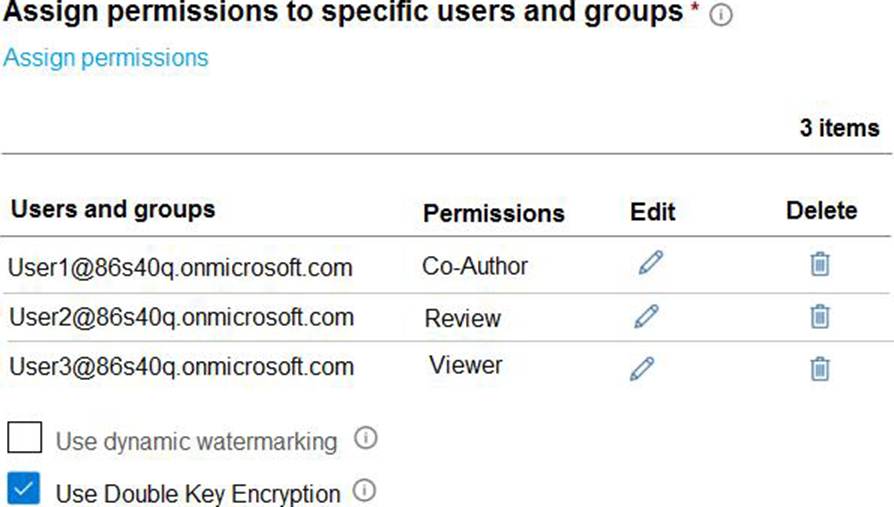
You apply Label1 to File 1.
For which users can Microsoft 365 Copilot summarize File1?
- A . No user
- B . User1 only
- C . User1 and User2 only
- D . User1, User2, and User3
You have a Microsoft 365 E5 subscription.
You need to create a sensitivity label named Label 1. The solution must ensure that users can use Microsoft 365 Copilot to summarize files that have Label1 applied.
Which permission should you select for Label1?
- A . Export content (EXPORT)
- B . Copy and extract content (EXTRACT)
- C . Edit content (DOCEDIT)
- D . View rights (VIEW)