Practice Free SC-300 Exam Online Questions
HOTSPOT
You have an Azure subscription that contains two resource groups named RG1 and RG2, a storage account named storage1.
You assign roles for the subscription as shown in the following table.
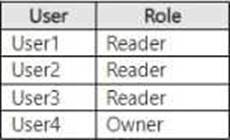
You assign roles for RG1 as shown in the following table.
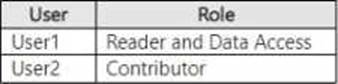
You assign roles for storage1 as shown in the following exhibit.
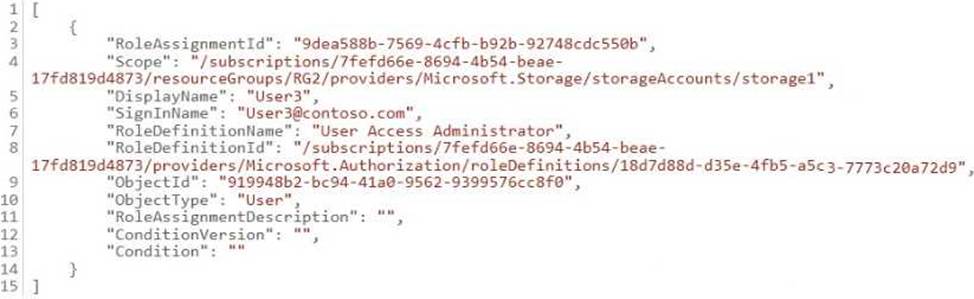
Roles are NOT assigned for other Azure resources.
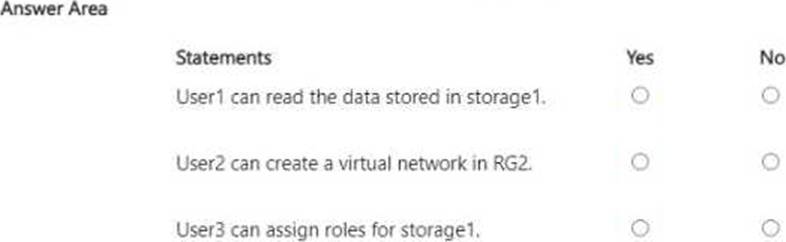
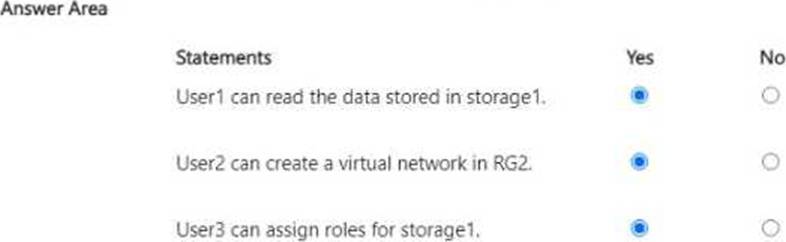
For each of the following statements, select Yes if the statement is true. Otherwise, select No.
You have a Microsoft Entra tenant.
You need to ensure that only users from specific external domains can be invited as guests to the tenant.
Which settings should you configure?
- A . Cross-tenant access settings
- B . External collaboration settings
- C . Linked subscriptions
- D . All identity providers
SIMULATION
Task 8
You need to prevent all users from using legacy authentication protocols when authenticating to Microsoft Entra ID.
Here’s how to do it:
Sign in to the Microsoft Entra admin center:
Ensure you have the role of Global Administrator or Conditional Access Administrator.
Navigate to Conditional Access:
Go to Security > Conditional Access.
Create a new policy:
Select + New policy.
Give your policy a name that reflects its purpose, like “Block Legacy Auth”.
Set users and groups:
Under Assignments, select Users or workload identities.
Under Include, select All users.
Under Exclude, select Users and groups and choose any accounts that must maintain the ability to use legacy authentication. It’s recommended to exclude at least one account to prevent lockout1. Target resources:
Under Cloud apps or actions, select All cloud apps.
Set conditions:
Under Conditions > Client apps, set Configure to Yes.
Check only the boxes for Exchange ActiveSync clients and Other clients.
Configure access controls:
Under Access controls > Grant, select Block access.
Enable policy:
Confirm your settings and set Enable policy to Report-only initially to understand the impact. After confirming the settings using report-only mode, you can move the Enable policy toggle fromReport-onlytoOn2.
By following these steps, you will block legacy authentication protocols for all users, enhancing the security posture of your organization by requiring modern authentication methods. Remember to monitor the impact of this policy and adjust as necessary to ensure business continuity.
You have an Azure subscription that contains a user named User1 and an Azure Key Vault named Vault1.
You need to ensure that User1 can read the metadata of certificates, keys, and secrets stored in Vault1. The solution must follow the principle of least privilege.
Which role should you assign to User1?
- A . Key Vault Crypto User
- B . Key Vault Crypto Officer
- C . Key Vault Reader
- D . Key Vault Secrets User
C
Explanation:
Comprehensive and Detailed In-Depth
Let’s break this down step by step based on Azure Key Vault roles, permissions, and the principle of least privilege, as outlined in Microsoft Identity and Access Administrator documentation. Understanding Azure Key Vault and the Requirement:
Azure Key Vault is a service that securely stores and manages cryptographic keys, secrets, and certificates. It uses role-based access control (RBAC) to manage permissions for users, groups, and applications.
The question requires that User1 can read the metadata of certificates, keys, and secrets in Vault1. In Azure Key Vault, "metadata" refers to the properties of these objects (e.g., name, creation date, expiration date), not the actual content (e.g., the secret value, key value, or certificate private key). The solution must follow the principle of least privilege, meaning User1 should be granted the minimum permissions necessary to perform the task, without access to unnecessary actions (e.g., modifying or deleting objects).
Azure Key Vault RBAC Roles and Permissions:
Azure Key Vault supports built-in RBAC roles that define specific permissions for managing keys, secrets, and certificates. Let’s examine each role in the options: Key Vault Crypto User:
This role allows a user to perform cryptographic operations using keys (e.g., encrypt, decrypt, sign, verify) and to read key metadata.
Permissions include: Microsoft.KeyVault/vaults/keys/read (read key metadata) and cryptographic operations like encrypt, decrypt, etc.
However, this role does not grant permissions to read metadata for secrets or certificates, and it includes cryptographic operation permissions, which are not needed for the task. Key Vault Crypto Officer:
This role is designed for managing keys and performing cryptographic operations. It includes permissions to create, delete, update, and read keys, as well as perform cryptographic operations. Permissions include: Microsoft.KeyVault/vaults/keys/* (full control over keys).
This role does not grant access to secrets or certificates and provides more permissions than needed
(e.g., create, delete), violating the principle of least privilege.
Key Vault Reader:
This role provides read-only access to the metadata of all objects in the Key Vault (keys, secrets, and certificates).
Permissions include: Microsoft.KeyVault/vaults/read (read vault properties) and Microsoft.KeyVault/vaults/*/read (read metadata for keys, secrets, and certificates). Importantly, this role does not allow access to the actual content of the objects (e.g., the secret value, key value, or certificate private key), only the metadata. It also does not allow write operations (e.g., create, update, delete).
This aligns perfectly with the requirement to "read the metadata" and follows the principle of least privilege.
Key Vault Secrets User:
This role allows a user to read the content of secrets (not just metadata) and perform operations like getting the secret value.
Permissions include: Microsoft.KeyVault/vaults/secrets/get (read secret values) and Microsoft.KeyVault/vaults/secrets/read (read secret metadata).
This role does not grant access to keys or certificates, and it provides more access than needed (reading the secret value, not just metadata), violating the principle of least privilege. Applying the Principle of Least Privilege:
The task requires User1 to read the metadata of certificates, keys, and secrets, but not to access their content or perform any write operations.
Key Vault Reader is the most appropriate role because:
It grants read-only access to the metadata of all objects (keys, secrets, certificates).
It does not allow access to the content of the objects (e.g., secret values), which is not required.
It does not allow write operations (e.g., create, delete), adhering to the principle of least privilege. The other roles either provide too much access (e.g., Key Vault Crypto Officer, Key Vault Secrets User) or do not cover all required objects (e.g., Key Vault Crypto User, Key Vault Secrets User).
Analysis of the Options:
HOTSPOT
You have an Azure AD tenant that contains the users shown in the following table.

In Azure AD Identity Protection, you configure a user risk policy that has the following settings:
• Assignments:
o Users: Group1
o User risk: Low and above
• Controls:
o Access: Block access
• Enforce policy: On
In Azure AD Identity Protection, you configure a sign-in risk policy that has the following settings:
• Assignments:
o Users: Group2
o Sign-in risk: Low and above
• Controls:
o Access: Require multi-factor authentication
• Enforce policy. On the following settings: ng settings:
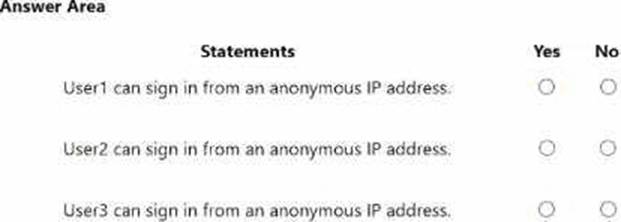
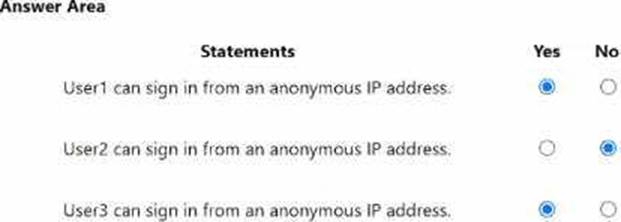
For each of the following statements, select Yes if the statement is true. Otherwise, select No. NOTE: Each correct selection is worth one point.
You need to configure the detection of multi-staged attacks to meet the monitoring requirements.
What should you do?
- A . Customize the Azure Sentinel rule logic.
- B . Create a workbook.
- C . Add Azure Sentinel data connectors.
- D . Add an Azure Sentinel playbook.
You need to allocate licenses to the new users from A. Datum. The solution must meet the technical requirements.
Which type of object should you create?
- A . a distribution group
- B . a Dynamic User security group
- C . an administrative unit
- D . an OU
HOTSPOT
You have an Azure AD tenant.
You perform the tasks shown in the following table.
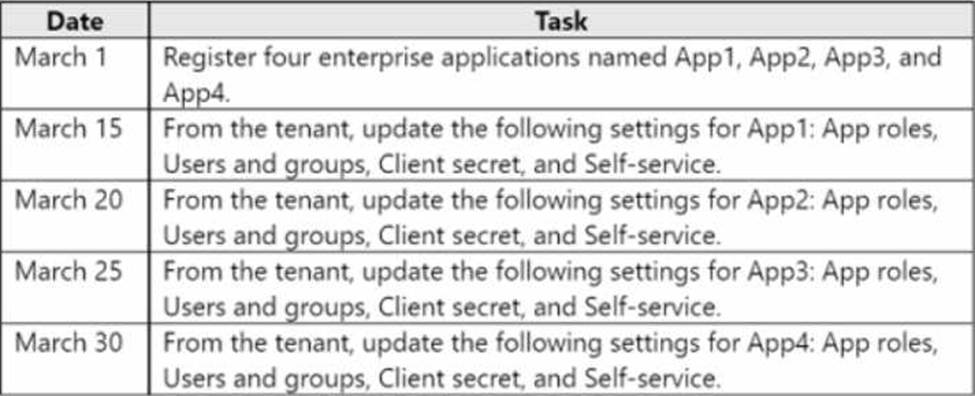
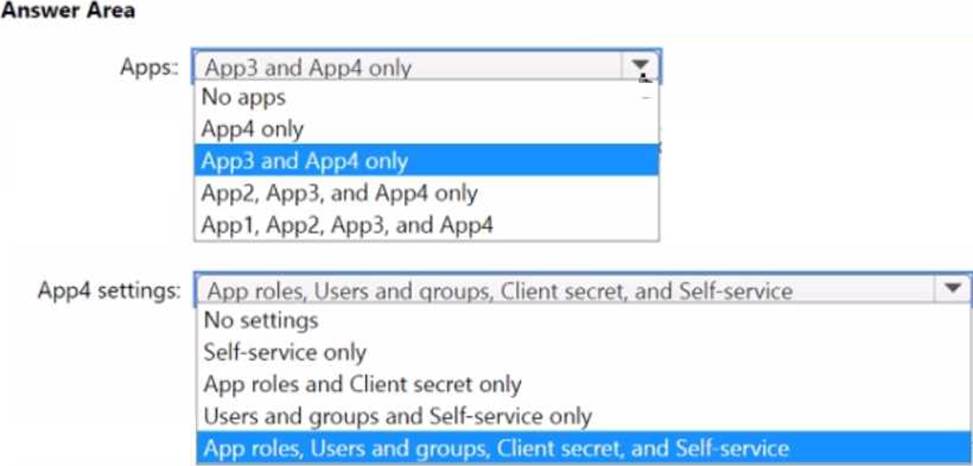
On April 5, an administrator deletes App1, App2, App3, and App4.
You need to restore the apps and the settings.
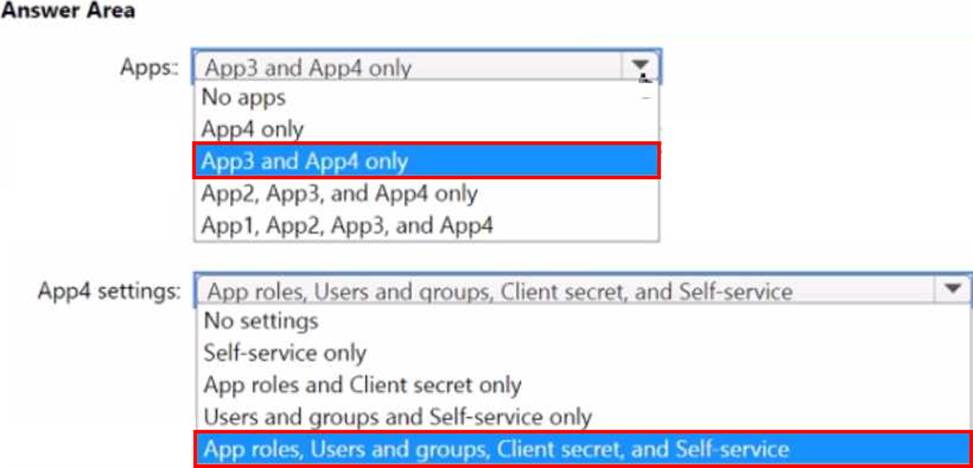
Which apps can you restore on April 16, and which settings can you restore for App4 on April 16? To answer, select the appropriate options in the answer area. NOTE: Each correct selection is worth one point.
HOTSPOT
Your network contains an on-premises Active Directory domain named contoso.com.
The domain contains the objects shown in the following table.
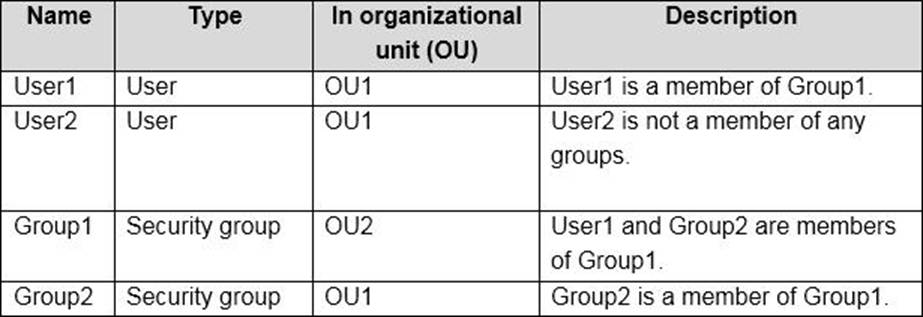
You install Azure AD Connect.
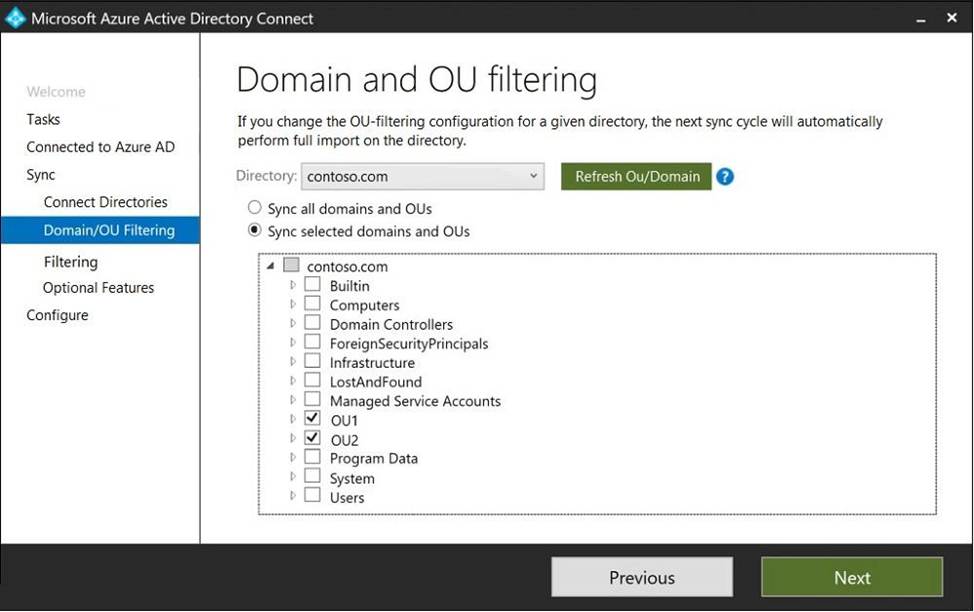
You configure the Domain and OU filtering settings as shown in the Domain and OU Filtering exhibit. (Click the Domain and OU Filtering tab.)
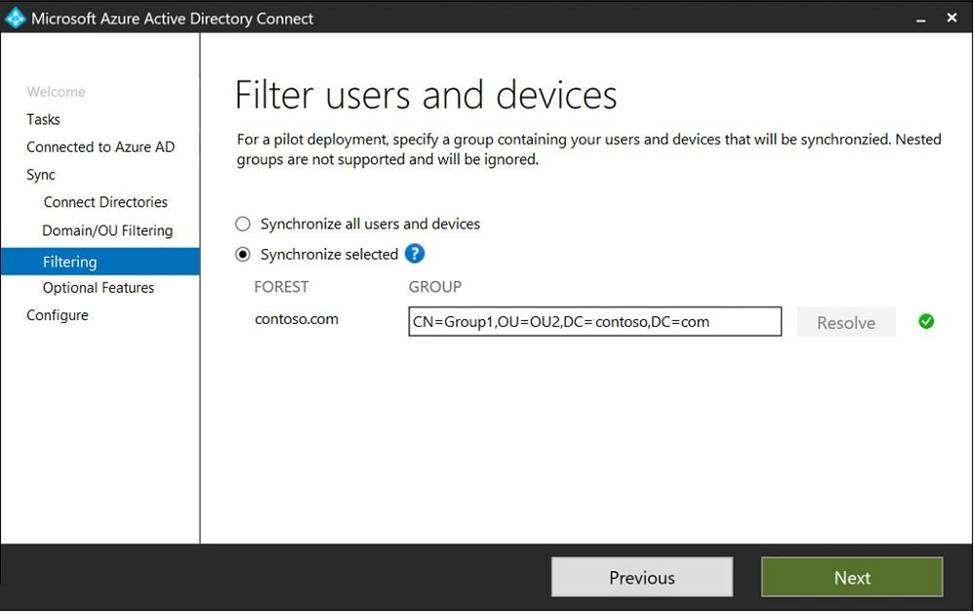
You configure the Filter users and devices settings as shown in the Filter Users and Devices exhibit. (Click the Filter Users and devices tab.)
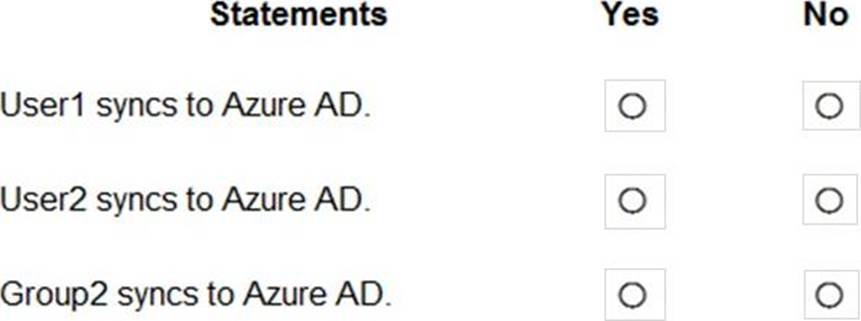
For each of the following statements, select Yes if the statement is true. Otherwise, select No.
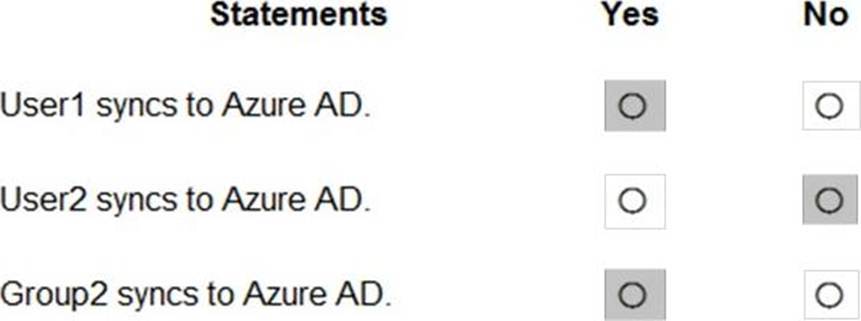
Explanation:
Only direct members of Group1 are synced. Group2 will sync as it is a direct member of Group1 but the members of Group2 will not sync.
Reference: https://docs.microsoft.com/en-us/azure/active-directory/hybrid/how-to-connect-install-custom
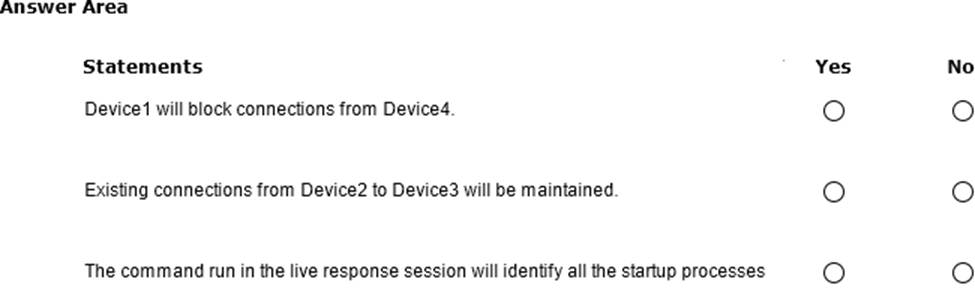
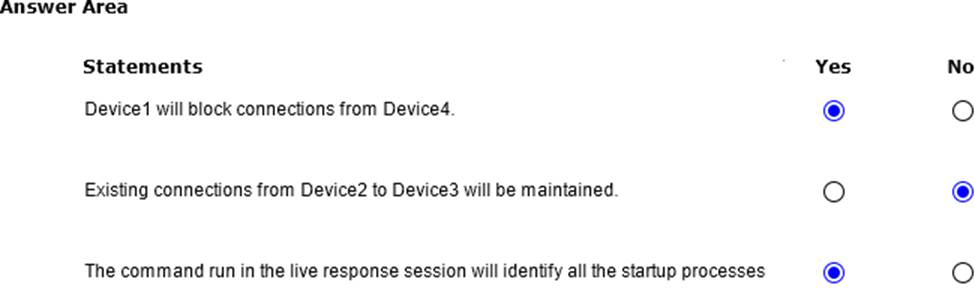
– During the startup of Device1, a connection is established to Device2 via port 5555.
– Device2 connects to Device3 by using port 5555.
– Device4 connects to Device1 by using port 5555.
You perform the following actions:
– Initiate a live response session on Device1 and run the processes
– From Devices in the Microsoft Defender portal, isolate Device1 and Device2.
For each of the following statements, select Yes if True. Otherwise select No. NOTE: Each correct selection is worth one point.