
Practice Free SC-300 Exam Online Questions
Note: This question is part of a series of questions that present the same scenario. Each question in the series contains a unique solution that might meet the stated goals. Some question sets might have more than one correct solution, while others might not have a correct solution.
After you answer a question in this section, you will NOT be able to return to it. As a result, these questions will not appear in the review screen.
You have an Active Directory forest that syncs to an Azure Active Directory (Azure AD) tenant.
You discover that when a user account is disabled in Active Directory, the disabled user can still authenticate to Azure AD for up to 30 minutes.
You need to ensure that when a user account is disabled in Active Directory, the user account is immediately prevented from authenticating to Azure AD.
Solution: You configure Azure AD Password Protection.
Does this meet the goal?
- A . Yes
- B . No
You have a Microsoft 365 E5 subscription that contains a Microsoft SharePoint Online site named Site!. Site! hosts PDF files
You need to prevent users from printing the files directly from Sitel.
Which type of policy should you create in the Microsoft Defender for Cloud Apps portal?
- A . activity policy
- B . file policy
- C . access policy
- D . session policy
Your network contains an Active Directory forest named contoso.com that is linked to an Azure Active Directory (Azure AD) tenant named contoso.com by using Azure AD Connect.
You need to prevent the synchronization of users who have the extensionAttribute15 attribute set to NoSync.
What should you do in Azure AD Connect?
- A . Create an inbound synchronization rule for the Windows Azure Active Directory connector.
- B . Configure a Full Import run profile.
- C . Create an inbound synchronization rule for the Active Directory Domain Services connector.
- D . Configure an Export run profile.
C
Explanation:
https://docs.microsoft.com/en-us/azure/active-directory/hybrid/how-to-connect-sync-change-the-configuration
Note: This question is part of a series of questions that present the same scenario. Each question in the series contains a unique solution that might meet the stated goals. Some question sets might have more than one correct solution, while others might not have a correct solution.
After you answer a question in this section, you will NOT be able to return to it as a result these questions will not appear in the review screen.
You have a Microsoft 365 E5 subscription.
You create a user named User1.
You need to ensure that User1 can update the status of identity Secure Score improvement actions. Solution: You assign the SharePoint Administrator role to User1
Does this meet the goal?
- A . Yes
- B . No
You need to create a query for a Microsoft Sentinel workbook.
The query must meet the following requirements:
– List all incidents by incident number.
– Only include the most recent log for each incident.
How should you complete the query? To answer, select the appropriate options in the answer area. NOTE: Each correct selection is worth one point.


HOTSPOT
You have an Azure subscription.
Azure AD logs are sent to a Log Analytics workspace.
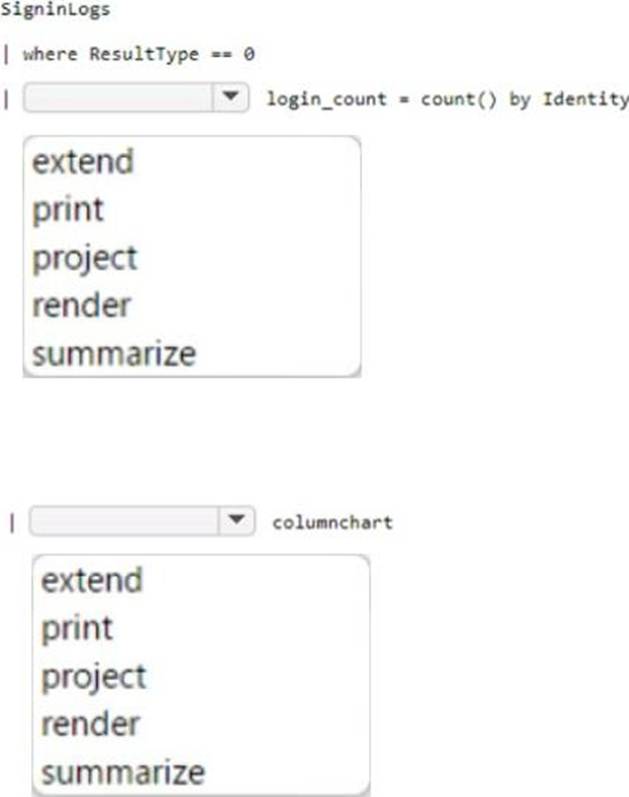
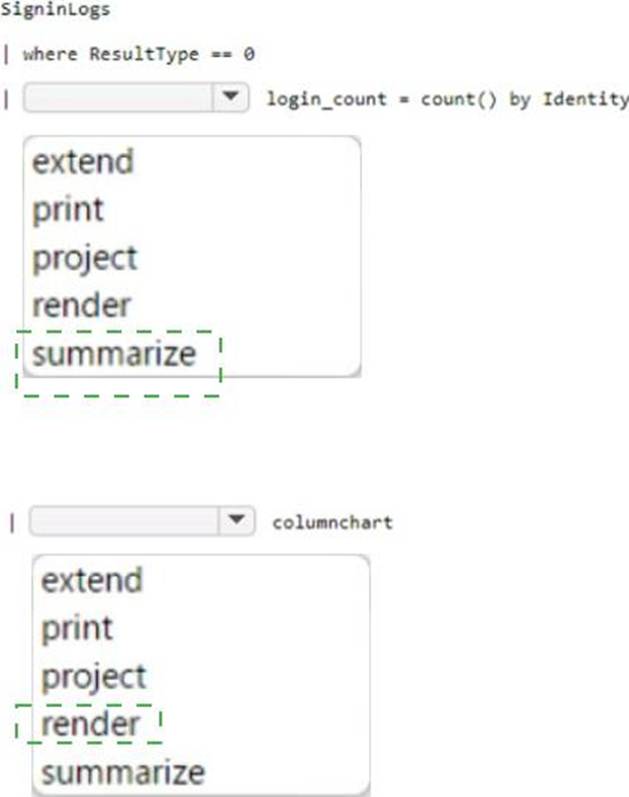
You need to query the logs and graphically display the number of sign-ins per user.
How should you complete the query? To answer, select the appropriate options in the answer area.
Explanation:
Box 1 =
SigninLogs
| where ResultType == 0
| summarize login_count = count() by identity
| render piechart
This query retrieves the sign-in logs, filters the successful sign-ins,summarizesthe count of sign-ins per user, and renders the result as a pie chart.
Box 2 = Render
You have a Microsoft 365 E5 subscription that contains a Microsoft SharePoint Online site named Site1. You need to be notified if a user downloads more than 50 files in one minute from Site1.
Which type of policy should you create in the Microsoft Defender for Cloud Apps portal?
- A . session policy
- B . anomaly detection policy
- C . activity policy
- D . file policy
You have an Azure Active Directory (Azure AD) tenant.
For the tenant. Users can register applications Is set to No.
A user named Admin1 must deploy a new cloud app named App1.
You need to ensure that Admin1 can register App1 in Azure AD. The solution must use the principle of least privilege.
Which role should you assign to Admin1?
- A . Application developer in Azure AD
- B . App Configuration Data Owner for Subscription1
- C . Managed Application Contributor for Subscription1
- D . Cloud application administrator in Azure AD
A
Explanation:
Reference: https://docs.microsoft.com/en-us/azure/active-directory/roles/delegate-app-roles
HOTSPOT
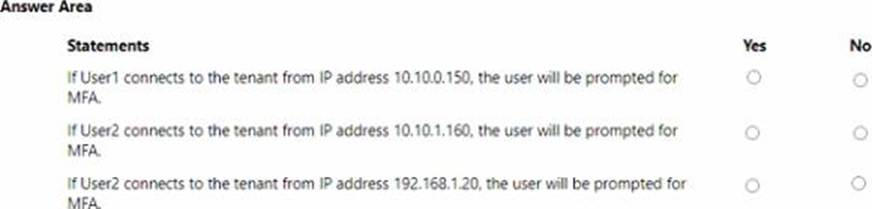
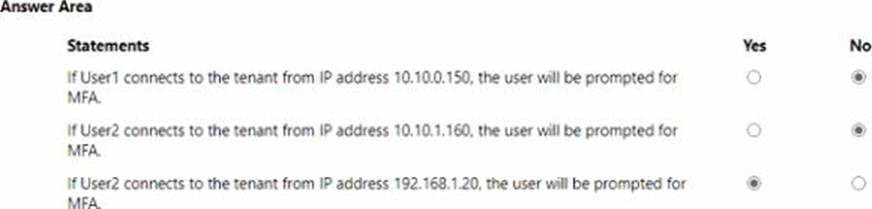
You have an AzureAD tenant that contains the users shown in the following table.

You have the locations shown in the following table.

The tenant contains a named location that Das the following configurations:
• Name: location1
• Mark as trusted location: Enabled
• IPv4 range: 10.10.0.0/16
MFA has a trusted iPad dress range of 193.17.17.0/24.
You have a Conditional Access policy that has the following settings:
• Name: CAPolicy1
• Assignments
o Users or workload identities: Group 1
o Cloud apps or actions: All cloud apps
* Conditions
* Locations All trusted locations
• Access controls
o Gant
• Grant access: Require multi-factor authentication
© Session: 0 controls selected
• Enable policy: On
For each of the following statements select Yes if the statement is true. Otherwise, select No. NOTE: Each correct selection is worth one point.
You have an Azure Active Directory (Azure AD) tenant.
You create an enterprise application collection named HR Apps that has the following settings:
• Applications: Appl. App?, App3
• Owners: Admin 1
• Users and groups: HRUsers
AH three apps have the following Properties settings:
• Enabled for users to sign in: Yes
• User assignment required: Yes
• Visible to users: Yes
Users report that when they go to the My Apps portal, they only sue App1 and App2-You need to ensure that the users can also see App3.
What should you do from App3? What should you do from App3?
- A . From Users and groups, add HRUsers.
- B . Prom Properties, change User assignment required to No.
- C . From Permissions, review the User consent permissions.
- D . From Single sign on, configure a sign-on method.
A
Explanation:
Reference:
https://docs.microsoft.com/en-us/azure/active-directory/manage-apps/assign-user-or-group-access-portal
https://docs.microsoft.com/en-us/azure/active-directory/user-help/my-applications-portal-workspaces