
Practice Free SC-300 Exam Online Questions
HOTSPOT
You need to implement password restrictions to meet the authentication requirements.
You install the Azure AD password Protection DC agent on DC1.
What should you do next? To answer, select the appropriate options in the answer area. NOTE: Each correct selection is worth one point.


Explanation:
Server1
On DC1
HOTSPOT
You have an Azure subscription named Sub1 ilia1 contains a storage account named storage1.
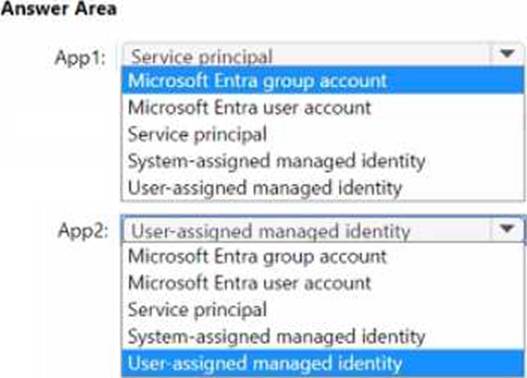
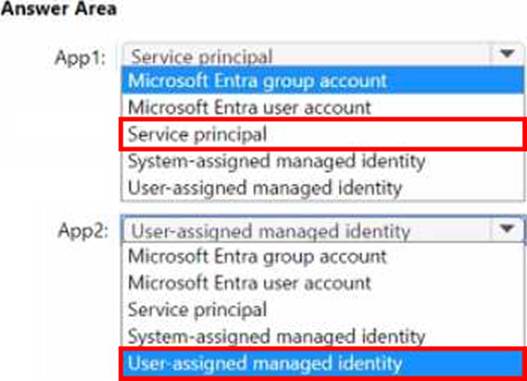
You need to deploy two apps named App1 and App2 that will have the following configurations:
• App1 will be deployed as a registered app in Sub1.
• App1 will access storage1 by using Microsoft Entra authentication.
• App2 will access storage1 by using a single Microsoft Entra identity.
• App2 be hosted on two new virtual machines named VM1 and VM2.
The solution must minimize administrative effort.
Which type of identity will each app use to access storage1? To answer, select the appropriate options in the answer area.
HOTSPOT
You have Microsoft Entra tenant.
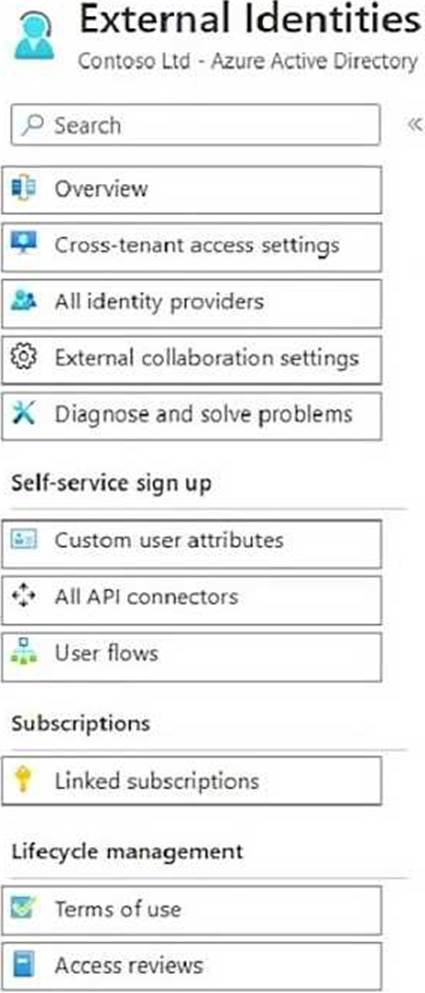
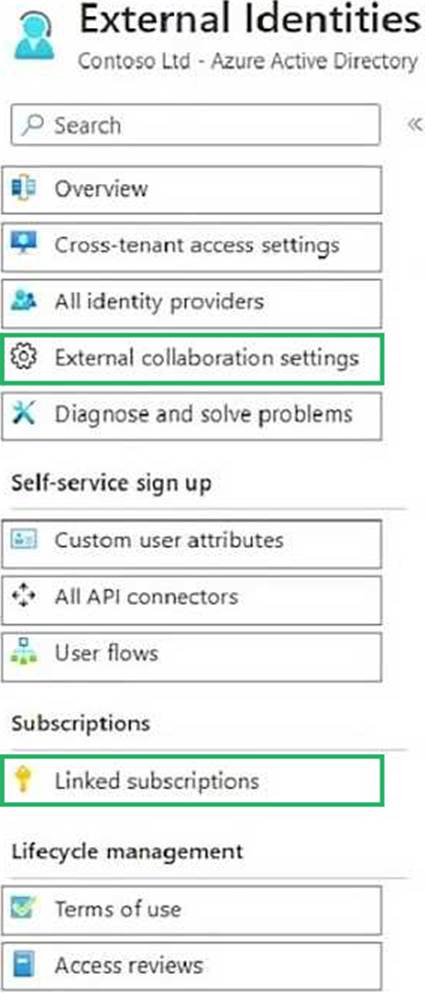
You need to configure the following External Identities features:
• B2B collaboration
• Monthly active users (MAU)-based pricing
Which two settings should you configure? To answer, select the settings in the answer area. NOTE: Each correct selection is worth one point.
HOTSPOT
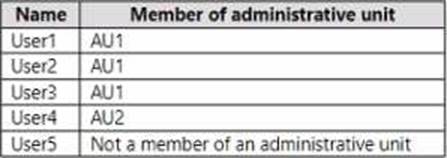
You have a Microsoft 365 E5 subscription that contains the users shown in the following table.
The users are assigned the roles shown in the following table.
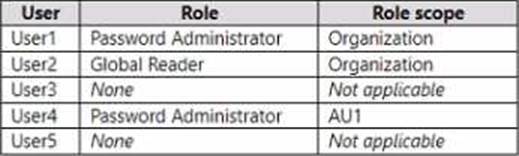
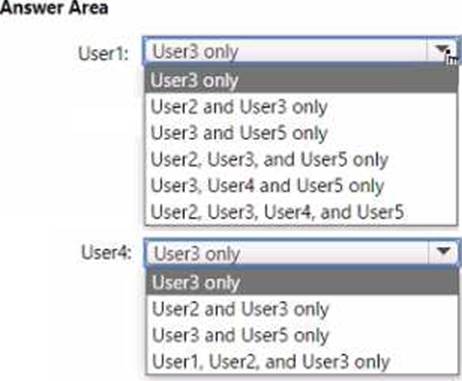
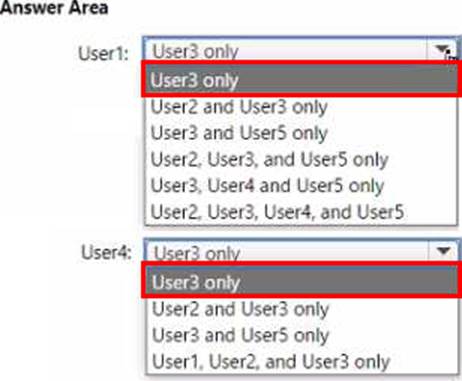
For which users can User1 and User4 reset passwords? To answer, select the appropriate options in the answer area. NOTE: Each correct selection is worth one point.
HOTSPOT
You have a Microsoft 365 subscription that contains three users named User1, User2, and User3 and an enterprise app named Appl.
The subscription contains the devices shown in the following table.
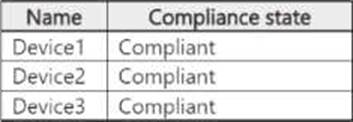
The subscription contains the groups shown in the following table.
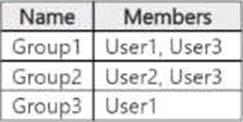
You create two Conditional Access policies that have the following settings:
• Name: Policy1
• Users:
o Include: Group1
o Exclude: Group3
• Target resources:
o Include: All resources
• Access controls: Block access
• Name: Policy2
• Users:
o Include: Group2
• Target resources:
o Include: App1
• Access controls:
° Grant access: Require device to be marked as compliant
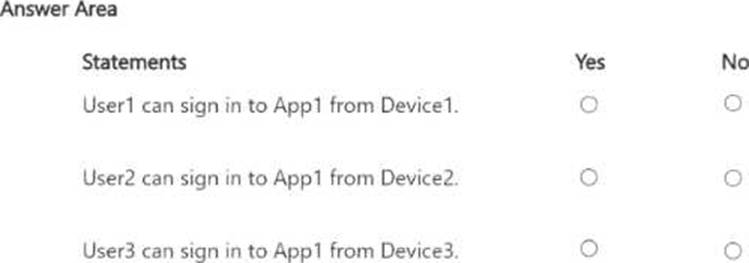
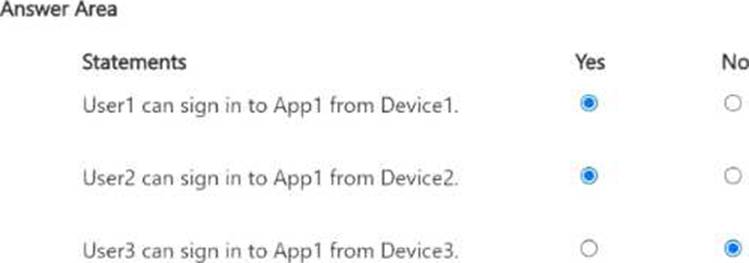
For each of the following statements select Yes if the statement is true Otherwise select No. NOTE: Each correct selection is worth one point.
Note: This question is part of a series of questions that present the same scenario. Each question in the series contains a unique solution that might meet the stated goals. Some question sets might have more than one correct solution, while others might not have a correct solution.
After you answer a question in this section, you will NOT be able to return to it as a result these
questions will not appear in the review screen.
You have a Microsoft 365 E5 subscription.
You create a user named User1.
You need to ensure that User1 can update the status of identity Secure Score improvement actions.
Solution: You assign the User Administrator role to User1.
Does this meet the goal?
- A . Yes
- B . No
You have an Azure subscription that uses Azure AD Privileged Identity Management (PIM).
You need to identify users that are eligible for the Cloud Application Administrator role.
Which blade in the Privileged Identity Management settings should you use?
- A . Azure resources
- B . Privileged access groups
- C . Review access
- D . Azure AD roles
You have a Microsoft Entra tenant that contains the users shown in the following table:
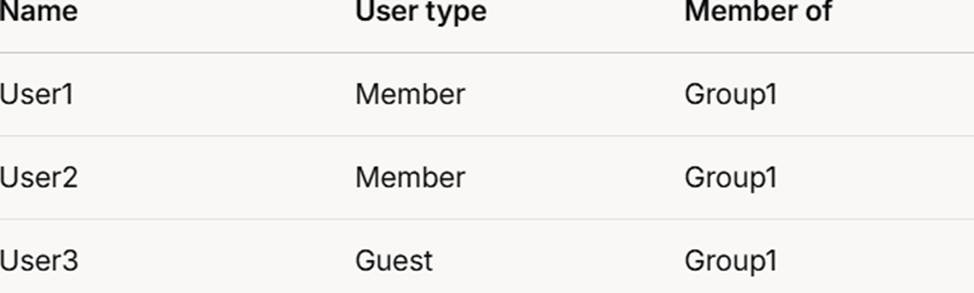
User1 is the owner of Group1.
You create an access review that has the following settings:
What to review: Teams + Groups
Scope: All users
Group: Group1
Reviewers: Users review their own access
Which users can perform access reviews for User3?
- A . User1 only
- B . User3 only
- C . User1 and User2 only
- D . User1, User2, and User3
B
Explanation:
Comprehensive and Detailed In-Depth
Let’s break this down step by step based on the Microsoft Entra access review settings and the
principles outlined in Microsoft Identity and Access Administrator documentation.
Understanding the Access Review Settings:
What to review: Teams + Groups This indicates that the access review is evaluating memberships in Teams and Groups within the Microsoft Entra tenant. Since the group specified is Group1, the review focuses on Group1 membership.
Scope: All users The scope defines who is being reviewed. "All users" in this
HOTSPOT
Your company has a Microsoft 365 tenant.
All users have computers that run Windows 10 and are joined to the Azure Active Directory (Azure AD) tenant.
The company subscribes to a third-party cloud service named Service1. Service1 supports Azure AD authentication and authorization based on OAuth. Service1 is published to the Azure AD gallery.
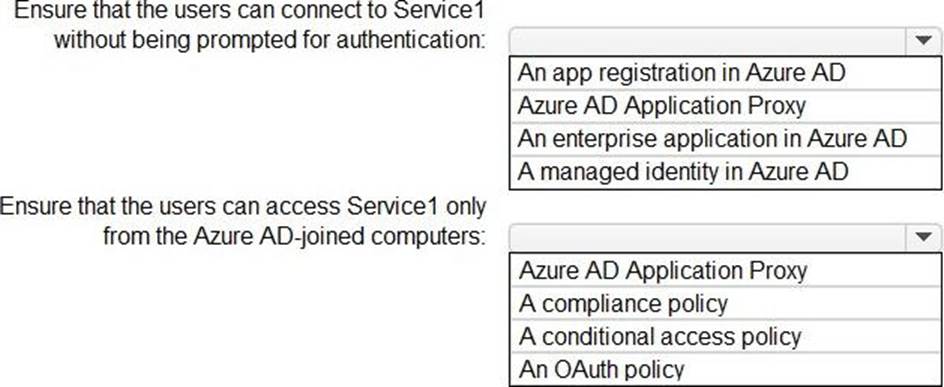
You need to recommend a solution to ensure that the users can connect to Service1 without being prompted for authentication. The solution must ensure that the users can access Service1 only from Azure AD-joined computers. The solution must minimize administrative effort.
What should you recommend for each requirement? To answer, select the appropriate options in the answer area. NOTE: Each correct selection is worth one point.
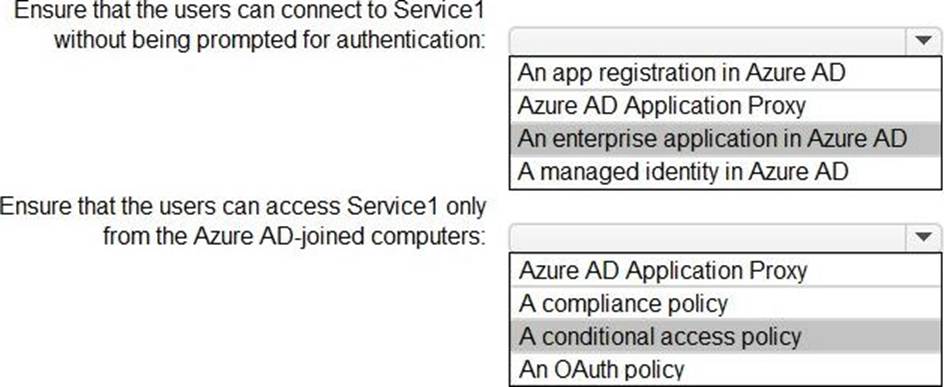
Explanation:
Reference:
https://docs.microsoft.com/en-us/azure/active-directory/develop/active-directory-how-applications-are-added
https://docs.microsoft.com/en-us/azure/active-directory/conditional-access/require-managed-devices
Your company has a Microsoft 365 tenant.
The company has a call center that contains 300 users. In the call center, the users share desktop computers and might use a different computer every day. The call center computers are NOT configured for biometric identification.
The users are prohibited from having a mobile phone in the call center.
You need to require multi-factor authentication (MFA) for the call center users when they access Microsoft 365 services.
What should you include in the solution?
- A . a named network location
- B . the Microsoft Authenticator app
- C . Windows Hello for Business authentication
- D . FIDO2 tokens
D
Explanation:
https://docs.microsoft.com/en-us/azure/active-directory/authentication/concept-authentication-passwordless