Practice Free SC-300 Exam Online Questions
HOTSPOT
You have two Microsoft Entra tenants named contoso.com and fabhkam.com.
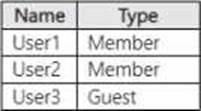
Contoso.com contains the users shown in the following table.
Contoso.com contains the groups shown in the following table.

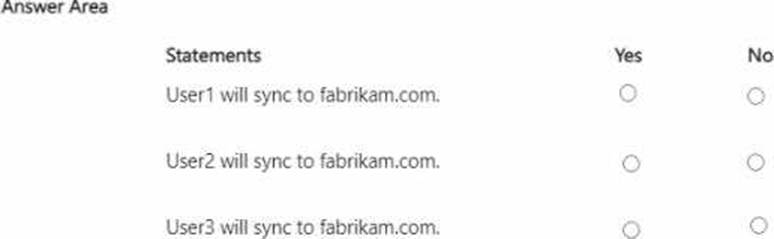
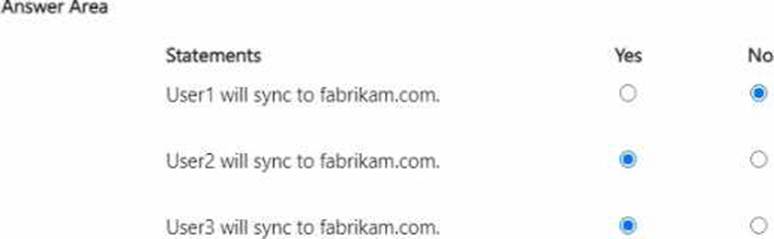
You configure cross-tenant synchronization from contoso.com to fabrikam.com and enable cross-tenant synchronization for User3 and Group2.
For each of the following statements, select Yes if the statement is true. Otherwise, select No. NOTE: Each correct selection is worth one point.
You have a Microsoft Exchange organization that uses an SMTP address space of contoso.com. Several users use their contoso.com email address for self-service sign-up to 1 Microsoft Entra. You gain global administrator privileges to the Microsoft Entra tenant that contains the self-signed users.
You need to prevent the users from creating user accounts in the contoso.com 2 Microsoft Entra tenant for self-service sign-up to Microsoft 365 services.
Which PowerShell cmdlet should you run?
- A . Update-MgDomain
- B . Update-MgPolicyAuthorizationPolicy
- C . Update-MgPolicyPermissionGrantPolicyExclude
- D . Update-MgDomainFederationConfiguration
Note: This question is part of a series of questions that present the same scenario. Each question in
the series contains a unique solution that might meet the stated goals. Some question sets might have more than one correct solution, while others might not have a correct solution.
After you answer a question in this section, you will NOT be able to return to it. As a result, these questions will not appear in the review screen.
You use Azure Monitor to analyze Azure Active Directory (Azure AD) activity logs.
You receive more than 100 email alerts each day for failed Azure AD user sign-in attempts.
You need to ensure that a new security administrator receives the alerts instead of you.
Solution: From Azure AD, you modify the Diagnostics settings.
Does this meet the goal?
- A . Yes
- B . No
DRAG DROP
You have an on-premises Microsoft Exchange organization that uses an SMTP address space of contoso.com.
You discover that users use their email address for self-service sign-up to Microsoft 365 services.
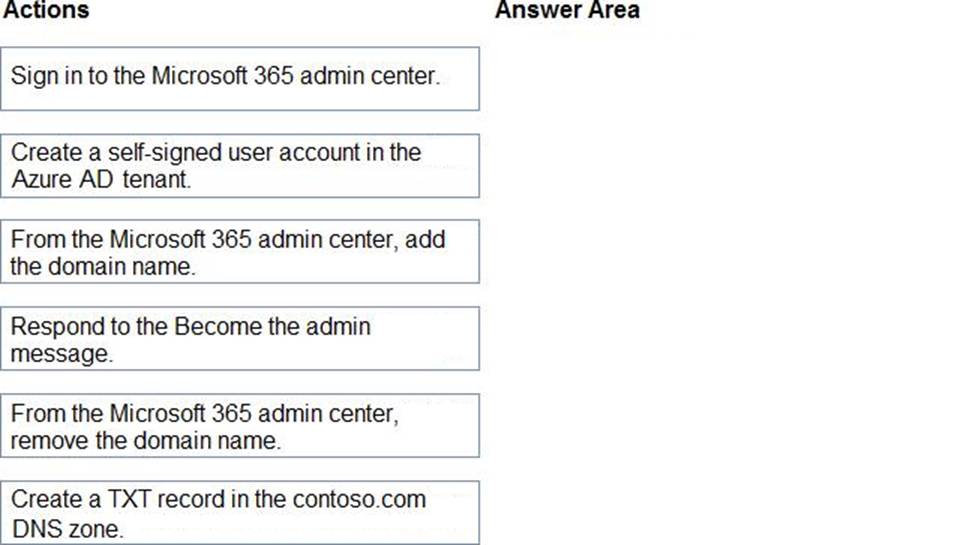
You need to gain global administrator privileges to the Azure Active Directory (Azure AD) tenant that contains the self-signed users.
Which four actions should you perform in sequence? To answer, move the appropriate actions from the list of actions to the answer area and arrange them in the correct order.
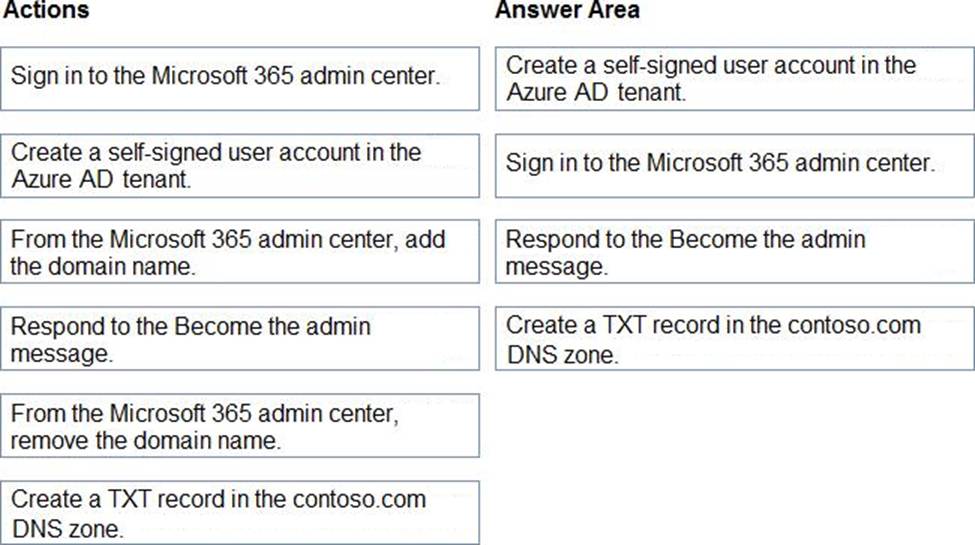
Explanation:
Reference: https://docs.microsoft.com/en-us/azure/active-directory/enterprise-users/domains-admin-takeover
You have a Microsoft Entra tenant that uses Microsoft Entra ID Premium licenses.
You plan to configure a terms of use (ToU) for the tenant.
You need to upload the ToU document.
Which format should you use for the document?
- A . HTML
- B . RTF
- C . PDF
- D . DOCX
DRAG DROP
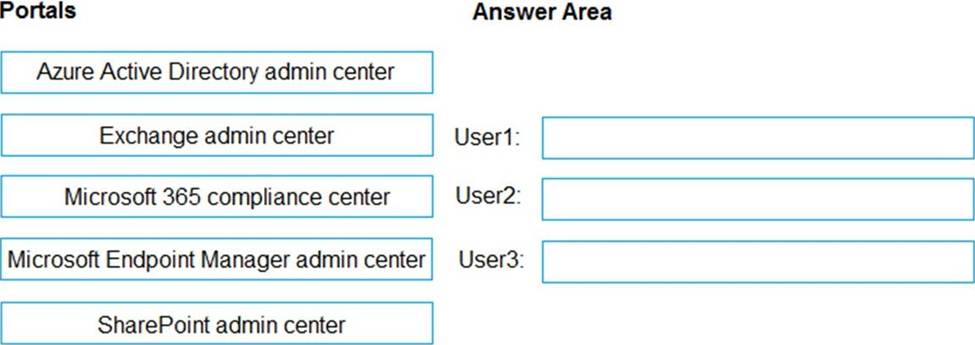
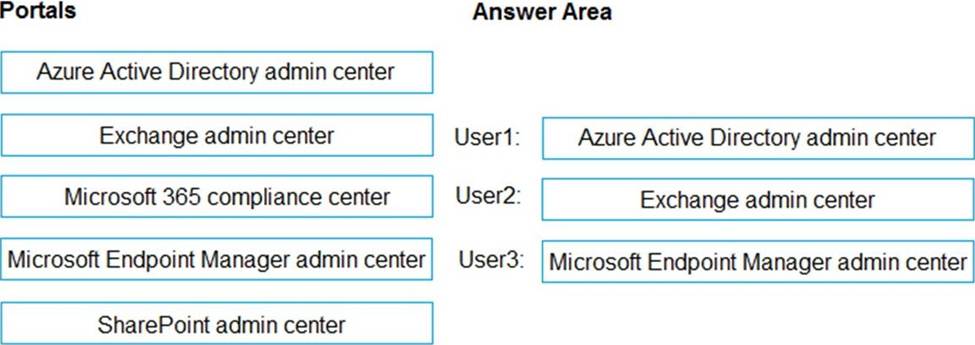
You have a Microsoft 365 E5 subscription that contains three users named User1, User2, and User3.
You need to configure the users as shown in the following table.
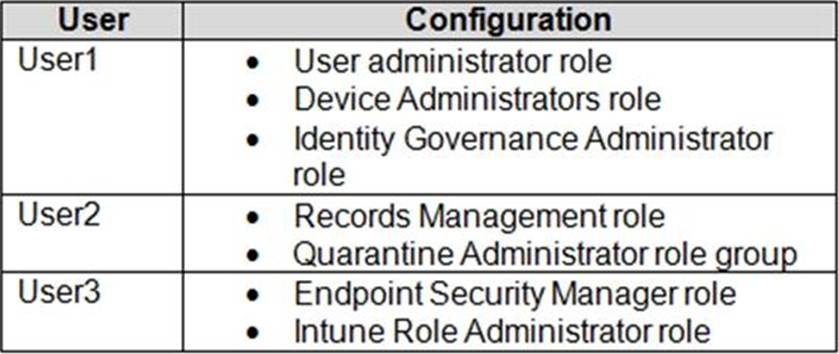
Which portal should you use to configure each user? To answer, drag the appropriate portals to the correct users. Each portal may be used once, more than once, or not at all. You may need to drag the split bar between panes or scroll to view content. NOTE: Each correct selection is worth one point.
You have multiple on-premises devices that run either Windows or Linux.
You have a Microsoft 365 E5 subscription.
You configure Microsoft Entra Internet Access.
You need to ensure that all the on-premises devices route internet traffic through Global Secure Access for security policy evaluation.
What should you do in the Microsoft Entra admin center?
- A . Deploy the Global Secure Access client.
- B . Create a remote network.
- C . Create a named location.
- D . Create an access package.
B
Explanation:
Comprehensive and Detailed In-Depth
Let’s break this down step by step based on Microsoft Entra Internet Access, Global Secure Access, and the requirements for routing internet traffic from on-premises devices, as outlined in Microsoft Identity and Access Administrator documentation.
Understanding the Scenario and Requirements:
On-premises devices running Windows or Linux: The devices are located in an on-premises environment (e.g., a corporate office or branch) and run either Windows or Linux operating systems. Microsoft 365 E5 subscription: This subscription includes Microsoft Entra ID P2 and Microsoft Entra Internet Access, which are part of the Global Secure Access suite. This provides the necessary licensing for the solution.
Microsoft Entra Internet Access: This is a Secure Web Gateway (SWG) solution that secures internet and SaaS app access by routing traffic through Microsoft’s Security Service Edge (SSE) for policy evaluation (e.g., web content filtering, Conditional Access).
Requirement: All on-premises devices must route their internet traffic through Global Secure Access for security policy evaluation. Global Secure Access is the unified framework for Microsoft Entra Internet Access and Microsoft Entra Private Access, providing a centralized way to manage network traffic security.
How Global Secure Access Routes Internet Traffic:
Global Secure Access can route internet traffic in two primary ways:
Global Secure Access Client: This client is installed on individual devices (e.g., Windows, macOS, Android, iOS) and routes traffic from the device to Microsoft’s SSE for policy evaluation. The client is user-aware and integrates with Microsoft Entra ID for identity-based policies.
Remote Network: This method creates an IPsec tunnel between an on-premises network (e.g., a branch office) and Microsoft’s SSE. All internet-bound traffic from devices in the network is routed through the tunnel for security policy evaluation, without requiring a client on each device.
The question involves multiple on-premises devices running Windows or Linux, which suggests a network-level solution may be more practical than installing a client on each device, especially since Linux support for the Global Secure Access client is limited.
You have an Azure Active Directory (Azure AD) tenant named conto.so.com that has Azure AD Identity Protection enabled. You need to Implement a sign-in risk remediation policy without blocking access.
What should you do first?
- A . Configure access reviews in Azure AD.
- B . Enforce Azure AD Password Protection.
- C . implement multi-factor authentication (MFA) for all users.
- D . Configure self-service password reset (SSPR) for all users.
C
Explanation:
MFA and SSPR are both required. However, MFA is required first.
Reference:
https://docs.microsoft.com/en-us/azure/active-directory/identity-protection/howto-identity-protection-remediate-unblock
https://docs.microsoft.com/en-us/azure/active-directory/authentication/howto-sspr-deployment
You need to track application access assignments by using Identity Governance. The solution must meet the delegation requirements.
What should you do first?
- A . Modify the User consent settings for the enterprise applications.
- B . Create a catalog.
- C . Create a program.
- D . Modify the Admin consent requests settings for the enterprise applications.
B
Explanation:
Reference: https://docs.microsoft.com/en-us/azure/active-directory/governance/entitlement-management-
overview
Topic 2, Contoso, Ltd
Overview
Contoso, Ltd is a consulting company that has a main office in Montreal offices in London and Seattle.
Contoso has a partnership with a company named Fabrikam, Inc Fabcricam has an Azure Active Diretory (Azure AD) tenant named fabrikam.com.
Existing Environment
The on-premises network of Contoso contains an Active Directory domain named contos.com. The domain contains an organizational unit (OU) named Contoso_Resources. The Contoso_Resoureces OU contains all users and computers.
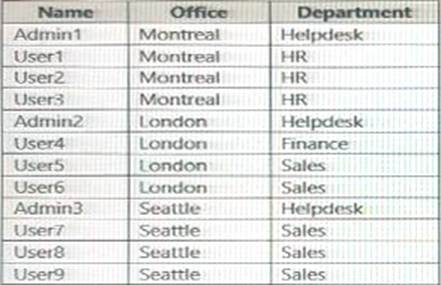
The Contoso.com Active Directory domain contains the users shown in the following table.
Microsoft 365/Azure Environment
Contoso has an Azure AD tenant named Contoso.com that has the following associated licenses:
✑ Microsoft Office 365 Enterprise E5
✑ Enterprise Mobility + Security
✑ Windows 10 Enterprise E5
✑ Project Plan 3
Azure AD Connect is configured between azure AD and Active Directory Domain Serverless (AD DS). Only the Contoso Resources OU is synced.
Helpdesk administrators routinely use the Microsoft 365 admin center to manage user settings.
User administrators currently use the Microsoft 365 admin center to manually assign licenses, All user have all licenses assigned besides following exception:
The users in the London office have the Microsoft 365 admin center to manually assign licenses.
All user have licenses assigned besides the following exceptions:
✑ The users in the London office have the Microsoft 365 Phone System License unassigned.
✑ The users in the Seattle office have the Yammer Enterprise License unassigned. Security defaults are disabled for Contoso.com.
Contoso uses Azure AD Privileged identity Management (PIM) to project administrator roles.
Problem Statements
Contoso identifies the following issues:
• Currently, all the helpdesk administrators can manage user licenses throughout the entire Microsoft 365 tenant.
• The user administrators report that it is tedious to manually configure the different license requirements for each Contoso office.
• The helpdesk administrators spend too much time provisioning internal and guest access to the required Microsoft 365 services and apps.
• Currently, the helpdesk administrators can perform tasks by using the: User administrator role without justification or approval.
• When the Logs node is selected in Azure AD, an error message appears stating that Log Analytics integration is not enabled.
Planned Changes
Contoso plans to implement the following changes.
Implement self-service password reset (SSPR). Analyze Azure audit activity logs by using Azure Monitor-Simplify license allocation for new users added to the tenant. Collaborate with the users at Fabrikam on a joint marketing campaign. Configure the User administrator role to require justification and approval to activate.
Implement a custom line-of-business Azure web app named App1. App1 will be accessible from the internet and authenticated by using Azure AD accounts.
For new users in the marketing department, implement an automated approval workflow to provide access to a Microsoft SharePoint Online site, group, and app.
Contoso plans to acquire a company named Corporation. One hundred new A Datum users will be created in an Active Directory OU named Adatum. The users will be located in London and Seattle.
Technical Requirements
Contoso identifies the following technical requirements:
• AH users must be synced from AD DS to the contoso.com Azure AD tenant.
• App1 must have a redirect URI pointed to https://contoso.com/auth-response.
• License allocation for new users must be assigned automatically based on the location of the user.
• Fabrikam users must have access to the marketing department’s SharePoint site for a maximum of 90 days.
• Administrative actions performed in Azure AD must be audited. Audit logs must be retained for one year.
• The helpdesk administrators must be able to manage licenses for only the users in their respective office.
• Users must be forced to change their password if there is a probability that the users’ identity was compromised.
HOTSPOT
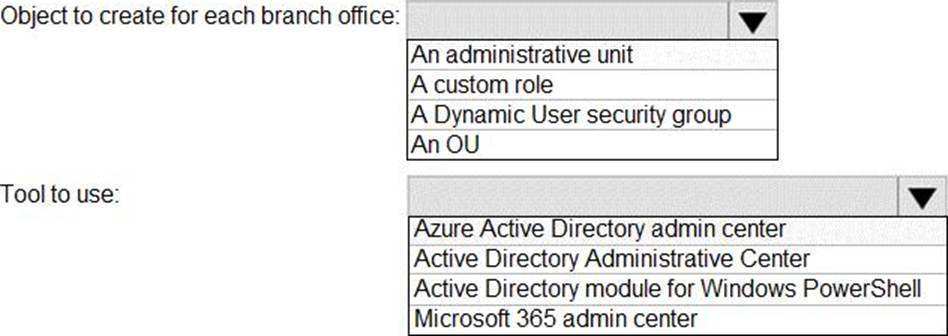
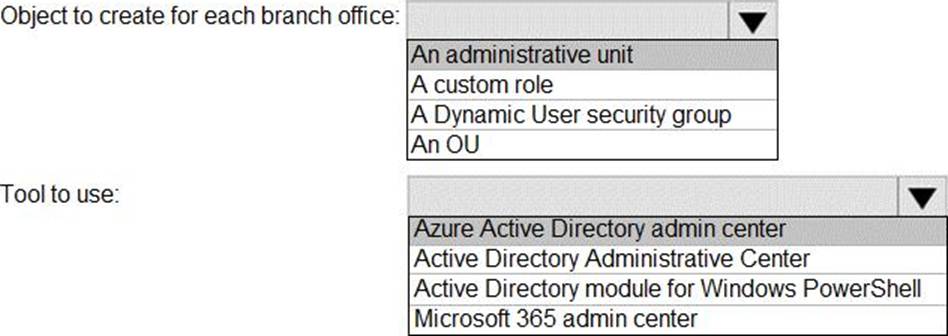
You need to meet the technical requirements for license management by the helpdesk administrators.
What should you create first, and which tool should you use? To answer, select the appropriate options in the answer area. NOTE: Each correct selection is worth one point.