
Practice Free SC-300 Exam Online Questions
Note: This question is part of a series of questions that present the same scenario. Each question in the series contains a unique solution that might meet the stated goals. Some question sets might have more than one correct solution, while others might not have a correct solution.
After you answer a question in this section, you will NOT be able to return to it. As a result, these questions will not appear in the review screen.
You have a Microsoft 365 tenant.
You have 100 IT administrators who are organized into 10 departments.
You create the access review shown in the exhibit. (Click the Exhibit tab.)
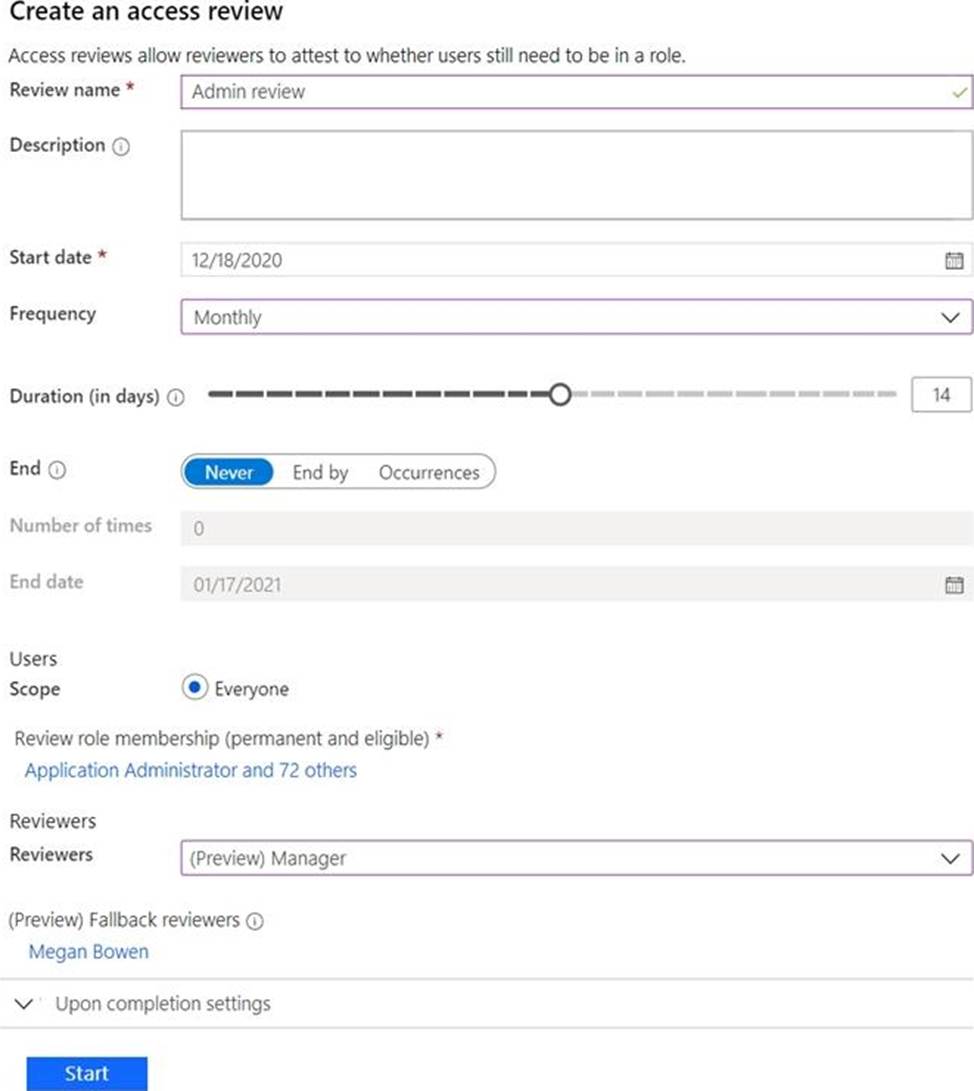
You discover that all access review requests are received by Megan Bowen.
You need to ensure that the manager of each department receives the access reviews of their respective department.
Solution: You set Reviewers to Member (self).
Does this meet the goal?
- A . Yes
- B . No
You have a Microsoft Entra tenant that has a Microsoft Entra ID P1 license.
You need to review the Microsoft Entra ID sign-in logs to investigate sign-ins that occurred in the past.
For how long does Microsoft Entra ID store events in the sign-in logs?
- A . 14 days
- B . 30 days
- C . 90days
- D . 365 days
B
Explanation:
Let’s break this down step by step based on Microsoft Entra’s sign-in log retention policies as outlined in Microsoft Identity and Access Administrator documentation.
Understanding Microsoft Entra Sign-In Logs and Licensing:
Microsoft Entra ID (formerly Azure Active Directory) provides sign-in logs as part of its auditing and reporting capabilities. These logs track user and application sign-in activities, which are critical for security monitoring and compliance.
The question specifies that the tenant has a Microsoft Entra ID P1 license. Licensing is a key factor in determining the retention period for sign-in logs in Microsoft Entra.
Retention Period Based on License Tier:
Microsoft Entra ID has different editions: Free, P1, and P2. Each edition offers different capabilities and retention periods for audit and sign-in logs.
Free Tier: The Free edition of Microsoft Entra ID retains sign-in logs for7 days.
P1 Tier: With a Microsoft Entra ID P1 license (as mentioned in the question), sign-in logs are retained for30 days. This is a standard feature of the P1 license, which provides enhanced security and monitoring capabilities compared to the Free tier.
P2 Tier: The P2 license also retains sign-in logs for30 days, but it includes additional features like risk-based conditional access and identity protection, which are not relevant to the retention period.
Analysis of the Options:
You have an Azure subscription.
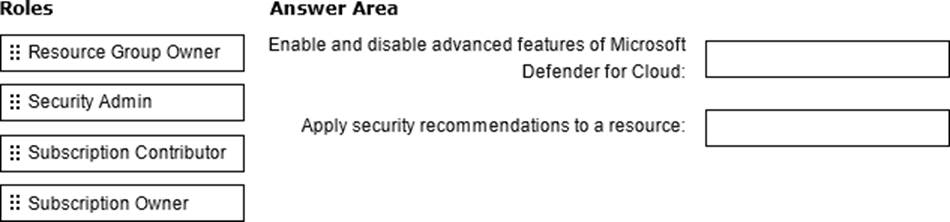
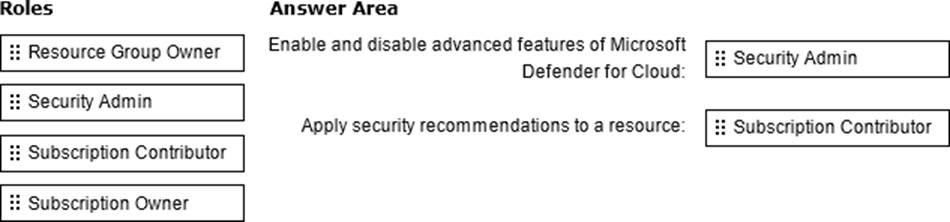
You need to delegate permissions to meet the following requirements:
– Enable and disable advanced features of Microsoft Defender for Cloud.
– Apply security recommendations to a resource.
The solution must use the principle of least privilege.
Which role should you use for each requirement? To answer drag the appropriate roles to the correct requirements. Each role may be used once, more than once, or not at all You may need to drag the split bar between panes or scroll to view content. NOTE: Each correct selection is worth one point.
HOTSPOT
You have an Azure Active Directory (Azure AD) tenant that contains a user named User1 and the groups shown in the following table.
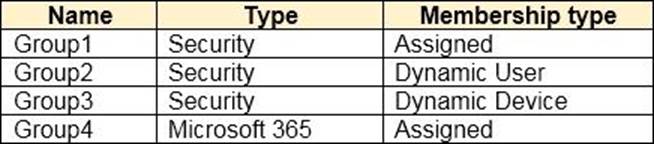
In the tenant, you create the groups shown in the following table.

Which members can you add to GroupA and GroupB? To answer, select the appropriate options in the answer area. NOTE: Each correct selection is worth one point.
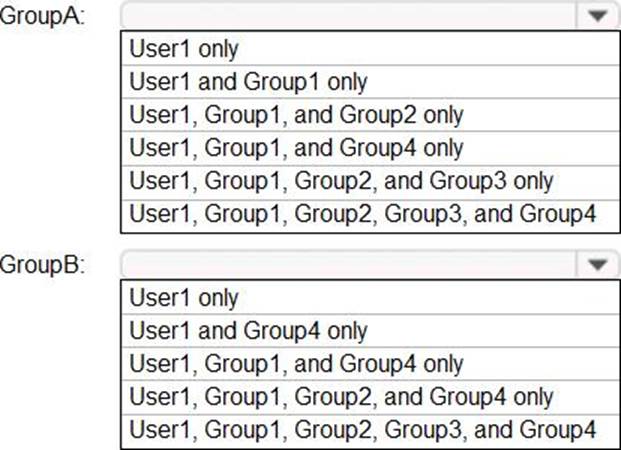
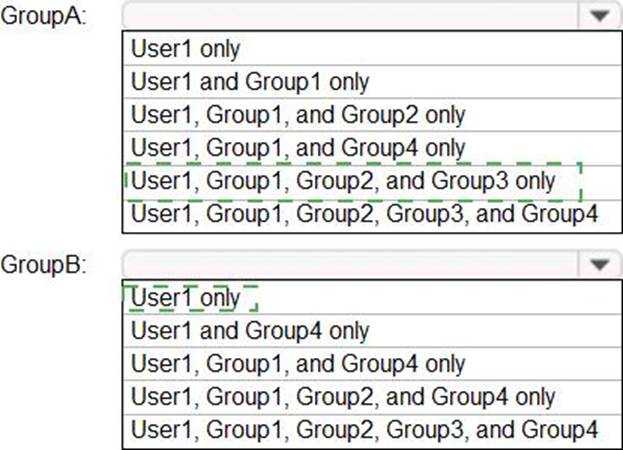
Explanation:
Reference: https://bitsizedbytes.wordpress.com/2018/12/10/distribution-security-and-office-365-groups-nesting/
HOTSPOT
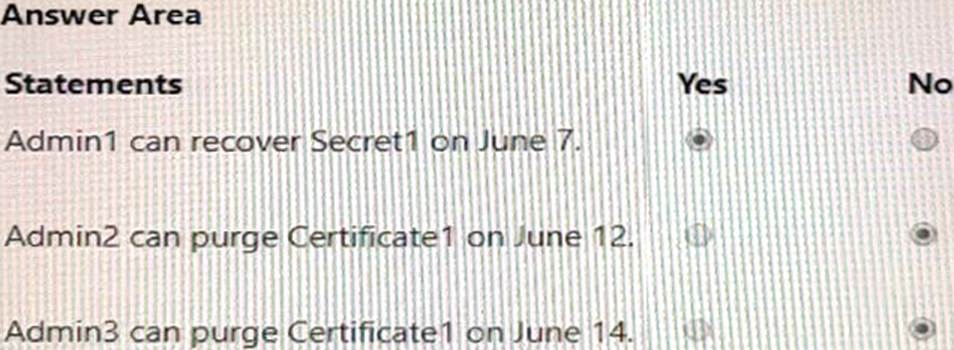
You have an Azure subscription that contains the key vaults shown in the following table.

The subscription contains the users shown in the following table.
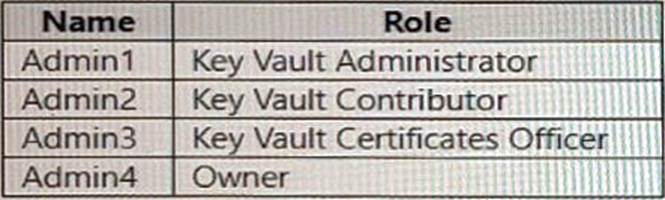
On June1, Admin4 performs the following actions:
• Deletes a certificate named Certificate! from Key Vault1
• Deletes a secret named Secret1 from KeyVault2
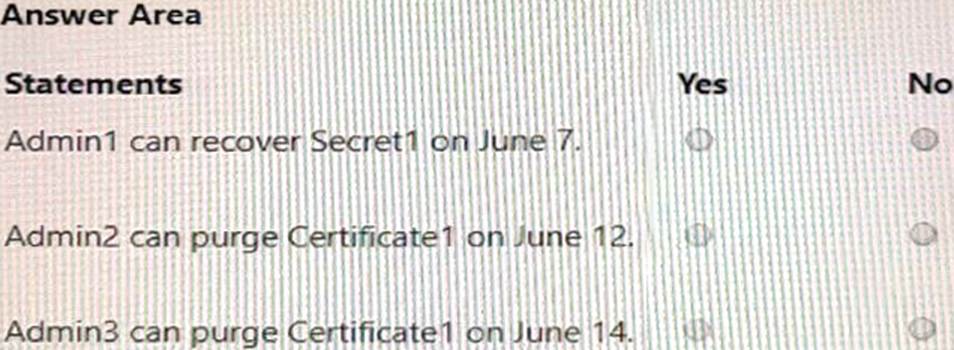
For each of the following statements, select Yes if the statement is true. Otherwise, select No. NOTE: Each correct selection is worth one point.
DRAG DROP
You have an Azure subscription that contains the resources shown in the following table.
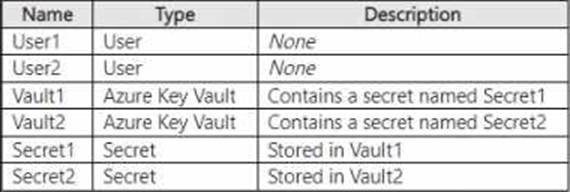
The subscription uses Privileged Identity Management (PIM).
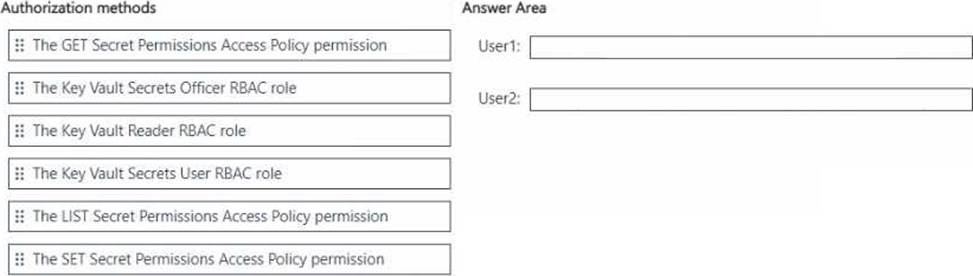
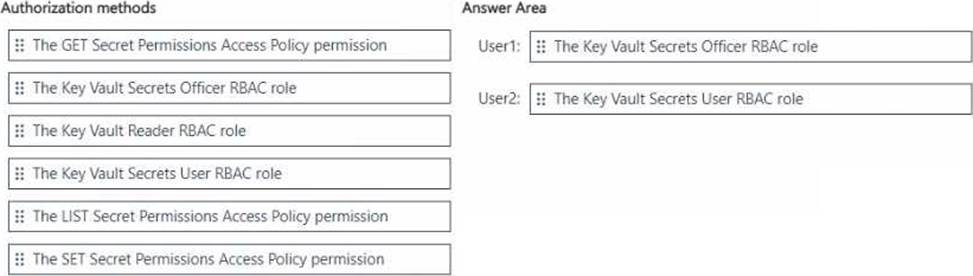
You need to configure the following access controls by using PIM:
• Ensure that User1 can read and update Secret1.
• Ensure that User2 can read the contents of the secrets stored in Vault2.
The solution must follow the principle of least privilege.
Which authorization method should you use for each user? To answer, drag the appropriate authorization methods to the correct users. Each authorization method may be used once, more than once, or not at all. You may need to drag the split bar between panes or scroll to view content. NOTE: Each correct selection is worth one point.
Your network contains an on-premises Active Directory domain that syncs to an Azure Active Directory (Azure AD) tenant-
Users sign in to computers that run Windows 10 and are joined to the domain.
You plan to implement Azure AD Seamless Single Sign-On (Azure AD Seamless SSO).
You need to configure the computers for Azure AD Seamless SSO.
What should you do?
- A . Enable Enterprise State Roaming.
- B . Configure Sign-in options.
- C . Install the Azure AD Connect Authentication Agent.
- D . Modify the Intranet Zone settings.
D
Explanation:
Reference: https://docs.microsoft.com/en-us/azure/active-directory/hybrid/how-to-connect-sso-quick-start
You have an Azure Active Directory (Azure AD) tenant that contains a user named User1.
You need to ensure that User1 can create new catalogs and add resources to the catalogs they own.
What should you do?
- A . From the Roles and administrators blade, modify the Service support administrator role.
- B . From the identity Governance blade, modify the Entitlement management settings.
- C . From the Identity Governance blade, modify the roles and administrators for the General catalog
- D . From the Roles and administrators blade, modify the Groups administrator role.
Topic 5, SIMULATIONS and TASK
SIMULATION
Task 1
You need to deploy multi factor authentication (MFA).
The solution must meet the following requirements:
• Require MFA registration only for members of the Sg-Finance group.
• Exclude Debra Berger from having to register for MFA.
• Implement the solution without using a Conditional Access policy.
Open the Microsoft Entra admin center:
Sign in as a Security Administrator or Global Administrator.
Navigate to MFA settings:
Go to Users > Active users.
On the Active users page, select Multi-factor authentication.
Manage user settings:
Find and select the Sg-Finance group.
Enable MFA for this group by setting the requirement status to Enabled.
Exclude a user from MFA:
In the Multi-factor authentication page, search for Debra Berger. Set her MFA status to Disabled to exclude her from MFA registration. Verify the configuration:
Ensure that all members of the Sg-Finance group have MFA enabled except for Debra Berger.
Communicate the change:
Inform the Sg-Finance group members about the MFA requirement and provide instructions on how
to register for MFA.
Monitor the setup:
Check the sign-in logs to confirm that MFA is being prompted for the Sg-Finance group members and not for Debra Berger.
You have a Microsoft 365 tenant.
All users must use the Microsoft Authenticator app for multi-factor authentication (MFA) when accessing Microsoft 365 services.
Some users report that they received an MFA prompt on their Microsoft Authenticator app without initiating a sign-in request.
You need to block the users automatically when they report an MFA request that they did not Initiate.
Solution: From the Azure portal, you configure the Fraud alert settings for multi-factor authentication (MFA).
Does this meet the goal?
- A . Yes
- B . No
A
Explanation:
The fraud alert feature lets users report fraudulent attempts to access their resources. When an unknown and suspicious MFA prompt is received, users can report the fraud attempt using the Microsoft Authenticator app or through their phone.
The following fraud alert configuration options are available:
Automatically block users who report fraud.
Code to report fraud during initial greeting.
Reference: https://docs.microsoft.com/en-us/azure/active-directory/authentication/howto-mfa-mfasettings