
Practice Free SC-300 Exam Online Questions
You use Azure Monitor to analyze Azure Active Directory (Azure AD) activity logs.
Yon receive more than 100 email alerts each day for tailed Azure Al) user sign-in attempts.
You need to ensure that a new security administrator receives the alerts instead of you.
Solution: From Azure monitor, you modify the action group.
Does this meet the goal?
- A . Yes
- B . No
HOTSPOT
Your on-premises network contains an Active Directory domain that uses Microsoft Entra Connect to sync with a Microsoft Entra tenant.
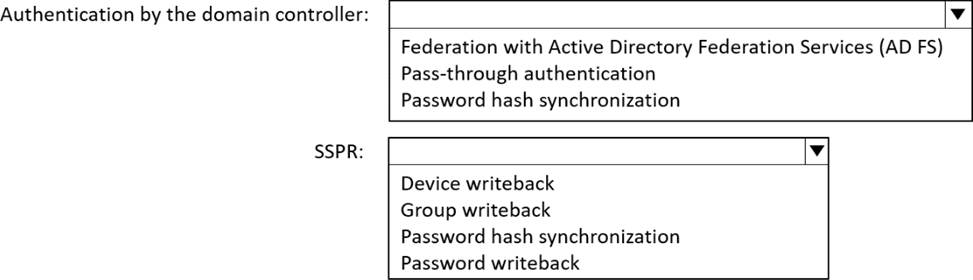
You need to configure Microsoft Entra Connect to meet the following requirements: Microsoft Entra sign-ins must be authenticated by an Active Directory domain controller. Active Directory domain users must be able to use Microsoft Entra self-service password reset (SSPR).
Minimize administrative effort.
What should you use for each requirement? To answer, select the appropriate options in the answer area.
Explanation:
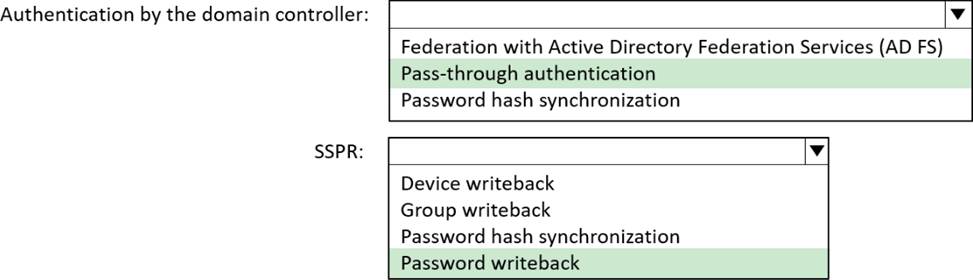
Microsoft Entra sign-ins must be authenticated by an Active Directory domain controller: Pass-through authentication
Active Directory domain users must be able to use Microsoft Entra self-service password reset (SSPR): Password writeback
Let’s break this down step by step based on Microsoft Entra Connect, authentication methods, and
SSPR requirements, as outlined in Microsoft Identity and Access Administrator documentation.
Requirement 1: Microsoft Entra sign-ins must be authenticated by an Active Directory domain controller
Understanding the Requirement:
The requirement states that Microsoft Entra sign-ins must be authenticated by an on-premises Active Directory domain controller. This means that the authentication process must occur on-premises rather than in the cloud.
Microsoft Entra Connect supports several authentication methods for hybrid identity:
Password Hash Synchronization (PHS): Password hashes are synchronized to Microsoft Entra ID, and authentication occurs in the cloud. This does not meet the requirement because the domain controller is not involved in the authentication process.
Pass-through Authentication (PTA): Users sign in to Microsoft Entra ID, but the authentication request is passed to an on-premises Active Directory domain controller for validation. This meets the requirement because the domain controller performs the authentication.
Federation with Active Directory Federation Services (AD FS): Users are redirected to an on-premises AD FS server, which authenticates them against the domain controller. This also meets the requirement because the domain controller is involved via AD FS.
Comparing the Options:
Federation with Active Directory Federation Services (AD FS):
AD FS provides federated authentication, where users are redirected to an on-premises AD FS server for authentication. The AD FS server communicates with the domain controller to validate credentials.
This meets the requirement because the domain controller authenticates the user. However, AD FS requires significant infrastructure (e.g., AD FS servers, Web Application Proxy servers) and ongoing maintenance, which increases administrative effort. Pass-through Authentication (PTA):
PTA allows Microsoft Entra ID to pass the authentication request directly to an on-premises domain controller via a lightweight agent installed on a server in the on-premises environment. This meets the requirement because the domain controller performs the authentication.
PTA is simpler to deploy and manage than AD FS. It requires only the Microsoft Entra Connect server
and the PTA agent, with no additional infrastructure like AD FS servers. This aligns with the
requirement to "minimize administrative effort."
Minimizing Administrative Effort:
The question emphasizes minimizing administrative effort.
AD FS requires deploying and maintaining a federation infrastructure, including AD FS servers, Web Application Proxy servers, certificates, and load balancers. This involves significant administrative overhead.
PTA, on the other hand, is lightweight. It uses the existing Microsoft Entra Connect server and a small agent, with no additional infrastructure required. It also supports high availability by allowing multiple PTA agents.
Therefore, PTA is the better choice to minimize administrative effort while meeting the requirement.
Conclusion for Requirement 1:
Both options meet the requirement for domain controller authentication, but PTA is the better choice because it minimizes administrative effort.
The correct answer for this requirement isPass-through authentication.
Requirement 2: Active Directory domain users must be able to use Microsoft Entra self-service
password reset (SSPR)
Understanding the Requirement:
The requirement states that Active Directory domain users must be able to use Microsoft Entra self-service password reset (SSPR).
SSPR allows users to reset their passwords via a web portal (e.g., aka.ms/sspr) without contacting an administrator. In a hybrid environment (with Microsoft Entra Connect), SSPR must be configured to work with on-premises Active Directory accounts.
For SSPR to work in a hybrid environment, the password reset must be written back to the on-premises Active Directory so that the user’s password is updated in both Microsoft Entra ID and Active Directory.
Understanding the Options:
Device writeback:
Device writeback synchronizes device objects (e.g., for Conditional Access or Windows Hello for Business) between Microsoft Entra ID and Active Directory. This is unrelated to SSPR or password management.
Group writeback:
Group writeback synchronizes Microsoft 365 groups from Microsoft Entra ID to Active Directory, allowing on-premises applications to use these groups. This is also unrelated to SSPR or password management.
Password hash synchronization:
Password hash synchronization (PHS) synchronizes the hash of a user’s Active Directory password to Microsoft Entra ID, enabling cloud authentication.
While PHS is often used in hybrid environments, it only synchronizes passwords from Active Directory to Microsoft Entra ID (one-way). It does not support writing password changes (e.g., from SSPR) back to Active Directory, which is required for SSPR in a hybrid environment. Password writeback:
Password writeback is a feature of Microsoft Entra Connect that allows password changes made in Microsoft Entra ID (e.g., via SSPR) to be written back to the on-premises Active Directory.
This is specifically designed for SSPR in hybrid environments. When a user resets their password using SSPR, the new password is written back to Active Directory, ensuring the user’s credentials are consistent across both environments.
Password writeback requires Microsoft Entra ID P1 or P2 licenses and must be enabled in Microsoft Entra Connect.
SSPR in a Hybrid Environment:
For SSPR to work for Active Directory domain users, password writeback must be enabled. Without password writeback, a password reset in Microsoft Entra ID would not update the on-premises Active Directory, rendering the user unable to sign in to on-premises resources.
Password writeback ensures that when a user resets their password via SSPR, the new password is synchronized to Active Directory, meeting the requirement.
Conclusion for Requirement 2:
The only option that enables SSPR for Active Directory domain users in a hybrid environment is Password writeback.
The other options (Device writeback, Group writeback, Password hash synchronization) do not support writing password changes back to Active Directory, which is necessary for SSPR.
Final Answer Summary:
Microsoft Entra sign-ins must be authenticated by an Active Directory domain controller: Pass-through authentication (meets the requirement and minimizes administrative effort compared to AD
FS).
Active Directory domain users must be able to use Microsoft Entra self-service password reset (SSPR): Password writeback (required for SSPR in a hybrid environment).
Reference: Microsoft Entra Connect documentation: "Choose the right authentication method" (Microsoft Learn: https://learn.microsoft.com/en-us/entra/identity/hybrid/connect/choose-ad-authn) Microsoft Entra Connect documentation: "Password writeback for SSPR" (Microsoft Learn: https://learn.microsoft.com/en-us/entra/identity/authentication/howto-sspr-writeback) Microsoft Identity and Access Administrator (SC-300) exam study guide, which covers Microsoft Entra Connect authentication methods and SSPR configuration in hybrid environments.
You have a Microsoft 365 E5 subscription that uses Microsoft Defender for Cloud Apps and Conditional Access policies. You need to block access to cloud apps when a user is assessed as high risk.
Which type of policy should you create in the Microsoft Defender for Cloud Apps?
- A . OAuth app policy
- B . anomaly detection polio
- C . access policy
- D . activity policy
You use Azure Monitor to analyze Azure Active Directory (Azure AD) activity logs.
Yon receive more than 100 email alerts each day for tailed Azure Al) user sign-in attempts.
You need to ensure that a new security administrator receives the alerts instead of you.
Solution: From Azure AD, you create an assignment for the Insights at administrator role.
Does this meet the goal?
- A . Yes
- B . No
You have an Azure subscription that contains the custom roles shown in the following table.

You need to create a custom Azure subscription role named Role3 by using the Azure portal. Role3 will use the baseline permissions of an existing role.
Which roles can you clone to create Role3?
- A . Role2 only
- B . built-in Azure subscription roles only
- C . built-in Azure subscription roles and Role2 only
- D . built-in Azure subscription roles and built-in Azure AD roles only
- E . Role1, Role2 built-in Azure subscription roles, and built-in Azure AD roles
You have a Microsoft 365 subscription that uses Microsoft Defender for Endpoint.
You need to add threat indicators for all the IP addresses in a range of 171.23.34.32-171.23.34.63. The solution must minimize administrative effort.
What should you do in the Microsoft Defender portal?
- A . Create an import file that contains the IP address of 171.23.34.32/27. Select Import and import the file.
- B . Select Add indicator and set the IP address to 171.23.34.32-171.23.34.63.
- C . Create an import file that contains the individual IP addresses in the range. Select Import and import the file.
- D . Select Add indicator and set the 1Paddress to 171.23.34.32/27.
HOTSPOT
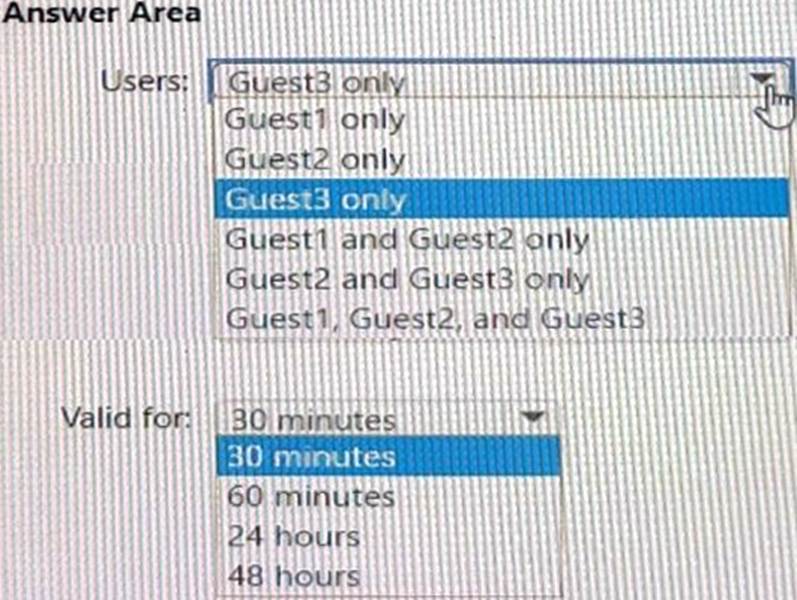
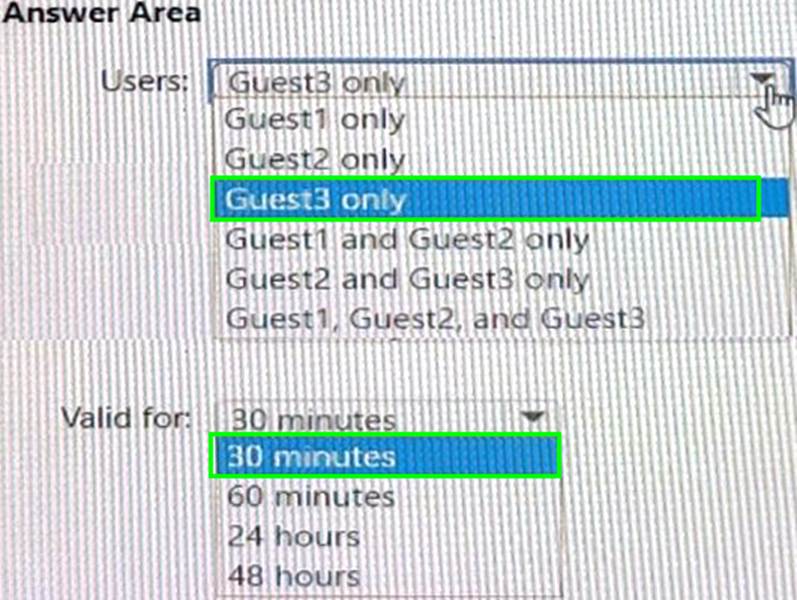
You have an Azure AD tenant named contoso.com that has Email one-time passcode for guests set to Yes.
You invite the guest users shown in the following table.

Which users will receive a one-time passcode, and how long will the passcode be valid? To answer, select the appropriate options in the answer area. NOTE: Each correct selection is worth one point.
HOTSPOT
You have a Microsoft 365 tenant named contoso.com.
Guest user access is enabled.
Users are invited to collaborate with contoso.com as shown in the following table.

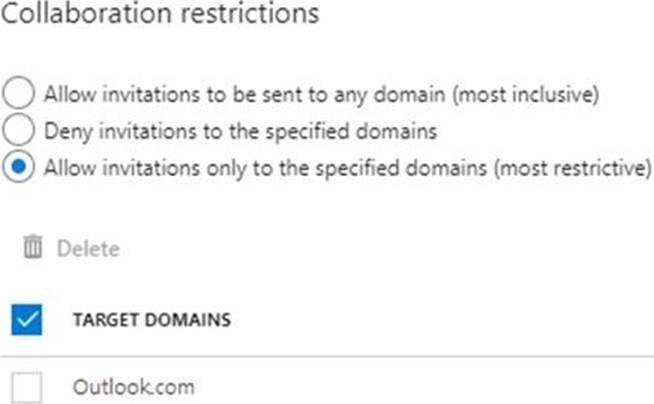
From the External collaboration settings in the Azure Active Directory admin center, you configure the Collaboration restrictions settings as shown in the following exhibit.
From a Microsoft SharePoint Online site, a user invites [email protected] to the site.
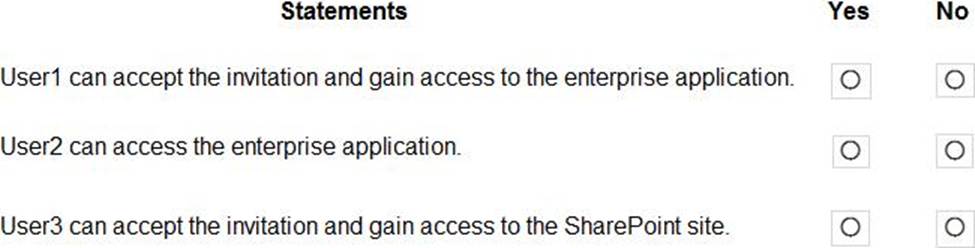
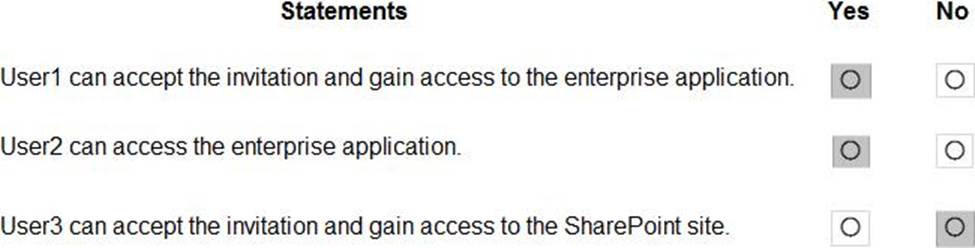
For each of the following statements, select Yes if the statement is true. Otherwise, select No. NOTE: Each correct selection is worth one point.
Explanation:
Box 1: Yes
Invitations can only be sent to outlook.com. Therefore, User1 can accept the invitation and access the application.
Box 2. Yes
Invitations can only be sent to outlook.com. However, User2 has already received and accepted an invitation so User2 can access the application.
Box 3. No
Invitations can only be sent to outlook.com. Therefore, User3 will not receive an invitation.
HOTSPOT
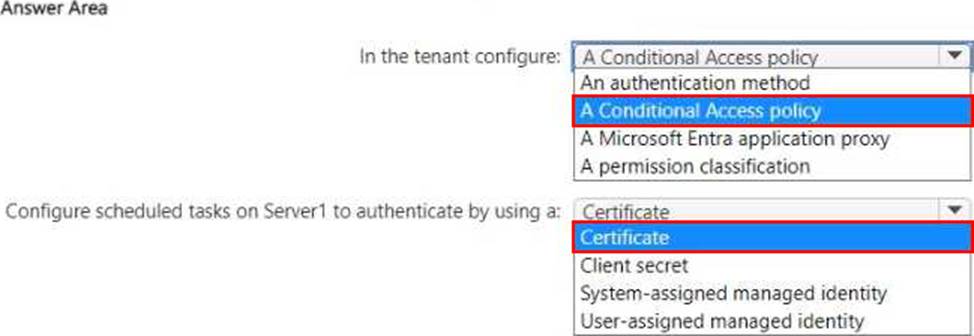
You have an on-premises server named Server! that runs Windows Server.
You have a Microsoft Entra tenant that contains an app registration named App1. App1 has Microsoft Graph application permissions.
You need to configure the environment to support App1.
The solution must meet the following requirements:
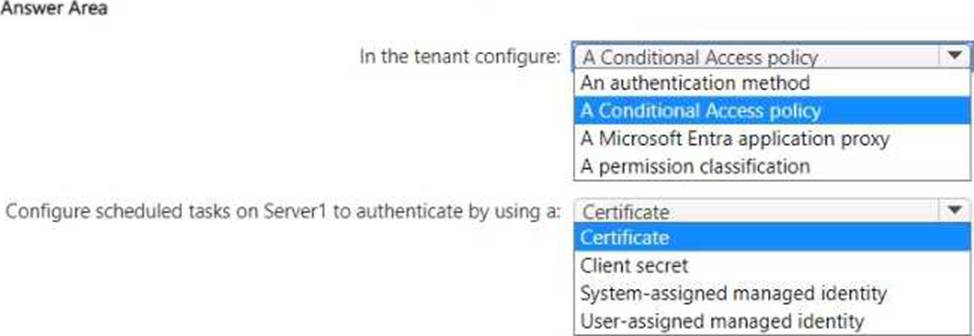
• App1 must be accessible only from the corporate network.
• The credentials for App1 must NOT be stored as plain text.
• Non-interactive scheduled tasks on Server 1 must be able to authenticate to App1.
What should you do? To answer, select the appropriate options in the answer area. NOTE: Each correct selection is worth one point.
You need to visualize Microsoft Sentinel data and enrich the data by using third-party data sources to identify indicators of compromise (loC).
What should you use?
- A . notebooks in Microsoft Sentinel
- B . Microsoft Defender for Cloud Apps
- C . Azure Monitor