
Practice Free DP-600 Exam Online Questions
Note: This question is part of a series of questions that present the same scenario. Each question in the series contains a unique solution that might meet the stated goals. Some question sets might have more than one correct solution, while others might not have a correct solution.
After you answer a question in this section, you will NOT be able to return to it. As a result, these questions will not appear in the review screen.
You have a Fabric tenant that contains a new semantic model in OneLake.
You use a Fabric notebook to read the data into a Spark DataFrame.
You need to evaluate the data to calculate the min, max, mean, and standard deviation values for all the string and numeric columns.
Solution: You use the following PySpark expression:
df.summary()
Does this meet the goal?
- A . Yes
- B . No
A
Explanation:
Correct Solution: You use the following PySpark expression:
df.summary()
summary(*statistics)[source]
Computes specified statistics for numeric and string columns. Available statistics are: – count – mean – stddev – min – max – arbitrary approximate percentiles specified as a percentage (eg, 75%)
If no statistics are given, this function computes count, mean, stddev, min, approximate quartiles (percentiles at 25%, 50%, and 75%), and max.
Note This function is meant for exploratory data analysis, as we make no guarantee about the backward compatibility of the schema of the resulting DataFrame.
>>> df.summary().show() +——-+——————+—–+
| stddev|2.1213203435596424| null|
Incorrect:
* df.show()
* df.explain().show()
* df.explain()
explain(extended=False)[source]
Prints the (logical and physical) plans to the console for debugging purpose.
Parameters: extended C boolean, default False. If False, prints only the physical plan.
>>> df.explain()
== Physical Plan ==
Scan ExistingRDD[age#0,name#1]
>>> df.explain(True)
== Parsed Logical Plan ==
…
== Analyzed Logical Plan ==
…
== Optimized Logical Plan ==
…
== Physical Plan ==
Reference: https://spark.apache.org/docs/2.3.0/api/python/pyspark.sql.html
HOTSPOT
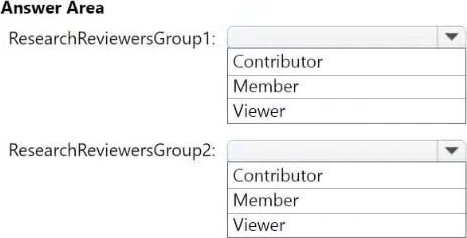
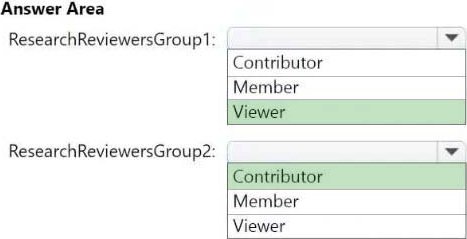
Which workspace role assignments should you recommend for ResearchReviewersGroup1 and ResearchReviewersGroup2? To answer, select the appropriate options in the answer area. NOTE: Each correct selection is worth one point.
Explanation:
Box 1: Viewer
ResearchReviewersGroup1
For the Research division workspaces, the members of ResearchReviewersGroup1 must be able to read lakehouse and warehouse data and shortcuts by using SQL endpoints.
Workspace roles in Lakehouse
Workspace roles define what user can do with Microsoft Fabric items. Roles can be assigned to individuals or security groups from workspace view. See, Give users access to workspaces.
The user can be assigned to the following roles:
Admin
Member
Contributor
Viewer
In a lakehouse the users with Admin, Member, and Contributor roles can perform all CRUD (CREATE, READ, UPDATE and DELETE) operations on all data. A user with Viewer role can only read data stored in Tables using the SQL analytics endpoint.
Box 2: Contributor
ResearchReviewersGroup2
For the Research division workspaces, the members of ResearchReviewersGroup2 must be able to read lakehouse data by using Lakehouse explorer.
Microsoft Fabric workspace roles
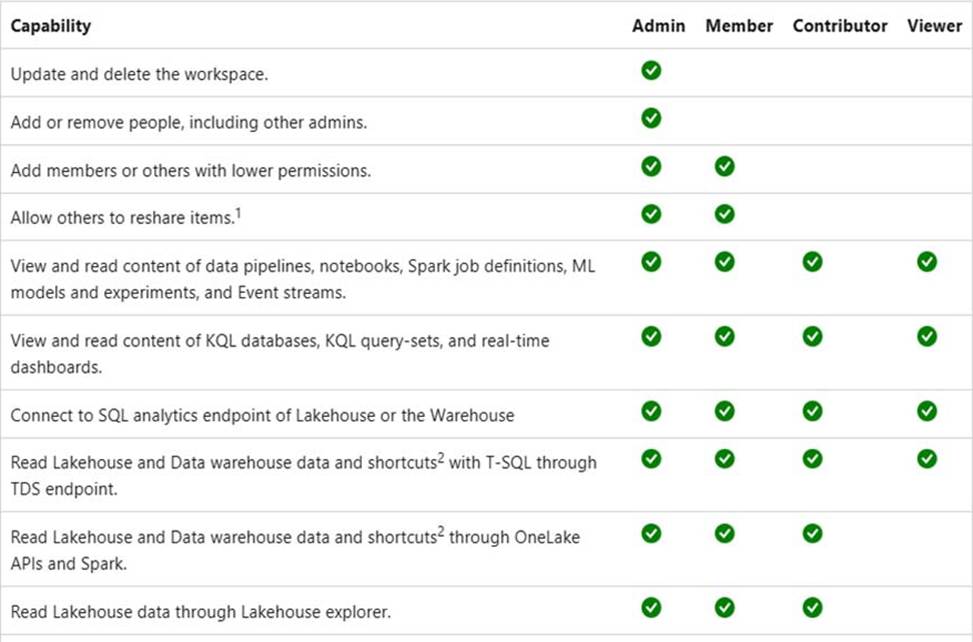
Etc.
Incorrect:
* Member
More permissions compared to Contributor
Scenario:
Identity Environment
Contoso has a Microsoft Entra tenant named contoso.com. The tenant contains two groups named ResearchReviewersGroup1 and ResearchReviewersGroup2.
Reference: https://learn.microsoft.com/en-us/fabric/data-engineering/workspace-roles-lakehouse
https://learn.microsoft.com/en-us/fabric/get-started/roles-workspaces
HOTSPOT
You have a Fabric workspace that uses the default Spark starter pool and runtime version 1.2.
You plan to read a CSV file named Sales_raw.csv in a lakehouse, select columns, and save the data as a Delta table to the managed area of the lakehouse. Sales_raw.csv contains 12 columns.
You have the following code.
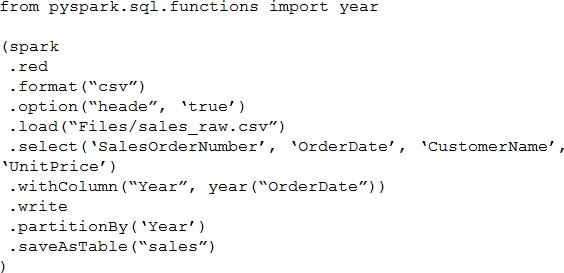
For each of the following statements, select Yes if the statement is true. Otherwise, select No. NOTE: Each correct selection is worth one point.
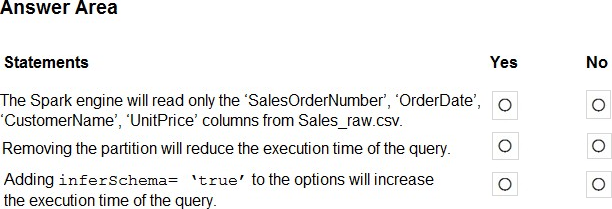
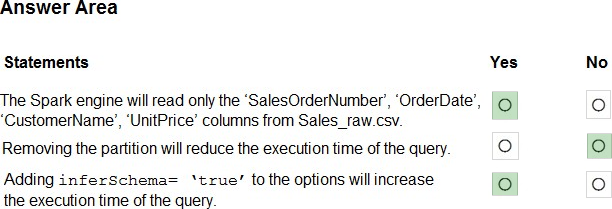
Explanation:
Box 1: Yes
PySpark Select Columns From DataFrame
In PySpark, select() function is used to select single, multiple, column by index, all columns from the list and the nested columns from a DataFrame, PySpark select() is a transformation function hence it returns a new DataFrame with the selected columns.
Select Single & Multiple Columns From PySpark
You can select the single or multiple columns of the DataFrame by passing the column names you wanted to select to the select() function. Since DataFrame is immutable, this creates a new DataFrame with selected columns. show() function is used to show the Dataframe contents.
Box 2: No
Box 3: Yes
pyspark.sql.DataFrameReader.csv
Loads a CSV file and returns the result as a DataFrame.
This function will go through the input once to determine the input schema if inferSchema is enabled. To avoid going through the entire data once, disable inferSchema option or specify the schema explicitly using schema.
Note: pyspark.sql.DataFrameWriter.saveAsTable
Saves the content of the DataFrame as the specified table.
Reference:
https://sparkbyexamples.com/pyspark/select-columns-from-pyspark-dataframe/
https://spark.apache.org/docs/latest/api/python/reference/pyspark.sql/api/pyspark.sql.DataFrameReader.csv.html
HOTSPOT
You have a Fabric workspace that uses the default Spark starter pool and runtime version 1.2.
You plan to read a CSV file named Sales_raw.csv in a lakehouse, select columns, and save the data as a Delta table to the managed area of the lakehouse. Sales_raw.csv contains 12 columns.
You have the following code.
For each of the following statements, select Yes if the statement is true. Otherwise, select No. NOTE: Each correct selection is worth one point.
Explanation:
Box 1: Yes
PySpark Select Columns From DataFrame
In PySpark, select() function is used to select single, multiple, column by index, all columns from the list and the nested columns from a DataFrame, PySpark select() is a transformation function hence it returns a new DataFrame with the selected columns.
Select Single & Multiple Columns From PySpark
You can select the single or multiple columns of the DataFrame by passing the column names you wanted to select to the select() function. Since DataFrame is immutable, this creates a new DataFrame with selected columns. show() function is used to show the Dataframe contents.
Box 2: No
Box 3: Yes
pyspark.sql.DataFrameReader.csv
Loads a CSV file and returns the result as a DataFrame.
This function will go through the input once to determine the input schema if inferSchema is enabled. To avoid going through the entire data once, disable inferSchema option or specify the schema explicitly using schema.
Note: pyspark.sql.DataFrameWriter.saveAsTable
Saves the content of the DataFrame as the specified table.
Reference:
https://sparkbyexamples.com/pyspark/select-columns-from-pyspark-dataframe/
https://spark.apache.org/docs/latest/api/python/reference/pyspark.sql/api/pyspark.sql.DataFrameReader.csv.html
DRAG DROP
You create a semantic model by using Microsoft Power BI Desktop.
The model contains one security role named SalesRegionManager and the following tables:
– Sales
– SalesRegion
– SalesAddress
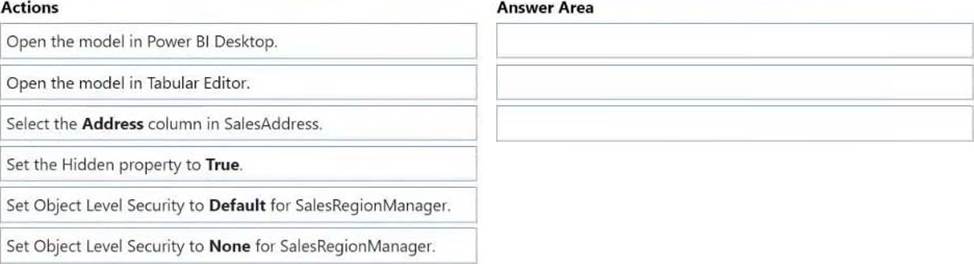
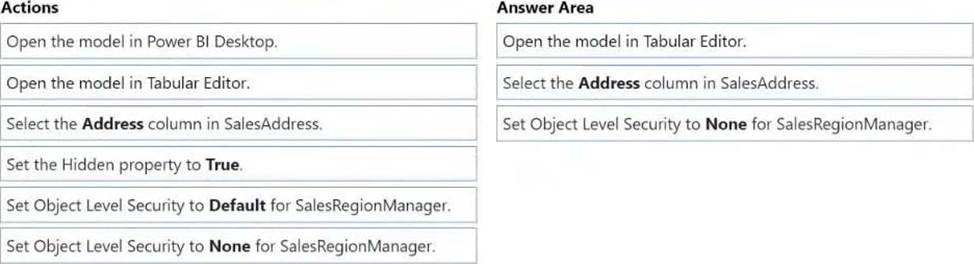
You need to modify the model to ensure that users assigned the SalesRegionManager role cannot see a column named Address in SalesAddress.
Which three actions should you perform in sequence? To answer, move the appropriate actions from the list of actions to the answer area and arrange them in the correct order.
Explanation:
Note: Power Platform, Power BI, Object level security (OLS) Object-level security (OLS) enables model authors to secure specific tables or columns from report viewers. For example, a column that includes personal data can be restricted so that only certain viewers can see and interact with it. In addition, you can also restrict object names and metadata. This added layer of security prevents users without the appropriate access levels from discovering business critical or sensitive personal information like employee or financial records. For viewers that don’t have the required permission, it’s as if the secured tables or columns don’t exist.
Step 1: Open the model in Tabular Editor
Configure object level security using tabular editor
HOTSPOT
You have the source data model shown in the following exhibit.
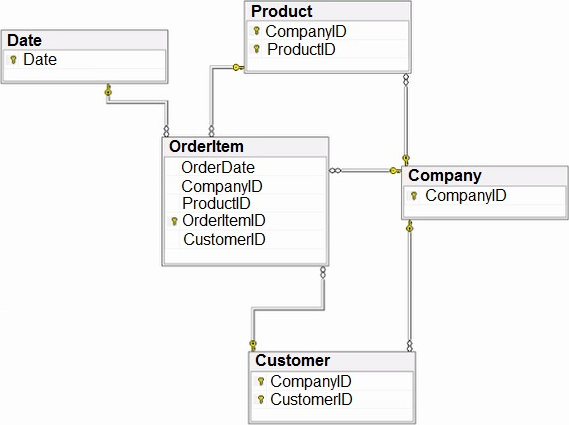
The primary keys of the tables are indicated by a key symbol beside the columns involved in each key.
You need to create a dimensional data model that will enable the analysis of order items by date, product, and customer.
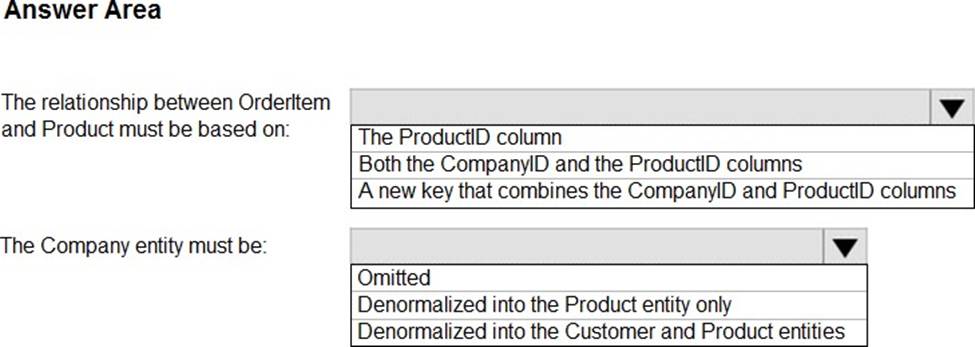
What should you include in the solution? To answer, select the appropriate options in the answer area. NOTE: Each correct selection is worth one point.
Explanation:
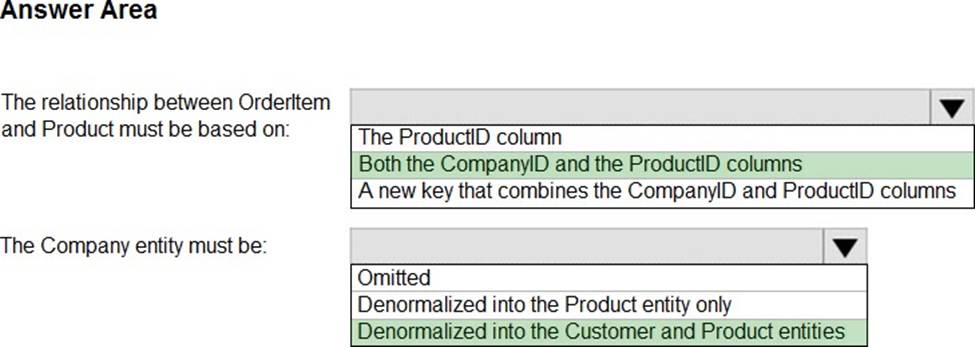
Box 1: Both the CompanyID and the productID columns.
The relationship between OrderItem and Product must be based on:
Need to enable the analysis of order items by date, product, and customer.
Incorrect:
* The productID column.
Need the CompanyID column as well.
Box 2: Denormalized in the Customer and Product entities
The Company entity must be:
Both the Customer and the Product tables use CompanyID as part of their primary key.
HOTSPOT
You have a Fabric tenant that contains a PySpark notebook named Notebook1.
You define sas_token as a variable in the first cell of Notebook1 and store a shared access signature (SAS) token in the variable.
In the second cell, you run the following code.
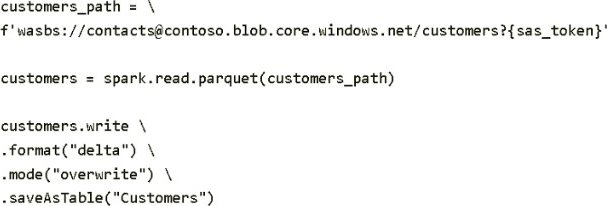
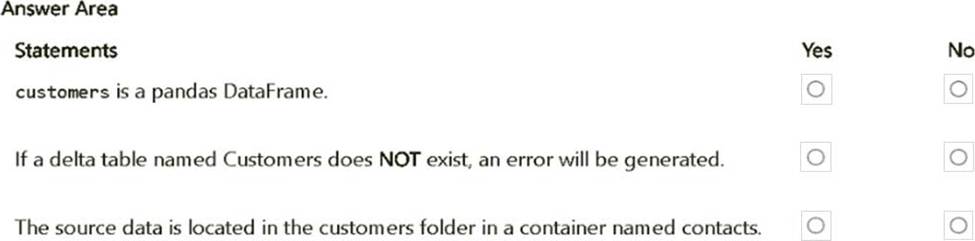
For each of the following statements, select Yes if the statement is true. Otherwise, select No. NOTE: Each correct selection is worth one point. Hot Area:
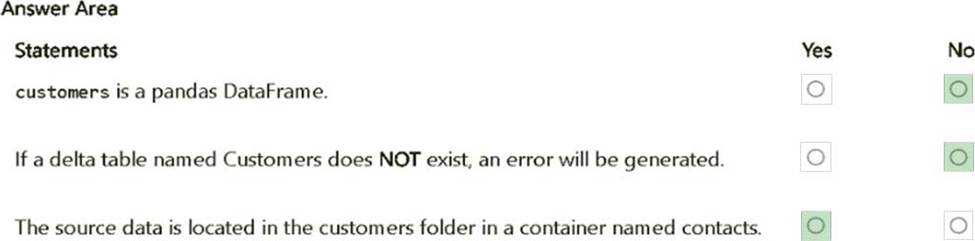
Explanation:
customers is a pandas DataFrame. – No.
The customers DataFrame is created using spark.read.parquet(), which is part of PySpark.
Therefore, customers is a Spark DataFrame, not a pandas DataFrame.
If a delta table named Customers does NOT exist, an error will be generated. – No.
The code uses .mode("overwrite"), which will create the table if it does not exist. There will not be an error if the table does not exist initially.
The source data is located in the customers folder in a container named contacts. – Yes.
The URI wasbs://[email protected]/customers specifies that the data is stored in a container named contacts within the folder customers.
You have a Fabric tenant that contains a warehouse. The warehouse uses row-level security (RLS).
You create a Direct Lake semantic model that uses the Delta tables and RLS of the warehouse.
When users interact with a report built from the model, which mode will be used by the DAX queries?
- A . DirectQuery
- B . Dual
- C . Direct Lake
- D . Import
You have a Fabric tenant that contains a warehouse. The warehouse uses row-level security (RLS).
You create a Direct Lake semantic model that uses the Delta tables and RLS of the warehouse.
When users interact with a report built from the model, which mode will be used by the DAX queries?
- A . DirectQuery
- B . Dual
- C . Direct Lake
- D . Import
You need to refresh the Orders table of the Online Sales department. The solution must meet the semantic model requirements.
What should you include in the solution?
- A . an Azure Data Factory pipeline that executes a Stored procedure activity to retrieve the maximum value of the OrderID column in the destination lakehouse
- B . an Azure Data Factory pipeline that executes a Stored procedure activity to retrieve the minimum value of the OrderID column in the destination lakehouse
- C . an Azure Data Factory pipeline that executes a dataflow to retrieve the minimum value of the OrderID
column in the destination lakehouse - D . an Azure Data Factory pipeline that executes a dataflow to retrieve the maximum value of the OrderID column in the destination lakehouse
D
Explanation:
Dataflow instead of Store procedure to minimize implementation and maintenance effort. Maximum OrderID top retrieve the Order that was created most recently.
Scenario:
The semantic model of the Online Sales department includes a fact table named Orders that uses Import made. In the system of origin, the OrderID value represents the sequence in which orders are created.
Semantic Model Requirements
Contoso identifies the following requirements for implementing and managing semantic models:
*-> The number of rows added to the Orders table during refreshes must be minimized.
The semantic models in the Research division workspaces must use Direct Lake mode.
General Requirements
Contoso identifies the following high-level requirements that must be considered for all solutions:
Follow the principle of least privilege when applicable.
*-> Minimize implementation and maintenance effort when possible.