
Practice Free DP-600 Exam Online Questions
You have a Fabric tenant that contains two workspaces named Workspace1 and Workspace2. Workspace1 contains a lakehouse named Lakehouse1. Workspace2 contains a lakehouse named Lakehouse2. Lakehouse1 contains a table named dbo.Sales. Lakehouse2 contains a table named dbo.Customers.
You need to ensure that you can write queries that reference both dbo.Sales and dbo.Customers in the same SQL query without making additional copies of the tables.
What should you use?
- A . a shortcut
- B . a dataflow
- C . a view
- D . a managed table
You have a Fabric tenant that contains a lakehouse.
You plan to query sales data files by using the SQL endpoint. The files will be in an Amazon Simple Storage Service (Amazon S3) storage bucket.
You need to recommend which file format to use and where to create a shortcut.
Which two actions should you include in the recommendation? Each correct answer presents part of the solution. NOTE: Each correct answer is worth one point.
- A . Create a shortcut in the Files section.
- B . Use the Parquet format
- C . Use the CSV format.
- D . Create a shortcut in the Tables section.
- E . Use the delta format.
You have a Fabric tenant.
You are creating a Fabric Data Factory pipeline.
You have a stored procedure that returns the number of active customers and their average sales for the current month.
You need to add an activity that will execute the stored procedure in a warehouse. The returned values must be available to the downstream activities of the pipeline.
Which type of activity should you add?
- A . Switch
- B . KQL
- C . Append variable
- D . Lookup
D
Explanation:
Lookup Activity
Lookup Activity can be used to read or look up a record/ table name/ value from any external source. This output can further be referenced by succeeding activities.
Note: Lookup activity can retrieve a dataset from any of the data sources supported by data factory and Synapse pipelines. You can use it to dynamically determine which objects to operate on in a subsequent activity, instead of hard coding the object name. Some object examples are files and tables.
Lookup activity reads and returns the content of a configuration file or table. It also returns the result of executing a query or stored procedure. The output can be a singleton value or an array of attributes, which can be consumed in a subsequent copy, transformation, or control flow activities like ForEach activity.
Incorrect:
* Append variable
Append Variable activity in Azure Data Factory and Synapse Analytics
Use the Append Variable activity to add a value to an existing array variable defined in a Data Factory or Synapse Analytics pipeline
* Copy data
In Data Pipeline, you can use the Copy activity to copy data among data stores located in the cloud.
After you copy the data, you can use other activities to further transform and analyze it. You can also use the Copy activity to publish transformation and analysis results for business intelligence (BI) and application consumption.
* KQL
The KQL activity in Data Factory for Microsoft Fabric allows you to run a query in Kusto Query Language (KQL) against an Azure Data Explorer instance.
* Switch
The Switch activity in Microsoft Fabric provides the same functionality that a switch statement provides in programming languages. It evaluates a set of activities corresponding to a case that matches the condition evaluation.
Reference:
https://learn.microsoft.com/en-us/azure/data-factory/control-flow-lookup-activity
https://learn.microsoft.com/en-us/azure/data-factory/control-flow-append-variable-activity
You have a Fabric tenant that contains a semantic model named Model1. Model1 uses Import mode.
Model1 contains a table named Orders.
Orders has 100 million rows and the following fields.
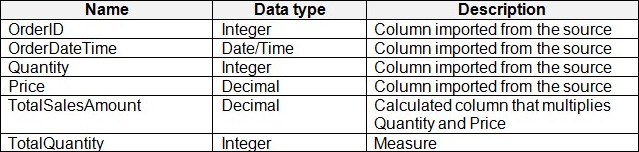
You need to reduce the memory used by Model1 and the time it takes to refresh the model.
Which two actions should you perform? Each correct answer presents part of the solution. NOTE: Each correct answer is worth one point.
- A . Split OrderDateTime into separate date and time columns.
- B . Replace TotalQuantity with a calculated column.
- C . Convert Quantity into the Text data type.
- D . Replace TotalSalesAmount with a measure.
DRAG DROP
You are building a solution by using a Fabric notebook.
You have a Spark DataFrame assigned to a variable named df. The DataFrame returns four columns.
You need to change the data type of a string column named Age to integer. The solution must return a DataFrame that includes all the columns.
How should you complete the code? To answer, drag the appropriate values to the correct targets. Each value may be used once, more than once, or not at all. You may need to drag the split bar between panes or scroll to view content. NOTE: Each correct selection is worth one point.
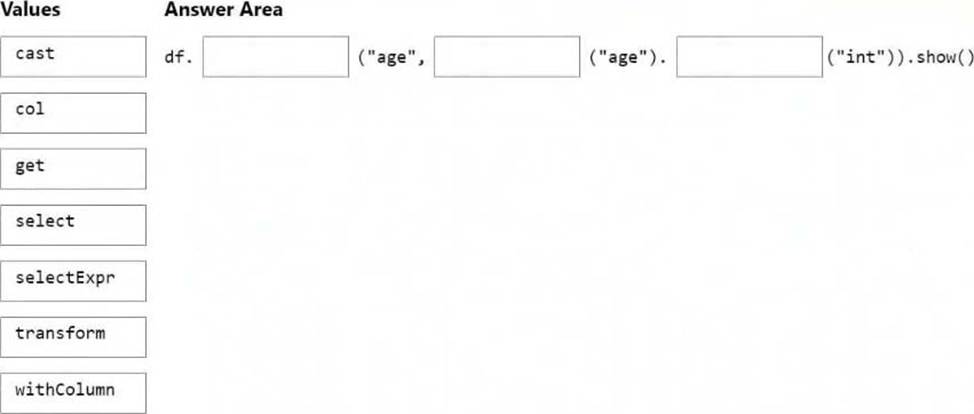
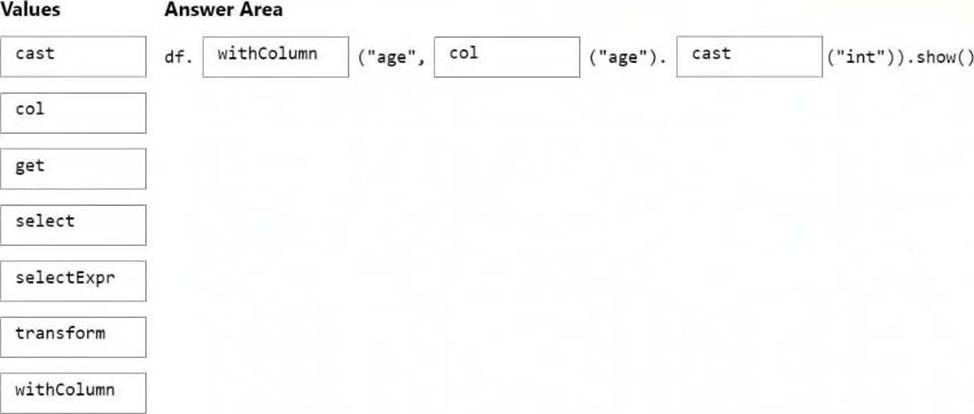
Explanation:
Box 1: withColumn
In PySpark, we can use the cast method to change the data type.
from pyspark.sql.types import IntegerType
from pyspark.sql import functions as F
# first method
df = df.withColumn("Age", df.age.cast("int"))
# second method
df = df.withColumn("Age", df.age.cast(IntegerType()))
# third method <– This one
df = df.withColumn("Age", F.col("Age").cast(IntegerType()))
Box 2: col
Box 3: cast
Reference: https://www.aporia.com/resources/how-to/change-column-data-types-in-dataframe/
You have a Fabric tenant.
You are creating a Fabric Data Factory pipeline.
You have a stored procedure that returns the number of active customers and their average sales for the current month.
You need to add an activity that will execute the stored procedure in a warehouse. The returned values must be available to the downstream activities of the pipeline.
Which type of activity should you add?
- A . Append variable
- B . Lookup
- C . Copy data
- D . KQL
B
Explanation:
The Lookup activity is specifically designed for executing queries or stored procedures and retrieving data from a data source. It allows you to capture the output from the stored procedure, making it available for use in subsequent activities within the pipeline.
This is particularly useful for scenarios where you need to process or route data based on the results returned from a stored procedure.
You have a Fabric tenant that contains a semantic model. The model contains 15 tables.
You need to programmatically change each column that ends in the word Key to meet the following requirements:
– Hide the column.
– Set Nullable to False
– Set Summarize By to None.
– Set Available in MDX to False.
– Mark the column as a key column.
What should you use?
- A . Microsoft Power BI Desktop
- B . ALM Toolkit
- C . Tabular Editor
- D . DAX Studio
C
Explanation:
Tabular Editor can be a helpful tool for managing datasets deployed to Fabric. With Tabular Editor, you can connect to and manage different types of datasets from a single interface. This is ideal for supporting and auditing data models, such as in a managed self-service BI environment.
Enhance productivity: Tabular Editor contains features that help you write DAX, manage your dataset and even automate and scale development, programmatically.
* Manage tables and columns: While most people use Tabular Editor to manage DAX, you can also manage data tables and columns. In Tabular Editor, you can view and edit Power Query code, and even automatically detect schema changes in the data source. With the Table Import Wizard, you can add new tables from supported sources like Power BI dataflows, SQL Server (or Serverless Pools) and Databricks, as Tabular Editor automatically generates the appropriate Power Query code and metadata for you. Finally, you can refresh selected tables to view any changes, with the ability to track refresh performance in real-time or even cancel and pause refreshes with the user interface.
* Etc.
Incorrect:
Not B: ALM Toolkit is a free and open-source tool to manage Microsoft Power BI datasets: Database compare, Code merging, Easy deployment, Source-control integration, Reuse definitions, Self-service to corporate BI.
It is based on the source code of BISM Normalizer, which provides similar features for Tabular models.
Reference: https://blog.tabulareditor.com/2023/07/13/using-tabular-editor-in-microsoft-fabric
You have a Fabric workspace named Workspace1 that is assigned to a newly created Fabric capacity named Capacity1.
You create a semantic model named Model1 and deploy Model1 to Workspace1. You need to publish changes to Model1 directly from Tabular Editor.
What should you do?
- A . For Workspace1, enable Git integration.
- B . For Model1, enable external sharing.
- C . For Workspace1, create a managed private endpoint.
- D . For Capacity1, set XMLA Endpoint to Read Write.
D
Explanation:
To publish changes to Model1 directly from Tabular Editor, the XMLA Endpoint must be set to Read Write in Fabric Capacity settings. This allows external tools like Tabular Editor, SSMS, and Power BI ALM Toolkit to connect, modify, and publish changes to the semantic model.
You have a Fabric tenant that contains a warehouse.
Several times a day, the performance of all warehouse queries degrades. You suspect that Fabric is throttling the compute used by the warehouse.
What should you use to identify whether throttling is occurring?
- A . the Capacity settings
- B . the Monitoring hub
- C . dynamic management views (DMVs)
- D . the Microsoft Fabric Capacity Metrics app
D
Explanation:
Monitor overload information with Fabric Capacity Metrics App
Capacity administrators can view overload information and drilldown further via Microsoft Fabric Capacity Metrics app.
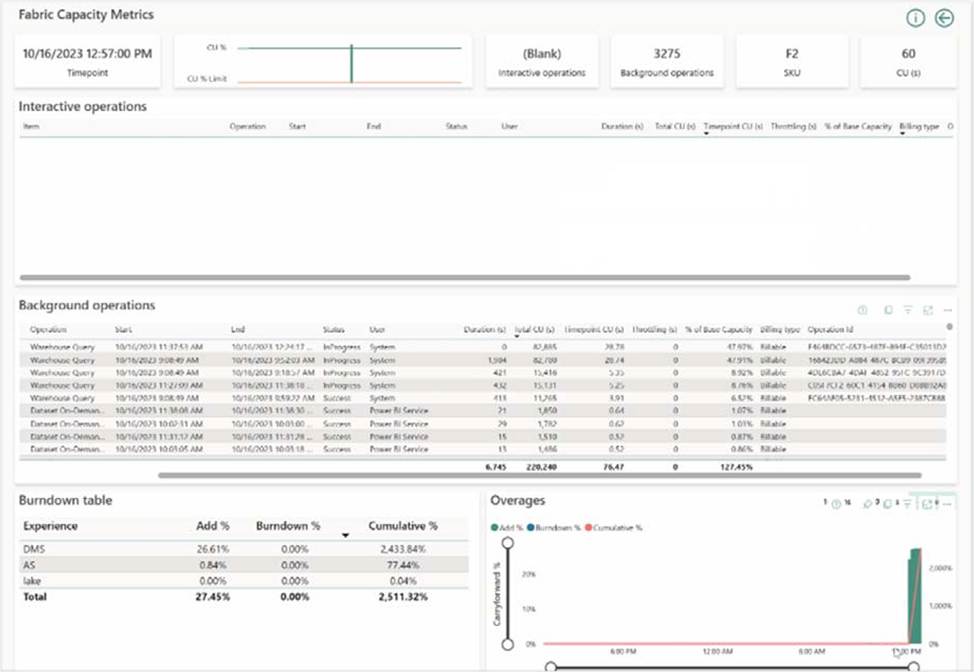
Note: Throttling
Throttling occurs when a customer’s capacity consumes more CPU resources than what was purchased. After consumption is smoothed, capacity throttling policies will be checked based on the amount of future capacity consumed. This results in a degraded end-user experience. When a capacity enters a throttled state, it only affects operations that are requested after the capacity has begun throttling.
Throttling policies are applied at a capacity level. If one capacity, or set of workspaces, is experiencing reduced performance due to being overloaded, other capacities can continue running normally.
Reference: https://learn.microsoft.com/en-us/fabric/data-warehouse/compute-capacity-smoothing-throttling
HOTSPOT
You have a Fabric tenant that contains a lakehouse.
You are using a Fabric notebook to save a large DataFrame by using the following code.
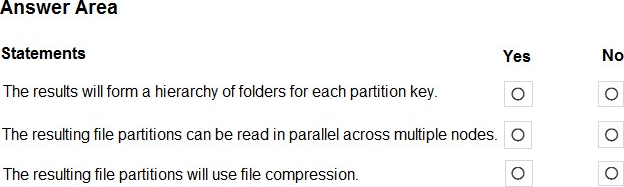
df.write.partitionBy(“year”, “month”, “day”).mode(“overwrite”).parquet(“Files/ SalesOrder”)
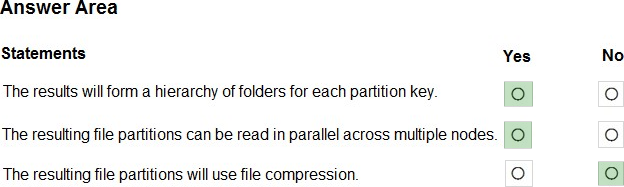
For each of the following statements, select Yes if the statement is true. Otherwise, select No. NOTE: Each correct selection is worth one point. Hot Area:
Explanation:
Box 1: Yes
PartitionBy segregates data into folders.
Note: PySpark partitionBy() is a function of pyspark.sql.DataFrameWriter class which is used to partition the large dataset (DataFrame) into smaller files based on one or multiple columns while writing to disk-
Box 2: Yes
Box 3: No
Reference: https://sparkbyexamples.com/pyspark/pyspark-partitionby-example/