
Practice Free DP-600 Exam Online Questions
You have a Microsoft Power BI project that contains a semantic model.
You plan to use Azure DevOps for version control.
You need to modify the .gitignore file to prevent the data values from the data sources from being pushed to the repository.
Which file should you reference?
- A . unappliedChanges.json
- B . cache.abf
- C . localSettings.json
- D . model.bim
C
Explanation:
In Power BI projects, the localSettings.json file contains information specific to the local environment, such as credentials, connections, or other settings that should not be pushed to a version control system for security reasons.
When using Azure DevOps (or any Git-based version control), sensitive information like data values, credentials, and configuration settings should be excluded from the repository by referencing these files in the .gitignore file. The localSettings.json file is designed to hold environment-specific configurations, which often include sensitive data.
You have a Fabric warehouse named Warehouse1 that contains a table named Table1. Table1 contains customer data.
You need to implement row-level security (RLS) for Table1. The solution must ensure that users can see only their respective data.
Which two objects should you create? Each correct answer presents part of the solution. NOTE: Each correct selection is worth one point.
- A . DATABASE ROLE
- B . STORED PROCEDURE
- C . CONSTRAINT
- D . FUNCTION
- E . SECURITY POLICY
AE
Explanation:
A database role is used to assign permissions to users or groups. In the context of RLS, you create roles that map to specific user groups or individuals, determining which rows they can access.
A security policy is used to enforce row-level security. This is done by creating a filter predicate that limits the rows returned based on a condition, such as the user’s identity or a specific column value.
You have a Fabric tenant that contains a workspace named Workspace1 and a user named User1.
Workspace1 contains a warehouse named DW1.
You share DW1 with User1 and assign User1 the default permissions for DW1.
What can User1 do?
- A . Build reports by using the default dataset.
- B . Read data from the tables in DW1.
- C . Connect to DW1 via the Azure SQL Analytics endpoint.
- D . Read the underlying Parquet files from OneLake.
A
Explanation:
By default, when a user is granted access to a Microsoft Fabric warehouse (DW1), they receive the Viewer role.
The Viewer role allows users to:
– Build reports using the default dataset associated with the warehouse.
– Read data from the dataset but not directly from tables unless explicitly granted additional permissions.
HOTSPOT
You have a Fabric workspace that contains a warehouse named Warehouse1. Warehouse1 contains the following data.
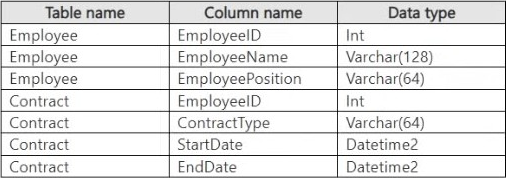
You need to create a T-SQL statement that will denormalize the tables and include the ContractType and
StartDate attributes in the results.
The solution must meet the following requirements:
– Include attributes from matching rows in the Contract table.
– Ensure that all the rows from the Employee table are preserved.
– Return the total number of employees per contract type for all the contract types that have more than two employees.
How should you complete the statement? To answer, select the appropriate options in the answer area. NOTE: Each correct selection is worth one point.
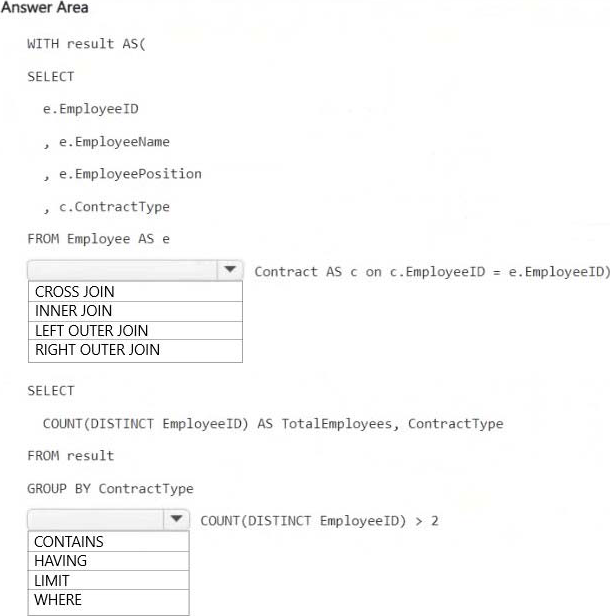
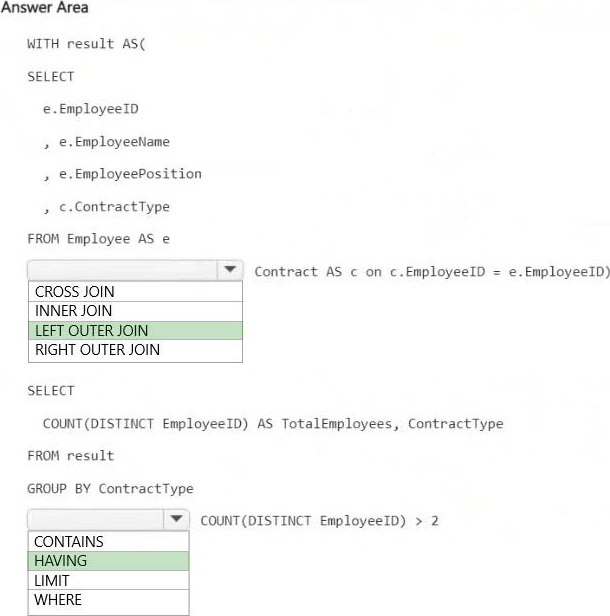
Explanation:
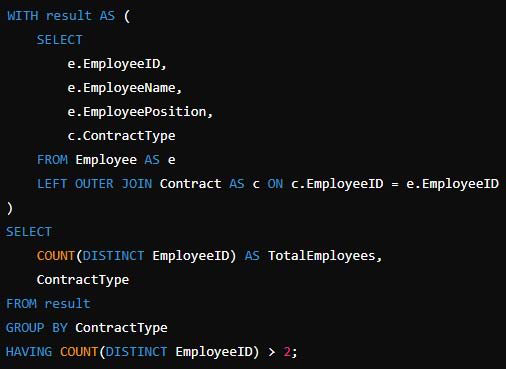
LEFT OUTER JOIN
Ensures that all employees are included even if they do not have a matching contract record in the Contract table. This satisfies the requirement that all Employee table rows must be preserved.
HAVING COUNT(DISTINCT EmployeeID) > 2
Filters out contract types that have fewer than or equal to two employees, ensuring that only contract types with more than two employees are included in the results.
HOTSPOT
You have a Fabric workspace that contains a warehouse named Warehouse1. Warehouse1 contains the following data.
You need to create a T-SQL statement that will denormalize the tables and include the ContractType and
StartDate attributes in the results.
The solution must meet the following requirements:
– Include attributes from matching rows in the Contract table.
– Ensure that all the rows from the Employee table are preserved.
– Return the total number of employees per contract type for all the contract types that have more than two employees.
How should you complete the statement? To answer, select the appropriate options in the answer area. NOTE: Each correct selection is worth one point.
Explanation:
LEFT OUTER JOIN
Ensures that all employees are included even if they do not have a matching contract record in the Contract table. This satisfies the requirement that all Employee table rows must be preserved.
HAVING COUNT(DISTINCT EmployeeID) > 2
Filters out contract types that have fewer than or equal to two employees, ensuring that only contract types with more than two employees are included in the results.
You have a Fabric tenant that contains a lakehouse named Lakehouse1. Lakehouse1 contains a Delta table that has one million Parquet files.
You need to remove files that were NOT referenced by the table during the past 30 days. The solution must ensure that the transaction log remains consistent, and the ACID properties of the table are maintained.
What should you do?
- A . From OneLake file explorer, delete the files.
- B . Run the OPTIMIZE command and specify the Z-order parameter.
- C . Run the OPTIMIZE command and specify the V-order parameter.
- D . Run the VACUUM command.
D
Explanation:
VACUUM
Applies to: check marked yes Databricks SQL check marked yes Databricks Runtime Remove unused files from a table directory.
VACUUM removes all files from the table directory that are not managed by Delta, as well as data files that are no longer in the latest state of the transaction log for the table and are older than a retention threshold.
Incorrect:
Not B: What is Z order optimization?
Z-ordering is a technique to colocate related information in the same set of files. This co-locality is
automatically used by Delta Lake on Azure Databricks data-skipping algorithms. This behavior dramatically
reduces the amount of data that Delta Lake on Azure Databricks needs to read.
Not C: Delta Lake table optimization and V-Order
V-Order is a write time optimization to the parquet file format that enables lightning-fast reads under the
Microsoft Fabric compute engines, such as Power BI, SQL, Spark, and others.
Power BI and SQL engines make use of Microsoft Verti-Scan technology and V-Ordered parquet files to achieve in-memory like data access times. Spark and other non-Verti-Scan compute engines also benefit from the V-Ordered files with an average of 10% faster read times, with some scenarios up to 50%.
V-Order works by applying special sorting, row group distribution, dictionary encoding and compression on parquet files, thus requiring less network, disk, and CPU resources in compute engines to read it, providing cost efficiency and performance. V-Order sorting has a 15% impact on average write times but provides up to 50% more compression.
Reference:
https://docs.databricks.com/en/sql/language-manual/delta-vacuum.html
https://learn.microsoft.com/en-us/fabric/data-engineering/delta-optimization-and-v-order?
Note: This question is part of a series of questions that present the same scenario. Each question in the series contains a unique solution that might meet the stated goals. Some question sets might have more than one correct solution, while others might not have a correct solution.
After you answer a question in this section, you will NOT be able to return to it. As a result, these questions will not appear in the review screen.
You have a Fabric tenant that contains a new semantic model in OneLake.
You use a Fabric notebook to read the data into a Spark DataFrame.
You need to evaluate the data to calculate the min, max, mean, and standard deviation values for all the string and numeric columns.
Solution: You use the following PySpark expression:
df.describe().show()
Does this meet the goal?
- A . Yes
- B . No
You have a Fabric workspace named Workspace1 that contains a dataflow named Dataflow1. Dataflow1 returns 500 rows of data.
You need to identify the min and max values for each column in the query results.
Which three Data view options should you select? Each correct answer presents part of the solution. NOTE: Each correct answer is worth one point.
- A . Show column value distribution
- B . Enable column profile
- C . Show column profile in details pane
- D . Show column quality details
- E . Enable details pane
You have a Fabric workspace named Workspace1 that contains an event stream named Eventstream1.
Eventstream1 reads data from an Azure event hub named Eventhub1.
Eventhub1 contains the following columns.
Name Data type:
MachineId Int
Payload Dynamic
Datetime Datetime
Location String
You need to add a continuous percentile calculation to the Payload column. The solution must minimize development effort.
What should you do?
- A . Add a KQL queryset to Workspace1.
- B . A dd a Group by transformation to Eventstream1.
- C . Add a Manage fields transformation to Eventstream1.
- D . Add an Aggregate transformation to Eventstream1.
Note: This section contains one or more sets of questions with the same scenario and problem. Each question presents a unique solution to the problem. You must determine whether the solution meets the stated goals. More than one solution in the set might solve the problem. It is also possible that none of the solutions in the set solve the problem.
After you answer a question in this section, you will NOT be able to return. As a result, these questions do not appear on the Review Screen.
Your network contains an on-premises Active Directory Domain Services (AD DS) domain named contoso.com that syncs with a Microsoft Entra tenant by using Microsoft Entra Connect.
You have a Fabric tenant that contains a semantic model.
You enable dynamic row-level security (RLS) for the model and deploy the model to the Fabric service.
You query a measure that includes the USERNAME() function, and the query returns a blank result.
You need to ensure that the measure returns the user principal name (UPN) of a user.
Solution: You update the measure to use the USEROBJECTID() function.
Does this meet the goal?
- A . Yes
- B . No
B
Explanation:
This function returns the unique identifier (Object ID) of the user in Azure Active Directory. While this can be useful for certain scenarios, it does not return the UPN, which is what you need.