
Practice Free Databricks Certified Professional Data Engineer Exam Online Questions
Which configuration parameter directly affects the size of a spark-partition upon ingestion of data into Spark?
- A . spark.sql.files.maxPartitionBytes
- B . spark.sql.autoBroadcastJoinThreshold
- C . spark.sql.files.openCostInBytes
- D . spark.sql.adaptive.coalescePartitions.minPartitionNum
- E . spark.sql.adaptive.advisoryPartitionSizeInBytes
A
Explanation:
This is the correct answer because spark.sql.files.maxPartitionBytes is a configuration parameter that
directly affects the size of a spark-partition upon ingestion of data into Spark. This parameter configures the maximum number of bytes to pack into a single partition when reading files from file-based sources such as Parquet, JSON and ORC. The default value is 128 MB, which means each partition will be roughly 128 MB in size, unless there are too many small files or only one large file.
Verified Reference: [Databricks Certified Data Engineer Professional], under “Spark Configuration” section; Databricks Documentation, under “Available Properties – spark.sql.files.maxPartitionBytes” section.
A table named user_ltv is being used to create a view that will be used by data analysts on various teams. Users in the workspace are configured into groups, which are used for setting up data access using ACLs.
The user_ltv table has the following schema:
email STRING, age INT, ltv INT
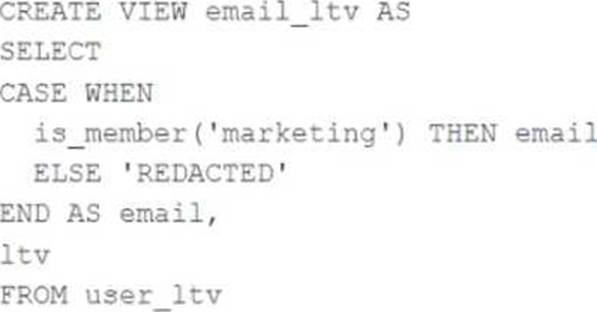
The following view definition is executed:
An analyst who is not a member of the marketing group executes the following query:
SELECT * FROM email_ltv
Which statement describes the results returned by this query?
- A . Three columns will be returned, but one column will be named "redacted" and contain only null values.
- B . Only the email and itv columns will be returned; the email column will contain all null values.
- C . The email and ltv columns will be returned with the values in user itv.
- D . The email, age. and ltv columns will be returned with the values in user ltv.
- E . Only the email and ltv columns will be returned; the email column will contain the string "REDACTED" in each row.
E
Explanation:
The code creates a view called email_ltv that selects the email and ltv columns from a table called user_ltv, which has the following schema: email STRING, age INT, ltv INT. The code also uses the CASE WHEN expression to replace the email values with the string “REDACTED” if the user is not a member of the marketing group. The user who executes the query is not a member of the marketing group, so they will only see the email and ltv columns, and the email column will contain the string “REDACTED” in each row.
Verified Reference: [Databricks Certified Data Engineer Professional],
under “Lakehouse” section; Databricks Documentation, under “CASE expression” section.
A data engineering team has a time-consuming data ingestion job with three data sources. Each notebook takes about one hour to load new data. One day, the job fails because a notebook update introduced a new required configuration parameter. The team must quickly fix the issue and load the latest data from the failing source.
Which action should the team take?
- A . Repair the run with the new parameter, and update the task by adding the missing task parameter.
- B . Update the task by adding the missing task parameter, and manually run the job.
- C . Repair the run with the new parameter.
- D . Share the analysis with the failing notebook owner so that they can fix it quickly.
A
Explanation:
Comprehensive and Detailed Explanation From Exact Extract of Databricks Data Engineer Documents:
The repair run capability in Databricks Jobs allows re-execution of failed tasks without re-running successful ones. When a parameterized job fails due to missing or incorrect task configuration, engineers can perform a repair run to fix inputs or parameters and resume from the failed state.
This approach saves time, reduces cost, and ensures workflow continuity by avoiding unnecessary recomputation. Additionally, updating the task definition with the missing parameter prevents future runs from failing.
Running the job manually (B) loses run context; (C) alone does not prevent recurrence; (D) delays resolution. Thus, A follows the correct operational and recovery practice.
The data architect has mandated that all tables in the Lakehouse should be configured as external (also known as "unmanaged") Delta Lake tables.
Which approach will ensure that this requirement is met?
- A . When a database is being created, make sure that the LOCATION keyword is used.
- B . When configuring an external data warehouse for all table storage, leverage Databricks for all ELT.
- C . When data is saved to a table, make sure that a full file path is specified alongside the Delta format.
- D . When tables are created, make sure that the EXTERNAL keyword is used in the CREATE TABLE statement.
- E . When the workspace is being configured, make sure that external cloud object storage has been mounted.
D
Explanation:
To create an external or unmanaged Delta Lake table, you need to use the EXTERNAL keyword in the CREATE TABLE statement. This indicates that the table is not managed by the catalog and the data files are not deleted when the table is dropped. You also need to provide a LOCATION clause to specify the path where the data files are stored.
For example:
CREATE EXTERNAL TABLE events ( date DATE, eventId STRING, eventType STRING, data STRING) USING DELTA LOCATION ‘/mnt/delta/events’;
This creates an external Delta Lake table named events that references the data files in the ‘/mnt/delta/events’ path. If you drop this table, the data files will remain intact and you can recreate the table with the same statement.
Reference:
https://docs.databricks.com/delta/delta-batch.html#create-a-table
https://docs.databricks.com/delta/delta-batch.html#drop-a-table
The DevOps team has configured a production workload as a collection of notebooks scheduled to run daily using the Jobs Ul. A new data engineering hire is onboarding to the team and has requested access to one of these notebooks to review the production logic.
What are the maximum notebook permissions that can be granted to the user without allowing accidental changes to production code or data?
- A . Can manage
- B . Can edit
- C . Can run
- D . Can Read
D
Explanation:
Granting a user ‘Can Read’ permissions on a notebook within Databricks allows them to view the notebook’s content without the ability to execute or edit it. This level of permission ensures that the new team member can review the production logic for learning or auditing purposes without the risk of altering the notebook’s code or affecting production data and workflows. This approach aligns with best practices for maintaining security and integrity in production environments, where strict access controls are essential to prevent unintended modifications.
Reference: Databricks documentation on access control and permissions for notebooks within the workspace (https://docs.databricks.com/security/access-control/workspace-acl.html).
A data engineer needs to install the PyYAML Python package within an air-gapped Databricks environment. The workspace has no direct internet access to PyPI. The engineer has downloaded the .whl file locally and wants it available automatically on all new clusters.
Which approach should the data engineer use?
- A . Upload the PyYAML .whl file to the user home directory and create a cluster-scoped init script to install it.
- B . Upload the PyYAML .whl file to a Unity Catalog Volume, ensure it’s allow-listed, and create a cluster-scoped init script that installs it from that path.
- C . Set up a private PyPI repository and install via pip index URL.
- D . Add the .whl file to Databricks Git Repos and assume automatic installation.
B
Explanation:
Comprehensive and Detailed Explanation From Exact Extract of Databricks Data Engineer Documents:
For secure, air-gapped Databricks deployments, the recommended practice is to host dependency files such as .whl packages in Unity Catalog Volumes ― a managed storage layer governed by Unity Catalog.
Once stored in a volume, these files can be safely referenced from cluster-scoped init scripts, which automatically execute installation commands (e.g., pip install /Volumes/catalog/schema/path/PyYAML.whl) during cluster startup.
This ensures consistent environment setup across clusters and compliance with data governance rules.
User directories (A) lack enterprise security controls; private repositories (C) are not viable in air-gapped setups; and Git repos (D) do not trigger package installation. Therefore, B is the correct and officially approved method.
What is a method of installing a Python package scoped at the notebook level to all nodes in the currently active cluster?
- A . Use &Pip install in a notebook cell
- B . Run source env/bin/activate in a notebook setup script
- C . Install libraries from PyPi using the cluster UI
- D . Use &sh install in a notebook cell
A
Explanation:
In Databricks notebooks, you can use the %pip install command in a notebook cell to install a Python package. This will install the package on all nodes in the currently active cluster at the notebook level. It is a feature provided by Databricks to facilitate the installation of Python libraries for the notebook environment specifically.
A junior data engineer has been asked to develop a streaming data pipeline with a grouped aggregation using DataFrame df. The pipeline needs to calculate the average humidity and average temperature for each non-overlapping five-minute interval. Incremental state information should be maintained for 10 minutes for late-arriving data.
Streaming DataFrame df has the following schema:
"device_id INT, event_time TIMESTAMP, temp FLOAT, humidity FLOAT"
Code block:
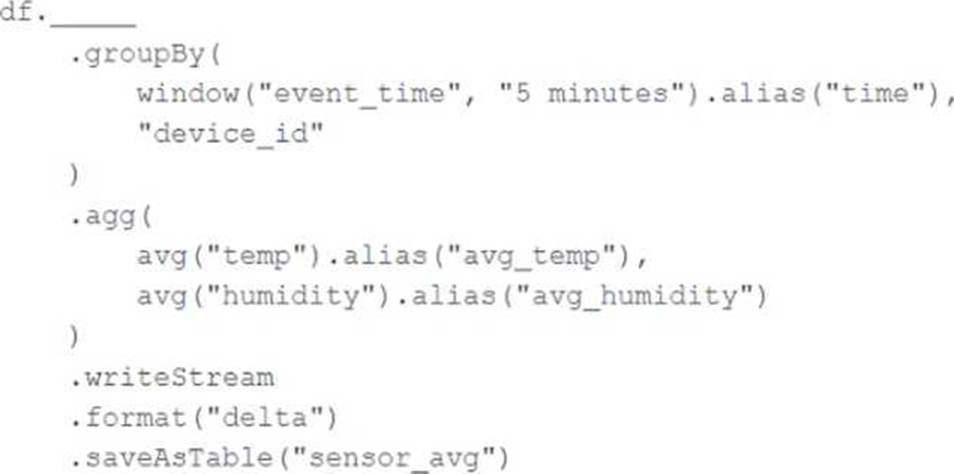
Choose the response that correctly fills in the blank within the code block to complete this task.
- A . withWatermark("event_time", "10 minutes")
- B . awaitArrival("event_time", "10 minutes")
- C . await("event_time + ‘10 minutes’")
- D . slidingWindow("event_time", "10 minutes")
- E . delayWrite("event_time", "10 minutes")
A
Explanation:
The correct answer is
What statement is true regarding the retention of job run history?
- A . It is retained until you export or delete job run logs
- B . It is retained for 30 days, during which time you can deliver job run logs to DBFS or S3
- C . t is retained for 60 days, during which you can export notebook run results to HTML
- D . It is retained for 60 days, after which logs are archived
- E . It is retained for 90 days or until the run-id is re-used through custom run configuration
An upstream system is emitting change data capture (CDC) logs that are being written to a cloud object storage directory. Each record in the log indicates the change type (insert, update, or delete) and the values for each field after the change. The source table has a primary key identified by the field pk_id.
For auditing purposes, the data governance team wishes to maintain a full record of all values that have ever been valid in the source system. For analytical purposes, only the most recent value for each record needs to be recorded. The Databricks job to ingest these records occurs once per hour, but each individual record may have changed multiple times over the course of an hour.
Which solution meets these requirements?
- A . Create a separate history table for each pk_id resolve the current state of the table by running a union all filtering the history tables for the most recent state.
- B . Use merge into to insert, update, or delete the most recent entry for each pk_id into a bronze table, then propagate all changes throughout the system.
- C . Iterate through an ordered set of changes to the table, applying each in turn; rely on Delta Lake’s versioning ability to create an audit log.
- D . Use Delta Lake’s change data feed to automatically process CDC data from an external system, propagating all changes to all dependent tables in the Lakehouse.
- E . Ingest all log information into a bronze table; use merge into to insert, update, or delete the most recent entry for each pk_id into a silver table to recreate the current table state.
E
Explanation:
This is the correct answer because it meets the requirements of maintaining a full record of all values that have ever been valid in the source system and recreating the current table state with only the most recent value for each record. The code ingests all log information into a bronze table, which preserves the raw CDC data as it is. Then, it uses merge into to perform an upsert operation on a silver table, which means it will insert new records or update or delete existing records based on the change type and the pk_id columns. This way, the silver table will always reflect the current state of the source table, while the bronze table will keep the history of all changes.
Verified Reference: [Databricks Certified Data Engineer Professional], under “Delta Lake” section; Databricks Documentation, under “Upsert into a table using merge” section.