
Practice Free Databricks Certified Professional Data Engineer Exam Online Questions
Which Python variable contains a list of directories to be searched when trying to locate required modules?
- A . importlib.resource path
- B . ,sys.path
- C . os-path
- D . pypi.path
- E . pylib.source
A data engineer is developing a Lakeflow Declarative Pipeline (LDP) using a Databricks notebook directly connected to their pipeline. After adding new table definitions and transformation logic in their notebook, they want to check for any syntax errors in the pipeline code without actually processing data or running the pipeline.
How should the data engineer perform this syntax check?
- A . Use the “Validate” option in the notebook to check for syntax errors.
- B . Open the web terminal from the notebook and run a shell command to validate the pipeline code.
- C . Disconnect the notebook from the pipeline and reconnect it to a compute cluster to access code validation features.
- D . Switch to a workspace file instead of a notebook to access validation and diagnostics tools.
A
Explanation:
Comprehensive and Detailed Explanation From Exact Extract of Databricks Data Engineer Documents:
Databricks provides a “Validate” option within the Lakeflow Declarative Pipeline development interface that checks pipeline configurations, transformations, and syntax errors before actual execution.
This feature parses and validates the pipeline logic defined in notebooks or workspace files to ensure correctness and consistency of table dependencies, DLT (Delta Live Table) syntax, and schema references.
The validation process does not process or move any data, making it ideal for testing new configurations before deployment.
Using the shell terminal (B) or workspace files (D) does not perform integrated pipeline-level validation, while reconnecting to compute clusters (C) is unrelated to syntax checks. Therefore, the verified and correct approach is A.
Which of the following is true of Delta Lake and the Lakehouse?
- A . Because Parquet compresses data row by row. strings will only be compressed when a character is repeated multiple times.
- B . Delta Lake automatically collects statistics on the first 32 columns of each table which are leveraged in data skipping based on query filters.
- C . Views in the Lakehouse maintain a valid cache of the most recent versions of source tables at all times.
- D . Primary and foreign key constraints can be leveraged to ensure duplicate values are never entered into a dimension table.
- E . Z-order can only be applied to numeric values stored in Delta Lake tables
B
Explanation:
https://docs.delta.io/2.0.0/table-properties.html
Delta Lake automatically collects statistics on the first 32 columns of each table, which are leveraged in data skipping based on query filters1. Data skipping is a performance optimization technique that aims to avoid reading irrelevant data from the storage layer1. By collecting statistics such as min/max values, null counts, and bloom filters, Delta Lake can efficiently prune unnecessary files or partitions from the query plan1. This can significantly improve the query performance and reduce the I/O cost.
The other options are false because:
Parquet compresses data column by column, not row by row2. This allows for better compression ratios, especially for repeated or similar values within a column2.
Views in the Lakehouse do not maintain a valid cache of the most recent versions of source tables at all times3. Views are logical constructs that are defined by a SQL query on one or more base tables3. Views are not materialized by default, which means they do not store any data, but only the query definition3. Therefore, views always reflect the latest state of the source tables when queried3. However, views can be cached manually using the CACHE TABLE or CREATE TABLE AS SELECT commands.
Primary and foreign key constraints can not be leveraged to ensure duplicate values are never entered into a dimension table. Delta Lake does not support enforcing primary and foreign key constraints on tables. Constraints are logical rules that define the integrity and validity of the data in a table. Delta Lake relies on the application logic or the user to ensure the data quality and consistency.
Z-order can be applied to any values stored in Delta Lake tables, not only numeric values. Z-order is a technique to optimize the layout of the data files by sorting them on one or more columns. Z-order can improve the query performance by clustering related values together and enabling more efficient data skipping. Z-order can be applied to any column that has a defined ordering, such as numeric, string, date, or boolean values.
Reference: Data Skipping, Parquet Format, Views, [Caching], [Constraints], [Z-Ordering]
The marketing team is looking to share data in an aggregate table with the sales organization, but the field names used by the teams do not match, and a number of marketing specific fields have not been approval for the sales org.
Which of the following solutions addresses the situation while emphasizing simplicity?
- A . Create a view on the marketing table selecting only these fields approved for the sales team alias the names of any fields that should be standardized to the sales naming conventions.
- B . Use a CTAS statement to create a derivative table from the marketing table configure a production jon to propagation changes.
- C . Add a parallel table write to the current production pipeline, updating a new sales table that varies as required from marketing table.
- D . Create a new table with the required schema and use Delta Lake’s DEEP CLONE functionality to sync up changes committed to one table to the corresponding table.
A
Explanation:
Creating a view is a straightforward solution that can address the need for field name standardization and selective field sharing between departments. A view allows for presenting a transformed version of the underlying data without duplicating it. In this scenario, the view would only include the approved fields for the sales team and rename any fields as per their naming conventions.
Reference: Databricks documentation on using SQL views in Delta Lake:
https://docs.databricks.com/delta/quick-start.html#sql-views
A data architect has designed a system in which two Structured Streaming jobs will concurrently write to a single bronze Delta table. Each job is subscribing to a different topic from an Apache Kafka source, but they will write data with the same schema. To keep the directory structure simple, a data engineer has decided to nest a checkpoint directory to be shared by both streams.
The proposed directory structure is displayed below:
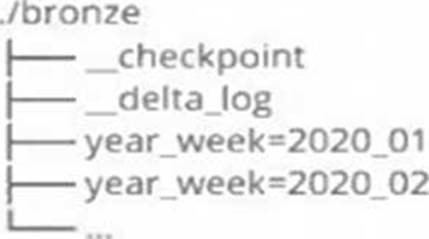
Which statement describes whether this checkpoint directory structure is valid for the given scenario and why?
- A . No; Delta Lake manages streaming checkpoints in the transaction log.
- B . Yes; both of the streams can share a single checkpoint directory.
- C . No; only one stream can write to a Delta Lake table.
- D . Yes; Delta Lake supports infinite concurrent writers.
- E . No; each of the streams needs to have its own checkpoint directory.
E
Explanation:
This is the correct answer because checkpointing is a critical feature of Structured Streaming that provides fault tolerance and recovery in case of failures. Checkpointing stores the current state and progress of a streaming query in a reliable storage system, such as DBFS or S3. Each streaming query must have its own checkpoint directory that is unique and exclusive to that query. If two streaming queries share the same checkpoint directory, they will interfere with each other and cause unexpected errors or data loss.
Verified Reference: [Databricks Certified Data Engineer Professional], under “Structured Streaming” section; Databricks Documentation, under “Checkpointing” section.
A member of the data engineering team has submitted a short notebook that they wish to schedule as part of a larger data pipeline. Assume that the commands provided below produce the logically correct results when run as presented.
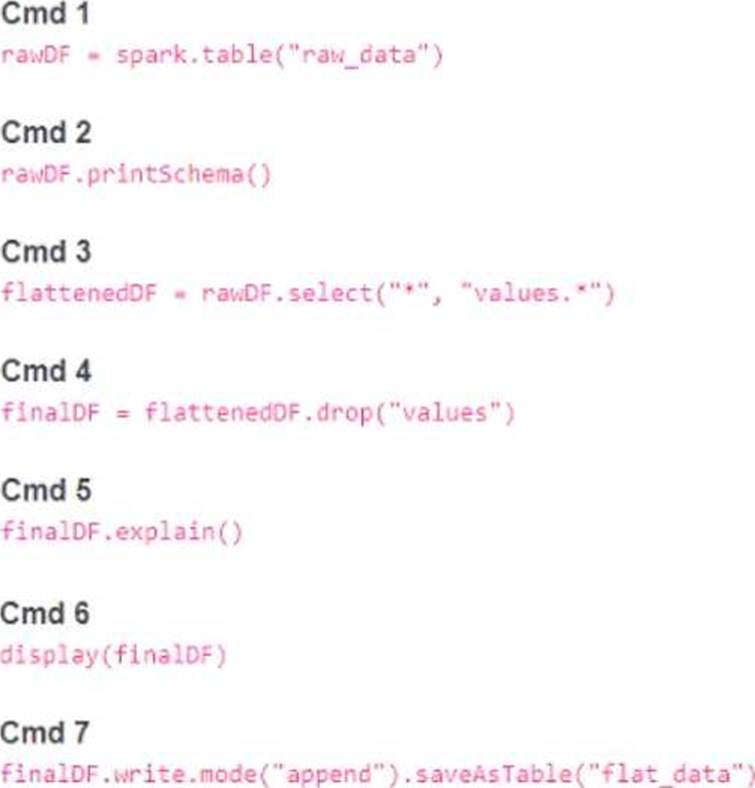
Which command should be removed from the notebook before scheduling it as a job?
- A . Cmd 2
- B . Cmd 3
- C . Cmd 4
- D . Cmd 5
- E . Cmd 6
E
Explanation:
Cmd 6 is the command that should be removed from the notebook before scheduling it as a job. This command is selecting all the columns from the finalDF dataframe and displaying them in the notebook. This is not necessary for the job, as the finalDF dataframe is already written to a table in Cmd 7. Displaying the dataframe in the notebook will only consume resources and time, and it will not affect the output of the job. Therefore, Cmd 6 is redundant and should be removed.
The other commands are essential for the job, as they perform the following tasks:
Cmd 1: Reads the raw_data table into a Spark dataframe called rawDF.
Cmd 2: Prints the schema of the rawDF dataframe, which is useful for debugging and understanding the data structure.
Cmd 3: Selects all the columns from the rawDF dataframe, as well as the nested columns from the values struct column, and creates a new dataframe called flattenedDF.
Cmd 4: Drops the values column from the flattenedDF dataframe, as it is no longer needed after flattening, and creates a new dataframe called finalDF.
Cmd 5: Explains the physical plan of the finalDF dataframe, which is useful for optimizing and tuning the performance of the job.
Cmd 7: Writes the finalDF dataframe to a table called flat_data, using the append mode to add new data to the existing table.
A data engineer is implementing Unity Catalog governance for a multi-team environment. Data scientists need interactive clusters for basic data exploration tasks, while automated ETL jobs require dedicated processing.
How should the data engineer configure cluster isolation policies to enforce least privilege and ensure Unity Catalog compliance?
- A . Use only DEDICATED access mode for both interactive workloads and automated jobs to maximize security isolation.
- B . Allow all users to create any cluster type and rely on manual configuration to enable Unity Catalog access modes.
- C . Configure all clusters with NO ISOLATION_SHARED access mode since Unity Catalog works with any cluster configuration.
- D . Create compute policies with STANDARD access mode for interactive workloads and DEDICATED access mode for automated jobs.
D
Explanation:
Comprehensive and Detailed Explanation From Exact Extract of Databricks Data Engineer Documents:
Unity Catalog enforces governance and data isolation through cluster access modes and compute policies. According to Databricks documentation, “Interactive clusters that multiple users share should use Standard access mode, while automated jobs and production pipelines should use Dedicated access mode for stricter isolation.” Standard access mode allows multiple users to share the same compute resources but still respects Unity Catalog permissions. Dedicated access mode isolates the job run’s execution environment, ensuring that data access is limited to the job’s identity. Configuring these modes within compute policies enforces least privilege and ensures all compute complies with Unity Catalog security standards. Options A and C are incorrect because using only Dedicated clusters reduces resource efficiency, while “No isolation” clusters are not Unity Catalog compliant.
A junior data engineer has been asked to develop a streaming data pipeline with a grouped aggregation using DataFrame df. The pipeline needs to calculate the average humidity and average temperature for each non-overlapping five-minute interval. Events are recorded once per minute per device.
Streaming DataFrame df has the following schema:
"device_id INT, event_time TIMESTAMP, temp FLOAT, humidity FLOAT"
Code block:
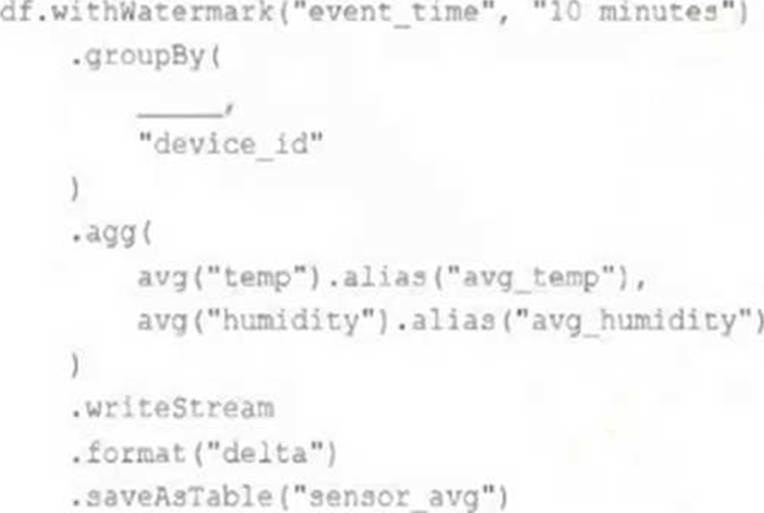
Choose the response that correctly fills in the blank within the code block to complete this task.
- A . to_interval("event_time", "5 minutes").alias("time")
- B . window("event_time", "5 minutes").alias("time")
- C . "event_time"
- D . window("event_time", "10 minutes").alias("time")
- E . lag("event_time", "10 minutes").alias("time")
B
Explanation:
This is the correct answer because the window function is used to group streaming data by time intervals. The window function takes two arguments: a time column and a window duration. The window duration specifies how long each window is, and must be a multiple of 1 second. In this case, the window duration is “5 minutes”, which means each window will cover a non-overlapping five-minute interval. The window function also returns a struct column with two fields: start and end, which represent the start and end time of each window. The alias function is used to rename the struct column as “time”.
Verified Reference: [Databricks Certified Data Engineer Professional], under “Structured Streaming” section; Databricks Documentation, under “WINDOW” section. https://www.databricks.com/blog/2017/05/08/event-time-aggregation-watermarking-apache-sparks-structured-streaming.html
A data engineer is using Lakeflow Declarative Pipeline to propagate row deletions from a source bronze table (user_bronze) to a target silver table (user_silver). The engineer wants deletions in user_bronze to automatically delete corresponding rows in user_silver during pipeline execution.
Which configuration ensures deletions in the bronze table are propagated to the silver table?
- A . Use apply_changes without CDF and filter rows where _soft_deleted is true.
- B . Enable Change Data Feed (CDF) on user_bronze, read its CDF stream, and use apply_changes() with apply_as_deletes=True for user_silver.
- C . Enable CDF on user_silver, read its transaction log, and use MERGE to sync deletions.
- D . Configure VACUUM on user_bronze to delete files, then rebuild user_silver from scratch.
B
Explanation:
Comprehensive and Detailed Explanation From Exact Extract of Databricks Data Engineer Documents:
According to Databricks documentation, Change Data Feed (CDF) allows pipelines to read incremental data changes, including inserts, updates, and deletes, from a Delta table. When deletions occur in the source table, reading the CDF stream ensures downstream consumers receive the deletion records. The Lakeflow Declarative Pipelines API provides the apply_changes() function (or auto-CDC pipelines) with the apply_as_deletes parameter to correctly apply those deletions to the target table. This enables automatic synchronization between bronze and silver layers. Options A and D either require manual handling or complete rebuilds, and C incorrectly applies CDF to the target rather than the source. Therefore, enabling CDF on the bronze table and using apply_as_deletes=True is the correct, Databricks-supported configuration.
A new data engineer notices that a critical field was omitted from an application that writes its Kafka source to Delta Lake. This happened even though the critical field was in the Kafka source. That field was further missing from data written to dependent, long-term storage. The retention threshold on the Kafka service is seven days. The pipeline has been in production for three months.
Which describes how Delta Lake can help to avoid data loss of this nature in the future?
- A . The Delta log and Structured Streaming checkpoints record the full history of the Kafka producer.
- B . Delta Lake schema evolution can retroactively calculate the correct value for newly added fields, as long as the data was in the original source.
- C . Delta Lake automatically checks that all fields present in the source data are included in the ingestion layer.
- D . Data can never be permanently dropped or deleted from Delta Lake, so data loss is not possible under any circumstance.
- E . Ingestine all raw data and metadata from Kafka to a bronze Delta table creates a permanent, replayable history of the data state.
E
Explanation:
This is the correct answer because it describes how Delta Lake can help to avoid data loss of this
nature in the future. By ingesting all raw data and metadata from Kafka to a bronze Delta table, Delta Lake creates a permanent, replayable history of the data state that can be used for recovery or reprocessing in case of errors or omissions in downstream applications or pipelines. Delta Lake also supports schema evolution, which allows adding new columns to existing tables without affecting existing queries or pipelines. Therefore, if a critical field was omitted from an application that writes its Kafka source to Delta Lake, it can be easily added later and the data can be reprocessed from the bronze table without losing any information.
Verified Reference: [Databricks Certified Data Engineer Professional], under “Delta Lake” section; Databricks Documentation, under “Delta Lake core features” section.